

Learning how to hide cables on a glass desk feels different from organizing cables under wood because you can see everything from above, below, and across the room. You cannot drill into tempered glass, screws are out, and every power brick stays visible if you place it poorly. Your decision comes down to mounting compatibility with glass, load support for a power strip, and how you will route cables so they disappear from sight lines.
You also need to think about your current setup versus your next upgrade, including desk thickness, single versus multi device loads, and whether your desk moves. A clean laptop setup needs a different approach than a gaming PC with a surge protector, docking station, and monitor arms. For broader context on trays, channels, and under desk layouts, browse the Cable Management and Under-Desk archive before you buy.
What Actually Matters
Mounting Method That Respects Glass
With glass, your first filter should be how the organizer attaches without drilling or cracking the top. Clamp on trays grip the edge of the desk and can be repositioned, which is helpful when you cannot use screws. Look for anti scratch protection where the clamp meets the surface and check that your desk thickness falls inside the listed clamp range.
Self adhesive trays and raceways offer a tool free install, but glass is smooth and heavy loads can stress adhesive over time, especially with heat from adapters. If you go adhesive, keep the load modest, clean the underside well, and give the bond time to cure before you load a power strip. Owners commonly report that lighter cable channels stay put longer than fully loaded trays when mounted with adhesive alone.
Size, Load Support, and Power Strip Fit
Think in terms of what you need to lift off the floor, usually a power strip plus adapters, excess length, and a few data cables. An open metal tray is often better for a bulky strip because you can drop it in, plug things from above, and still reach switches. A slim channel is better for guiding long runs toward a leg or PC rather than holding weight.
Always compare the listed weight support and interior dimensions against your actual strip, not just cable count. A tray that sags or flexes will show more under glass and can pull on adhesive. For heavy workstation loads, a steel clamp design with a defined load rating gives you more confidence than an unspecified basket, and it keeps the strip stable when you plug and unplug.
Visibility From Above, Below, and Across the Room
Glass makes placement as important as the product itself. Cables centered under clear glass remain visible from your chair and from the opposite side of the room. You get a cleaner result when you push the tray toward the back edge, face the opening inward to hide contents, and route vertical drops tight to a rear leg or monitor arm.
Color and shape affect how much the hardware stands out. White blends with bright rooms and white frames, while black disappears better in shadow under a dark frame or against a PC. Low profile J style channels help here because they guide cords in a straight line instead of letting them hang in loops that catch the eye through the top. Pair your layout with soft rear lighting ideas from minimalist RGB desk setup if you want glow without highlighting clutter.
Airflow, Access, and Future Changes
Power bricks need air, and glass traps attention on dust and heat. An open frame tray promotes airflow to reduce heat buildup and makes cleaning easier than a closed box. Avoid wrapping a hot adapter tightly in ties or sealing it inside a fabric pouch with no ventilation.
Also consider how often you will add or remove cables. Non locking channels let you lift cables out without removing the whole raceway, which is ideal if you swap docks, chargers, or consoles. Trays with inward or outward facing options give you flexibility to hide cords daily but flip access outward when you need to reach plugs. Choose hardware you can adjust without peeling everything off the glass.
These examples show a few options that show the range, from clamp on steel trays made for glass to adhesive channels for guiding runs out of sight:
This article contains affiliate links. If you buy through one of our links, CustomPCGaming may earn a commission at no extra cost to you. Commissions never influence which products we recommend or how we rank them. Read our Affiliate Disclosure for details.
Quick Picks at a Glance

Prime Cinati Under Desk Cable Management Tray White

Prime EVEO Under Desk Cable Management Kit
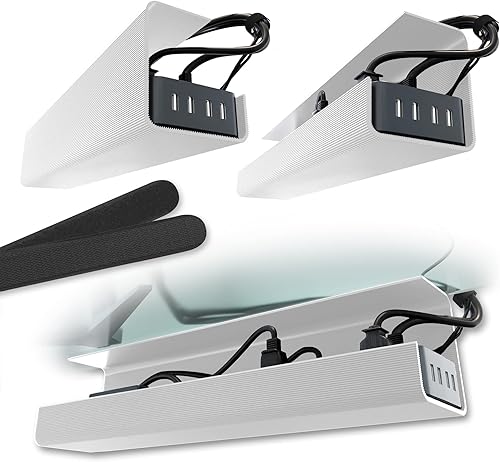
Prime Scandinavian Hub Under Desk Cable Management Tray

Prime Mount-It! 23.6-Inch Clamp-On Under Desk Cable
As an Amazon Associate we earn from qualifying purchases. Product prices and availability are accurate as of the date/time indicated.
Pros
- Tool free clamp setup causes no damage to desk
- Strong metal construction securely holds power strips
- Fits wide range of desk thicknesses and materials
- Includes clips and ties for complete organization
Cons
- Only fits desks between 0.4 and 2.4 inches thick
- Single tray may be small for complex gaming or dual monitor setups
- Open design may not fully conceal bulky adapters
The Cinati Under Desk Cable Management Tray White is a clamp mount wire organizer designed for home offices, study desks and workstations. It is ideal for anyone who wants to hide power strips and charging cables without drilling into furniture.
Its standout feature is the no drill clamp that attaches to desk edges from 0.4 to 2.4 inches thick and works on wood, glass and metal. In daily use, the reversible opening lets you face the tray inward for a hidden look or outward for quick access to plugs and adapters.
Built from fully welded metal with a powder coated white finish, the tray feels sturdy and resists rust and dust buildup. Anti scratch mats on the clamps protect your desktop, while the 13.4 by 4.6 inch basket holds up to 10 lbs of cords and power strips.
The main limitation is size and fit, since very thick executive desks or desks without an accessible edge will not work with the clamp. A single tray can also fill up fast if you run multiple monitors, a PC, printer and chargers together.
Overall, this is a smart, damage free solution for cleaner floors and safer foot space. If you want simple, sturdy under desk organization with easy repositioning, this Cinati tray is an excellent pick.
Brand: Cinati, Color: White, Material: Metal with powder coating for rust resistance.
Size: 13.4L x 4.6W x 3.1H inches, Load capacity: Up to 10 lbs per tray.
Installation: Clamp mount for desks 0.4 to 2.4 inches thick, fits wood, glass and metal surfaces.
In the box: 1 cable management tray, 4 cable clips and 6 cable ties with 2 year manufacturer warranty.
Pros
- Complete 6-piece kit covers long desks and multi-device workstations
- Fast, damage-free adhesive install works without tools
- Open channel design simplifies cable routing and future changes
- Slim modern style keeps cords hidden for a cleaner, safer workspace
Cons
- Adhesive may not hold well on rough, textured or dusty desk surfaces
- Open J-channel leaves cables partially visible from below compared to enclosed raceways
- Only available in black, so color matching options are limited
The EVEO Under Desk Cable Management Kit includes six J-channel raceways designed to hide and route cords beneath desks and tables. It is built for remote workers, students, gamers and anyone with multiple monitors, chargers and PC accessories to manage.
In real use, the kit stands out for capacity and convenience. It can hold up to 10 power cords or 16 ethernet cables across 96 inches of coverage, which easily handles a full computer setup. The strong self-adhesive backing allows quick, tool-free mounting under most desks.
Design is simple, slim and practical. The black neoprene channels have a modern low-profile look that blends under furniture while keeping wires accessible. The non-locking open design lets you drop cables in or pull them out without removing the raceway.
There are a few limits to consider. Adhesion works best on smooth, clean surfaces and may weaken on textured wood, laminate edges or dusty undersides. The open J shape also prioritizes easy access over full enclosure, so very thick bundles may still peek through.
Overall, this is a practical, flexible solution for cleaner cable management without drilling. If you want an affordable, easy to install way to tame desk clutter and improve safety, this EVEO kit is an excellent choice.
Brand: EVEO, Model: Under Desk Cable Management Kit
Includes: 6 raceways for 96 inches, 8 feet total coverage, black finish
Capacity: Holds up to 10 power cords or 16 ethernet cables
Material: Neoprene, Style: Modern, Usage: Indoor
Installation: Self-adhesive, no tools required, Item size: 19.5 inches L x 2.5 inches W
Pros
- No drilling or tools required for installation
- Large capacity holds power strips plus multiple bricks and cables
- Strong adhesive stays secure over time when cured properly
- Durable PVC build feels solid and resists bending
- Two trays included for full desk coverage
Cons
- Adhesive needs a full 24-hour cure before loading with heavy gear
- Self-adhesive mount works best on smooth, flat surfaces and may not grip textured wood
- PVC plastic construction is sturdy but not as heavy-duty as metal trays
The Scandinavian Hub Under Desk Cable Management Tray is a 17-inch, 2-pack cord organizer designed for renters, remote workers and anyone who wants a tidy desk without drilling. It mounts under your desk to hide power strips, chargers and loose cables out of sight.
In daily use, the 3.5-inch wide channel easily swallows a full power strip plus adapters and bundled cords. Once the adhesive cures, the trays stay put and keep weight off the floor, which makes cleaning easier and improves airflow around chargers.
Built from sturdy PVC in a modern white finish, each tray feels solid and resists flexing under normal office loads. The open design keeps cables accessible while maintaining a clean, minimal look that suits home offices and gaming setups.
The main tradeoff is the installation method. You need to wait a full 24 hours for maximum hold, and adhesion is strongest on smooth, flat surfaces. Very rough or textured undersides and extremely heavy equipment may require extra caution.
Overall, this is a practical, renter-friendly solution for fast cable cleanup. If you want spacious, no-screw storage for power strips without tools or damage, this 2-pack is an easy recommendation.
Brand: Scandinavian Hub, Color: White, Style: Modern for clean under desk integration.
Dimensions: 17 inches long by 3.5 inches wide with spacious interior for power strips and chargers.
Material: Durable polyvinyl chloride, Installation: Self-adhesive, no-screw mount for indoor use.
In the Box: 2 cable management trays with pre-applied adhesive and warranty included.
Pros
- No-drill clamp works on glass and standing desks where drilling is not allowed
- Sturdy alloy steel construction supports heavy power strips without bending
- Large 23.6-inch capacity handles multiple cables, docks and surge protectors
- Open design improves airflow and makes it easy to add or remove cables
Cons
- Clamp only fits desktops between 0.2 and 1.97 inches thick, so very thick desks are not compatible
- Open wire frame organizes cables but does not fully conceal them from every viewing angle
- Single black finish and size offers limited style options for custom setups
The Mount-It! MI-7286BLK is a 23.6-inch under desk cable tray designed for users who cannot or do not want to drill into their desk. It is a smart pick for standing desk users, renters, office professionals and gamers with glass or premium desktops.
Its standout feature is the clamp-on mounting system that installs in minutes without screws or adhesive. In real use, the dual-facing setup is practical because you can hide cables inward for a clean look or flip it outward for easy access to power strips and adapters.
Build quality is a strong point thanks to powder-coated alloy steel that supports up to 11 lbs without sagging. The 23.6-inch open frame easily holds surge protectors, docking stations and bundled cords while allowing airflow to limit heat buildup.
The main limitation is compatibility, since the clamp only fits desktops from 0.2 to 1.97 inches thick. The open design also keeps cables accessible but will not completely hide them from sightlines below, so perfectionists may want an additional cover.
Overall, this is a durable and renter-friendly solution that outperforms adhesive trays for long term stability. If you need a no-drill, heavy-duty organizer for a standing or glass desk, this Mount-It! tray is an excellent choice backed by a lifetime warranty.
Model MI-7286BLK in black measures 24.75 x 5 x 5 inches with a 23.6-inch tray area and weighs 4.75 pounds. It is made from powder-coated alloy steel with a modern finish.
Installation uses a clamp mount that fits desktops 0.2 to 1.97 inches thick and supports up to 11 lbs. It is designed for computer racks and cabinets use and includes lifetime warranty coverage with US based support.
Matching a Part to Your Build
If your glass desk holds a laptop, a single monitor, and a few chargers, focus on slim guidance rather than bulk storage. The EVEO Cable Management Under Desk Kit (6 Units) uses self adhesive raceways with a 96” J Channel 6X16 layout and non locking channels for easy placement and removal. Per the spec sheet it can organize up to 10 power cords or 16 ethernet cables across 6 included raceways, which lets you run everything toward one rear corner instead of letting loops show through the top.
You might pair that type of channel kit with the Scanfield Under Desk Cable Management Tray when you need a small catch all for a compact strip. This is a 17-Inch, 2-Pack White set with strong adhesive backing and a spacious open design that owners commonly describe as sturdy for multiple cables and adapters. Keep the load light on glass, mount near the back edge, and you should NOT buy a large steel tray for this minimal load because it will look bulky and draw attention under clear glass.
If you run a gaming PC, dual monitors, dock, and surge protector, prioritize clamp strength and tray length. The Mount-It! Under Desk Cable Management Tray is a 23.6 inch powder coated steel tray with clamp on no drill install, made for glass desks and standing desks where permanent modification is not an option. It supports up to 11 lbs, fits desktops from 0.2 inch to 1.97 inch thick, and offers dual facing setup inward to hide cords or outward for easy access, plus an open frame that promotes airflow.
A similar clamp approach is the Under Desk Cable Management Tray White, which hangs from desk frames with a clamp and includes anti scratch mats to protect the top. It measures 13.4L x 4.6W x 3.1H, holds up to 10lbs, fits desks within 0.4 inch to 2.4 inch thick, and the kit contains 1 cable tray, 4 cable clips and 6 cable ties. Face the opening inward for daily hiding on glass, and reserve outward facing for times when you need to reach the strip often. This style suits renters and anyone who wants to reposition without peeling adhesive.
If your glass top sits on a standing frame, plan for movement and cable slack. Clamp trays generally handle motion better than adhesive alone because they grip the frame rather than relying only on bond strength. Leave a service loop near the lifting column, guide the drop with channels, and check clearance so the tray does not hit crossbars at low height. For lighting that stays neat when the desk moves, review how to choose LED desk lighting for eye comfort for damage free routing ideas.
Common Mistakes
• Relying only on adhesive for a heavy strip on glass. Adhesive trays work best for modest loads and guided runs, while a fully loaded surge protector can creep, tilt, or drop over time. If you must use adhesive under glass, split weight between two trays or channels, keep bricks low and centered, and consider a clamp tray for the main power load.
• Choosing a tray that is too small, too deep, or overloaded with slack. Excess coiled cable bulges below the glass and shows from every angle, and overfilling blocks airflow around adapters. Measure your strip first, store only the slack you need, and use ties and clips to flatten runs before you call the job done.
• Routing cables down the center where they stay visible through the top. Even a good tray looks messy if drops hang in midair. Push storage to the rear third, run verticals tight to a back leg, and use narrow channels to hide the path to the wall or PC. A quick chair level check from the front and sides will show you what guests will see.
Who Should Wait or Buy Differently
A clamp tray or adhesive raceway is not ideal for you if your glass desk has a beveled, curved, or unusually thick edge that falls outside the listed clamp range, if your glass is cracked or chipped near the mounting point, or if you need to hide a full tower worth of bricks, UPS units, and network gear under a small top. In those cases you should NOT buy another under desk basket and hope it holds, and instead use a floor level power hub behind furniture, a side cabinet for bricks, or a frame mounted spine that carries weight to metal rather than glass. If your setup is still changing fast, wait until your monitor, PC position, and strip size are settled so you buy the right length and mounting style once.
Frequently Asked Questions
Can you mount a cable tray without drilling into glass?
Yes, you can use clamp on trays that grip the edge or strong adhesive trays and channels that stick to the underside. Clamps are generally more stable for heavier power strips on glass, while adhesive channels excel at guiding thin runs. Always follow the maker mounting instructions and respect the listed thickness and load limits.
Why do adhesive trays fall off glass desks?
They usually fall because the load exceeds what the bond can hold, the surface was dusty or oily, or heat softened the bond. Lighten the tray, clean with alcohol and let it dry, allow full cure time, and avoid mounting hot bricks directly on adhesive. For heavy or standing desk use, a clamp design avoids this failure mode.
What color hides best under clear glass?
There is no single winner because it depends on your frame, floor, and lighting. White tends to blend with bright frames and walls, while black recedes in shadow and matches dark PCs and monitor arms. If you add glow, keep strips behind the rear edge so light washes the wall instead of outlining cables, as shown in 8 RGB LED strips for a corner desk glow.



Write Your Review
No reviews yet. Be the first to share your experience!