

Video credit: monica kim 🌷. Original video: https://www.youtube.com/watch?v=K89daFmUlZE. This is our own independent breakdown and is not affiliated with the video creator. As an Amazon Associate, CustomPCGaming earns from qualifying purchases. Product prices shown in the video may have changed.
Watch the build
Parts in this build
- Philips Hue Play Light Bar
- UT Wire Cable Station
- SteelSeries QcK Prism XL
- Bestier L-Shaped Gaming Desk
- NOUHAUS Ergo3D
- Razer Strider XXL
- Corsair MM350 PRO
- Gimars Leather Desk Pad
- VIVO Single Monitor Arm
Parts list is our summary of the video for reference. Confirm current specs and price on the retailer page before buying.
Watch: The Setup Tour
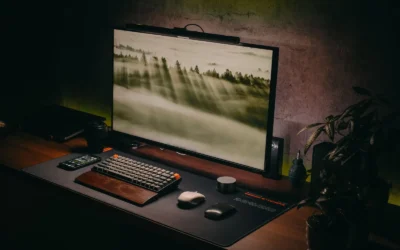
A blackout clutter free desk setup tour like this is about restraint. You get dark surfaces, hidden cables, and soft background light that lets your monitor do the talking. If you want a battlestation that feels calm for work by day and focused for play at night, this layout is built for you.
What This Setup Is Going For
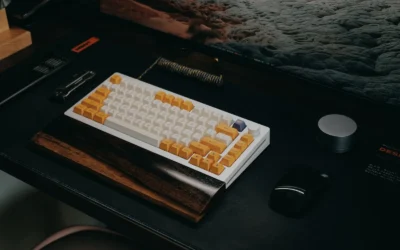
You are looking at a dark, low contrast battlestation where every surface stays close to black or charcoal. The desk top, the mat, the chair frame, and the monitor bezels blend together, so your screen, your keyboard legends, and one warm or cool glow become the focal points.
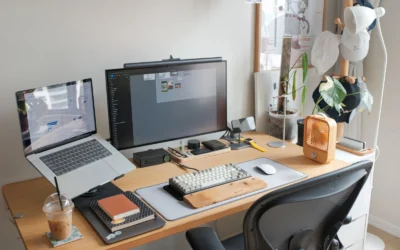
Most builds in this style use a single large desk or an L shaped corner desk with the PC tucked to one side and the monitor centered. A full desk mat anchors the keyboard and mouse, while a single arm lifts the display off the surface. Bias lighting behind the monitor adds depth without adding visual noise.
This approach suits a bedroom, a small home office, or a shared apartment where you need the setup to disappear when you are not using it. Dark finishes hide dust and minor marks better than white, and they pair well with low evening light. If you join video calls or stream, the dark background keeps attention on you rather than on shelves of gear.
There are tradeoffs you should accept before you buy. Matching blacks is harder than it sounds. One matte black desk, one glossy black tower, and one faded black fabric chair can clash in person. Cable routing also takes more planning because every light colored cable stands out against a dark desk.
You will spend more time on trays, sleeves, and a small cable box than you expect. That planning is part of the style. For ideas on surface coverage, see how to choose an XXL desk mat for full desk coverage and our Desk Mats & Deskspace Organization archive.
This style does NOT suit small rooms with no wall clearance, renters who cannot adjust anything, tight budgets that cannot cover an arm and lighting together, or people who move often and need a fast teardown. If you fall in one of those groups, a smaller single desk with fewer add ons will serve you better.
The Gear Breakdown
This is the core of the breakdown. Below you will find our current picks for building a setup with this look in 2026, followed by why each choice matters for a blackout theme. Use the list as your shopping reference, then read the notes to understand what actually shapes the result.
This article contains affiliate links. If you buy through one of our links, CustomPCGaming may earn a commission at no extra cost to you. Commissions never influence which products we recommend or how we rank them. Read our Affiliate Disclosure for details.
Quick Picks at a Glance

Prime Corsair MM350 PRO Extended XL Gaming Mouse Pad

Prime Razer Strider XXL Hybrid Gaming Mouse Mat

Bestier 71.5 Inch L-Shaped Gaming Desk with LED

SteelSeries QcK Prism Cloth Medium Gaming Mouse

Philips Hue Play Smart Light Bar 2-Pack White

Prime VIVO STAND-V001 Single Monitor Arm for 13 to 38

Prime UT Wire Cable Management Box Black

Nouhaus Ergo3D Ergonomic Office Chair with 3D
As an Amazon Associate we earn from qualifying purchases. Product prices and availability are accurate as of the date/time indicated.
Pros
- Massive extended size covers mouse and keyboard in one smooth surface
- Spill-proof coating makes cleanup fast and helps prevent stains
- Micro-weave fabric offers fast glide ideal for FPS and MOBA play
- Sturdy anti-slip rubber base and stitched edges hold up to heavy daily use
Cons
- Extra large 36.6 inch footprint requires a spacious desk and is not portable
- Cloth surface still needs prompt wiping after spills to stay pristine
- No RGB lighting or color options for users who want extra customization
The Corsair MM350 PRO Extended XL is a spill-proof cloth mouse pad designed for PC gamers who want one continuous surface for mouse and keyboard. With a massive 930mm by 400mm footprint, it suits battlestations, home offices and anyone who prefers low DPI sweeping movements.
In real world use, the micro-weave fabric feels dense and fast, allowing quick flicks with consistent tracking for FPS, MOBA and productivity work. The spill-proof coating causes liquids to bead on top instead of soaking in, so coffee or water can be wiped off quickly without stiffness.
Build quality is a clear strength, with 4mm thick plush rubber that stays flat and resists bunching during intense play. The 360 degree stitched anti-fray edges feel smooth on wrists, while the textured rubber base keeps the pad firmly planted on wood, glass or laminate desks.
The size is also its main tradeoff, as it needs a large, clear desk and is not meant for travel or compact setups. Gamers looking for RGB lighting, multiple colors or a harder speed surface may want to consider other options in the Corsair lineup.
Overall, the MM350 PRO is an excellent pick for gamers who value durability, easy maintenance and smooth speed. It combines practical spill protection with premium comfort and precision, making it a smart upgrade for any extended desk setup.
Model: CH-9413770-WW, Size: Extended XL, Dimensions: 930mm x 400mm, 36.6 x 15.7 inches, Thickness: 4mm.
Surface Material: Micro-weave cloth with spill-proof stain-resistant coating, Base: Anti-skid plush rubber, Edges: 360 degree anti-fray stitching.
Color: Black, Shape: Rectangular, Compatibility: Optical and laser gaming mice, Recommended Use: Gaming and office setups.
Pros
- Smooth, fast glide with solid stopping power for FPS, MOBA and everyday use
- Extra large XXL size fits full keyboard and mouse with room for low DPI movement
- Stays firmly in place thanks to textured grooved anti slip underside
- Durable and easy to clean with water resistant surface and fray resistant edges
Cons
- XXL footprint needs a large desk and can overwhelm compact setups
- Hybrid texture feels different from pure cloth and takes time to adjust to
- Some users report actual dimensions measure slightly smaller than listed
The Razer Strider XXL is a hybrid mouse mat that combines a firm gliding top with a soft, rollable base. It is made for gamers who want hard surface speed without giving up cloth like control and comfort.
In real use, the glide feels fast and even yet offers reliable stopping power for precise flicks. Users moving from cloth pads note smoother tracking in games while keeping accuracy for productivity work.
Build quality is strong with a 3mm cushioned profile, grooved anti slip underside and stitched edges that resist fraying. The water resistant surface wipes clean easily and the XXL size covers keyboard and mouse with room to spare.
The large footprint is not ideal for compact desks and the hybrid texture takes time to adjust to if you love traditional fabric. A few buyers also note the mat can measure slightly smaller than the listed dimensions.
Overall, the Strider XXL is an excellent pick for competitive and casual gamers seeking speed, control and portability in one mat. If you have the desk space, it delivers a premium, durable upgrade over standard cloth pads.
Brand: Razer, Model: RZ02-03810100-R3U1, Color: Classic Black, Use: Gaming mouse mat.
Size: 16.2 x 37 inches, Thickness: 3mm, Weight: 13.92 ounces, Material: Polyvinyl Chloride.
Features: Non slip grooved base, anti fraying stitched edges, water resistant surface, rollable portable design with wrist support.
Pros
- Huge corner layout ideal for multitasking, streaming and dual monitor setups
- Integrated power and USB charging eliminates messy extension cords
- Fun RGB lighting creates an immersive gaming atmosphere
- Smart organization features like monitor stand, CPU racks, cup holder and headset hook
Cons
- Assembly is easier with two people due to large size and multiple parts
- Desk height is fixed with no sit to stand adjustment
- Only one small drawer, so extra storage may be needed for office supplies
The Bestier 71.5 Inch L-Shaped Gaming Desk is a large corner workstation designed for gamers, streamers and home office users. It combines a wide L shape layout with a raised monitor shelf to support dual monitors plus a laptop in one efficient footprint.
Standout features include a built-in power strip with 4 AC outlets and 2 USB ports, plus an RGB light strip under the monitor stand. In daily use, the power hub keeps PCs, consoles and phones charged without extra cables, while the 20 colors and 22 dynamic modes add real atmosphere to late night sessions.
Design wise, the black carbon fiber textured top looks sleek and resists scratches, fingerprints and spills. The alloy steel frame feels sturdy for gaming gear, and side storage racks neatly hold a PC tower, PS5 or speakers to keep the desktop clear.
There are a few tradeoffs to consider. Assembly is best done with two people, and the desk height is fixed so it does not convert for standing use. Storage is also focused on open shelves rather than closed drawers, which may not suit users with lots of paperwork.
Overall, this Bestier L-shaped desk delivers excellent space, power access and gaming style for everyday use. If you want a roomy, organized and immersive setup for work and play, it is a smart pick for bedrooms, dorms and home offices.
Shape: L-Shape corner design measuring 71.5 inches wide by 19.7 inches deep by 35.8 inches high. Working diagonal length reaches 84.47 inches for generous multitasking space.
Materials: P2 particleboard top with painted carbon fiber finish plus alloy steel legs and stainless steel frame. Tabletop is scratch resistant and easy to clean, total weight is 52.6 pounds.
Features: Raised monitor stand, 2 open shelves, 1 drawer, adjustable metal grid, foldable cup holder and headphone hook with 3 mounting positions. Built-in power rated at 1500W with 120V, 12A AC outlets and 5V, 2.2A USB ports.
Plan for two person assembly and clear a large floor area before unboxing. Follow the included instructions step by step and tighten all screws only after aligning the L shape sections.
Place your monitors on the raised stand for better ergonomics and route cables to the built-in power hub. Use the side racks for your PC tower or console to improve airflow and free desktop space.
Experiment with the RGB remote to match lighting to your mood, with lower brightness for work and dynamic modes for gaming. Add a cable tray and monitor arms if you want an even cleaner setup.
Pros
- Proven QcK cloth surface for controlled, precise mouse movement
- Vibrant 2-zone RGB adds both style and functional game notifications
- Excellent tracking performance for low and high DPI playstyles
- Stable non-slip rubber base prevents unwanted shifting
Cons
- RGB lighting requires a USB connection, adding cable management
- Cloth surface needs regular cleaning to maintain smooth glide
- Medium size may feel small for very low sensitivity players who make wide sweeps
The SteelSeries QcK Prism Cloth Medium is a wired RGB gaming mouse pad designed for control oriented PC gamers. It is a great fit for players who want legendary QcK precision with added lighting flair without taking over the entire desk.
Standout features include brilliant 2-zone RGB illumination with in-game lighting notifications and a micro-woven cloth surface. In real use, tracking feels smooth and consistent for both precise low DPI aiming and fast high DPI movements.
Build quality centers on the dense, smooth black cloth top paired with a thin low profile design. The non-slip rubber base keeps the pad firmly planted, while the Medium footprint offers a good balance of freedom and compact placement.
There are a few tradeoffs to consider. You will need a free USB port to power the lighting, and the cloth will collect dust and require cleaning over time. Very low sensitivity gamers may also prefer a larger extended pad for broad arm movements.
Overall, this is a strong pick for gamers who love the QcK control feel and want reactive RGB style. If you value steady accuracy, easy lighting setup, and a stable base, it delivers where it matters.
Brand: SteelSeries, Model: QcK Prism Cloth Medium
Surface: Micro-woven cloth optimized for control and low plus high DPI tracking
Lighting: 2-zone RGB dynamic illumination with in-game notifications
Base: Non-slip rubber for stable placement
Color: Black, Dimensions: Approx. 12.6 x 10.63 inches with slim profile
Pros
- Vibrant color output with bright, smooth dimming and warm to cool white range
- Versatile mounting with adjustable table stands and secure TV clips
- Excellent Hue Sync performance for gaming setups and movie nights
- Works with Alexa, Google Assistant, Apple HomeKit and Matter
Cons
- Requires Hue Bridge sold separately for full features, automations and voice control
- Higher cost than basic LED strips or standalone light bars
- Limited to three Play bars per power supply, larger setups need extra accessories
The Philips Hue Play Light Bar Base Kit includes two White and Color Ambiance LED bars, a power supply, table stands and TV mounts. It is designed for gamers, movie fans and smart home users who want responsive bias lighting behind a TV or around a setup.
With 16 million colors and tunable warm to cool white, you can create calm ambience or bold effects in seconds. Paired with the Hue Sync app, the bars react to music, movies and gameplay for a truly immersive wall wash of light.
Each bar has a compact rectangular design in white with a painted acrylic finish that blends into modern decor. The included stands allow angle adjustment, while the clips and tape provide secure TV mounting for a clean, cable managed look.
The main tradeoff is the Hue Bridge requirement, since you need it for remote control, automations and voice commands. Some users may also find the system pricey compared to basic LED strips, and expanding beyond three bars requires an additional power supply.
Overall, this 2-pack delivers premium brightness, color accuracy and reliability that Hue is known for. If you want polished, expandable smart lighting for entertainment, it is an excellent long term choice.
Set Includes: 2x Hue Play White and Color Ambiance light bars, 1x power supply, 2x table stands, 2x TV mounting supports
Light Performance: 16 million colors plus warm to cool white, dimmable, color changing with music sync
Power and Build: Corded electric, 6.6 watts, synthetic polymer housing with acrylic shade, 1.2 pounds total
Placement Options: Tabletop, floor mount or TV rear mount in vertical, horizontal or flat position
Smart Compatibility: Requires Hue Bridge, works with Hue app, Alexa, Google Assistant, Apple HomeKit and Matter
Model Details: Philips Hue model 7820231U7, 2-pack in White, 2 year manufacturer warranty
Start by deciding placement for the best glow, behind the TV for bias lighting, on a cabinet for ambience or on the floor for wall washing. Use the included stands for angled tabletop use or the clips with double sided tape for secure rear TV mounting.
Connect both bars to the power supply, plug in and add them in the Hue app through your Hue Bridge. Then assign them to an Entertainment area to enable Hue Sync for movies, music and games.
For the most immersive effect, use two or three bars per TV and fine tune brightness, color temperature and sync intensity in the app. Add automations or voice commands to switch scenes hands free.
Pros
- Wide compatibility with ultrawide and standard monitors up to 38 inches
- Full motion adjustability for ergonomic comfort and glare reduction
- Sturdy alloy steel and aluminum construction with secure mounting options
- Built-in cable management keeps power and AV cables organized
- Simple installation with detachable VESA plate and included hardware
Cons
- 22 lbs weight limit may not support heavier large monitors
- Pole style height adjustment requires manual repositioning rather than gas spring motion
- Requires VESA 75x75 or 100x100 mounting, so non VESA monitors need an adapter
The VIVO STAND-V001 is a single monitor desk mount designed for 13 to 32 inch screens and ultrawide monitors up to 38 inches. It is built for remote workers, students, gamers and anyone wanting to free up desk space while improving posture.
Real world performance centers on flexibility, with +90 to -90 degree tilt, 360 degree swivel and rotation, plus up to 16 inches of height adjustment. You can easily switch from landscape to portrait, raise the screen to eye level, and angle it to reduce glare and neck strain.
Construction uses alloy steel and aluminum for a stable, wobble free feel during daily use. The heavy duty C-clamp secures to desks up to 3.25 inches thick with hand tightening, while the included grommet mount offers a clean through desk option.
The main limits are the 22 lbs weight capacity and standard VESA 75x75 or 100x100 support, so check your monitor specs first. As a pole style mount, height changes require loosening the arm rather than the one touch motion of gas spring arms.
Overall, the STAND-V001 is a reliable, easy to install upgrade for ergonomic comfort and a cleaner setup. If you need full motion adjustability for a single ultrawide or standard monitor, it delivers strong value and everyday practicality.
Model: STAND-V001, Mounting: C-clamp for desks up to 3.25 inches thick plus grommet mount included
Compatibility: 13 to 32 inch monitors and ultrawide up to 38 inches, up to 22 lbs, VESA 75x75mm and 100x100mm
Adjustment: +90 to -90 degree tilt, 360 degree swivel, 360 degree rotation, up to 16 inch height adjustment, portrait and landscape orientation
Materials and Color: Alloy steel and aluminum construction in black with integrated cable management clips
Pros
- Large capacity holds big and tall plugs that smaller boxes cannot fit
- Creates a tidy, family friendly charging station for multiple devices at once
- Simple drop in setup with no tools, just place the strip inside and route cords
- Clean matte black finish looks neat in living rooms, bedrooms and offices
Cons
- Power strip and chargers are not included, box only
- Lid can feel loose and may need tidy cable placement to sit flat
- Lightweight plastic can sound hollow and rattle with phone vibration, and top grommets can pop out
The UT Wire UTW-BXSM-BK is a desktop cable management box designed to conceal a power strip, chargers and excess cord length. It is made for anyone tired of tangled cables on a desk, nightstand, kitchen counter or behind the TV.
In daily use, the extra long 16.4 inch interior easily swallows a standard 6 to 12 outlet strip plus bulky adapters. The top flip door with three slots lets you feed out just what you need for phones, tablets, headphones and watches, while the top groove holds a device upright as it charges.
The box is lightweight plastic in matte black, so it blends quietly under TVs and on mantels or desks. Side openings on the left, top and right make cable routing flexible, and setup takes seconds with no tools or mounting required.
Build quality is functional rather than premium, as the plastic feels a bit hollow and can rattle if your phone vibrates on top. The lid does not lock tightly and the soft top grommets can pop out when pulling thicker cables through, so a little cable arranging inside helps.
Overall, this is a practical and affordable fix for cord clutter, especially for shared family charging spots and home entertainment setups. If you want a larger, simple hideaway box with convenient top access, this UT Wire model is a smart pick.
Brand: UT Wire, Model: UTW-BXSM-BK, Color: Black, Style: Desktop charging box
Dimensions: 16.4L x 6.6W x 5.4H inches, Weight: 16 ounces, Material: Plastic
Capacity: Fits most standard 6 to 12 outlet power strips, power strip and chargers not included
Usage: Indoor only with top flip door plus left, top and right cable openings for flexible routing
Pros
- Excellent airflow from full mesh design ideal for long sessions
- Highly adjustable lumbar, headrest, armrests and recline
- Sturdy aluminum frame and base with strong stability
- Versatile for home office, study room, computer and gaming use
Cons
- Mesh seat feels firmer than plush foam cushions
- Comfort and fit can vary by height and body type
- Assembly required and recline tension takes time to dial in
The Nouhaus Ergo3D NHO-0001 is a high back mesh office chair built for professionals, students and gamers who sit for long hours. It focuses on ergonomic posture with dedicated support for the head, back, hips and arms.
Standout features include 3D adjustable lumbar support, 4D adjustable armrests and a height adjustable headrest plus up to 135 degrees of recline. In daily use, this flexibility helps reduce lower back pressure and lets you shift easily between focused work and relaxed leaning.
The full body mesh seat and split back design promote airflow to keep you cool and prevent sweat buildup. The aluminum alloy 5 point base with dual casters feels sturdy and stable, and it includes blade wheels made for smooth rolling on hardwood floors.
There are some tradeoffs to consider. The mesh seat feels firmer than thick foam cushions, so fans of plush seating may need time to adjust. Fit can also vary by height and body shape, so take time to dial in the lumbar, headrest and arm positions.
Overall, the Ergo3D is a smart pick for home offices and study rooms where breathability and adjustability matter. If you want a minimalist, rolling ergonomic chair with strong back support for long desk days, it delivers excellent everyday value.
Model: Nouhaus Ergo3D NHO-0001BL in Black, high back ergonomic design
Materials: Breathable mesh seat and back with aluminum frame and base
Adjustability: 3D lumbar support, 4D armrests, adjustable headrest, 135 degree recline
Capacity and Base: Supports up to 275 lbs with 5 point aluminum base and dual casters
Use: Indoor office and study room chair for adult desk, computer and gaming setups
| Gear | Common in this style | Our 2026 pick | Why |
|---|---|---|---|
| Bias light | a bias light in this style | Philips Hue Smart Play Light Bar Base Kit, White | a color-accurate accent bar for a smart-home setup |
| Cable management | a cable management in this style | UT Wire UTW-BXSM-BK Desktop Mobile Charging | a small hub that keeps charging cables from falling behind the desk |
| Desk mat | a desk mat in this style | SteelSeries QcK Prism Cloth – Gaming Mouse Pad | a large cloth mat with an RGB edge that anchors the desk visually |
| Desk | a desk in this style | Bestier 71.5 Inch L‑Shaped Gaming Desk with LED | a budget corner desk with built-in accent lighting |
| Chair | a chair in this style | Nouhaus Ergo3D Ergonomic Office Chair Lumbar | a full mesh ergonomic chair with 3D armrests on a budget |
| Desk mat | a desk mat in this style | Razer Strider Hybrid Mouse Mat | a hybrid hard-soft feel in a full-desk size |
| Desk mat | a desk mat in this style | Corsair MM350 PRO Spill-Proof Cloth Gaming Mouse | a thick stitched XL mat that resists fraying |
| Desk mat | a desk mat in this style | Gimars Leather Desk Pad | a budget leather-look pad for a professional setup |
| Monitor arm | a monitor arm in this style | VIVO Single 13 to 38 inch Ultrawide Monitor Arm | a budget single arm that covers standard VESA monitors |
The desk sets the footprint. The Bestier 71.5 Inch L‑Shaped Gaming Desk with LED gives you a corner layout with room for a monitor plus a laptop to the side. Per the spec sheet, it includes a raised monitor stand, 4 AC outlets plus 2 USB ports, and an RGB strip with 20 static colors and 22 dynamic modes. You can place your tower on the side wing and keep the main surface open.
Lighting shapes the mood more than any other add on. The Philips Hue Smart Play Light Bar Base Kit, White offers millions of colors with warm to cool white control, plus voice control through Alexa or Google Assistant. It requires a Hue Bridge for full smart home control, and you can stand it on a shelf or mount it behind your display for a soft halo.
Cable control holds the blackout illusion together. The UT Wire UTW-BXSM-BK Desktop Mobile Charging hides a power strip inside a box that measures 16.4 x 6.5 x 5.4 inches, with a top flip door and side openings for cords. Do not overload a single outlet, and keep power supplies ventilated inside and around the box. For more surface ideas, compare cork vs felt desk mat
How To Adapt It To Your Room
Will a blackout corner desk actually fit your wall and still leave room for your chair to move? Start there before you order anything. Measure the wall or bedroom for the desk width, and map out door swing, closet access, and where your chair needs to roll.
Adapt this to your space before buying. Measure the wall or bedroom for the desk width, a corner layout needs more depth for a monitor arm to pull back. A corner desk like the Bestier option needs extra depth because the arm swings in an arc. If your room is narrow, you may prefer a straight desk against the wall so you keep knee space and easy cable access behind.
Check your monitor for a VESA pattern before choosing an arm, and confirm the desk edge thickness for a clamp. The VIVO Single 13 to 38 inch Ultrawide Monitor Arm fits VESA 75x75mm or 100x100mm screens that weigh up to 22 lbs, which covers most 13 inch to 32 inch displays and ultrawide models up to 38 inches. It clamps to desks up to 3.25 inches thick and offers tilt from plus 90 degrees to minus 90 degrees with 360 degree swivel and rotation.
Follow the mounting instructions closely, verify the weight of your display with its cables, and check the desk edge thickness for a clamp before you tighten anything. Height adjustment up to 16 inches along the center pole gives you room to lift the screen off the mat, but you still need slack in your display and power cables. Route cables through the detachable clips on the arm so they move with the display.
If you rent, use no-drill cable trays and adhesive raceways rather than screwing into the desk or wall, and find a stud before any wall mount. Adhesive channels work well along the back edge of a dark desk because they blend in. A clamp on tray under the rear edge holds the strip and bricks out of sight, while a sleeve groups the single drop to the wall outlet.
Match the blackout look with the finish of the desk and mat first, then the lighting color, rather than buying every accessory in one brand. Pick one black finish as your base, such as matte carbon texture or flat black wood, then choose a mat that sits close to it. Add light last, with one warm white or one cool white as your daily default and color only for evenings.
A standing desk lists a weight capacity, keep the tower, monitors and arm under it. Even with a fixed desk, keep weight centered and follow the assembly instructions for the frame and shelves. Leave a vent gap behind a tower, keep the monitor stand or arm base clear of the power strip box, and confirm your outlet can handle the PC, display, and lights together. For ambient ideas, browse Bias Lighting & Ambient RGB.
What Actually Changes The Feel
Bias lighting does the most work in a blackout room. A soft glow behind the monitor reduces the harsh edge between a bright screen and a dark wall, which makes long evenings feel calmer. You do not need rainbow effects. One steady color at low brightness is often enough to give the desk depth.
Cable management comes next. When every cable is lifted off the floor and grouped into one run, the whole desk looks wider and your mouse moves without snagging. A small box for the strip plus a tray and a sleeve under the desk will change the look more than a new keyboard. Keep the charging cables you use daily at the side wing so they do not cross your mat.
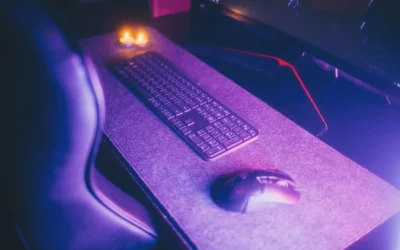
A full desk mat is the third upgrade that matters. The Corsair MM350 PRO Spill-Proof Cloth Gaming Mouse spans 930mm x 400mm with a 4mm thick rubber base and stitched edges that guard against peeling. The Razer Strider Hybrid Mouse Mat uses a 3mm thick base with a firm glide surface and water resistant coating. The SteelSeries QcK Prism Cloth – Gaming Mouse Pad adds 2 zone RGB around a micro woven cloth top for control focused tracking.
Lower priority items include extra wall art, matching bottles, and secondary accent bars. They photograph well but add little to daily comfort. No verified frame rate numbers are available for this build, so judge it on comfort, noise, and how easy it is to keep tidy. If you want more background on riser height and eye level, read how to choose monitor riser height for comfortable setup.
Build It At Three Budgets
Budget Version
Choose a manual or single motor desk, a well reviewed sub 150 chair such as a SIHOO M57, a single VIVO arm, one Govee light strip, a large cloth mat and a no drill cable tray. For a first blackout setup on a tight budget. You get the core look with an open surface and hidden strip, and you can add a proper cable box later.
Start with the VIVO Single 13 to 38 inch Ultrawide Monitor Arm and the Corsair MM350 PRO Spill-Proof Cloth Gaming Mouse for coverage and lift. This path suits students and first apartments where you need low cost and simple assembly.
Balanced Version
Choose a dual motor standing desk, a mid ergonomic or racing chair, a gas spring arm, a monitor light bar plus one strip, a stitched XL mat and a clamp on cable tray with a sleeve. For most people who want it to last. This is the version we recommend for daily work plus evening play.
Build it around the Bestier 71.5 Inch L‑Shaped Gaming Desk with LED, the Nouhaus Ergo3D Ergonomic Office Chair Lumbar with mesh back and 135 degree recline, and the Philips Hue Smart Play Light Bar Base Kit, White for bias light. Add the UT Wire UTW-BXSM-BK Desktop Mobile Charging to hide the strip. This suits you if you sit for long hours and want support for head, back, hips, and arms without a bulky racing shell.
Premium Version
Choose a Herman Miller or Steelcase chair, an Ergotron arm, a light bar plus wall panels, a felt or leather pad and a fully sleeved cable run. For a setup you plan to keep for years. Every touch point feels more refined, from the arm motion to the mat edge.
Pair the Razer Strider Hybrid Mouse Mat or a leather look pad with layered lighting and a full under desk tray system. This suits you if you rarely move, you work from home full time, and you want a quiet, stable station with long term parts support.
FAQ
Do I need a monitor arm for a blackout clutter free desk setup tour style build?
You do not strictly need one, but an arm frees the surface under the display and hides the stock stand base. Confirm VESA 75x75mm or 100x100mm, check that your screen is under 22 lbs with cables, and verify desk edge thickness before you buy.
How do I keep cables hidden on a dark desk without drilling?
Use a small desktop box for the power strip, a no drill tray under the back edge, and adhesive raceways for the vertical drop. Group display, PC, and light power into one sleeve so only a single run reaches the wall, and keep power supplies ventilated.
What mat size works best for a corner blackout desk?
Measure your main work zone first, then choose a mat that covers keyboard plus mouse with margin on each side. A large stitched XL mat like the Corsair option at 930mm x 400mm suits most straight sections, while an XXL hybrid mat suits wider corners. See 6 gaming desk mats for keyboard and mouse only for sizing help.
Final Verdict
A blackout setup rewards patience more than spending. When you get the desk footprint right, lift the monitor, hide the strip, and cover the surface with one mat, the room feels larger and calmer. Updated in November 2026 per current spec sheets and owner feedback.
Our pick: the Balanced version with the Bestier corner desk, VIVO arm, Hue Play bars, and stitched XL mat, because it gives you lasting comfort and tidy cables without overbuilding for most bedrooms and home offices.


Write Your Review
No reviews yet. Be the first to share your experience!