

Your glass desk feels open and modern until every typing session sends your screen shaking, and you fear a metal clamp could scratch or fracture the surface. You still want eye level comfort, smooth tilt, and free desk space without risking your tempered top. In this guide we explain how to shop for safe support, including how panel traits covered in our QD-OLED versus WOLED differences influence height, distance, and angle needs for daily work and play.
We evaluated single arm mounts for clamp design, weight range, VESA compatibility, motion smoothness, and cable control with glass tops in mind. You will see which models suit ultrawide screens, which suit compact workstations, and which need extra reinforcement plates to stay secure. This roundup is for remote workers, creators, students, and gamers who love the airy look of glass but refuse to compromise on stability or ergonomic posture.
This article contains affiliate links. If you buy through one of our links, CustomPCGaming may earn a commission at no extra cost to you. Commissions never influence which products we recommend or how we rank them. Read our Affiliate Disclosure for details.
Quick Picks at a Glance

Prime Rfiver Single Monitor Arm for 17-34 Inch Flat

Prime MSI MAG MT101G Gas Spring Monitor Arm for 17-32

HUANUO FlowLift Single Monitor Mount for 13-32

HUANUO FlowLift Dual Monitor Stand for 13-32 Inch
HUANUO Dual Monitor Stand 13-40 Inch
Prime VIVO Pole Mount Monitor Arm for 17 to 32 Inch

HUANUO FlowLift Pro Single Monitor Arm for 13-32

Prime VIVO STAND-V001 Single Monitor Arm for 13 to 38

Prime ErGear Single Monitor Arm for 13-34 Inch Screens
Prime MOUNTUP Single Monitor Arm for 17-32 Inch Screens
As an Amazon Associate we earn from qualifying purchases. Product prices and availability are accurate as of the date/time indicated.
Pros
- Wide compatibility with large 17 to 34 inch monitors including curved screens
- Excellent ergonomic range with tilt, swivel and full rotation
- Sturdy aluminum build with smooth gas spring movement
- Two mounting options fit most desk setups
- Frees up valuable desk space while improving posture
Cons
- Single monitor only, not expandable for dual screen setups
- Large 34 inch screens near max weight may limit full range of motion
- C-clamp requires adequate desk edge thickness and clearance
The Rfiver Single Monitor Arm is built for 17 to 34 inch flat and curved monitors weighing up to 22 lbs. It is a smart pick for remote workers, students and gamers who want a cleaner desk and better posture.
Real world flexibility stands out, with tilt from minus 45 to plus 90 degrees, wide swivel and full 360 degree rotation. Switching between landscape and portrait feels quick and smooth, which helps reduce neck and eye strain during long sessions.
The tall center pole adjusts up to 670mm with an arm reach of 492 to 565mm, so dialing in height and focal distance is easy. The aluminum frame and gas spring mechanism feel sturdy and stable, with smooth motion that holds position well.
It is single screen only, so it will not suit dual monitor users without buying a second unit. Very large or heavy curved screens near the weight limit may also feel less nimble at extreme angles.
Overall, this is a durable, ergonomic and space saving mount that delivers premium adjustability at a practical level. If you need full motion support for one large monitor, it is an excellent value choice.
Compatibility: 17 to 35 inch flat and curved monitors, 4.4 to 22 lbs, VESA 75x75mm and 100x100mm.
Adjustment: Tilt minus 45 to plus 90 degrees, swivel plus 90 to minus 90 degrees, 360 degree rotation.
Reach and Height: Center pole 0 to 670mm height, arm extension 492 to 565mm.
Build and Mounting: Aluminum construction, gas spring arm, C-clamp and grommet installation, black finish, tabletop mount.
Pros
- Strong 22 lbs capacity handles most 17 to 32 inch monitors
- Highly adjustable tilt, swivel and pivot for ergonomic positioning
- Includes both clamp and grommet mounts for different desks
- Metal build with quick release VESA plate and 3 year warranty
Cons
- Single screen only, not suitable for dual or triple monitor setups
- Not compatible with monitors larger than 32 inch or heavier than 22 lbs
- Gas spring tension requires manual adjustment during initial setup
The MSI MAG MT101G is a gas spring single monitor arm designed for 17 to 32 inch displays. It is ideal for gamers, home office users and creators who want more desk space and better ergonomics.
The gas spring allows smooth one hand height adjustment while tilt, swivel and full rotation help you find the perfect viewing angle. The quick release VESA plate makes installation and monitor swaps fast, and both clamp and grommet bases fit most desks.
Built with a metal frame and premium aluminum accents in black, the arm feels sturdy and stable at full extension. The clean finish blends with MSI gaming setups and office workstations while helping keep cables tidy.
It only supports one monitor up to 22 lbs, so it is not for large ultrawides or multi screen battlestations. You will also need to tune the gas spring tension on first install to match your monitor weight.
Overall, the MAG MT101G delivers flexible ergonomics, solid build quality and easy installation in a compact footprint. If you need an affordable single arm for a 17 to 32 inch monitor, it is a smart and reliable pick.
Screen size support: 17 to 32 inches. Max load: 22 lbs. VESA patterns: 75x75 and 100x100 mm. Mounting: tabletop clamp for 10 to 75 mm and grommet for 10 to 45 mm.
Movement: tilt plus 80 to minus 45 degrees, swivel plus 90 to minus 90 degrees, rotation plus 180 to minus 180 degrees. Material: metal, color black. Warranty: 3 years.
Pros
- Sturdy alloy steel build feels stable and holds position at any angle
- Smooth gas spring motion allows easy one handed adjustment for height, tilt and swivel
- Quick beginner friendly installation with both C-clamp and grommet mounting hardware included
- Wide range of motion including portrait rotation is great for work, study and gaming
- Built in cable management helps free up desk space for a cleaner setup
Cons
- 19.8 lbs weight limit means some heavier 32 inch monitors may not be supported
- Best suited for solid wood desks within thickness range with clear space underneath for clamp
- Small visible logos on arm and minor hardware variations reported between units
The HUANUO FlowLift HNSS6 is a single gas spring monitor arm designed for 13 to 32 inch LCD monitors. It is a great fit for home offices, students, gamers and anyone wanting to free up desk space and improve posture.
Real world performance is smooth and user friendly, with one handed control for height, tilt, swivel and rotation. The screen lifts up to 39.6cm and stays firmly in place, making it easy to switch between landscape and portrait or find a comfortable viewing angle.
Design and build quality stand out with automotive grade alloy steel, a clean black finish and integrated cable management. The arm feels hefty and stable, and the one piece structure inspires confidence for daily adjustments over long term use.
There are a few limitations to consider, including the 19.8 lbs capacity and support for only 75x75mm and 100x100mm VESA. It also needs a suitable wood desk with proper thickness and clearance, and some users note small logos and hardware differences.
Overall, this is a reliable, easy to install and highly adjustable monitor mount that delivers excellent value. If your monitor is within size and weight limits, it is a smart upgrade for comfort, flexibility and a tidier workspace.
Model HNSS6 supports 13 to 32 inch monitors weighing 4.4 to 19.8 lbs with VESA 75x75mm and 100x100mm. Movement includes tilt from -50 to +85 degrees, swivel 90 degrees each way and 360 degree rotation.
Construction is alloy steel in black with tabletop C-clamp and grommet mounting options. Compatible desk thickness is 0.59 to 3.54 inches, with wood desktops recommended and maximum lift height of 39.6cm.
Check your monitor size, weight without stand, and VESA pattern before buying to ensure compatibility. Larger 32 inch models should be weighed carefully since heavier displays may exceed the limit.
Measure desk thickness and confirm clear space under the desk for the clamp or a grommet hole. Choose grommet mounting for extra stability if your desk already has a hole or cable opening.
After install, adjust gas spring tension to match your screen weight for smooth one handed movement. Route cables through the management clips to keep motion free and your desk organized.
Pros
- Very sturdy dual clamp design stays stable during typing and gaming
- Smooth, easy adjustment with tilt, swivel, rotate and height for ergonomic viewing
- Frees up desk space and includes cable management for a clean setup
- Solid cast metal build with straightforward installation and all hardware included
Cons
- Fits wooden desks 0.59 to 3.54 inches thick only, not for glass or plastic desks and needs clear space underneath
- Monitors under 4.4 lbs may feel floaty and require careful tension adjustment
- Included VESA screws may be too long for some slim monitors, so check screw depth before mounting
The HUANUO FlowLift HNDS6 is a dual monitor desk mount made for 13 to 32 inch computer screens with standard VESA mounting. It suits gamers, home office workers, programmers and students who want two screens at the right height while reclaiming desk space.
Each arm supports 4.4 to 19.8 lbs and moves with tilt, swivel, full rotation and generous height lift. Users report smooth one hand repositioning for landscape to portrait flips, pulling screens close for focused work, or pushing back for video.
Build quality stands out with alloy steel arms, a large base platform and a dual C-clamp structure for extra grip. The mount offers both clamp and grommet installation for desks 0.59 to 3.54 inches thick, plus integrated cable guides for a tidy look.
Compatibility needs careful checking before buying. It is recommended for wooden desks only, it will not suit glass or plastic tops or desks with cross beams underneath, and very light displays can need extra tension tuning.
For a stable, flexible and space saving dual screen upgrade, this FlowLift mount is a smart pick. It delivers ergonomic comfort, solid stability and clean cable routing that works well for work, study and play.
Model: HUANUO HNDS6 FlowLift Dual Monitor Stand in Black, made with alloy steel for strength and stability.
Monitor compatibility: 13 to 32 inches, VESA 75x75mm and 100x100mm, 4.4 to 19.8 lbs per arm with tilt, swivel, rotation and height adjustment.
Desk compatibility and mounting: C-clamp or grommet mount for wooden desks 0.59 to 3.54 inches thick with clear under desk space.
Pros
- Rock-solid aluminum construction with dual C-clamp base prevents wobble with heavy monitors
- Excellent height and reach for tall users and sit-stand desks
- Smooth full-motion adjustment holds position without sagging
- Easy clamp or grommet installation plus built-in USB ports and cable management
Cons
- Assembly can take over an hour and instructions require careful attention
- Arms may need tension adjustment for lighter monitors to prevent drifting
- Large footprint and dual clamp design may not suit thin or glass desks
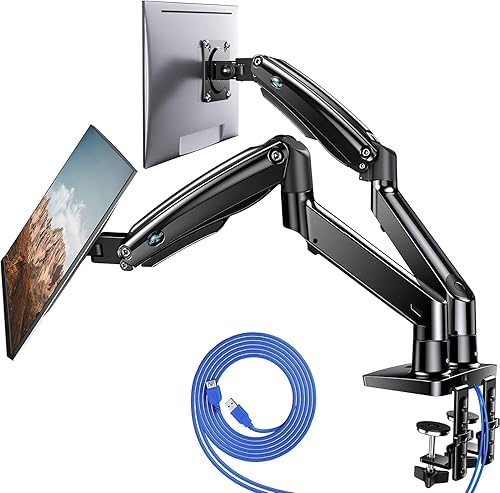
The HUANUO HNDS7 is a premium dual monitor stand designed for two 13 to 40 inch screens, including heavy ultrawides. It is built for remote workers, gamers and office users who want ergonomic comfort and more usable desk space.
Standout features include extra tall height adjustment up to 21.1 inches and long arms that extend to 25.59 inches for deep desks. In daily use, monitors stay firmly in place during sit to stand transitions, with smooth swivel, tilt and 360 degree rotation for perfect positioning.
Build quality feels premium thanks to solid aluminum arms, a larger base and a unique dual C-clamp design. Both clamp and grommet mounting are supported, and integrated cable channels plus dual USB charging ports keep the setup clean and functional.
Installation takes some time and requires careful assembly, especially when balancing two large screens. Very light monitors may need tension tuning to prevent upward drift, and the sturdy base needs a solid wood style desk for best results.
Overall, this is a stable, versatile and well built solution for dual large monitor setups. If you need tall adjustability, full motion flexibility and extra desk space, it is an excellent value for a long term workstation upgrade.
Model: HUANUO HNDS7 dual monitor mount in black aluminum. Supports two 13 to 40 inch monitors up to 26.4 lbs per arm with VESA 75x75mm and 100x100mm.
Adjustment Range: Height up to 21.1 inches, arm extension up to 25.59 inches, swivel minus 90 to plus 90 degrees, tilt minus 30 to plus 85 degrees, 360 degree rotation.
Mounting and Extras: Fits desks up to 3.54 inches thick with C-clamp or grommet mounting. Includes two USB ports with 5.25 ft cable and integrated cable management.
Pros
- Solid alloy steel construction holds monitors firmly without slipping or sagging
- Extremely versatile fit for production carts, metro shelves, C-stands and desk poles
- Smooth tilt, swivel and rotate functions support ergonomic viewing and portrait mode
- Easy to install, adjust and relocate with removable VESA plate
Cons
- Pole is not included, so you must already have a compatible pole
- Compact arm length may feel short for larger 32 inch screens in tight setups
- Deeply recessed VESA sockets can require extra alignment and no rubber pad is included for metal poles
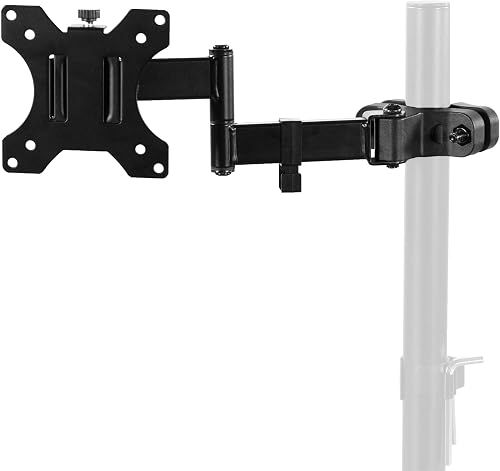
The VIVO MOUNT-POLE01A is a clamp on VESA bracket that adds a monitor to an existing pole, rather than a full stand. It is built for creators, office workers and DIY setups using production carts, shelving poles, C-stands or multi monitor poles.
It supports 17 to 32 inch screens up to 17.6 lbs with 75mm and 100mm VESA patterns. Users praise its stable hold on metro shelf poles and dual monitor poles, plus easy flipping between horizontal and vertical for photoshoots and client viewing.
The mount uses heavy duty alloy steel with tilt, swivel and rotation plus a swiveling arm for flexible positioning. Cable clips route cords along the arm, and the clamp rotates fully around the pole for quick collaboration and screen sharing.
The pole is not included, and the arm itself is fairly compact, so measure your screen and clearance first. Some monitors with recessed VESA holes need careful alignment, and there is no rubber liner to protect bare metal poles.
For its versatility and solid locking strength, this is a smart upgrade for custom workstations and mobile carts. If you already have a pole in the 1.1 to 2.4 inch range, it delivers pro level flexibility in a simple, reliable package.
Model: MOUNT-POLE01A by VIVO, black alloy steel pole mount bracket, pole not included.
Compatibility: 17 to 32 inch monitors and TVs up to 17.6 lbs, VESA 75x75mm and 100x100mm, pole diameter 1.1 to 2.4 inches.
Motion: 30 degree tilt up and down, 180 degree swivel, 360 degree rotation, full 360 degree clamp rotation around pole.
In the Box: Monitor arm with removable VESA plate, mounting hardware, cable clips, instruction manual, backed by 3 year warranty.
Pros
- Strong metal and aluminum build holds large 31.5 inch displays up to 19.8 lbs without droop
- Quick installation with included hardware, clear instructions and snap-in VESA plate
- Smooth articulation for height, tilt, swivel and portrait rotation
- TUV Rheinland certified and tested at 3x load for added safety
- Slim profile frees desk space and keeps cables neat for a clean workstation
Cons
- Strict fit requires correct screen size, weight range and VESA pattern plus wood desk only
- Lower arm has limited vertical travel, most height adjustment comes from upper arm
- Plastic trim around joints needs careful tightening to avoid stripping during assembly
The HUANUO FlowLift Pro is a single monitor arm designed for 13 to 32 inch flat and curved screens with VESA 75 and 100 patterns. It is built for remote workers, coders, designers and gamers who want eye level comfort and a cleaner desk.
Standout features include the MechaSpring arm for consistent tension without gas pressure loss and the LockSteady system for one finger moves with no droop. In real use, it holds large 31.5 inch displays steady while allowing smooth tilt, swivel and rotation for work, play and screen sharing.
Build quality feels premium with 90 percent metal and aluminum construction in a slimmer, easy to grab profile. Setup is fast thanks to the tool free snap in VESA plate, dual C clamp and grommet base, plus integrated cable management for a minimalist look.
Compatibility is strict, so you must meet size, weight and VESA specs together and use a wood desk 0.59 to 3.54 inches thick. The lower arm offers limited vertical travel and a few users note plastic trim around joints needs careful tightening to avoid stripping.
Overall, the FlowLift Pro delivers strong stability, ergonomic flexibility and TUV Rheinland certified safety in a compact design. If your monitor and desk fit the requirements, it is a smart upgrade for comfort, focus and long term reliability.
Compatibility: 13 to 32 inch monitors, 4.4 to 19.8 lbs flat or 4.4 to 15.4 lbs curved, VESA 75x75 and 100x100.
Mounting: Tabletop C-clamp and grommet base for wood desks 0.59 to 3.54 inches thick.
Movement: Articulating arm with tilt up to 85 degrees, swivel and 360 degree rotation for landscape and portrait modes.
Materials and Safety: Aluminum and metal construction, TUV Rheinland certified and tested at 3x load, model HNDMA118B-SS.
Pros
- Wide compatibility with ultrawide and standard monitors up to 38 inches
- Full motion adjustability for ergonomic comfort and glare reduction
- Sturdy alloy steel and aluminum construction with secure mounting options
- Built-in cable management keeps power and AV cables organized
- Simple installation with detachable VESA plate and included hardware
Cons
- 22 lbs weight limit may not support heavier large monitors
- Pole style height adjustment requires manual repositioning rather than gas spring motion
- Requires VESA 75x75 or 100x100 mounting, so non VESA monitors need an adapter
The VIVO STAND-V001 is a single monitor desk mount designed for 13 to 32 inch screens and ultrawide monitors up to 38 inches. It is built for remote workers, students, gamers and anyone wanting to free up desk space while improving posture.
Real world performance centers on flexibility, with +90 to -90 degree tilt, 360 degree swivel and rotation, plus up to 16 inches of height adjustment. You can easily switch from landscape to portrait, raise the screen to eye level, and angle it to reduce glare and neck strain.
Construction uses alloy steel and aluminum for a stable, wobble free feel during daily use. The heavy duty C-clamp secures to desks up to 3.25 inches thick with hand tightening, while the included grommet mount offers a clean through desk option.
The main limits are the 22 lbs weight capacity and standard VESA 75x75 or 100x100 support, so check your monitor specs first. As a pole style mount, height changes require loosening the arm rather than the one touch motion of gas spring arms.
Overall, the STAND-V001 is a reliable, easy to install upgrade for ergonomic comfort and a cleaner setup. If you need full motion adjustability for a single ultrawide or standard monitor, it delivers strong value and everyday practicality.
Model: STAND-V001, Mounting: C-clamp for desks up to 3.25 inches thick plus grommet mount included
Compatibility: 13 to 32 inch monitors and ultrawide up to 38 inches, up to 22 lbs, VESA 75x75mm and 100x100mm
Adjustment: +90 to -90 degree tilt, 360 degree swivel, 360 degree rotation, up to 16 inch height adjustment, portrait and landscape orientation
Materials and Color: Alloy steel and aluminum construction in black with integrated cable management clips
Pros
- Sturdy alloy steel construction feels solid and holds monitor securely in place
- Quick three step setup with tool-free VESA plate and all needed tools included
- Smooth and wide range of motion for height, tilt, swivel and portrait to landscape rotation
- Compact footprint with effective cable management creates a cleaner workspace
Cons
- Slight shake possible when fully extended or when desk is bumped
- Limited to 19.8 lbs and 100x100mm VESA, not suitable for larger heavy duty displays
- Initial tension and tilt adjustment may need two hands and fine tuning
The ErGear Single Monitor Arm EGDMA69B is designed for 13 to 34 inch flat or curved monitors with 75x75mm or 100x100mm VESA patterns. It is a smart pick for home offices, gamers and students who want more desk space and better posture without a bulky stand.
You get up to 17.5 inches of height adjustment and 18.1 inches of reach, plus 80 degree up tilt, 50 degree down tilt, 90 degree swivel and 360 degree rotation. In daily use, that means easy eye level positioning, quick portrait to landscape flips and smooth sharing of your screen with others.
The alloy steel frame feels solid, with a 40 percent wider VESA head for extra stability and a durable core rated for long term use. Tool free cable clips keep cords tidy, while the C-clamp or grommet mount options fit most desks and leave a small footprint.
It supports up to 19.8 lbs, so very heavy 34 inch ultrawides and non VESA monitors will need an adapter or a heavier duty arm. Some users notice slight shake at full extension, and initial tilt tension is easier to set with two hands.
Overall, this is a sturdy, flexible and easy to install arm that delivers premium ergonomics for everyday work and play. If your monitor fits the size, weight and VESA requirements, it is an excellent upgrade for a cleaner, more comfortable setup.
Compatibility: 13 to 34 inch flat or curved monitors up to 19.8 lbs, VESA 75x75mm and 100x100mm. Movement: Up to 17.5 inch height, 18.1 inch reach, plus 80 degree up and 50 degree down tilt, plus or minus 90 degree swivel, 360 degree rotation.
Installation: C-clamp for desks 0.39 to 2.56 inches thick or grommet mount for desks 0.39 to 2.95 inches thick with tool free VESA plate. Build: Alloy steel in Black, tabletop mount, model EGDMA69B.
Pros
- Smooth one finger adjustment once tension is set correctly
- Wide compatibility with flat and curved monitors from top brands
- Sturdy steel construction reduces wobble and holds position
- Built in cable management keeps workspace tidy
- Quick 15 minute setup with both clamp and grommet hardware included
Cons
- Tension and tilt require manual hex key adjustment, especially for heavier screens
- Tight curve monitors with 1000R to 1800R curvature may need a heavy duty model instead
- Maximum stability requires grommet mount and keeping the arm partially retracted
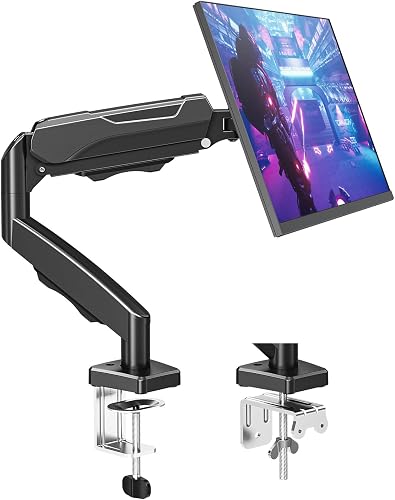
The MOUNTUP MU0004 is a single monitor desk mount designed for 17 to 32 inch screens weighing 4.4 to 19.8 lbs. It is built for remote workers, students and gamers who want ergonomic flexibility and a clutter free desk.
Standout performance comes from its full motion arm with tilt, swivel, 360 degree rotation and up to 19.4 inches of extension. Once tension is dialed in with the included hex key, repositioning feels smooth and the screen stays exactly where you place it.
Design is practical with heavy duty alloy steel, a compact clamp or grommet base and snap on covers that hide cables. Height adjusts up to 16.9 inches above the desk, and the VESA plate fits both 75mm and 100mm patterns from most major monitor brands.
Setup takes some fine tuning, as heavier monitors over 15 lbs need multiple counterclockwise turns to balance correctly. Deep curved screens and maximum arm extension can also introduce some wobble, so grommet mounting is best for stability.
Overall, this is a sturdy, versatile and user friendly mount that frees up valuable desk space. For single screen setups in home or office use, it delivers excellent adjustability and reliable daily performance.
Compatibility: 17 to 32 inch flat and curved monitors, 75x75mm and 100x100mm VESA, 4.4 to 19.8 lbs capacity. Fits monitors from ASUS, Acer, Samsung, LG, HP, Dell, Lenovo and AOC.
Motion Range: Tilt minus 45 degrees to plus 90 degrees, swivel plus or minus 180 degrees, 360 degree rotation, 19.4 inch extension, 16.9 inch height adjustment.
Mounting and Build: C-clamp or grommet base for desks 0.39 to 2.76 inches thick. Alloy steel construction in black, model MU0004 with tabletop mounting and integrated cable management.
Buying Guide for Glass Desk Monitor Arms
Clamp Safety and Load Distribution on Glass
Glass cannot absorb point pressure like wood, so your first check is how the base spreads force across the surface. Many makers, including the team behind HUANUO FlowLift Single Monitor Mount, recommend wood only and advise against bare glass clamping without added protection. The VIVO Single 13 to 38 inch Ultrawide Monitor Arm uses a wide C-clamp that tightens by hand up to 3.25 inches, which helps you control pressure when you add soft pads and avoid over torque.
You can make glass viable by placing rubber or felt pads on both sides plus a thin wood or metal distribution plate above and below the clamp area. Keep the arm close to the rear edge where the panel is strongest, center the column to limit leverage, and avoid sudden yanks when you swivel. The MOUNTUP Single Monitor Desk Mount Holds Screen and ErGear Single Monitor Arm both offer C-clamp and grommet bases, but for glass you should favor the padded clamp and skip any drilling.
Weight Capacity, Screen Size and VESA Fit
Match your monitor weight, not just diagonal size, to the arm rating before you mount anything on glass. The Single Monitor Arm Desk Mount for 17-34″ Screens and MSI MAG MT101G – Gas Spring Single Monitor Stand each support up to 22 lbs with 75x75mm and 100x100mm VESA patterns, which covers most 27 inch flat panels and many curved models. Heavier 32 inch displays need careful tension tuning so the head does not droop forward or stress one side of the clamp.
Ultrawide owners should verify width, curve radius, and rear VESA placement as well as pounds for balance on a clear top. The VIVO Single 13 to 38 inch Ultrawide Monitor Arm accommodates regular 13 to 32 inch screens and ultrawide panels up to 38 inches, while ErGear Single Monitor Arm fits 13 to 34 inch screens up to 19.8 lbs. If you game on high-refresh OLED gaming screens, allow extra clearance for tilt, swivel, and portrait rotation without hitting the desk.
Motion Range and Ergonomic Stability
You want tilt, swivel, and rotation that move smoothly without jerking the glass or loosening the base over time. The HUANUO FlowLift Pro Monitor Arm for 13-32 inch uses a mechanical spring with visible tension feedback and one finger adjustment, which limits sudden torque during repositioning. Paired with powerful 4K graphics cards, a well positioned screen lets you hold eye level posture during long sessions and reduce neck and shoulder strain.
Look for height travel around 16 to 17.5 inches and reach near 18 to 19.4 inches for deeper glass desks and multi purpose setups. The MOUNTUP Single Monitor Desk Mount Holds Screen extends up to 19.4 inches with tilt from minus 45 to plus 90 degrees, and ErGear Single Monitor Arm lifts to 17.5 inches with plus 80 to minus 50 degrees tilt. Once balanced, keep the arm partly retracted, lock tilt firmly for heavy panels, and use gentle motions to lower vibration.
Mounting Styles and Cable Control for Clear Tops
For glass, a padded C-clamp beats a bolt through grommet that would require a hole in tempered material and create fracture risk. The VIVO Black Pole Mount Monitor Arm for 17 to 32 is only a pole add on without its own base, so you need an existing sturdy pole system for it to work. Dual column units like HUANUO Dual Monitor Stand for 13-40 inch and HUANUO FlowLift Dual Monitor Stand double the load and leverage, which raises risk on thin glass unless you add full width reinforcement boards.
Glass shows every cable, so integrated routing matters as much as strength for a clean and calm workstation. The VIVO Single 13 to 38 inch Ultrawide Monitor Arm includes detachable clips along the arm and pole, ErGear Single Monitor Arm uses tool free clips that open quickly for rerouting, and HUANUO options guide cords down the column and out of sight. Tidy routing also prevents cable tug from shifting your balance point during swivel moves or height changes.
Final Thoughts
If you want broad ultrawide reach with simple pole height control, choose VIVO Single 13 to 38 inch Ultrawide Monitor Arm, while users who want smooth spring motion and visible tension control will prefer HUANUO FlowLift Pro Monitor Arm for 13-32 inch with proper pads and plates for glass protection.
Frequently Asked Questions
Can you put a single monitor arm on a glass desk?
Yes, you can in 2026 if your top is tempered, at least 8mm thick, and free of chips around the clamp zone. Always use rubber pads plus a load spreading plate, tighten gradually by hand, and keep the arm near the rear edge for strength. If the maker states wood only, treat that as a caution to add reinforcement or choose a freestanding alternative for safety.
Do you need to drill a glass desk for a monitor mount?
You should not drill tempered glass because it can shatter and voids most warranties for desks and mounts. Choose a padded C-clamp model such as MOUNTUP Single Monitor Desk Mount Holds Screen or ErGear Single Monitor Arm and skip the grommet bolt entirely. Once mounted, fine tune resolution and smoothness with help from our 1440p GPU pairing guide for balanced visuals and comfortable viewing distance.
What size and weight monitor works on glass with one arm?
Most single arms in 2026 support 13 to 32 inch monitors from 4.4 to 19.8 lbs, with select models like Single Monitor Arm Desk Mount for 17-34″ Screens reaching 22 lbs and 34 inches. Confirm your VESA pattern is 75x75mm or 100x100mm and include cables in your load estimate for accuracy. A look at our balanced Ryzen gaming rig shows how a typical 27 to 32 inch setup balances weight, power, and desk space.
How do I stop wobble and protect glass long term?
Keep the arm partly retracted, center the screen over the base, and distribute weight with a wood board if your glass flexes or creaks. Route cables loosely so swivel motion does not yank the head, and recheck clamp snugness monthly without over tightening the screw. While you maintain your station, keep firmware fresh with our safe BIOS update walkthrough to avoid interruptions during work or play sessions.
Browse more picks in our Monitor Arms & Mounting category.
This roundup is not a good fit for every build; consider your target resolution, platform, and budget before buying.




Write Your Review
No reviews yet. Be the first to share your experience!