

If your two monitors sit on bulky factory feet, you know the pain: keyboards pushed forward, cables tangled behind, screens wobbling every time you type. A best desk mount for two monitors that clamps to the desk solves that by lifting both displays off the surface and locking them to the rear edge. This guide covers six clamp-based picks from VIVO, WALI, HUANUO and more for remote workers, students, coders and gamers running dual screens. You will also find practical advice on fit and ergonomics alongside our favorite monitor arms and mounting options for tidy battlestations.
We focused only on models that secure with a C-clamp or optional grommet bolt, not freestanding bases or wall mounts. Our team assessed clamp footprint and desk thickness range, VESA compatibility, weight capacity per arm, tilt and swivel range, height travel and cable routing. We paid close attention to real-world details like dual C-clamp stability, tool-free VESA plates and portrait rotation for coding or documents. The result is a tight shortlist that helps you match your monitors and desk without guesswork or returns.
This article contains affiliate links. If you buy through one of our links, CustomPCGaming may earn a commission at no extra cost to you. Commissions never influence which products we recommend or how we rank them. Read our Affiliate Disclosure for details.
Quick Picks at a Glance

VIVO Dual Monitor Desk Mount STAND-V002 for 13-30

MOUNTPRO Dual Monitor Arm for 13-32 Inch Screens

HUANUO FlowLift Dual Monitor Stand for 13-32 Inch
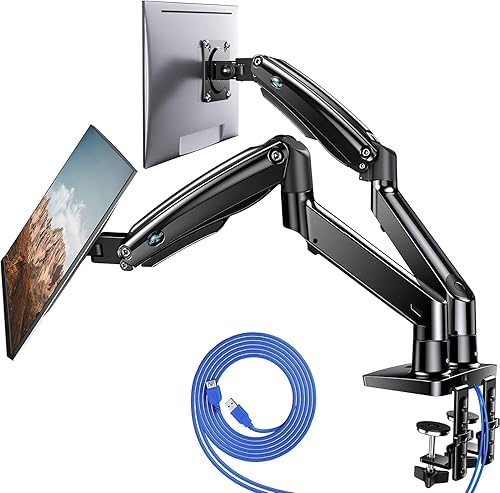
HUANUO Dual Monitor Stand 13-40 Inch

Prime WALI M002 Dual Monitor Stand for 13-32 Inch

ErGear Dual Monitor Arm for 13-32 Inch Screens
As an Amazon Associate we earn from qualifying purchases. Product prices and availability are accurate as of the date/time indicated.
Pros
- Sturdy steel construction supports two monitors securely without wobble
- Highly adjustable tilt, swivel, rotation and height for ergonomic comfort
- Dual mounting options with C-clamp and grommet fit most desks
- Easy installation with detachable VESA brackets and included hardware
- Integrated cable management for cleaner desk setup
Cons
- Limited to 30 inch screens and 22 lbs per arm, not suitable for larger or heavy ultrawide monitors
- Requires VESA 75x75 or 100x100 mounting holes, non VESA monitors need separate adapter
- Shared center pole design offers less independent positioning than separate gas spring arms
The VIVO STAND-V002 is a dual monitor desk mount designed to hold two 13 to 30 inch computer screens up to 22 lbs each. It is built for office professionals, students, gamers and remote workers who want to free up desk space and improve ergonomics.
Each arm offers plus 90 to minus 90 degree tilt, 180 degree swivel and 360 degree rotation, so you can switch easily between landscape and portrait. Height slides along the center pole for comfortable eye level alignment, which helps reduce neck and back strain during long work sessions.
The stand uses heavy duty steel with a black finish and includes both a C-clamp for desks up to 3.25 inches thick and a grommet mount option. Cable management clips along the arms and pole help route cords neatly, while detachable VESA plates make attaching 75x75mm and 100x100mm monitors straightforward.
The shared center pole saves space but offers less independent movement than premium gas spring arms. It also has size and weight limits, so very large, curved ultrawide or non VESA monitors will need a different solution or adapter.
Overall, the STAND-V002 delivers strong stability, flexible adjustment and simple installation for standard dual monitor setups. If you need an affordable and reliable way to create a clean, ergonomic two screen workstation, it is an excellent choice.
Brand: VIVO, Model: STAND-V002, Color: Black, Material: Steel. Mounting type: tabletop with heavy duty C-clamp and optional grommet mount for desks up to 3.25 inches thick.
Compatibility: Fits two 13 to 30 inch screens up to 22 lbs each with VESA 75x75mm or 100x100mm patterns. Movement includes plus 90 to minus 90 degree tilt, 180 degree swivel, 360 degree rotation and height adjustment along center pole.
In the box: Dual monitor stand with center pole, two articulating arms, detachable VESA plates, C-clamp and grommet hardware, cable clips and instruction manual. Backed by 3 year manufacturer warranty.
Pros
- Sturdy aluminum construction feels stable even with two large monitors mounted
- Super smooth tilt, swivel and rotate joints make it easy to adjust or share your screen
- Flexible C-clamp and grommet installation works with most desks and takes minutes
- Frees up significant desk space while improving posture and viewing comfort
Cons
- Not compatible with 1000R, 1500R or 1800R curved ultrawide screens
- 19.8 lb weight limit per arm may not support heavier 32 inch or professional monitors
- 16.9 inch maximum height may be low for taller users or sit stand desks in standing mode
The MOUNTPRO dual monitor arm is built for users running two 13 to 32 inch flat monitors in a home office, gaming or productivity setup. It is ideal if you want better ergonomics and more usable desk space without a complicated installation.
In daily use, the full motion arms stand out with smooth tilt, swivel and 360 degree rotation for landscape or portrait viewing. Users report easy one hand height tweaks and stable positioning, plus the ability to angle a screen toward a coworker in seconds.
The stand uses an aluminum frame with VESA 75 and 100 brackets and a choice of C-clamp or grommet base for desks up to 2.76 inches thick. Hidden cable routing keeps wires tucked away, while the compact base lifts both displays to free up most of your desktop.
It is not perfect, as deep curve gaming monitors and heavier 32 inch displays may exceed the compatibility or weight limits. Very tall users might also want more than the 16.9 inch max height, especially for standing desk use.
Overall, this is a practical, sturdy and versatile dual arm for most flat dual screen setups. If your monitors fit the size and weight range, it delivers comfort, flexibility and a cleaner desk in one simple upgrade.
Compatibility: Fits two 13 to 32 inch flat monitors, 4.4 to 19.8 lbs per screen, VESA 75x75 and 100x100mm. Not for 1000R, 1500R or 1800R curved screens.
Adjustment Range: Tilt up 90 degrees and down 45 degrees, swivel 180 degrees, rotate 360 degrees. Max height 16.9 inches, max extension 19.5 inches.
Installation and Build: Tabletop C-clamp or grommet mount for desks 0.39 to 2.76 inches thick. Aluminum construction in black Freelift finish with integrated cable management.
Pros
- Very sturdy dual clamp design stays stable during typing and gaming
- Smooth, easy adjustment with tilt, swivel, rotate and height for ergonomic viewing
- Frees up desk space and includes cable management for a clean setup
- Solid cast metal build with straightforward installation and all hardware included
Cons
- Fits wooden desks 0.59 to 3.54 inches thick only, not for glass or plastic desks and needs clear space underneath
- Monitors under 4.4 lbs may feel floaty and require careful tension adjustment
- Included VESA screws may be too long for some slim monitors, so check screw depth before mounting
The HUANUO FlowLift HNDS6 is a dual monitor desk mount made for 13 to 32 inch computer screens with standard VESA mounting. It suits gamers, home office workers, programmers and students who want two screens at the right height while reclaiming desk space.
Each arm supports 4.4 to 19.8 lbs and moves with tilt, swivel, full rotation and generous height lift. Users report smooth one hand repositioning for landscape to portrait flips, pulling screens close for focused work, or pushing back for video.
Build quality stands out with alloy steel arms, a large base platform and a dual C-clamp structure for extra grip. The mount offers both clamp and grommet installation for desks 0.59 to 3.54 inches thick, plus integrated cable guides for a tidy look.
Compatibility needs careful checking before buying. It is recommended for wooden desks only, it will not suit glass or plastic tops or desks with cross beams underneath, and very light displays can need extra tension tuning.
For a stable, flexible and space saving dual screen upgrade, this FlowLift mount is a smart pick. It delivers ergonomic comfort, solid stability and clean cable routing that works well for work, study and play.
Model: HUANUO HNDS6 FlowLift Dual Monitor Stand in Black, made with alloy steel for strength and stability.
Monitor compatibility: 13 to 32 inches, VESA 75x75mm and 100x100mm, 4.4 to 19.8 lbs per arm with tilt, swivel, rotation and height adjustment.
Desk compatibility and mounting: C-clamp or grommet mount for wooden desks 0.59 to 3.54 inches thick with clear under desk space.
Pros
- Rock-solid aluminum construction with dual C-clamp base prevents wobble with heavy monitors
- Excellent height and reach for tall users and sit-stand desks
- Smooth full-motion adjustment holds position without sagging
- Easy clamp or grommet installation plus built-in USB ports and cable management
Cons
- Assembly can take over an hour and instructions require careful attention
- Arms may need tension adjustment for lighter monitors to prevent drifting
- Large footprint and dual clamp design may not suit thin or glass desks
The HUANUO HNDS7 is a premium dual monitor stand designed for two 13 to 40 inch screens, including heavy ultrawides. It is built for remote workers, gamers and office users who want ergonomic comfort and more usable desk space.
Standout features include extra tall height adjustment up to 21.1 inches and long arms that extend to 25.59 inches for deep desks. In daily use, monitors stay firmly in place during sit to stand transitions, with smooth swivel, tilt and 360 degree rotation for perfect positioning.
Build quality feels premium thanks to solid aluminum arms, a larger base and a unique dual C-clamp design. Both clamp and grommet mounting are supported, and integrated cable channels plus dual USB charging ports keep the setup clean and functional.
Installation takes some time and requires careful assembly, especially when balancing two large screens. Very light monitors may need tension tuning to prevent upward drift, and the sturdy base needs a solid wood style desk for best results.
Overall, this is a stable, versatile and well built solution for dual large monitor setups. If you need tall adjustability, full motion flexibility and extra desk space, it is an excellent value for a long term workstation upgrade.
Model: HUANUO HNDS7 dual monitor mount in black aluminum. Supports two 13 to 40 inch monitors up to 26.4 lbs per arm with VESA 75x75mm and 100x100mm.
Adjustment Range: Height up to 21.1 inches, arm extension up to 25.59 inches, swivel minus 90 to plus 90 degrees, tilt minus 30 to plus 85 degrees, 360 degree rotation.
Mounting and Extras: Fits desks up to 3.54 inches thick with C-clamp or grommet mounting. Includes two USB ports with 5.25 ft cable and integrated cable management.
Pros
- Excellent adjustability with tilt, swivel, rotation and height adjustment for ergonomic viewing
- Sturdy metal construction holds two monitors securely without wobble
- Space saving desk mount design opens up work surface for keyboard, laptop and accessories
- Flexible C-clamp and grommet installation plus detachable VESA plates for easier setup
Cons
- 22 lbs weight limit per arm is not ideal for very heavy or large curved gaming monitors
- Manual articulation requires loosening and tightening joints, no gas spring assistance
- Requires a compatible desk edge or grommet hole and takes time to assemble and level both screens
The WALI M002 is an articulating dual monitor stand designed for two screens from 13 to 32 inches. It is built for remote workers, students, gamers and multitaskers who want more desk space and better ergonomics.
Each arm extends and retracts with plus or minus 75 degree tilt and plus or minus 90 degree swivel for comfortable viewing. You can rotate either screen 360 degrees to switch quickly between landscape and portrait for coding, reading or editing.
The all metal construction feels solid and stable with detachable VESA plates that slide for height adjustment. The two stage locking C-clamp and grommet bases keep the pole firmly anchored to the desk without wobble.
It supports up to 22 lbs per arm and VESA 75 and 100 patterns, so very heavy or oversized curved monitors may not fit. Adjustment is manual rather than gas spring assisted, so you will need to loosen and tighten joints to reposition.
Overall, this is a practical and reliable dual monitor solution that improves comfort, organization and productivity. If you need flexible full motion control on a sturdy stand, it is an excellent choice for dual screen setups.
Model: WALI M002 Dual Monitor Desk Mount in Black, tabletop mount design for two screens.
Compatibility: Fits two 13 to 32 inch monitors up to 22 lbs per arm, VESA 75x75mm and 100x100mm.
Adjustment: Extend and retract arms, plus or minus 75 degree tilt, plus or minus 90 degree swivel, 360 degree rotation, height adjustable plates.
Installation: 2.7 inch C-clamp and 2.7 inch grommet base with two stage locking system, metal construction.
Warranty: 10 year manufacturer warranty with US based customer support available 7 days a week.
Pros
- Very sturdy alloy steel construction holds monitors steady without shaking
- Smooth independent adjustment for height, tilt, swivel and rotation stays in place
- Fast tool-free VESA setup with flexible C-clamp or grommet mounting options
- Smart cable management and space saving design creates a cleaner desk
- Durable long term performance backed by a 5-year warranty
Cons
- Only fits wooden desks within specific thickness ranges, not ideal for glass desks or desks with blocking crossbeams
- Initial assembly and tension adjustment can take time to balance perfectly
- Limited to 19.8 lbs per screen and 75x75mm or 100x100mm VESA, so not for extra heavy or nonstandard monitors
The ErGear Dual Monitor Arm is built for remote workers, gamers and multitaskers who use two 13 to 32 inch monitors side by side or stacked. It replaces bulky stock stands to reclaim desk space while placing each screen at eye level. If you want independent control over height and angle for both displays, this mount is made for you.
Each arm moves independently with generous height adjustment, extension, tilt, swivel and full rotation for portrait or landscape use. Users report smooth repositioning for sharing screens or finding an ergonomic viewing angle, and monitors stay firmly in place once tension is set. It handles daily adjustments well without sagging or drifting.
The construction uses alloy steel with an upgraded VESA head that fits tighter with a smaller gap for added stability. Both the C-clamp and grommet mounts feel solid on compatible wooden desks, and the base includes a cable routing cutout. Tool-free VESA plates and clip-on cable management make setup and daily use faster and cleaner.
It is not universal for all setups, as it only supports up to 19.8 lbs per monitor and 75x75mm or 100x100mm VESA patterns. Installation works best on wooden desks within the specified thickness range and can be blocked by crossbeams or cable trays. Initial assembly and tension tuning can also take some patience to get perfectly balanced.
Overall, this is a sturdy, versatile and user friendly dual monitor solution for most home and office workstations. It delivers smooth ergonomics, reliable hold and smart cable control in a durable package. For anyone upgrading to a cleaner dual screen setup, it is a strong value backed by a 5-year warranty.
Brand: ErGear, Model: EGDMA70B-DS-UK, Color: Black, Material: Alloy Steel, Mounting Type: Tabletop Mount
Monitor Compatibility: 13 to 32 inch flat or curved screens, Max Load 19.8 lbs per arm, VESA 75x75mm and 100x100mm
Adjustment Range: Height up to 17.5 inch, Extension up to 18.1 inch, Tilt +80 to -50 degrees, Swivel +/- 90 degrees, 360 degree rotation
Mounting Options: C-clamp for desks 0.39 to 2.56 inch thick, Grommet mount for desks 0.39 to 2.95 inch thick, Wooden desk recommended
Buying Guide
Clamp Strength and Desk Compatibility
Start with your desk, not your monitors. Most C-clamps in this group fit wood tops from about 0.39 inches up to 3.54 inches thick, with the VIVO Dual Monitor Desk Mount rated up to 3.25 inches and the ErGear Dual Monitor Arm, Full Adjustable Monitor fitting 0.39 to 2.56 inches on clamp and up to 2.95 inches through a grommet hole. Avoid glass or thin plastic tops, and look underneath for cross beams or modesty panels that can block the clamp. Dual-clamp designs like the HUANUO FlowLift™ Dual Monitor Stand spread load over a larger platform for less wobble. Larger bases also resist twisting when you swivel a wide pair.
Decide between rear-edge clamp and bolt-through grommet before you order. Clamp installation needs clear access to the back edge, while grommet mounting needs a hole between 0.39 and 1.97 inches in diameter on models like the HUANUO Dual Monitor Stand for 13″–40″. Hand-tighten evenly and use the included pads to protect the finish. Leave a few inches behind the desk for tilt clearance. If you are also rethinking tower placement and ventilation, factor in case airflow and desk layout planning so your PC does not fight your screens for rear space.
Monitor Size, Weight and VESA Fit
Your monitors must pass three checks at once: diagonal size, weight per screen and VESA hole pattern. The VIVO Dual Monitor Desk Mount supports 13 to 30 inches up to 22 lbs per screen, the WALI Articulating Dual Monitor Stand for 13-32 handles up to 32 inches and 22 lbs per arm, and most gas-spring arms like the Dual Monitor Arm Desk Mount Fits Max 32 inch support 4.4 to 19.8 lbs per screen. All six picks use 75x75mm or 100x100mm VESA, so confirm that pattern on the back of your displays. Keep the original screws and spacers in case standoffs are needed.
Weight matters more than diagonal alone, especially with ultrawides. The HUANUO Dual Monitor Stand for 13″–40″ steps up to 26.4 lbs per arm with solid aluminum arms for heavier pairs, while lighter office or gaming pairs stay nimble on the HUANUO FlowLift™ Dual Monitor Stand. Note that the Dual Monitor Arm Desk Mount Fits Max 32 inch is not rated for deep 1000R, 1500R or 1800R curves, so verify curvature if you run aggressive gaming panels. Heavier glass bases and built-in speakers add hidden weight many shoppers overlook. Pairing the right mount with modern graphics cards driving dual displays keeps refresh rates smooth across both screens.
Full Motion Adjustment and Viewing Comfort
Look for independent tilt, swivel and rotation on each arm plus meaningful height travel. Common ranges here include tilt from +90 to -90 degrees or +85 to -50 degrees, swivel up to 180 degrees or plus or minus 90 degrees, and full 360-degree rotation for portrait or landscape use. Height travel varies from about 15.75 inches on the HUANUO FlowLift™ Dual Monitor Stand to 16.9 inches on the Dual Monitor Arm Desk Mount Fits Max 32 inch, 17.5 inches on ErGear and up to 21.1 inches on the HUANUO Dual Monitor Stand for 13″–40″. Extension up to 25.59 inches helps on deep desks. Check that portrait mode clears the desk surface before you commit.
Good ergonomics means getting the top bezel near eye level and the viewing distance matched to your tasks. Pull one screen closer for spreadsheets, push both back for video calls, or rotate a secondary panel vertical for code, chat or long documents. The VIVO Dual Monitor Desk Mount slides along its center pole for simple shared height, while gas-spring arms allow one-hand tweaks without tools. Small tweaks to tilt reduce glare from windows and overhead lights. Just as with CPU cooler clearance planning, measure your seated eye height and desk depth before you lock positions.
Desk Space Savings and Cable Control
The biggest everyday win is reclaimed surface area. Lifting two screens can free more than 80 percent of the footprint used by stock stands, leaving room for a full-size keyboard, notebook, audio interface or laptop dock. All six mounts route cables along the arms and pole with clips, and the ErGear Dual Monitor Arm, Full Adjustable Monitor uses upgraded clips that open without tools for quicker rerouting. Keep power and DisplayPort slack looped, not taut, so motion stays smooth. Label both ends during setup to simplify future swaps.
If you charge phones, headsets or controllers at your desk, consider built-in connectivity. The HUANUO Dual Monitor Stand for 13″–40″ adds two USB ports with a 5.25 ft feed cable to simplify top-ups without reaching for a wall brick. That tidy approach pairs well with a dedicated setup like this 1440p gaming PC build for immersive play, where clean routing behind the monitors improves both looks and ventilation. Short Velcro ties behind the pole keep slack neat without pinching.
Final Thoughts
If you want a straightforward steel pole that simply gets two midsize screens off your desk, you will love VIVO Dual Monitor Desk Mount for its simplicity and steady hold, while creators or gamers with larger, heavier pairs should step up to HUANUO Dual Monitor Stand for 13″–40″ for extra height, reach and load support.
Frequently Asked Questions
Will a clamp mount damage my desk?
When installed correctly on a recommended wood top, a clamp mount should not damage your desk in 2026. Use the included rubber or foam pads, tighten both clamp screws evenly and avoid overtightening on veneer or hollow-core surfaces. Check thickness against the rated range and confirm no crossbeam interferes underneath. If you are unsure about material strength, grommet mounting through a reinforced hole often distributes pressure more evenly.
Can one clamp base hold two 32-inch monitors side by side?
Yes, provided each screen meets the size, weight and VESA limits at the same time. Models like the WALI Articulating Dual Monitor Stand for 13-32 and HUANUO FlowLift™ Dual Monitor Stand are designed for dual 32-inch setups up to about 19.8 to 22 lbs per arm in 2026. Measure total width including bezels and compare it to arm extension, up to 25.59 inches on long-arm designs, so outer edges do not overhang small desks.
How long does installation take?
Most people finish in under 15 minutes with basic hand tools. Attach the C-clamp or grommet base, slide on the arms, then hang each monitor on its detachable VESA plate and adjust tilt tension. The ErGear Dual Monitor Arm, Full Adjustable Monitor even offers tool-free VESA attachment for quicker swaps. For broader setup inspiration, browse our budget build guides for complete desk setups that pair well with dual screens in 2026.
Do clamp mounts work with curved monitors?
Many do, as long as weight and VESA pattern match and curvature is modest. Flat and gentle curves mount cleanly on arms like the ErGear and HUANUO models that support 13 to 32 inches in 2026. The Dual Monitor Arm Desk Mount Fits Max 32 inch specifically excludes deep 1000R, 1500R and 1800R curves, so check your monitor spec sheet first. When in doubt, contact the mount maker with your exact model number and VESA size.
This roundup is not a good fit for every build; consider your target resolution, platform, and budget before buying.






Write Your Review
No reviews yet. Be the first to share your experience!