

Video credit: Cyrad. Original video: https://www.youtube.com/watch?v=prZeN71Qld0. This is our own independent breakdown and is not affiliated with the video creator. As an Amazon Associate, CustomPCGaming earns from qualifying purchases. Product prices shown in the video may have changed.
Watch the build
Parts in this build
- FLEXISPOT E7 Standing Desk
- SteelSeries QcK Prism XL
- Razer Strider XXL
- Branch Ergonomic Chair
- Yecaye Under Desk Cable Tray
- Govee Envisual TV Backlight
- YSAGi Leather Desk Pad
- Logitech G840 XL
- 6amLifestyle Headphone Stand
Parts list is our summary of the video for reference. Confirm current specs and price on the retailer page before buying.
Watch: The Setup Tour
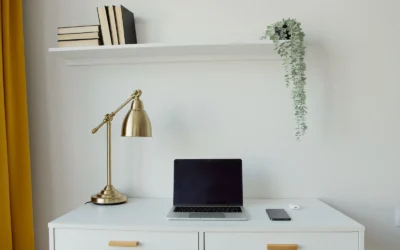
This all-white clutter free desk setup tour focuses on bright surfaces, open space, and thoughtful placement over sheer quantity of gear. You will see how a simple layout with a wide desk, soft glow behind the screen, and hidden cables can feel calm and focused. Use the embedded tour as a guide to proportions and layout only, while our breakdown below shares our own researched picks for 2026 to help you recreate the style.
What This Setup Is Going For
You are building for visual calm. White tops, white walls, and a large mat create an open base that makes your monitors and lighting stand out. You keep decor to a few items so the desk feels uncluttered even with a full PC, speakers, and everyday work tools in reach.
Most builds in this style use one wide standing desk rather than a corner unit. You can run dual monitors on an arm or switch to a single ultrawide for fewer cables and a wider view. A dual-motor frame gives you sit to stand flexibility, though you must respect the listed weight capacity and follow assembly guidance.
This look fits a bedroom, dorm nook, or home office with light walls and a window nearby. You do not need a large room, but you do need wall width for the desk plus space to slide your chair back. If you want ideas for mat sizing, see our guide on how to measure your desk for an XXL mat before you order.
The tradeoffs are real. White finishes often carry a premium over black, and matching every accessory in the same shade takes patience. Cable routing takes an afternoon of planning, and an L-shaped plan demands extra depth so a monitor arm can pull back without hitting the wall.
This style does NOT suit everyone. It is a poor fit for very small rooms with no wall width, renters who cannot use even adhesive channels, tight budgets where function must come first, or anyone who moves often and needs to break down quickly. For those cases, a darker compact build is easier to maintain. You can browse more ideas in our Desk Mats and Deskspace Organization hub.
The Gear Breakdown
This is the core of our all-white clutter free desk setup tour. Below you will find what is common in this style side by side with our researched picks for 2026. Use it as a shopping reference, not as a claim about the video, which only shows layout inspiration.
This article contains affiliate links. If you buy through one of our links, CustomPCGaming may earn a commission at no extra cost to you. Commissions never influence which products we recommend or how we rank them. Read our Affiliate Disclosure for details.
Quick Picks at a Glance

Prime YSAGi PU Leather Desk Pad 31.5 x 15.8 Inch

Prime 6amLifestyle Under Desk Dual Headphone Hanger

Prime Govee Envisual TV Backlight T2 with Dual Cameras

Prime Yecaye Metal Under Desk Cable Management Tray

Branch Verve Chair Review
As an Amazon Associate we earn from qualifying purchases. Product prices and availability are accurate as of the date/time indicated.
Pros
- Extra large size eliminates need for separate small mouse pad
- Durable PU leather resists water, stains and daily wear
- Suede underside stays put during typing and mousing
- Slim and lightweight design is easy to move and store flat
- Sleek black look fits professional office and home decor
Cons
- Thin 0.08 inch build offers minimal cushioning compared to padded mats
- PU leather can show creases if folded or rolled for long periods
- Black color may show dust and lint more easily than lighter colors
The YSAGi Leather Desk Protector measures 31.5 by 15.8 inches and is designed to cover a full keyboard, mouse and writing area in one clean surface. It suits office workers, students and remote professionals who want a tidy and professional setup at home or work.
In daily use, the smooth PU leather top provides comfortable tracking for optical mice and a pleasant surface for writing and typing. The suede backing grips the desktop firmly to prevent sliding, which the brand claims improves friction by 70 percent over double sided leather designs.
At only 0.08 inches thick, the pad lays flat without adding bulk under wrists or laptops while still shielding against scratches, spills, heat and scuffs. The black rectangular finish looks sleek and professional, and multiple color options let you match your workspace style.
As a PU leather mat, it will not offer the cushioned feel of thicker desk pads and sharp objects can still mark the surface if pressed hard. Users who prefer stitched edges or a hard gaming surface for high DPI play may want a different style.
Overall, this YSAGi desk mat is a practical, low maintenance upgrade for anyone needing large scale protection with mouse pad convenience. With waterproof easy wipe cleaning and warranty support, it is a solid value pick for office and study desks.
Brand: YSAGi, Model: PU Leather New-02, Color: Black, Shape: Rectangular. Material is polyurethane PU leather with a non slip suede backing.
Size: 31.52 inches L x 15.8 inches W with 0.08 inch thickness. Item weight is 0.3 kg, designed for full desk coverage for laptop, keyboard and mouse.
Care: Waterproof surface cleans with a dry cloth for dust and a damp cloth for liquid, grease and dirt. Store flat and avoid folding to keep the surface smooth.
Pros
- Dual hanger design doubles storage without using desk surface space
- Solid aluminum metal build with powder coated finish for strength and durability
- Rubber padded arms with safety lip prevent slipping, scratching and accidental falls
- Clamp mount installs in minutes and works on desks, shelves and cabinets
Cons
- Limited to surfaces 50mm or thinner, will not fit extra thick executive desks
- Under desk position may interfere with knees or drawers in tight workspaces
- Shorter arms may feel tight for extra large over ear audiophile models
The 6amLifestyle Under Desk Dual Headphone Hanger is a clamp on metal mount designed to hold two headsets beneath your workspace. It is made for gamers, remote workers and students who want a clutter free desk without giving up quick access to headphones.
In daily use, the dual 2.04 inch arms easily accommodate wired, wireless and gaming headsets from brands like Bose, Beats, Sony and JBL. The 11lb capacity means you can hang two full size headsets with no sagging, bending or wobble.
Build quality is a clear strength thanks to the sturdy aluminum body with a clean powder coated black finish. The arched soft rubber pads cushion headband leather while the raised ends add extra security against slips.
The clamp system fits desks, shelves and cabinets up to 50mm thick, but it will not work on thicker tops or uneven edges. Under desk placement is great for saving space, though users with small desks should check knee clearance before installing.
Overall, this is a smart, durable and practical organization upgrade for any dual headset setup. If you need strong, out of sight storage that installs without drilling, this patented dual hanger is an excellent pick.
Model: 6AS-APH-1101BK, Color: Black, Material: Aluminum with powder coated finish, Style: Universal under desk dual hanger.
Dimensions: 6.5 x 3.15 x 1.18 inches, Weight: 0.18 kg, Arm Length: 2.04 inches, Max Load: 11lb.
Compatibility: Fits surfaces up to 50mm thick, works with desks, cabinets, shelves and glass surfaces, fits most Bose, Beats, Sony, AKG, JBL and gaming headsets.
Pros
- Immersive ambient effect that extends movies and games beyond the screen
- Unlimited content compatibility since camera reads the screen directly
- Bright, dense RGBIC color with strong customization and music sync
- DreamView ecosystem and voice control add whole home personalization
Cons
- Only fits 75 to 85 inch TVs, not suitable for smaller or larger screens
- Camera calibration needs stable WiFi and careful placement to perform best
- Indoor use only, not water resistant, and camera can be affected by direct sunlight
The Govee Envisual TV LED Backlight T2 model H605C is a 16.4 foot RGBIC light strip built specifically for 75 to 85 inch TVs. It is designed for movie lovers, sports fans and gamers who want a true home theater atmosphere with minimal wiring.
Its standout feature is the upgraded dual camera system that reads colors from the screen edges in real time. In everyday use, this creates smooth, responsive bias lighting that follows action scenes, gameplay and music without needing an HDMI sync box.
Build quality centers on a dense 60 LEDs per meter strip with double the light beads for vivid, natural color. The top mount camera, corded power design and app plus voice control feel modern and living room ready.
Drawbacks are mainly about fit and setup. It only suits large 75 to 85 inch TVs, needs careful calibration and stable WiFi, and direct sunlight should be avoided for accurate color capture.
Overall, the T2 is an excellent pick for large TV owners who want immersive, customizable ambient light. If you value easy content sync, DreamView expansion and rich RGBIC color, it delivers a compelling upgrade.
Model H605C is a multicolor RGBIC LED strip with 16.4 feet length for indoor use on 75 to 85 inch TVs. It uses corded electric power at 12 volts and 48 watts with plastic housing and linear string light form factor.
Control options include Govee Home App, Bluetooth, WiFi and voice control with multiple scene, DIY and music modes. Connectivity supports both Bluetooth and WiFi for flexible calibration and daily operation.
In the box you get the light kit for one TV installation with modern styling suited for movie themes and all season use. It is not water resistant and is intended for indoor living room or media room setups.
Mount the strip evenly around the back perimeter of your 75 to 85 inch TV and place the dual cameras centered on top with a clear view of the screen. Avoid direct sunlight on the cameras for the most accurate color matching.
Use the Govee Home App close to your router or with a mobile hotspot to load the calibration screen faster. Follow the on screen calibration points carefully, then test with colorful movie or game content.
Explore DreamView to link compatible Govee lights, and try Energetic, Rhythm, Spectrum and Music modes to match your mood. Adjust brightness in the app to reduce eye strain during night viewing.
Pros
- Tool-free clamp installation with no drilling or permanent damage
- Sturdy metal construction holds everyday power strips and adapters securely
- Padded clamps protect high-value desks, great for renters and offices
- Dual bars and included ties make wrapping and organizing cords fast
Cons
- Fixed drop height sits low with no adjustment option
- Metal is on the softer side and not intended for heavy equipment
- 14.17-inch length may feel compact for large multi-device setups
The Yecaye Metal Under Desk Cable Management Tray is a clamp-on shelf designed to hide power strips, chargers and loose cords without drilling into your desk. It is built for office workers, gamers and renters using standard desks or height-adjustable standing desks who want a cleaner setup fast.
In daily use, it holds a power strip plus adapters neatly out of sight while dual side bars let you wrap extra cord length to stop tangles. Reviewers note it installs in minutes with the clamp design and instantly tidies dangling cables under the desk.
The frame uses coated iron with a modern black finish that resists rust and abrasion better than plastic alternatives. Padded clamps grip wood, metal and lacquered tops firmly while helping prevent scratches and wobble during cable adjustments.
It is not perfect, as the tray hangs at a fixed low height with no adjustment and the metal can flex if overloaded. The compact 14.17 inch length is great for minimal setups but may feel tight if you run multiple large power bricks.
Overall, this is a practical, renter-friendly upgrade for anyone wanting hidden wiring without permanent installation. If you need simple, sturdy under-desk storage for everyday electronics, it delivers solid value and a tidier workspace.
Brand: Yecaye, Material: Coated iron, Color: Black, Dimensions: 14.17L x 4.53W inches, Weight: 2.2 pounds.
Installation: Clamp-on, no-drill mounting with included hardware and anti-scratch padding. Compatibility: Standard office desks, standing desks, gaming desks and home workstations.
Capacity: Holds power strips, USB hubs, chargers and adapters with dual wrap bars and cuttable ties included for cord organization.
Pros
- Excellent adjustability for a personalized ergonomic fit
- Breathable 3D knit back helps regulate temperature during long sits
- Supportive V-shaped back encourages healthy posture
- Modern versatile design suits professional and home offices
- High density foam seat built for extended daily use
Cons
- Large 27 inch footprint may feel bulky in small workspaces
- Armrest adjustment is limited to height with no pivot or width control
- Firm ergonomic feel may not suit users who prefer plush cushioning
The Branch Verve Chair is a high performance executive office chair designed for home office professionals, remote workers and anyone sitting 8 or more hours daily. It combines ergonomic support with a clean, modern look that works in both corporate and home setups.
Standout features include six adjustment points for seat height and depth, tilt and tilt lock, lumbar height and armrest height. In real world use, the V-shaped suspended back adapts to your posture to reduce fatigue and encourage healthier sitting during long sessions.
Design and build quality feel premium with an aluminum frame, sculpted V-shaped back and breathable 3D knit that promotes airflow. The contoured high density foam seat stays comfortable over time, while the futuristic armrests and Galaxy finish add versatile style.
The main drawbacks are the large footprint, which needs ample space, and armrests that adjust for height only. Some users may also want more recline control or softer cushioning for personal preference.
Overall, the Verve is a strong pick for professionals who want customizable, breathable, all day support without a bulky executive look. If you prioritize posture support and airflow for long hours, it delivers comfort, style and practical adjustability.
Brand: Branch, Model: Verve Chair
Category: Home Office Desk Chair, Size: Large
Color: Galaxy, Frame Material: Aluminum
Dimensions: 27 inches D x 27 inches W x 41 inches H
Back: Ventilated 3D knit with V-shaped suspended spine support
Seat: Contoured high density foam cushion
Adjustments: Seat height, seat depth, tilt, tilt lock, lumbar height, armrest height
| Gear | Common in this style | Our 2026 pick | Why |
|---|---|---|---|
| Desk | a desk in this style | FLEXISPOT E7 Standing Desk | a stable dual-motor frame that handles a full tower and dual monitors |
| Desk mat | a desk mat in this style | SteelSeries QcK Prism XL | a large cloth mat with an RGB edge that anchors the desk visually |
| Desk mat | a desk mat in this style | Razer Strider XXL | a hybrid hard-soft feel in a full-desk size |
| Chair | a chair in this style | Branch Ergonomic Chair | a clean-looking ergonomic chair that suits a work and play desk |
| Cable management | a cable management in this style | Yecaye Under Desk Cable Tray | a long clamp-on tray that hides a power strip and the bulk of the cables |
| Bias light | a bias light in this style | Govee Envisual TV Backlight | a camera-based backlight for a large monitor or a TV in the setup |
| Desk mat | a desk mat in this style | YSAGi Leather Desk Pad | a wipe-clean dual-sided pad for a minimalist desk |
| Desk mat | a desk mat in this style | Logitech G840 XL | a firm large cloth mat with consistent tracking |
| Headphone stand | a headphone stand in this style | 6amLifestyle Headphone Stand | a budget stand in several finishes to match the desk |
The desk sets the tone. The FLEXISPOT E7 Standing Desk uses a stable dual-motor frame that is meant to hold a full tower and dual monitors without wobble during height changes. You get sit to stand use for long work days, but you still need to keep your total load under the listed weight capacity and follow the assembly instructions closely.
Lighting and cable control do the heavy lifting for the uncluttered feel. The Govee Envisual TV LED Backlight T2 with Dual uses dual cameras to match on screen color along the edges for a soft halo behind a large display, and you can expand it with DreamView and app control. The strip length at 16.4ft is sized for 75-85 inch TVs per the spec sheet, so measure your display before you plan edge coverage. Pair it with the Yecaye Metal Under Desk Cable Management Tray which clamps on with no drilling and gives your power strip and adapters a metal home out of sight. If you want background on this tech, read how to choose Camera-Based backlights for immersive builds.
The surface and seating round it out. The YSAGi Leather Desk Protector, Office Mat measures 31.5 inch by 15.8 inch per the spec sheet and gives you a waterproof PU leather top with a non slip suede back that resists scratches and spills. The Branch Verve Chair, High Performance Executive offers six points of adjustment with a contoured seat and breathable knit back for long sessions, while the 6amLifestyle Under Desk Dual Headphone Hanger clamps to desks up to 50mm thick with 2.04 inch arms and holds up to 11lb for two headsets.
How To Adapt It To Your Room
Will this bright setup actually fit my wall and my monitors? That is the question to answer before you buy anything. Start with wall width, outlet location, and your monitor size, then choose a desk and arm that suit those limits rather than forcing a layout you saw online.
Adapt this to your space before buying. Measure the wall or dorm room for the desk width with a tape, including baseboards, doors, and how far your chair needs to slide back. A compact room can still work if you pick a straight desk against the longest wall and keep tower placement off the top.
Depth matters as much as width. A L-shaped layout needs more depth for a monitor arm to pull back and tilt without hitting the wall. Leave room behind the desk for the arm post and for cables to bend gently rather than pinching against drywall.
Check your monitor for a VESA pattern before choosing an arm, and confirm the desk edge thickness for a clamp. Look up your display weight with its stock stand removed and compare it to the arm rating. Follow the mounting instructions step by step and tighten all joints before you route any cables.
If you rent, use no-drill cable trays and adhesive raceways rather than screwing into the desk or wall, and find a stud before any wall mount. Clamp-on trays like the Yecaye option protect the finish and move with you. For more under desk ideas, see our Cable Management and Under-Desk guides.
A standing desk lists a weight capacity, keep the tower, monitors and arm under it. Place a heavy tower on the floor or on a dedicated stand when you can to reduce sway at standing height. Follow the assembly instructions, keep cables slack for movement, and recheck bolts after the first week of use.
Match the all-white look with the finish of the desk and mat first, then the lighting color, rather than buying every accessory in one brand. A warm white bias glow feels cozy at night while a daylight white feels crisp for work, so pick one temperature and repeat it across strips and bars. Mixing too many shades of white is what makes a setup look busy.
Power safety matters with all that glow. Do not overload a single outlet with PC, monitors, chargers, and lighting on one power strip, and keep power supplies ventilated with space around bricks and strips. Route excess length into the tray with a sleeve so nothing hangs where your feet or chair wheels can snag it.
What Actually Changes The Feel
Bias lighting changes the feel more than any other add-on. A soft halo behind your display reduces eye strain in a dark room and makes white surfaces glow instead of glaring. You can explore glow options in our Bias Lighting and Ambient RGB hub to pick a temperature that suits your room.
Cable management is second. When power strips, bricks, and excess cords live in a tray with a sleeve to the PC, your desktop instantly feels larger. You will dust less often and you will actually use your height adjustment because nothing tugs when the desk moves.
A full-desk mat is third. It unifies keyboard, mouse, and wrist space into one zone and protects a white top from marks. Leather pads wipe down quickly while cloth mats give more stopping control, so choose based on how you work and play rather than brand alone.
Lower priority upgrades include headphone stands, extra wall panels, and matching white keycaps. They polish the look but they do not change comfort or focus the way light, cables, and surface do. If your budget is tight, skip decor first and put funds toward a better arm or chair.
Build It At Three Budgets
Use these three builds as starting points. Each keeps the same bright, open layout but swaps durability and adjustability to suit your budget and how long you plan to keep the setup.
Budget Version
You get a manual or single-motor desk, a value focused ergonomic chair such as the SIHOO M57, a single VIVO arm, one Govee light strip, a large cloth mat, and a no-drill cable tray. This suits you if you want a first all-white setup on a tight budget and you are okay upgrading the chair and arm later.
Balanced Version: Our Recommendation
You get a dual-motor standing desk like the FLEXISPOT E7, a mid range ergonomic chair such as the Branch Verve Chair, High Performance Executive, a gas-spring arm, a monitor light bar plus one strip, a stitched XL mat, and a clamp-on tray with a sleeve like the Yecaye Metal Under Desk Cable Management Tray. This suits most people who want daily sit to stand use that lasts through 2026 and beyond.
Premium Version
You get a Herman Miller or Steelcase chair, an Ergotron arm, a light bar plus wall panels, a felt or leather pad such as the YSAGi Leather Desk Protector, Office Mat, and a fully sleeved cable run with ventilated power. This suits you if you plan to keep the setup for years and you want top adjustability with minimal maintenance.
FAQ
How do I keep an all-white desk setup from getting cluttered again?
Give everything a home off the top with a tray, a headphone hanger, and one cable sleeve to the PC. You should route new cables the same day you add gear so clutter never piles up. A weekly five minute reset keeps white surfaces looking open without deep organizing sessions.
Can I build a clutter free white setup in a rental without drilling?
Yes, you can. Use clamp-on trays, adhesive raceways, and freestanding light bars instead of screws or wall mounts. Confirm your desk edge thickness for clamps, find a stud before any wall mount you do approve with your landlord, and follow all mounting instructions for safety.
What size desk mat should I get for a dual monitor white setup?
Measure your desk top first, then choose a mat that leaves a small border of desk visible on all sides for a balanced look. For dual monitors, most people prefer a full-desk XL that holds keyboard and mouse with room to spare. Check tracking feel and edge stitching so the mat stays flat through daily use.
Final Verdict
This style works when you prioritize space, light, and hidden cables over filling every inch with gear. It asks for planning up front, but daily use feels calm and focused once your layout is set.
Our pick: the Balanced Version with the FLEXISPOT E7, Yecaye tray, and Govee backlight, built for most people who want a lasting all-white clutter free desk setup tour inspiration that stays practical in a real room.




Write Your Review
No reviews yet. Be the first to share your experience!