

If you are wondering will a monitor arm fit my desk, you are asking the right question before you buy. The right arm can lift your screen to eye level, free up surface space for your keyboard and docking station, and let you adjust position with one hand, but only if your desk can hold the mount and your monitor matches the weight range and VESA pattern. Your decision comes down to desk thickness and material, C-clamp or grommet mounting, monitor size and weight, and how much lift and reach you need for your current screen and a possible next upgrade to a larger ultrawide.
In this guide updated for November 2026, you will learn how to measure your desk in two minutes, how to read weight and VESA specs without confusion, and how to match movement range to your room layout. You will see a few options that show the range in the list below, but the focus here is the method so you can pick with confidence and avoid a return. You do not need special tools, just a tape measure and the spec sheet for your monitor.
What Actually Matters
Not every desk and monitor pair works with every arm. These four checks will tell you quickly if you are compatible and what style you should choose.
Desk Thickness and Edge Shape
Start by measuring the thickness of your top at the back edge where you plan to clamp. In the examples researched for this guide, C-clamp mounts support desks from as thin as 0.39 inches or 0.4 inches up to 2.56 inches, 2.76 inches, or up to 3.25 inches depending on model, while grommet mounts support desks up to 2.25 inches, up to 2.95 inches, or from 0.59 inches to 3.54 inches. If your top falls outside the listed range for that model, you need a different mount.
You also need a flat gripping area. Look under your desk for beams, drawers, or modesty panels that could block a clamp, and check the back edge for lips or curves. Per the spec sheets, arms are not recommended for desks with double shelves, enclosed back panels, or curved edges where the clamp cannot fully grip, and the underside should be free of beams or panels that interfere with installation.
Desk Material and Mount Style
Material matters as much as thickness. Wood tops are recommended for most clamp and grommet arms because they resist compression and hold screws well. Glass, hollow core, or very thin particle board can crack or flex, so you should consider freestanding options for glass desks instead of a clamp. Always follow the manufacturer mounting instructions and tighten by hand to the specified fit.
You have two common install paths. A C-clamp grips the back edge with no drilling, which is ideal if you rent or rearrange often. A grommet mount passes through an existing cable hole for a cleaner look and a centered position. Browse more ideas in our Monitor Arms and Mounting guides to see how each style affects cable routing and desk space.
Monitor Weight, Size and VESA Pattern
Weight is more important than screen size. Check your monitor manual for weight without the stock stand and for the VESA hole pattern on the back. The arms covered here support 4.4 to 19.8 lbs, 7 to 25 lbs, up to 22 lbs, or up to 26.4 lbs for flat screens and 19.8 lbs for curved screens. Size ranges include 13 to 32 inches, 17 to 34 inches, 13 to 34 inches, up to 34 inches, and ultrawide models up to 38 inches. All use VESA 75x75mm or 100x100mm.
Remove the stock stand and look for four threaded holes in a square. If you see 75x75mm or 100x100mm spacing, you can use a direct plate. Curved ultrawides place more leverage on the head, so stay well inside the rated weight and verify the pattern before you order. Owners commonly report sag or droop when a heavy curved panel is paired with an arm rated right at its limit.
Range of Motion and Room Clearance
Think about where you sit and how you want to move. Height adjustment in these examples goes up to 16 inches along a center pole, up to 17.3 inches above the worksurface, up to 17.5 inches, or up to 18.1 inches, with one model offering up to 39.6cm of lift. Reach extends up to 18.1 inches or up to 19.3 inches. Tilt options include 75 degrees, plus 90 degrees to minus 90 degrees, minus 50 degrees to plus 85 degrees, minus 60 degrees to plus 90 degrees, plus 80 degrees to minus 50 degrees, and plus 70 degrees to minus 45 degrees, with swivel of plus or minus 90 degrees or plus 180 degrees to minus 180 degrees and 360 degrees of rotation.
You need space for that motion to work. Leave clearance behind the desk so the arm can fold without hitting a wall, and check overhead clearance if you use a tall pole. If you plan portrait use for documents or a tidy look with hidden wires, favor models with built-in cable management and full rotation. A clean backdrop also helps if you pair your setup with a corner desk glow with RGB strips.
To illustrate the differences in clamp range, weight support, and motion, here are a few options that show the range:
This article contains affiliate links. If you buy through one of our links, CustomPCGaming may earn a commission at no extra cost to you. Commissions never influence which products we recommend or how we rank them. Read our Affiliate Disclosure for details.
Quick Picks at a Glance

HUANUO FlowLift Single Monitor Mount for 13-32

Ergotron LX Single Monitor Arm for Up to 34 Inch

Prime VIVO STAND-V001 Single Monitor Arm for 13 to 38

Prime ErGear Single Monitor Arm for 13-34 Inch Screens
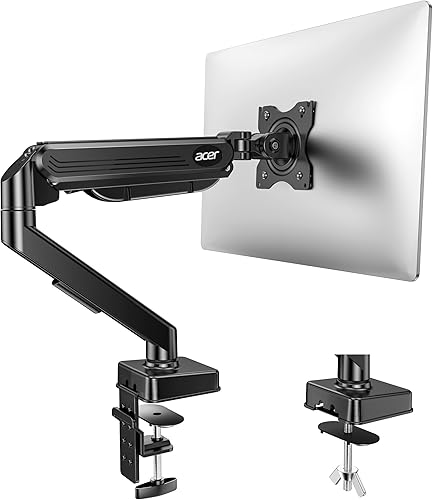
Acer Single Monitor Arm for 17-34 Inch Screens
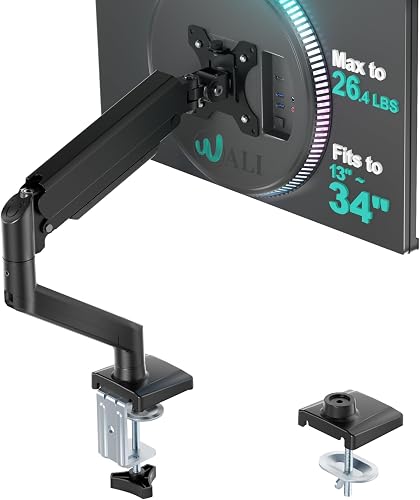
Prime WALI Single Monitor Arm for 13-34 Inch Screens
As an Amazon Associate we earn from qualifying purchases. Product prices and availability are accurate as of the date/time indicated.
Pros
- Sturdy alloy steel build feels stable and holds position at any angle
- Smooth gas spring motion allows easy one handed adjustment for height, tilt and swivel
- Quick beginner friendly installation with both C-clamp and grommet mounting hardware included
- Wide range of motion including portrait rotation is great for work, study and gaming
- Built in cable management helps free up desk space for a cleaner setup
Cons
- 19.8 lbs weight limit means some heavier 32 inch monitors may not be supported
- Best suited for solid wood desks within thickness range with clear space underneath for clamp
- Small visible logos on arm and minor hardware variations reported between units
The HUANUO FlowLift HNSS6 is a single gas spring monitor arm designed for 13 to 32 inch LCD monitors. It is a great fit for home offices, students, gamers and anyone wanting to free up desk space and improve posture.
Real world performance is smooth and user friendly, with one handed control for height, tilt, swivel and rotation. The screen lifts up to 39.6cm and stays firmly in place, making it easy to switch between landscape and portrait or find a comfortable viewing angle.
Design and build quality stand out with automotive grade alloy steel, a clean black finish and integrated cable management. The arm feels hefty and stable, and the one piece structure inspires confidence for daily adjustments over long term use.
There are a few limitations to consider, including the 19.8 lbs capacity and support for only 75x75mm and 100x100mm VESA. It also needs a suitable wood desk with proper thickness and clearance, and some users note small logos and hardware differences.
Overall, this is a reliable, easy to install and highly adjustable monitor mount that delivers excellent value. If your monitor is within size and weight limits, it is a smart upgrade for comfort, flexibility and a tidier workspace.
Model HNSS6 supports 13 to 32 inch monitors weighing 4.4 to 19.8 lbs with VESA 75x75mm and 100x100mm. Movement includes tilt from -50 to +85 degrees, swivel 90 degrees each way and 360 degree rotation.
Construction is alloy steel in black with tabletop C-clamp and grommet mounting options. Compatible desk thickness is 0.59 to 3.54 inches, with wood desktops recommended and maximum lift height of 39.6cm.
Check your monitor size, weight without stand, and VESA pattern before buying to ensure compatibility. Larger 32 inch models should be weighed carefully since heavier displays may exceed the limit.
Measure desk thickness and confirm clear space under the desk for the clamp or a grommet hole. Choose grommet mounting for extra stability if your desk already has a hole or cable opening.
After install, adjust gas spring tension to match your screen weight for smooth one handed movement. Route cables through the management clips to keep motion free and your desk organized.
Pros
- Securely holds large ultrawide monitors up to 34 inches and 25 lbs without sagging
- Smooth articulation with generous lift, tilt and rotation for all-day comfort
- Includes both desk clamp and grommet mount to fit different desk types
- Durable metal build with cable management and 10-year warranty for long-term use
Cons
- Supports only one monitor, so dual screen setups require a second arm
- Solid 9.8 pound frame can be bulky to handle during solo installation
- Limited to specific VESA patterns and desk thicknesses, so check fit before buying
The Ergotron LX is a single monitor desk mount designed for flat and curved computer monitors up to 34 inches and 25 pounds. It is ideal for remote workers, creators and gamers who want to free up desk space and improve posture.
With 13 inches of smooth lift, up to 17.3 inches above the worksurface, plus 75 degrees of tilt and 360 degrees of rotation, finding a comfortable viewing angle is easy. Portrait to landscape changes, shared screen viewing and standing desk use all feel stable and controlled.
The matte black metal build looks clean and professional, while built-in cable management routes cords neatly out of sight. Both a two-piece desk clamp and grommet mount are included, and the modular design works with additional Ergotron accessories.
Installation takes some effort due to the solid 9.8 pound frame, and it only supports one display with 75x75mm or 100x100mm VESA patterns. Users with extra large screens or desks outside the supported thickness range should measure carefully first.
Overall, the Ergotron LX stands out for smooth adjustability, rock solid stability and long-term durability. If you want a premium single monitor arm that keeps your setup ergonomic and clutter free, it is a smart choice.
Compatibility: Single flat or curved monitor up to 34 inches, 7 to 25 lbs
VESA Patterns: 75x75mm and 100x100mm
Adjustment: 13 inches lift, 75 degrees tilt, 360 degrees rotation
Mounting: Tabletop desk clamp for 0.4 to 2.4 inch desks and grommet mount for desks up to 2.25 inches
Build: Metal construction in Matte Black, Model 45-241-224 with 10-year warranty
Pros
- Wide compatibility with ultrawide and standard monitors up to 38 inches
- Full motion adjustability for ergonomic comfort and glare reduction
- Sturdy alloy steel and aluminum construction with secure mounting options
- Built-in cable management keeps power and AV cables organized
- Simple installation with detachable VESA plate and included hardware
Cons
- 22 lbs weight limit may not support heavier large monitors
- Pole style height adjustment requires manual repositioning rather than gas spring motion
- Requires VESA 75x75 or 100x100 mounting, so non VESA monitors need an adapter
The VIVO STAND-V001 is a single monitor desk mount designed for 13 to 32 inch screens and ultrawide monitors up to 38 inches. It is built for remote workers, students, gamers and anyone wanting to free up desk space while improving posture.
Real world performance centers on flexibility, with +90 to -90 degree tilt, 360 degree swivel and rotation, plus up to 16 inches of height adjustment. You can easily switch from landscape to portrait, raise the screen to eye level, and angle it to reduce glare and neck strain.
Construction uses alloy steel and aluminum for a stable, wobble free feel during daily use. The heavy duty C-clamp secures to desks up to 3.25 inches thick with hand tightening, while the included grommet mount offers a clean through desk option.
The main limits are the 22 lbs weight capacity and standard VESA 75x75 or 100x100 support, so check your monitor specs first. As a pole style mount, height changes require loosening the arm rather than the one touch motion of gas spring arms.
Overall, the STAND-V001 is a reliable, easy to install upgrade for ergonomic comfort and a cleaner setup. If you need full motion adjustability for a single ultrawide or standard monitor, it delivers strong value and everyday practicality.
Model: STAND-V001, Mounting: C-clamp for desks up to 3.25 inches thick plus grommet mount included
Compatibility: 13 to 32 inch monitors and ultrawide up to 38 inches, up to 22 lbs, VESA 75x75mm and 100x100mm
Adjustment: +90 to -90 degree tilt, 360 degree swivel, 360 degree rotation, up to 16 inch height adjustment, portrait and landscape orientation
Materials and Color: Alloy steel and aluminum construction in black with integrated cable management clips
Pros
- Sturdy alloy steel construction feels solid and holds monitor securely in place
- Quick three step setup with tool-free VESA plate and all needed tools included
- Smooth and wide range of motion for height, tilt, swivel and portrait to landscape rotation
- Compact footprint with effective cable management creates a cleaner workspace
Cons
- Slight shake possible when fully extended or when desk is bumped
- Limited to 19.8 lbs and 100x100mm VESA, not suitable for larger heavy duty displays
- Initial tension and tilt adjustment may need two hands and fine tuning
The ErGear Single Monitor Arm EGDMA69B is designed for 13 to 34 inch flat or curved monitors with 75x75mm or 100x100mm VESA patterns. It is a smart pick for home offices, gamers and students who want more desk space and better posture without a bulky stand.
You get up to 17.5 inches of height adjustment and 18.1 inches of reach, plus 80 degree up tilt, 50 degree down tilt, 90 degree swivel and 360 degree rotation. In daily use, that means easy eye level positioning, quick portrait to landscape flips and smooth sharing of your screen with others.
The alloy steel frame feels solid, with a 40 percent wider VESA head for extra stability and a durable core rated for long term use. Tool free cable clips keep cords tidy, while the C-clamp or grommet mount options fit most desks and leave a small footprint.
It supports up to 19.8 lbs, so very heavy 34 inch ultrawides and non VESA monitors will need an adapter or a heavier duty arm. Some users notice slight shake at full extension, and initial tilt tension is easier to set with two hands.
Overall, this is a sturdy, flexible and easy to install arm that delivers premium ergonomics for everyday work and play. If your monitor fits the size, weight and VESA requirements, it is an excellent upgrade for a cleaner, more comfortable setup.
Compatibility: 13 to 34 inch flat or curved monitors up to 19.8 lbs, VESA 75x75mm and 100x100mm. Movement: Up to 17.5 inch height, 18.1 inch reach, plus 80 degree up and 50 degree down tilt, plus or minus 90 degree swivel, 360 degree rotation.
Installation: C-clamp for desks 0.39 to 2.56 inches thick or grommet mount for desks 0.39 to 2.95 inches thick with tool free VESA plate. Build: Alloy steel in Black, tabletop mount, model EGDMA69B.
Pros
- Wide 17 to 34 inch compatibility with solid 19.8 lb weight capacity
- True ergonomic flexibility with tilt, swivel, rotation and 18.1 inch height range
- Heavy duty aluminum and gas spring build stays stable without sag
- Fast 5 minute setup with both C-clamp and grommet mounting included
- Frees up desk space while reducing neck, eye and back strain
Cons
- Gas spring tension must be manually tuned when swapping to a heavier or lighter monitor
- Not suitable for desks with double shelves, enclosed back panels, curved edges or glass tops
- Single screen design only, so multi monitor users will need additional arms
The Acer AMS001 is a single gas spring monitor arm designed for 17 to 34 inch screens weighing 4.4 to 19.8 lbs. It is built for remote workers, students and gamers who want a cleaner desk and more comfortable viewing position.
Real world use centers on smooth full motion control with tilt, swivel and 360 degree rotation plus up to 18.1 inches of height lift. You can move from sitting to standing, switch to portrait for coding or documents, and adjust with one hand after initial setup.
Build quality stands out with an aluminum frame and automotive grade pneumatic core rated for long term daily motion. The structure feels rigid with larger displays and resists sagging or wobbling when properly balanced with the tension screw.
There are limits to note, as you must tune tension for your exact monitor weight to prevent dropping or rising. It also needs a solid wood style desk from 0.59 to 3.15 inches thick and is not ideal for double shelves, enclosed backs or curved edges.
Overall, this is a practical ergonomic upgrade for single monitor setups that need flexibility, stability and fast installation. If you want full adjustability and space savings in a compact aluminum arm, it is easy to recommend.
Model: AMS001, Brand: Acer, Mount Type: Single gas spring arm, Color: Black, Material: Aluminum, Weight: 2.4 kg.
Compatibility: 17 to 34 inch monitors, 4.4 to 19.8 lbs, VESA 75x75mm and 100x100mm, Desk thickness 0.59 to 3.15 inches with C-clamp or grommet base.
Motion Range: Tilt -60 to +90 degrees, Swivel plus or minus 90 degrees, 360 degree rotation, Max height up to 18.1 inches.
Pros
- Strong metal build holds large and ultrawide monitors steady without drooping
- Smooth tilt, swivel and rotation help reduce neck, shoulder and back strain
- Quick setup with both C-clamp and grommet hardware included
- Built-in cable management creates a tidier and roomier desk
- Wide compatibility for flat and curved screens up to 34 inches
Cons
- Curved screens are limited to 19.8 lbs, so weight must be checked carefully
- Best for solid wooden desks only, not ideal for glass desks or desks with a crossbeam
- Initial tension adjustment can require some trial and error to get perfect balance
The WALI GSMP001N is an adjustable single monitor arm for 13 to 34 inch screens. It is made for remote workers, students and gamers who want to reclaim desk space and improve posture without a bulky stand.
In real use, it extends 19.3 inches and lifts up to 17.3 inches with smooth tilt, swivel and 360 degree rotation. Users report steady positioning for work, video calls and gaming, plus easy switching between landscape and portrait.
Build quality feels solid with an all metal frame, wider VESA head and tighter fitting panel for added stability. The core is tested for over 20,000 cycles, so daily adjustments stay smooth and reliable over time.
There are some limits to know. Curved monitors have a lower 19.8 lbs limit, and installation works best on solid wooden desks with no lip or crossbeam underneath. You will also need to dial in the tension on first setup.
Overall, this is a sturdy, versatile and easy to install solution for a cleaner ergonomic setup. If your monitor size, VESA pattern and desk type match, it offers excellent comfort and value.
Model GSMP001N supports 13 to 34 inch monitors, 17 inch minimum recommended, with VESA 75x75mm and 100x100mm mounting holes. Max load is 26.4 lbs for flat screens and 19.8 lbs for curved screens.
Motion range includes 19.3 inch extension, 17.3 inch height adjustment, plus 180 degree swivel, 70 degree up and 45 degree down tilt, and 360 degree rotation. Mounting type is tabletop with C-clamp and grommet options for desks 0.39 to 2.76 inches thick.
Construction is metal in black finish with built-in cable management. Movement types include rotate, swivel and tilt for full ergonomic positioning.
Before buying, confirm your monitor size, weight and VESA pattern. This arm fits most flat and curved LCD and LED screens up to 34 inches with 75mm or 100mm holes.
Check desk thickness and material. It is recommended for wooden desks only within the supported thickness range, with clear space under the desk for secure clamping.
For best results, set the tension during initial setup so the screen stays in place at any height. Route power and display cables through the arm guides for a tidy finish.
Matching a Part to Your Build
If you have a standard wood desk with a back edge from 0.59 inches to 3.15 inches thick and a 24 inch to 27 inch monitor weighing 4.4 to 19.8 lbs with VESA 75x75mm or 100x100mm, look for a gas spring arm with one hand adjustment and tilt from minus 60 degrees to plus 90 degrees. The HUANUO FlowLift™ Single Monitor Mount fits 13 to 32 inch screens in that weight class and lifts up to 39.6cm, while the Acer Single Monitor Mount supports 17 to 34 inch screens in the same weight class and raises up to 18.1 inches. Either gives you tilt, plus or minus 90 degrees swivel, and 360 degrees rotation for sitting or standing use.
If you have a thicker top up to 3.25 inches or you plan an ultrawide up to 38 inches, prioritize pole height and load margin. The VIVO Single 13 to 38 inch Ultrawide Monitor Arm fits most 13 inch to 32 inch screens plus ultrawide models up to 38 inches up to 22 lbs, with height adjustment up to 16 inches and tilt from plus 90 degrees to minus 90 degrees. The WALI Adjustable Single Monitor Arm for 13-34 inch fits up to 34 inch screens, up to 26.4 lbs for flat panels and 19.8 lbs for curved panels, with up to 17.3 inches of lift and up to 19.3 inches of extension. Both suit a warm wood floating monitor setup where you want the screen centered and cables routed along the arm.
If you have a heavier 7 to 25 lbs monitor or you want a more premium choice with long support, look at lift height and warranty. The Ergotron – LX Monitor Arm fits single screens up to 34 inches, offers up to 17.3 inches of height with 13 inches of lift, 360 degrees of rotation and 75 degrees of tilt, and includes both a desk clamp for 0.4 to 2.4 inches and a grommet mount for up to 2.25 inches. If you want a simpler install on desks from 0.39 inches to 2.56 inches by clamp or 0.39 inches to 2.95 inches by grommet, the ErGear Single Monitor Arm supports 13 to 34 inch screens up to 19.8 lbs with up to 17.5 inches of height and up to 18.1 inches of reach.
Common Mistakes
Mistake 1: Judging by screen size alone. A 32 inch lightweight office panel and a 34 inch curved gaming panel can differ by several pounds and place different force on the head. Always match both the diagonal range and the exact weight to the spec sheet, and confirm VESA 75x75mm or 100x100mm before you buy.
Mistake 2: Clamping where the desk cannot hold it. Glass tops, hollow doors, thin folding tables, or edges with a lip, rear crossbar, or cable tray can crack or prevent a solid grip. Measure thickness at the exact clamp point, check that the underside is clear, and choose wood when possible or switch to a freestanding base.
Mistake 3: Forgetting wall and cable clearance. An arm that extends up to 19.3 inches needs room to swing, and a tall pole needs vertical space. Push your desk forward a few inches during setup, route power and display cables with slack through the clips, and recheck tilt and swivel after you add cables so the screen stays where you set it.
Who Should Wait or Buy Differently
A clamp or grommet arm is not ideal for you if your top is glass, very thin, or has no clear rear edge for gripping, if you cannot drill and you have no clamp access, or if your monitor uses a non standard mount with no VESA holes. In those cases you should wait and choose a freestanding stand, replace the top with solid wood, or pick a monitor with standard 75x75mm or 100x100mm holes so a future arm will fit without adapters.
Frequently Asked Questions
How do I check if will a monitor arm fit my desk?
Measure thickness at the back edge and compare it to the clamp or grommet range, such as 0.39 inches to 2.76 inches or up to 3.25 inches. Confirm the top is wood or another solid material, the underside is clear of beams, and the edge is flat enough for full contact.
Can I use a clamp arm on a glass or thin desk?
It is not recommended for most glass or hollow tops because pressure can cause cracks or dents. If you have that type of desk, use a freestanding stand that rests on the surface or replace the top with a solid wood panel that falls inside the rated thickness range.
Do I need a grommet hole for a monitor arm?
No, most models in this guide include both a C-clamp and a grommet base. Use the clamp if you want no drilling, or use the grommet option if you already have a cable hole and want a centered mount on desks up to 2.25 inches, up to 2.95 inches, or 0.59 inches to 3.54 inches depending on model.






Write Your Review
No reviews yet. Be the first to share your experience!