

If you are asking is the Samsung 990 Pro a good gaming SSD in 2026, you are really asking how to match an NVMe drive to your whole build. The right choice depends on your resolution and refresh target, your platform and socket, your case size and clearance, your power budget, and whether you are buying for your current system or your next upgrade.
This buying guide gives you a decision framework instead of just a ranked list. You will learn what specs actually affect game loads and smoothness, when PCIe 5.0 matters, and how to avoid paying for speed you cannot use. For a broader view of current drive options, browse the NVMe & SSD Storage archive to see how different capacities and interfaces compare.
What Actually Matters
Interface Generation and Platform Support
Your motherboard determines what speed you can actually use. A PCIe 4.0 M.2 slot tops out near the limit of PCIe 4.0, while a PCIe 5.0 x4 slot can double that ceiling if your CPU and board support it. Before you compare drives, check your board manual for which M.2 slots are PCIe 4.0 and which are PCIe 5.0, and whether using a slot shares bandwidth with your graphics card.
If your system only has PCIe 4.0 support, a PCIe 5.0 drive will still work but will run at PCIe 4.0 speeds, so you will not see its full sequential rate. That is why many gamers on AM4 or older Intel platforms stick with a strong PCIe 4.0 drive and put the savings elsewhere. If you are planning a new AM5 or recent Intel build, reviewing how to choose a B550 motherboard for gaming can help you understand how chipset lanes and M.2 placement affect SSD choice, even though newer boards have moved to PCIe 5.0.
Random Performance Versus Sequential Speed
Sequential read and write numbers look impressive on the box, but games rarely load as one large sequential file. Random read and write performance, measured in IOPS, reflects how quickly a drive can fetch many small files, which is closer to what happens when you launch a game, load a level, or stream assets with DirectStorage. A drive with strong random performance will feel snappier in everyday gaming than one that only wins on sequential peaks.
When you compare spec sheets, look at both figures. Per the spec sheet, one PCIe 4.0 example reaches up to 7,450 MB/s sequential read and 6,900 MB/s sequential write with up to 1400K/1550K IOPS random read/write, while a PCIe 5.0 example reaches up to 14,700/13,300 MB/s sequential read/write with up to 1,850K/2,600K IOPS. The second is described as up to twice as fast as the 990 PRO class on sequential speed, but the benefit you feel in games will depend more on random IOPS and how the game engine loads data.
Power Efficiency and Thermal Control
High speed drives generate heat, and sustained heat can reduce performance. Look for a controller designed for efficiency and thermal management, especially if your drive will sit under a graphics card or in a laptop with limited airflow. According to owners, drives that stay cooler tend to maintain more consistent load times during long sessions.
Spec sheets often highlight this directly. One PCIe 4.0 drive notes up to 50% improved performance per watt over its predecessor and uses a nickel-coated controller for smart thermal control in a slim M.2 2280 form factor that meets the PCI-SIG D8 standard. A newer PCIe 5.0 drive notes a 5nm controller that boosts power efficiency up to 49% over the 990 PRO class while maintaining advanced thermal control. For compact builds, also check whether your motherboard provides a built-in M.2 heatsink or if you need one.
Capacity, Endurance, and Console or DirectStorage Features
Capacity affects more than how many games you can install. Larger drives often have more spare area and can sustain performance better as they fill up. For gaming in 2026, 1TB is the practical minimum for most players, while 2TB gives you room for a growing library and large titles that exceed 100GB each. Some PCIe 5.0 families now offer options up to 8TB if you want to keep everything installed at once.
Also consider platform-specific features. Certain drives are marketed as a good fit for PS5 and for DirectStorage PC games, with claims of up to 65% improvement in random performance for faster loads in those scenarios. If you plan to use the drive in a console, confirm it meets the console size and heatsink requirements. For PC, the Samsung Magician software is often mentioned for monitoring drive health, protecting data, and handling firmware updates, which helps you keep performance steady over time.
To see how these trade-offs play out in real products, here are a few options that show the range from efficient PCIe 4.0 to high ceiling PCIe 5.0:
This article contains affiliate links. If you buy through one of our links, CustomPCGaming may earn a commission at no extra cost to you. Commissions never influence which products we recommend or how we rank them. Read our Affiliate Disclosure for details.
Quick Picks at a Glance

Samsung 990 PRO 1TB NVMe SSD – PCIe 4.0 M.2 2280

Samsung 9100 PRO 1TB PCIe 5.0 NVMe M.2 SSD
As an Amazon Associate we earn from qualifying purchases. Product prices and availability are accurate as of the date/time indicated.
Pros
- Blazing sequential and random speeds near the PCIe 4.0 limit
- Excellent power efficiency and smart thermal control
- Proven Samsung reliability with 5-year warranty
- Easy installation and full PS5 compatibility
- Intuitive Samsung Magician software for health monitoring
Cons
- Needs a PCIe 4.0 system to reach advertised speeds, slower on PCIe 3.0
- This model ships without a heatsink, may need separate cooler for PS5 or compact builds
- Premium price tier compared to budget PCIe 4.0 drives
The Samsung 990 PRO 1TB is a flagship PCIe 4.0 NVMe M.2 SSD designed for gamers, creators and power users who need top tier responsiveness. It is ideal for upgrading a gaming PC, PS5 or performance laptop where fast loads and smooth multitasking matter.
In real world use it delivers sequential reads up to 7,450 MB/s and writes up to 6,900 MB/s, with random performance up to 1400K/1550K IOPS. That means quicker game loads, faster large file transfers and snappier performance in DirectStorage titles and heavy workloads.
Build quality is excellent with Samsung's in-house nickel-coated controller and smart thermal control for stable sustained speeds. The slim, single-sided M.2 2280 design meets the PCI-SIG D8 standard and fits easily in most desktops and compatible laptops.
To achieve full speed you need a PCIe 4.0 capable motherboard or console, otherwise performance is limited by the interface. This version also comes without a heatsink, so PS5 users and those with thermally constrained cases should consider adding one.
Overall the 990 PRO 1TB blends elite speed, improved efficiency and trusted reliability backed by a 5-year warranty. If you want a fast, future ready drive for gaming and demanding tasks, it remains one of the best PCIe 4.0 choices.
Capacity: 1TB, Form Factor: M.2 2280, Interface: PCIe 4.0 x4, NVMe
Sequential Performance: Up to 7,450 MB/s read, 6,900 MB/s write, Random up to 1400K/1550K IOPS
Features: Intelligent Turbo Write, AES 256-bit Encryption, Smart Thermal Control with nickel-coated controller
Compatibility: PC, Laptop, Mac, Sony PlayStation 5, Weight: 9.07g, Dimensions: 3.16 x 0.87 x 0.09 inches
Warranty: 5 Years Manufacturer, Model: MZ-V9P1T0B/AM, Software: Samsung Magician
Pros
- Class-leading PCIe 5.0 speeds for boot times and large file transfers
- Excellent power efficiency and thermal stability under sustained loads
- Strong, durable build quality with high-quality PCB and components
- Reliable performance for gaming, content creation and AI workloads
- Backed by a 5-year manufacturer warranty
Cons
- Requires a PCIe 5.0 compatible motherboard or laptop to reach advertised speeds
- Premium price compared to PCIe 4.0 SSDs
- Can run warmer in compact systems without additional cooling or heatsink
The Samsung SSD 9100 PRO 1TB is a flagship PCIe 5.0 NVMe M.2 drive built for users who demand next generation speed. It is designed for gamers, video editors, AI creators and power users handling massive files and intensive workloads.
In real world use, it delivers up to 14,700MB/s sequential read and 13,300MB/s write speeds, nearly twice the 990 PRO. Random performance up to 1,850K/2,600K IOPS means faster game loads, smoother multitasking and near instant large file transfers in supported systems.
Build quality reflects Samsung's reputation as the world's leading flash memory brand. The drive uses in house DRAM and NAND with a 5nm controller that improves power efficiency by up to 49 percent while advanced thermal control keeps performance stable under load.
To unlock full speed you need a PCIe 5.0 compatible desktop or laptop, otherwise performance will be limited. As a premium Gen5 drive it also commands a higher cost than PCIe 4.0 alternatives and may run warmer in compact systems without adequate cooling.
Overall, the 9100 PRO is an outstanding choice if you want cutting edge speed, proven reliability and future proof storage. For anyone building a high end PC or upgrading for AI, 4K/8K editing or competitive gaming, it delivers elite performance you can count on.
Capacity: 1TB, Form Factor: M.2 2280, Interface: PCIe 5.0 x4 NVMe, Hardware Platform: PC
Sequential Speeds: Up to 14,700MB/s read and 13,300MB/s write, Random IOPS: Up to 1,850K read and 2,600K write
Controller: 5nm with Intelligent Turbo Write, Cache: 1GB, Features: Hardware Encryption, Innovative Power and Thermal Control
Compatibility: Desktop and Laptop with PCIe 5.0 support, Software: Samsung Magician for firmware updates and health monitoring
Model: MZ-VAP1T0B/AM, Color: Black, Weight: 9.07g, Dimensions: 3.2 x 0.9 x 0.09 inches, Warranty: 5 Year Manufacturer
Matching a Part to Your Build
Scenario 1: You have a PCIe 4.0 gaming PC or PS5 and want fast, efficient loading. If your board and CPU are PCIe 4.0, focus on a drive that maximizes that interface without excess heat or power draw. The Samsung SSD 990 PRO 1TB, PCIe 4.0 M.2 2280 is a clear example, rated up to 7,450/6,900 MB/s sequential read/write and up to 1400K/1550K IOPS, with smart thermal control and improved performance per watt. It fits the slim M.2 2280 size and is positioned for DirectStorage PC games and PS5 use, so you get responsive loads without needing a PCIe 5.0 platform.
This path also leaves more of your power and thermal budget for your graphics card, which matters more for frame rates at 1440p and 4K. If you are pairing your SSD with a midrange GPU upgrade, the comparison in RTX 4060 ti vs RTX 5060 shows why balancing SSD, GPU, and CPU spend often yields smoother overall performance than chasing the fastest sequential number alone.
Scenario 2: You are building a new PCIe 5.0 system and want headroom for AI workloads, 4K/8K editing, and future games. Here a Gen5 drive makes sense if your motherboard has a PCIe 5.0 x4 M.2 slot with adequate cooling. The Samsung SSD 9100 PRO 1TB, PCIe 5.0×4 M.2 2280 illustrates the step up, rated up to 14,700/13,300 MB/s sequential read/write and up to 1,850K/2,600K IOPS, described as up to twice the speed of the 990 PRO class. It also offers capacity options up to 8TB and uses a 5nm controller for better efficiency, which helps in long creative sessions.
Choose this route only if your platform can expose the speed and your case can cool it. You will need to verify M.2 heatsink clearance and that your motherboard does not throttle the slot when the GPU is under load. If you do not have PCIe 5.0 support today but plan to upgrade your platform within a year, you could still buy Gen5 for later use, but expect it to run at Gen4 speeds until you move boards.
Scenario 3: You have a compact case, laptop, or small form factor build. Physical fit and thermals outweigh peak speed. Both example drives use the M.2 2280 form factor, but laptops and compact desktops often have only one or two M.2 slots with limited airflow. Prioritize a drive with proven thermal control and lower power draw, and confirm your device supports the drive height with its heatsink. A highly efficient PCIe 4.0 drive often runs cooler in tight spaces than a Gen5 drive at full speed, which helps you avoid thermal slowdowns during extended gaming.
Common Mistakes
• Buying a PCIe 5.0 drive for a PCIe 4.0-only board and expecting double the game load improvement. The drive will work, but your slot will cap sequential speed at PCIe 4.0 levels. Check your motherboard spec sheet first and put extra funds toward capacity or your GPU if you are limited to Gen4. The Budget Build Guides section can help you balance storage with other parts.
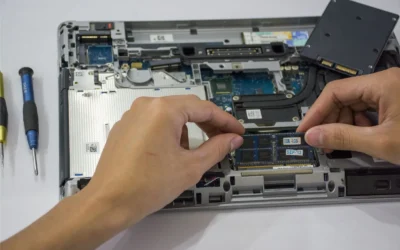
• Ignoring clearance and cooling. An M.2 drive tucked under a hot graphics card without a heatsink can get warm and reduce sustained performance. Before you buy, verify whether your board includes an M.2 heatsink, whether your case allows airflow over it, and whether a tall heatsink will interfere with your GPU or other components. Follow the manufacturer mounting instructions and use anti-static handling.
• Chasing maximum sequential speed while overlooking capacity and random performance. A drive with a huge sequential number but modest random IOPS may not feel faster in games than a well balanced drive with strong random read/write. Also, filling a small drive to 90% full can hurt responsiveness, so choose a capacity that leaves 15 to 20% free space after your current library is installed.
Who Should Wait or Buy Differently
If your current motherboard, laptop, or console does not have PCIe 5.0 support and you are happy with load times today, a premium PCIe 5.0 drive is not ideal for you right now. It is also not a good fit if you need maximum capacity on a tight budget, since you will often get more usable game storage per dollar by choosing a larger PCIe 4.0 drive or adding a second Gen4 drive later. Wait for your next platform upgrade to move to Gen5, or buy differently by prioritizing a 2TB PCIe 4.0 option that lets you keep more games installed without constantly shuffling files.
Frequently Asked Questions
Is the Samsung 990 Pro still fast enough for gaming in 2026?
Yes, for most gamers it is. Per the spec sheet it reaches up to 7,450/6,900 MB/s sequential and up to 1400K/1550K IOPS random, which is near the ceiling of PCIe 4.0 and more than enough for fast boots, level loads, and DirectStorage titles. You will only see a clear advantage from Gen5 if your platform supports PCIe 5.0 x4 and your workloads can use the extra sequential and random headroom.
Do I need PCIe 5.0 for DirectStorage and PS5 gaming?
No. DirectStorage and PS5 titles benefit from NVMe speed and strong random performance, but they do not require PCIe 5.0. A quality PCIe 4.0 drive that meets the console size and thermal requirements and offers solid random IOPS will deliver quick loads. PCIe 5.0 mainly helps if you also do heavy content creation or want overhead for future games that stream larger assets.
What should I check before installing a new M.2 SSD?
Confirm your M.2 slot type, length support for 2280, and whether a heatsink is included or needed. Check case and motherboard clearance, update your BIOS at your own risk only if needed for drive recognition, and use anti-static precautions. After installation, use the maker software to monitor health and apply firmware updates.


Write Your Review
No reviews yet. Be the first to share your experience!