

You want to learn how to choose a monitor light bar that lights your desk without washing out your screen. You are already juggling resolution and refresh target, platform and socket, case size and clearance, and power budget, plus whether this purchase is for your current setup or your next upgrade.
This guide gives you a simple decision framework you can reuse for any flat or curved display. As of November 2026, you can browse our Bias Lighting and Ambient RGB guides to see how bias light fits into a full setup. You will compare mounting fit, optical design and color quality, controls and backlight, and power and cable routing.
What Actually Matters
Fit and Mounting for Flat Versus Curved Displays
Start with physical fit because even good optics cannot help if the bar wobbles or leaves dark corners. Measure your top bezel thickness and compare it to clip ranges such as 0.3 inch to 1.1 inch for slim screens or up to 3.35 inch for thicker or irregular backs. For width, common bar lengths include 11.8 inch for compact desks, 16.1 inch (41 cm) for midsize monitors, and up to 26 inch (66 cm) for 34 inch and larger ultrawides.
Curvature matters as much as width. Some bars are shaped for curved monitors from 800R to 3000R curvature, while others list support for 27 inch to 34 inch models with 1000R or 1800R curves. If you use a webcam, look for a low profile shape, a right angle USB-C cable, and a weighted or sliding clip that clears the camera. A similar clearance mindset helps when you read our mid tower case guide for long GPUs, where fit comes before features.
Optical Design, Glare Control and Eye Comfort
A monitor bar should throw light forward onto your desk, not back into your eyes or onto your panel. Look for a 45 degree asymmetrical optical design that is described as no glare and flicker free. Certifications you will see include IEC/TR 62778 and IEC/EN 62471 for blue light safety, with some models carrying an RG0 rating. Per the spec sheet, that combination is intended for long sessions of reading, office work, or gaming.
Color accuracy and output shape comfort. High color rendering such as RA98 or Ra95 helps printed pages, artwork, and game colors look more natural under desk light. Output examples in this group include up to 1400 lux at the center with 500 lux across a wider area, auto dimming toward 900 lux, up to 800 lux for a 30 inch by 20 inch coverage area, and 275lm flux or 250LM ratings with 78, 84, or 88 LED beads. Choose wider and more even coverage if your desk is deep, and choose higher rendering accuracy if you edit photos or do color sensitive work.
Color Temperature, Dimming and Backlight Control
Color temperature sets the mood and focus. Many bars offer stepless adjustment from 3000K to 6500K, one option extends from 2700K to 6500K, and a simpler option steps through 3000K, 4000K, and 6500K presets. Some models add 4 preset brightness levels for quick changes. If your room light shifts during the day, an ambient sensor with auto dimming plus power off memory can keep your setting consistent without constant taps.
Decide if you want front light only or front plus RGB bias light. Front plus back designs offer modes such as Work Mode, Immersive Mode, and Design Mode, with backlight choices like 15 RGB backlight modes or 10 RGB backlight modes and adjustable backlight brightness. Control style matters too. Touch control on the bar keeps things simple, while a wireless remote with touch response lets you adjust from your chair. If you like structured decision steps, our guide to choosing a CPU cooler shows a similar way to weigh automation versus manual control.
Power, Cable Length and Desk Footprint
Almost every bar in this category powers over USB from your monitor, PC, adapter, or power bank, so check what ports you have free. Cable length affects routing, with examples such as a 1.5m cable for close ports and a 1.8m USB-C cable for routing behind a deep desk or arm mount. A right angle plug helps when clearance behind the monitor is tight.
The main reason to pick a bar over a lamp is desk space. Listings in this group describe saving nearly 90 percent of desk space or over 50 percent compared with traditional lamps. Build also affects daily use. A full metal body can aid heat conduction during long sessions, while a bar with silicone anti slip pads can be easier to reposition. Pick metal if your bar runs for many hours, and pick a compact clamp if you move gear often.
To see how these specs combine, here are a few options that show the range from compact eye care bars to wide curved models with dual light and RGB. Compare their clamp range, color range, and control style against your monitor size and room lighting before you pick.
This article contains affiliate links. If you buy through one of our links, CustomPCGaming may earn a commission at no extra cost to you. Commissions never influence which products we recommend or how we rank them. Read our Affiliate Disclosure for details.
Quick Picks at a Glance

Quntis Curved Monitor Light Bar 26in for 34in

Quntis Monitor Light Bar with Auto-Dimming

Quntis Monitor Light Bar with Backlight

ONWAY Curved Monitor Light Bar with
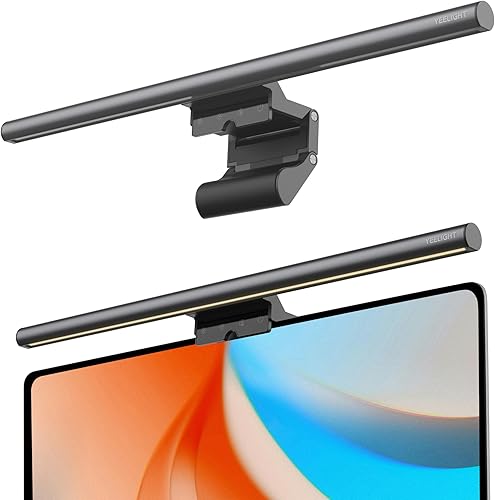
Prime YEELIGHT Monitor Light Bar YLYTD-0037

Prime SAMPHON 11.8 Inch Monitor Light Bar Eye Care LED
As an Amazon Associate we earn from qualifying purchases. Product prices and availability are accurate as of the date/time indicated.
Pros
- Excellent coverage for large curved and flat ultrawide monitors with minimal dark corners
- Eye friendly design with anti glare optics, low blue light and high color accuracy
- Flexible front plus RGB back lighting for both productivity and ambient gaming setups
- Stable clamp mount saves desk space and includes remote, auto dimming and memory function
Cons
- Oversized for standard 24 to 27 inch monitors, best suited only for large ultrawide screens
- Corded USB power required, so it needs a free USB port or adapter near the desk
- Remote only operation means losing the remote can limit convenient control
The Quntis ScreenLinear Curved monitor light bar is a 26 inch dual light built specifically for 34 inch and larger curved ultrawide monitors. It is made for gamers, remote workers, creators and students who want wide, glare free desk lighting without using desk space.
Standout performance comes from the foldable dual bar design that follows monitor curvature for even coverage with up to 1400 lux in the center. The front light offers stepless 3000K to 6500K adjustment plus auto dimming, while 15 RGB rear modes add immersive bias lighting for movies and late night gaming.
Build quality feels solid with a matte aluminum bar, reinforced 3 section clamp and silicone anti slip pads that fit screens up to 3.35 inches thick. The right angle USB C cable leaves room for a webcam, and the included remote plus memory function make daily use simple and tidy.
The main tradeoff is size, as this 26 inch bar is too wide for smaller flat monitors and best reserved for ultrawide setups. It also requires corded USB power and relies on a small remote, so you will need a nearby port and a safe place to keep the controller.
Overall, this is an excellent pick for ultrawide curved monitor owners who want bright, eye friendly task light by day and colorful ambient light by night. If you work long hours or game in a dark room, it delivers comfort, coverage and style in one clean mount.
Pros
- No glare on screen thanks to asymmetrical optical design
- Auto dimming plus full manual brightness and color temperature control
- High Ra98 CRI delivers natural, accurate color for work and reading
- Sturdy aluminum construction with space saving clip mount
- Flicker free, low blue light design helps reduce eye fatigue
Cons
- Requires constant USB connection, no built in battery for portable use
- Clip fit may vary on ultra thin or curved monitors
- Touch controls can be sensitive and take time to master in the dark
The Quntis Computer Monitor Lamp is a USB powered light bar designed to sit on top of your monitor and light your workspace without lighting your screen. It is built for students, office workers, designers and gamers who spend long hours at a desk and want more comfortable lighting.
Its standout feature is the asymmetrical optical design that directs light downward onto the desk, eliminating reflections and screen glare. The built in ambient sensor auto adjusts output to maintain balanced illumination, while stepless dimming and 3000K to 6500K color tuning let you shift from warm reading light to cool focus light.
In daily use, the 78 LED array with Ra98 color rendering produces even, natural looking light with minimal shadows. Colors look accurate and text is easier to read, which is especially helpful for design work, studying and late night sessions with reduced eye strain.
Build quality is solid with a slim lacquered aluminum bar and a weighted clip that mounts securely without tools. Touch controls are responsive, USB power keeps wiring simple, and the compact profile saves valuable desk space compared to a traditional desk lamp.
It is not perfect, as it needs constant USB power and the clip may not fit every ultra thin or curved display perfectly. Overall, this is a practical, eye friendly upgrade for any home office setup that delivers focused, customizable light where you need it most.
Finish and Build: Lacquered aluminum light bar with weighted monitor clip for stable, tool free mounting.
Lighting Specs: 78 LED beads, 3000K to 6500K adjustable color temperature, stepless brightness with auto dimming sensor.
Eye Comfort Features: Flicker free output, low blue light design, asymmetrical optics for no screen glare, ultra high Ra98 color rendering.
Size and Power: 15.7 inch wide, 0.78 inch slim profile, USB powered with touch controls for easy operation.
Pros
- Effectively eliminates screen glare while lighting the desk evenly
- Versatile front and back lighting suits work, gaming, reading and crafting
- Quick, stable installation on curved and thin monitors
- Convenient remote with intuitive touch controls and memory function
- Excellent color accuracy for designers and video calls
Cons
- Rear backlight effect is subtle and brightness only, no color adjustment
- Corded USB power cable can be tricky to hide for a clean setup
- IR remote requires line of sight to work reliably
The Quntis LI-HY-0214-GY is a 16.1-inch monitor light bar built for remote workers, gamers, students and creators who need comfortable desk lighting. It mounts on top of your monitor to free up desk space while avoiding screen glare.
Its standout feature is dual front and rear lighting with Work, Immersive and Design modes for focus, ambiance or balanced illumination. With 84 LEDs, stepless dimming, adjustable color temperature and Ra95 rendering, it delivers even, flicker free light that feels easy on the eyes.
Build quality feels solid with a matte grey aluminum body and a patented sliding weighted clip. Installation takes seconds and fits flat, ultra thin and curved monitors securely, while the touch remote with glowing buttons makes control simple.
It is not perfect, as the rear backlight is subtle compared to RGB setups and adjusts for brightness only. The USB cord can be hard to hide, and the IR remote needs a clear line of sight to respond.
Overall, this is an excellent upgrade for anyone wanting eye comfort, true colors and flexible control. If you want glare free lighting for work, study, gaming or crafts, this Quntis light bar is easy to recommend.
Model LI-HY-0214-GY, 16.1 inch grey aluminum light bar with 84 LEDs, 7.5 watts, 5V USB powered. Mounts by hanging clip for flat and curved monitors.
Features adjustable color temperature, stepless dimming, dimmable backlight, flicker free and memory function. Controlled by smart IR touch remote, with front and rear light sources and Ra95 CRI.
In the box you get the light bar, remote control, power cable, battery and user manual. Designed for indoor office, study, bedroom and gaming setups.
Pros
- Glare-free asymmetric lighting protects eyes during long computer work and reading
- Versatile clamp fits curved, flat and ultra-thin monitors securely without wobble
- Precise remote and manual controls with stepless brightness and color tuning
- High Ra95 color accuracy mimics natural light for true colors and reduced fatigue
- Built-in memory plus RGB backlight adds convenience and gaming ambiance
Cons
- Corded USB-C power requires a nearby port, no battery option for portable use
- Not water resistant, strictly for indoor office use
- Plastic clamp and shade may feel less premium than full metal designs
The ONWAY Curved Monitor Light Bar is a desk focused LED light designed to sit on top of your monitor and wash your workspace in soft, even light. It is made for remote workers, students and gamers using 27 to 34 inch curved screens, but it also works well on flat and ultra thin monitors.
Standout performance comes from the wireless touch remote and stepless controls for brightness and 3000K to 6500K color temperature. You can shift from cool focus light for work to warm relaxing tones for evenings, plus switch through 10 RGB backlight modes with dynamic rhythm effects for gaming ambiance.
Design is practical and modern in black with a flexible clamp that grips varying monitor thicknesses without slipping or blocking the screen. The 45 degree asymmetric optics with 88 LEDs and Ra95 color rendering deliver bright 275lm desk coverage that mimics natural light while avoiding reflections.
There are a few tradeoffs to note. It needs constant USB-C power so you will need a free port, and it is indoor only with no water resistance. The plastic and polystyrene build keeps it light but does not feel as premium as full metal bars.
Overall, this is a smart pick if you want remote convenience, curved monitor compatibility and true eye comfort in one compact bar. For long study sessions, office work or late night gaming, it improves visibility and reduces fatigue without adding desk clutter.
Model Number: PCTB-0O1 by ONWAY, Modern black desk lamp for office and computer work use.
Light Source: LED with 88 LEDs, 275lm flux, Ra95 color rendering, 3000K to 6500K stepless tuning.
Control: Wireless 8cm touch remote plus manual touch, dimmable with memory and auto dimming, 10 RGB backlight modes.
Power and Build: Corded electric via 1.8m USB-C cable, plastic and metal build, indoor use only, not water resistant.
Compatibility: Fits 27 to 34 inch curved 1000R and 1800R plus flat and ultra thin monitors, camera mount compatible.
Pros
- High Ra95 color rendering preserves screen color accuracy for creative work
- No-glare asymmetric optics plus RG0 low blue light reduces eye fatigue
- Full metal build with effective heat dissipation feels premium and durable
- Touch control with stepless brightness and wide 2700K to 6500K range
- Space-saving clip design frees desk space compared to traditional lamps
Cons
- USB powered only, so it requires a free port or adapter and has no battery option
- No auto-brightness sensor or remote, all adjustments use on-bar touch controls
- 5W 250LM output suits desk task lighting but will not illuminate a whole room
The YEELIGHT Monitor Light Bar YLYTD-0037 is a USB powered LED screen bar designed for home office workers, programmers, designers and gamers using flat or curved monitors. It sits on top of your display to light your desk without glare or screen reflection.
Standout performance comes from its eye-care optics with RG0 blue light safety, flicker-free light and 250LM of even illumination. With stepless dimming and 2700K to 6500K tuning plus three one-touch presets, you can shift quickly from focused cool white to warm relaxing light.
Color accuracy is a major strength thanks to Ra95 CRI and 78 LED beads that render true-to-life tones with minimal shadows. That makes it especially useful for designers and content creators who need consistent color while reducing eye strain during long sessions.
Build quality feels premium with a full aluminum body in dark gray that dissipates heat and keeps a low profile for webcams. The retractable clip fits monitors from 0.3 to 1.1 inches thick and the 1.5m USB cable keeps your desk clean and saves space compared to traditional lamps.
The tradeoffs are modest but worth noting, as there is no auto brightness, remote or app control, so you rely on touch controls. Overall, this is an excellent pick for anyone wanting comfortable, accurate and clutter-free desk lighting for work, study and gaming.
Light Source: 78 LEDs, 250LM, 5W USB powered with Ra95 CRI for true color fidelity. Color temperature ranges from 2700K warm to 6500K cool with stepless dimming and touch control.
Fit and Build: Full aluminum body in dark gray, 17.6 inches wide, 1.1 pounds. Retractable clip fits flat and curved monitors from 0.3 to 1.1 inches thick without blocking webcams.
In the Box: Monitor light bar with 1.5m USB cable for indoor home office use. Backed by a 1 year manufacturer warranty.
Pros
- Bright and uniform coverage ideal for large desks and keyboards
- Reduces eye strain and screen reflections during extended use
- Easy USB compatibility with PC, adapter or power bank
- Compact, stable clip design fits most monitors without tools
- Memory function adds everyday convenience
Cons
- Plastic build feels less premium than metal light bars
- No wireless remote or auto brightness sensor for hands free control
- Single button control takes time to learn for new users
The SAMPHON SC02 Monitor Light Bar is an 11.8 inch USB powered LED bar designed to sit on top of your monitor for focused desk lighting. It is made for remote workers, students and gamers who spend long hours at a computer and want to free up desk space.
Its standout performance is bright, even coverage with up to 800 lux across your desk area. The 45 degree beam aims light at the desk and keyboard while avoiding screen glare, and three color temperatures plus stepless dimming let you tune from cozy warm to crisp daylight.
Design is simple and modern in black plastic with a compact 11.8 inch profile. The patented counterweight clip installs in seconds without tools and holds steady on thin, thick, flat or curved screens, while a side mechanical switch handles all controls.
There are some tradeoffs to note. The all plastic housing feels basic compared to aluminum rivals, and there is no remote or ambient light sensor. You will need to learn the single switch logic of short presses and long presses.
Overall, this is a practical and user friendly upgrade over a bulky desk lamp for eye comfort and clutter free setups. If you want affordable, glare free and adjustable monitor lighting for work and play, it is a smart pick.
Brand: SAMPHON, Model: SC02, Style: Modern Black, Size: 11.8L x 0.78W x 3.3H inches, Material: Plastic shade and housing.
Light: LED with up to 800 lux central brightness, 3 color temperatures 3000K, 4000K, 6500K, 45 degree beam angle, stepless dimming with memory function.
Power: 5V USB powered via computer, adapter or power bank, Mounting: Table mount counterweight clip for most flat and curved monitors, Control: Side mechanical switch, In Box: Light bar, USB cable, Manual, Warranty: 1 year.
Matching a Part to Your Build
Scenario 1: Wide curved setup for work by day and play at night. If your display is 34 inch or larger, prioritize a bar up to 26 inch long that lists 800R to 3000R support and a clamp that fits up to 3.35 inch thick screens. The Quntis Curved Monitor Light Bar 15 RGB Backlight illustrates this approach with up to 1400 lux at the center, 500 lux across a wider area, RA98 rendering, 3000K to 6500K front light, and 15 RGB backlight modes. You should NOT buy this size if your monitor is compact, since overhang can look awkward and add unneeded width.
Scenario 2: Compact flat monitor for study or office with sensitive eyes. Focus on glare control, high rendering, and simple touch control rather than RGB. The Quntis Computer Monitor Lamp shows this style with 78 LED beads, RA98 rendering, auto dimming toward 900 lux, and 3000K to 6500K stepless adjustment, while the YEELIGHT Monitor Light Bar offers a full metal body, 2700K to 6500K range, Ra95 rendering, and a clip for 0.3 inch to 1.1 inch screens with a 1.5m cable. If you share a room, this simpler front only style is often less distracting than rear RGB glow. Pair it with ideas from our budget build guides if you are balancing comfort upgrades with core PC parts.
Scenario 3: Mixed use desk where you want quick remote changes and evening ambiance. Look for dual front and back sources, memory that restores your last setting, and a remote you can find in the dark. The Quntis Computer Monitor Light Bar with Backlight highlights a smart remote with orange glow buttons, 84 LED beads, Ra95 rendering, and 16.1 inch length, while the ONWAY Curved Monitor Light Bar with adds a wireless touch remote, 88 LEDs, 275lm flux, 10 RGB backlight modes, and a 1.8m USB-C cable for 27 inch to 34 inch curved screens. On a tight desk, the Monitor Light Bar, Eye-Care USB Reading Mnitor shows the opposite trade with 11.8 inch length, up to 800 lux, and 3000K, 4000K, and 6500K steps. Owners commonly report that remotes get lost easily, so you may prefer on bar touch control if your monitor is within arm reach.
Common Mistakes
Mistake 1: Buying the wrong width and curve for your panel. A short 11.8 inch bar on a 34 inch ultrawide leaves dark corners at the edges, while a 26 inch bar on a small flat screen overhangs and may catch your webcam. Check length, listed curvature such as 1000R or 1800R versus 800R to 3000R, and clamp thickness before you order.
Mistake 2: Ignoring rendering accuracy and glare optics. A bar without a 45 degree asymmetrical design can reflect on your screen and force you to raise monitor brightness, which increases fatigue. If you read a lot or handle color work, favor RA98 or Ra95 ratings, flicker free output, and textured covers or hoods that shield your eyes.
Mistake 3: Assuming power, memory, and controls work the same everywhere. Some bars power only from a powered USB port and lose settings without power off memory, while others keep brightness and color temperature after restart. Remote range, touch sensitivity, and cable length from 1.5m to 1.8m also vary, so confirm your port location and whether you can reach the bar easily.
Who Should Wait or Buy Differently
A dedicated monitor bar is not ideal for you if you mainly use a laptop on the couch, have a monitor with a very thick protruding back that no clip can grip, or already use bias strip lighting you like. In those cases you should NOT buy a clamp bar yet and may do better with a small desk lamp, a USB bias strip, or a monitor upgrade first, then revisit fit, brightness needs, and control style once your desk layout is stable.
Frequently Asked Questions
Will a monitor light bar fit my curved monitor?
It can if you match length, curvature, and clip thickness. Look for explicit support such as 800R to 3000R or 1000R and 1800R for 27 inch to 34 inch screens, plus a clamp range that covers your bezel. If your back is irregular or very thick, favor a sliding weighted clip with adjustable points.
Do I need RGB backlight or is front light enough?
Front light alone is enough for reading, office work, and reduced contrast between screen and room. Rear RGB with 10 or 15 modes adds evening ambiance and softer bias light for movies and games. Choose dual light if you play late at night, and choose front only if you share a room or get distracted by glow.
Does auto dimming replace manual brightness control?
Auto dimming helps by tracking ambient light and holding output near levels like 900 lux, but you will still want manual control. Stepless dimming from 3000K to 6500K or 2700K to 6500K lets you tune for paper versus screen tasks. Memory that restores your last setting saves time after power loss.





Write Your Review
No reviews yet. Be the first to share your experience!