

If you are asking do monitor light bars actually reduce eye strain, you are really asking how to balance light around your PC so long sessions feel calmer on your eyes. A bright screen floating in a dark room forces constant adaptation between glare and shadow, while even desk light plus soft wall glow keeps the whole scene closer in tone. Your resolution and refresh target, platform and socket, case size and clearance, and power budget still define the core build, but lighting decides how comfortable that build feels after hours of work or play.
As of November 2026, researched owner feedback points in a consistent direction: light bars do not correct vision, but they can lower perceived glare and fatigue when you pick the right beam shape and color temperature. This guide walks through that decision step by step, and you can explore more context in our Bias Lighting and Ambient RGB archive before you choose.
What Actually Matters
Front Beam Control and Glare Avoidance
The first job of a monitor bar is to put light on your desk without putting it in your eyes or on your screen. Look for an asymmetrical optical design that angles output down and forward, often described with values such as an 18 degree anti glare angle or a 45 degree beam angle per the spec sheet. That shaping is what separates a true screen bar from a generic strip stuck on a monitor.
When you compare options, check how the bar handles reflections on glossy panels and how wide the pool of light feels on your keyboard and notes. Owners commonly report that a tight, desk only pattern feels more focused, while a wider wash feels more relaxed for reading. If you share a room, a controlled beam also keeps spill away from others, which pairs well with a clean layout like those in our Cases and Airflow guides.
Back Bias Light Versus Front Task Light
Front light helps you see your desk, back bias light helps your eyes judge screen brightness. A rear glow that washes the wall behind your monitor lowers the contrast between a bright display and a dark room, which many users describe as easier during evening use. Some bars offer front light only, others combine front plus rear sources with separate work, immersive, or design style modes.
Think about your room first. In a very dark space, a model with adjustable backlight brightness can add welcome depth without washing out the image. In a room with decent ambient light, front task light alone might be enough. Either way, you want smooth dimming and a useful color temperature span such as 2700K to 6500K or 3000K to 6500K per the spec sheet, so you can go warm at night and cooler for daytime focus.
Color Quality, Flicker and Blue Light Handling
Color rendering tells you how natural objects look under the bar. Values such as Ra95, Ra98, or CRI over 95 per the spec sheet indicate strong fidelity for paper, keyboards, and skin tones, which matters if you edit photos or review prints at your desk. High rendering does not replace display calibration, but it keeps your surroundings from skewing what you see.
Comfort also comes from stability. Look for flicker free output and documented blue light handling such as RG0 or compliance with IEC and EN 62471 style standards as listed per the spec sheet. Owners commonly report that steady, low glare light with adjustable warmth feels less irritating than a cool, harsh source, especially when you dim down for movies or late reading.
Mounting, Power and Controls
Fit is practical and often overlooked. Check clamp thickness compatibility, with examples per the spec sheet such as 0.17 inch to 2.36 inch with support for 1000R to 1800R curved screens, or a narrower 0.3 inch to 1.1 inch range on other models. You also want clearance for thin bezels and for a top mounted webcam, plus a weighted or sliding clip that holds firm without pressure on the panel. For general clearance planning, the same careful measuring mindset from our How to Choose a CPU Cooler guide applies here.
Power is usually USB from your PC, hub, or adapter, with some designs using USB-C and a 1.5m cable per the spec sheet. Controls range from touch strips to remotes to wireless dials with auto dimming toward around 900 lux and memory for your last setting. If your desk is shared or you adjust often, a remote or dial is easier than reaching for the bar, while auto dimming helps when room light shifts through the day.
To see how those ideas look in real hardware, here are a few options that show the range from simple front bars to dual front plus back designs with remotes and dials.
This article contains affiliate links. If you buy through one of our links, CustomPCGaming may earn a commission at no extra cost to you. Commissions never influence which products we recommend or how we rank them. Read our Affiliate Disclosure for details.
Quick Picks at a Glance

BenQ ScreenBar Halo 2 LED Monitor Light Bar

Quntis Monitor Light Bar with Auto-Dimming

Quntis Monitor Light Bar with Backlight
Prime YEELIGHT Monitor Light Bar YLYTD-0037

Prime SAMPHON 15.7 Inch Monitor Light Bar

Prime SAMPHON RGB Monitor Light Bar 15.75 Eye-Care
As an Amazon Associate we earn from qualifying purchases. Product prices and availability are accurate as of the date/time indicated.
Pros
- Completely glare free on screen with even, flicker free desk coverage
- Excellent color rendering with CRI over 95, tested not to interfere with calibration work
- Premium aluminum build with stable clamp that fits flat and curved monitors
- Intuitive wireless controller with auto dimming, motion activation and memory for favorite settings
- Blue light hazard free illumination designed for extended eye comfort
Cons
- Costs more than many basic monitor light bars
- Front light beam is narrow and can feel stark at high brightness in very dark rooms
- Requires a USB connection for power, so cable routing is still needed
The BenQ ScreenBar Halo 2 is a USB powered LED bar that clamps to the top of your monitor to light your desk without glare. It is designed for remote workers, students, coders, gamers and visual creators who spend long hours in front of a screen.
Its dual lighting system pairs a glare free front light with a wide ambient backlight to balance brightness around your display. In daily use, the front beam stays off the screen while the back glow reduces eye fatigue, and stepless brightness plus 2700K to 6500K temperature make it easy to tune for day or night.
Build quality feels premium with an aluminum bar, polished dark grey finish and a sturdy clamp that fits flat and 1000R to 1800R curved monitors. The wireless dial controller sits neatly on the desk and shows exact values, so adjustments feel precise and effortless.
It is not perfect, as the slim front beam can feel focused and stark compared to a diffuse desk lamp. Some users also wish the backlight threw further down the wall, and you still need to route a USB cable for power.
Overall, the Halo 2 is one of the most polished and eye friendly monitor lights you can buy for focus and comfort. If you want accurate color, smart auto features and zero screen glare in a clutter free setup, it is an excellent upgrade.
Model: BenQ ScreenBar Halo 2 in Dark Grey with minimalist aluminum bar and polished finish. Mounts on top of monitors 0.17 to 2.36 inches thick, including 1000R to 1800R curved screens.
Lighting: Dual front and back LED system with stepless brightness, 2700K to 6500K color temperature, CRI over 95, flicker free and blue light hazard free output.
Controls: Wireless dial plus touch controls for brightness, color temperature and modes, with display readout, ambient light sensor, motion sensor and memory for favorite settings.
Power and size: 5W USB powered operation, 19.7 inch wide bar, 800g weight, includes light bar, wireless controller, adapter and webcam accessory for indoor office and study use.
Pros
- No glare on screen thanks to asymmetrical optical design
- Auto dimming plus full manual brightness and color temperature control
- High Ra98 CRI delivers natural, accurate color for work and reading
- Sturdy aluminum construction with space saving clip mount
- Flicker free, low blue light design helps reduce eye fatigue
Cons
- Requires constant USB connection, no built in battery for portable use
- Clip fit may vary on ultra thin or curved monitors
- Touch controls can be sensitive and take time to master in the dark
The Quntis Computer Monitor Lamp is a USB powered light bar designed to sit on top of your monitor and light your workspace without lighting your screen. It is built for students, office workers, designers and gamers who spend long hours at a desk and want more comfortable lighting.
Its standout feature is the asymmetrical optical design that directs light downward onto the desk, eliminating reflections and screen glare. The built in ambient sensor auto adjusts output to maintain balanced illumination, while stepless dimming and 3000K to 6500K color tuning let you shift from warm reading light to cool focus light.
In daily use, the 78 LED array with Ra98 color rendering produces even, natural looking light with minimal shadows. Colors look accurate and text is easier to read, which is especially helpful for design work, studying and late night sessions with reduced eye strain.
Build quality is solid with a slim lacquered aluminum bar and a weighted clip that mounts securely without tools. Touch controls are responsive, USB power keeps wiring simple, and the compact profile saves valuable desk space compared to a traditional desk lamp.
It is not perfect, as it needs constant USB power and the clip may not fit every ultra thin or curved display perfectly. Overall, this is a practical, eye friendly upgrade for any home office setup that delivers focused, customizable light where you need it most.
Finish and Build: Lacquered aluminum light bar with weighted monitor clip for stable, tool free mounting.
Lighting Specs: 78 LED beads, 3000K to 6500K adjustable color temperature, stepless brightness with auto dimming sensor.
Eye Comfort Features: Flicker free output, low blue light design, asymmetrical optics for no screen glare, ultra high Ra98 color rendering.
Size and Power: 15.7 inch wide, 0.78 inch slim profile, USB powered with touch controls for easy operation.
Pros
- Effectively eliminates screen glare while lighting the desk evenly
- Versatile front and back lighting suits work, gaming, reading and crafting
- Quick, stable installation on curved and thin monitors
- Convenient remote with intuitive touch controls and memory function
- Excellent color accuracy for designers and video calls
Cons
- Rear backlight effect is subtle and brightness only, no color adjustment
- Corded USB power cable can be tricky to hide for a clean setup
- IR remote requires line of sight to work reliably
The Quntis LI-HY-0214-GY is a 16.1-inch monitor light bar built for remote workers, gamers, students and creators who need comfortable desk lighting. It mounts on top of your monitor to free up desk space while avoiding screen glare.
Its standout feature is dual front and rear lighting with Work, Immersive and Design modes for focus, ambiance or balanced illumination. With 84 LEDs, stepless dimming, adjustable color temperature and Ra95 rendering, it delivers even, flicker free light that feels easy on the eyes.
Build quality feels solid with a matte grey aluminum body and a patented sliding weighted clip. Installation takes seconds and fits flat, ultra thin and curved monitors securely, while the touch remote with glowing buttons makes control simple.
It is not perfect, as the rear backlight is subtle compared to RGB setups and adjusts for brightness only. The USB cord can be hard to hide, and the IR remote needs a clear line of sight to respond.
Overall, this is an excellent upgrade for anyone wanting eye comfort, true colors and flexible control. If you want glare free lighting for work, study, gaming or crafts, this Quntis light bar is easy to recommend.
Model LI-HY-0214-GY, 16.1 inch grey aluminum light bar with 84 LEDs, 7.5 watts, 5V USB powered. Mounts by hanging clip for flat and curved monitors.
Features adjustable color temperature, stepless dimming, dimmable backlight, flicker free and memory function. Controlled by smart IR touch remote, with front and rear light sources and Ra95 CRI.
In the box you get the light bar, remote control, power cable, battery and user manual. Designed for indoor office, study, bedroom and gaming setups.
Pros
- High Ra95 color rendering preserves screen color accuracy for creative work
- No-glare asymmetric optics plus RG0 low blue light reduces eye fatigue
- Full metal build with effective heat dissipation feels premium and durable
- Touch control with stepless brightness and wide 2700K to 6500K range
- Space-saving clip design frees desk space compared to traditional lamps
Cons
- USB powered only, so it requires a free port or adapter and has no battery option
- No auto-brightness sensor or remote, all adjustments use on-bar touch controls
- 5W 250LM output suits desk task lighting but will not illuminate a whole room
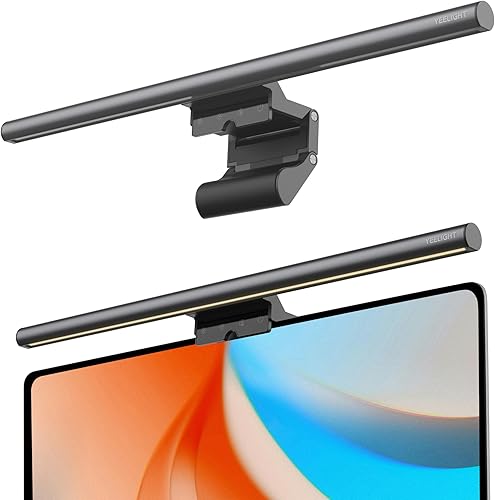
The YEELIGHT Monitor Light Bar YLYTD-0037 is a USB powered LED screen bar designed for home office workers, programmers, designers and gamers using flat or curved monitors. It sits on top of your display to light your desk without glare or screen reflection.
Standout performance comes from its eye-care optics with RG0 blue light safety, flicker-free light and 250LM of even illumination. With stepless dimming and 2700K to 6500K tuning plus three one-touch presets, you can shift quickly from focused cool white to warm relaxing light.
Color accuracy is a major strength thanks to Ra95 CRI and 78 LED beads that render true-to-life tones with minimal shadows. That makes it especially useful for designers and content creators who need consistent color while reducing eye strain during long sessions.
Build quality feels premium with a full aluminum body in dark gray that dissipates heat and keeps a low profile for webcams. The retractable clip fits monitors from 0.3 to 1.1 inches thick and the 1.5m USB cable keeps your desk clean and saves space compared to traditional lamps.
The tradeoffs are modest but worth noting, as there is no auto brightness, remote or app control, so you rely on touch controls. Overall, this is an excellent pick for anyone wanting comfortable, accurate and clutter-free desk lighting for work, study and gaming.
Light Source: 78 LEDs, 250LM, 5W USB powered with Ra95 CRI for true color fidelity. Color temperature ranges from 2700K warm to 6500K cool with stepless dimming and touch control.
Fit and Build: Full aluminum body in dark gray, 17.6 inches wide, 1.1 pounds. Retractable clip fits flat and curved monitors from 0.3 to 1.1 inches thick without blocking webcams.
In the Box: Monitor light bar with 1.5m USB cable for indoor home office use. Backed by a 1 year manufacturer warranty.
Pros
- Extra wide illumination covers large monitors and desks evenly
- Eye-care asymmetric beam minimizes screen glare and fatigue during long sessions
- Easy stepless brightness and color adjustment with helpful memory function
- Quick, tool-free installation with stable clip for most monitor types
Cons
- Plastic housing feels less premium than metal alternatives
- No auto-brightness sensor, remote control or smart features
- Requires a nearby USB port or adapter for power due to wired design
The SAMPHON 15.7-inch Monitor Light Bar is a USB powered screen bar designed for home office users, students, coders and gamers who spend long hours at a desk. It mounts on top of your monitor to light your workspace without taking up desk space.
Its standout feature is the 45-degree asymmetric lighting that puts up to 900 lux on your keyboard and documents while keeping light out of your eyes and off your screen. With 3 color temperatures from warm 3000K to cool 6500K plus stepless dimming, you can easily tune it for focused work, reading or relaxed gaming.
Setup takes seconds thanks to the weighted clip that fits flat, curved, thin and thick monitors without tools. The matte black bar looks clean and minimal, and the side mechanical knob makes power, color and brightness adjustments quick with one hand.
Build quality is functional rather than premium, as the housing and shade are plastic instead of aluminum. It also lacks advanced extras like auto brightness, wireless remote or app control, and it needs a free USB port or adapter nearby.
Overall, this is a practical and space saving upgrade for anyone dealing with eye strain, glare or a dim desk setup. If you want wide, even and customizable monitor lighting with simple controls, it delivers strong value for offices and gaming stations.
Brand: SAMPHON
Size: 15.7-inch ultrawide LED bar for full desk coverage
Brightness: Up to 900 lux central brightness with stepless dimming
Color Temperature: 3 modes from 3000K warm to 6500K cool white
Lighting Design: 45-degree asymmetric beam for glare-free eye care
Power Source: USB powered, compatible with computer, adapter and power bank
Material and Color: Plastic housing and shade in Black
Mounting: Tool-free counterweight clip for flat and curved monitors
Pros
- Independent front task light and RGB ambient light can be used together or separately
- Glare-free asymmetric lighting helps reduce eye fatigue for work, study and late night gaming
- Tool-free clip installs in seconds and keeps the desk free of lamp bases and clutter
- Memory function saves favorite brightness and color for instant setup
- USB-C power offers flexible placement for home, office and dorm desks
Cons
- Plastic housing feels less premium than metal monitor lamps
- 150-lumen output is ideal for personal desks but may feel underpowered for large workspaces
- No remote or app control, all adjustments require using the onboard buttons
The SAMPHON SC03 is a 15.75-inch monitor light bar that pairs task lighting with gaming ambiance in one unit. It is designed for remote workers, students and gamers who spend long hours at a desk and want both focus and mood lighting without extra lamps.
Front illumination uses a 45-degree beam to light the keyboard and desk evenly while keeping glare off the screen and out of your eyes. In use, that means less eye fatigue during late work sessions, plus three color temperatures and dimming to shift from cool focus to warm relaxation.
The bar mounts with a retractable clip lined with soft silicone, so it grips flat, curved, thin or thick monitors without tools or damage. The polished black plastic housing looks modern and lightweight at 15.75 inches wide, and dual tactile buttons give separate control of front and RGB lights with helpful memory for last settings.
No lighting product is perfect, and this one uses a plastic body instead of premium aluminum, so it feels functional rather than luxurious. Maximum output of 150 lumens suits personal desks but may feel limited in very bright rooms, and control is manual only with no remote or app.
Overall, the SAMPHON RGB Monitor Light Bar delivers strong value as a two-in-one eye care lamp and gaming backlight. If you want a clean, USB-C powered setup that improves comfort by day and adds color by night, it is a smart pick for home and office desks.
Model SAMPHON SC03 measures 15.75L x 0.78W x 3.15H inches with a black polished plastic housing for modern setups. It mounts to the top of the monitor to save desk space and reduce clutter.
Lighting includes a dimmable front light with 3 color temperatures plus an independent 9-mode RGB backlight. It offers a 45-degree beam angle, 150 lumens maximum output, 5 watts power and LED sources for front and rear.
Power is via USB-C corded electric at 5 volts for use with laptops, adapters or power banks. The universal table mount clip fits flat and curved monitors with a soft pad to prevent scratches.
In the box you get the RGB Monitor Light Bar, USB power cable and user manual with 1-year manufacturer warranty.
Matching a Part to Your Build
If your setup is a dark room battlestation for long gaming or coding nights, prioritize dual light with strong beam control. The BenQ ScreenBar Halo 2 LED Monitor Light Bar shows this approach with front light plus wide adjustable backlight, stepless brightness, 2700K to 6500K range, and a wireless controller with memory for favorite settings. The Quntis Computer Monitor Light Bar with Backlight follows a similar idea with front plus back sources, multiple lighting modes, and a remote, which suits users who want ambiance for play and focused light for work without adding a desk lamp.
If your setup is a compact student desk or a budget home office, keep it simple and focus on glare free front light and easy dimming. The Quntis Computer Monitor Lamp centers on asymmetrical desk illumination, auto dimming support toward 900 lux, 3000K to 6500K adjustment, and high Ra98 rendering from 78 LED beads per the spec sheet. The Monitor Light Bar, Eye-Care USB Computer Monitor offers a similar focused brief with a 15.7 inch bar, 45 degree asymmetric pattern, and 900 lux central brightness across a 35 inch by 25 inch area, which can feel ample on a small desk. Pair either with ideas from our Budget Build Guides if you are balancing the whole setup cost.
If your setup leans toward streaming, casual play, and mood lighting, consider how front task light and rear color interact. The RGB Monitor Light Bar, Eye-Care Dual Light Reading combines a dimmable front section with a 9 mode RGB backlight on a 15.75 inch USB-C bar, so you can keep neutral white for homework and switch to color for movies. The YEELIGHT Monitor Light Bar takes a cleaner path with a full metal body, 78 beads, Ra95 rendering, RG0 blue light handling, and 2700K to 6500K control, which suits flat and curved monitors where you want webcam clearance and steady everyday light.
Common Mistakes
Mistake one is buying before you measure fit. A clip that suits thick office monitors might sit loose on an ultra slim gaming panel, and a tall bar might crowd a centered webcam. Check thickness support such as 0.17 inch to 2.36 inch or 0.3 inch to 1.1 inch per the spec sheet, confirm curve support such as 1000R to 1800R if you use a curved screen, and leave room so the bar does not press on the display.
Mistake two is running cool white at full brightness all night. High output and daylight color temperatures can feel harsh in a dark room and work against the comfort you wanted. Start dim and warm within the 2700K to 6500K or 3000K to 6500K range, then raise output only until keys and paper read clearly without halo on screen.
Mistake three is expecting a bar to replace good room lighting or good posture habits. A front only bar will not lift a pitch black wall behind you, and an RGB rear glow alone will not light your keyboard for long typing. Match the design to the gap: add back bias for contrast, add front task light for desk work, and keep breaks, viewing distance, and screen height in mind.
Who Should Wait or Buy Differently
A monitor light bar is not ideal for every desk, so pause if your room already has soft, even light that keeps screen and walls close in brightness or if you do color critical proofing in a controlled viewing booth where any extra spill could mislead you. It is also not a good fit if your monitor has an unusual top hump, a built in camera module with no clearance, or a very thick chassis outside the listed clamp range. In those cases you might be better with a quality bias strip behind the desk, a repositioned room lamp, or waiting until you change monitors and can pick mounting and control features together.
Frequently Asked Questions
Do monitor light bars actually reduce eye strain?
They can reduce perceived strain by lowering harsh contrast and cutting screen reflections, but they do not treat eye conditions. Owners commonly report less fatigue in dark rooms when front light is even and back glow softens the wall behind the display. Keep expectations modest and pair lighting with breaks and proper viewing distance.
Should I pick front light, backlight, or both?
Pick front light if your keyboard and papers feel dim, pick backlight if a bright screen floats in a dark room. If you both work late and watch or play in the same chair, a dual design with independent control gives you task light for focus and soft color for relax time. Check dimming range and memory so your preferred mix returns each power on.
What color temperature and brightness should I use?
Many users prefer warmer settings near the low end of the 2700K to 6500K span at night and more neutral settings during the day. Start at low brightness, then raise it until text looks clear without glare, using auto dimming toward around 900 lux if your bar offers it. If colors look dull or skin looks off, favor higher rendering such as Ra95 or higher and avoid pushing saturation from RGB modes during work.



Write Your Review
No reviews yet. Be the first to share your experience!