

You settle in for a night shift with two monitors glowing, yet your ceiling light bounces off one screen while your keyboard sits in shadow. A bulky desk lamp only makes it worse, crowding your mousepad and throwing uneven pools across the center gap. That frustration is why the best screen light bar for a dual monitor setup matters so much, it lays smooth, directed light on your desk without washing out either display.
We looked at ten current options from Quntis, BenQ, ONEMIX and LedDeskLamp-Pzloz to see how they handle real dual screen quirks like dark corners, mismatched curves and webcam clearance. This guide is for coders, designers, students and gamers who want calm, eye friendly light across both panels. If you are pairing new displays, our notes on QD OLED vs WOLED differences can help you match lighting to your panel type and viewing distance.
This article contains affiliate links. If you buy through one of our links, CustomPCGaming may earn a commission at no extra cost to you. Commissions never influence which products we recommend or how we rank them. Read our Affiliate Disclosure for details.
Quick Picks at a Glance

Prime Quntis 17.7 Inch Curved Monitor Light Bar with RGB

Quntis Curved Monitor Light Bar 26in for 34in

Pzloz 24W Eye Care LED Desk Lamp with Clamp

BenQ ScreenBar Halo 2 LED Monitor Light Bar

Quntis Monitor Light Bar with Auto-Dimming

Quntis Monitor Light Bar with Backlight

Prime Quntis 26in Curved Monitor Light Bar for 34in

Quntis RGB Monitor Light Bar with Remote
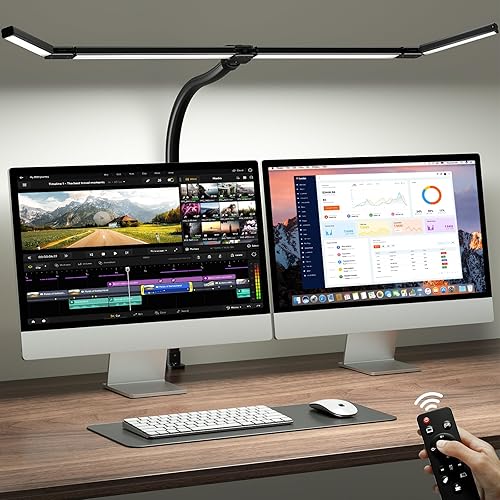
ONEMIX 42-Inch LED Desk Lamp with Clamp

Prime Quntis 20.1" Monitor Light Bar with Remote
As an Amazon Associate we earn from qualifying purchases. Product prices and availability are accurate as of the date/time indicated.
Pros
- Powerful, even front light with no glare or flicker for eye comfort
- Vibrant RGB backlight with music sync adds fun to gaming setups
- Works on curved and flat monitors with secure, scratch safe clip
- Remote and touch dual control with memory is convenient for daily use
Cons
- Corded USB power requires an available port near your monitor
- Indoor use only with no waterproofing for other environments
- Single 17.7 inch bar may feel short for ultrawide or dual monitor coverage
The Quntis 17.7 inch curved monitor light bar is built for remote workers and gamers who live on a single curved setup from morning to night. It pairs a glare free 900 lux task light up front with a colorful RGB glow behind the screen for work and play.
In daily use, the front light clearly illuminates keyboards and desks without reflecting on the display or shining in your eyes. The rear RGB offers 13 presets plus 10 music reactive modes, so you can keep a calm solid color for focus or let it pulse with games, movies and playlists.
Build quality feels solid with a matte black aluminum bar and a weighted clip that fits 17 to 34 inch curved and flat monitors. Non slip rubber protects the screen while the flat top works as a centered base for a webcam, which saves desk space for calls and streaming.
Control is flexible with both remote and touch options, plus stepless dimming from 3000K to 6500K and memory for your last settings. As a corded USB powered lamp for indoor use only, you will need a free port nearby and a second bar may help for very wide dual monitor setups.
Overall, this is a smart pick for gamers, creators and home office users who want eye comfort, true Ra95 color and fun ambience in one device. If you want a stable, flicker free curved monitor light with real music sync, this Quntis bar delivers strong value.
Pros
- Excellent coverage for large curved and flat ultrawide monitors with minimal dark corners
- Eye friendly design with anti glare optics, low blue light and high color accuracy
- Flexible front plus RGB back lighting for both productivity and ambient gaming setups
- Stable clamp mount saves desk space and includes remote, auto dimming and memory function
Cons
- Oversized for standard 24 to 27 inch monitors, best suited only for large ultrawide screens
- Corded USB power required, so it needs a free USB port or adapter near the desk
- Remote only operation means losing the remote can limit convenient control
The Quntis ScreenLinear Curved monitor light bar is a 26 inch dual light built specifically for 34 inch and larger curved ultrawide monitors. It is made for gamers, remote workers, creators and students who want wide, glare free desk lighting without using desk space.
Standout performance comes from the foldable dual bar design that follows monitor curvature for even coverage with up to 1400 lux in the center. The front light offers stepless 3000K to 6500K adjustment plus auto dimming, while 15 RGB rear modes add immersive bias lighting for movies and late night gaming.
Build quality feels solid with a matte aluminum bar, reinforced 3 section clamp and silicone anti slip pads that fit screens up to 3.35 inches thick. The right angle USB C cable leaves room for a webcam, and the included remote plus memory function make daily use simple and tidy.
The main tradeoff is size, as this 26 inch bar is too wide for smaller flat monitors and best reserved for ultrawide setups. It also requires corded USB power and relies on a small remote, so you will need a nearby port and a safe place to keep the controller.
Overall, this is an excellent pick for ultrawide curved monitor owners who want bright, eye friendly task light by day and colorful ambient light by night. If you work long hours or game in a dark room, it delivers comfort, coverage and style in one clean mount.
Pros
- Very bright 24W output that easily covers a full desk or dual monitor setup
- Highly flexible positioning that stays in place when adjusted
- Eye comfortable, even light with no noticeable flicker or glare
- Quick clamp installation and convenient wireless remote included
- Sturdy metal build with clean modern look in black
Cons
- Remote requires a separate battery and can occasionally lose connection and need a power reset
- Corded power only with no built-in rechargeable battery for portable use
- Clamp mount only, with no freestanding base option for desks that cannot be clamped
The Pzloz CLED-5501C is a clamp style architect LED desk lamp designed for home offices, dorm desks and creative workstations. It is built for students, remote workers, drafters and crafters who need bright, adjustable light without sacrificing desk space.
With 5 color temperatures from warm 3000K to cool 5500K and 5 brightness levels, you get 25 combinations plus dedicated reading and night modes. In daily use the max output easily lights a dual monitor setup, while lower settings are comfortable for late night reading and the remote makes switching effortless.
The design centers on flexibility with a 360-degree base post, 180-degree folding swing arms and a 270-degree rotating dual bar head. The metal clamp installs in a minute or two and holds firm during adjustments, and the black painted finish looks clean and professional.
There are a few tradeoffs to know. The remote needs its own battery which is not included, and some users report occasional glitches that require unplugging the lamp to reset. It is corded only and clamp only, so it will not work as a portable light or on desks where a clamp cannot be used.
Overall, this is a practical, eye friendly work light that delivers excellent coverage, customization and value for study and office use. If you want a sturdy, super adjustable lamp with remote convenience for long work hours, it is an easy recommendation.
Model CLED-5501C in Black is a corded electric 24W LED desk lamp with dual light sources and clamp mounting for indoor office use. Included components are the desk lamp, wireless remote control and power cord.
Lighting specs include 5 color temperatures from 3000K to 5500K, 5 brightness levels from 20 percent to 100 percent, high color rendering with CRI over 90, and flicker free, glare free performance with light and shadow reduction technology.
Adjustability features include a 360-degree standing pole, 180-degree foldable swing arms and a 270-degree rotatable lamp head with 45-degree tilt asymmetric design. Control is by wireless remote with touch operation and smart light sensor functions.
Pros
- Completely glare free on screen with even, flicker free desk coverage
- Excellent color rendering with CRI over 95, tested not to interfere with calibration work
- Premium aluminum build with stable clamp that fits flat and curved monitors
- Intuitive wireless controller with auto dimming, motion activation and memory for favorite settings
- Blue light hazard free illumination designed for extended eye comfort
Cons
- Costs more than many basic monitor light bars
- Front light beam is narrow and can feel stark at high brightness in very dark rooms
- Requires a USB connection for power, so cable routing is still needed
The BenQ ScreenBar Halo 2 is a USB powered LED bar that clamps to the top of your monitor to light your desk without glare. It is designed for remote workers, students, coders, gamers and visual creators who spend long hours in front of a screen.
Its dual lighting system pairs a glare free front light with a wide ambient backlight to balance brightness around your display. In daily use, the front beam stays off the screen while the back glow reduces eye fatigue, and stepless brightness plus 2700K to 6500K temperature make it easy to tune for day or night.
Build quality feels premium with an aluminum bar, polished dark grey finish and a sturdy clamp that fits flat and 1000R to 1800R curved monitors. The wireless dial controller sits neatly on the desk and shows exact values, so adjustments feel precise and effortless.
It is not perfect, as the slim front beam can feel focused and stark compared to a diffuse desk lamp. Some users also wish the backlight threw further down the wall, and you still need to route a USB cable for power.
Overall, the Halo 2 is one of the most polished and eye friendly monitor lights you can buy for focus and comfort. If you want accurate color, smart auto features and zero screen glare in a clutter free setup, it is an excellent upgrade.
Model: BenQ ScreenBar Halo 2 in Dark Grey with minimalist aluminum bar and polished finish. Mounts on top of monitors 0.17 to 2.36 inches thick, including 1000R to 1800R curved screens.
Lighting: Dual front and back LED system with stepless brightness, 2700K to 6500K color temperature, CRI over 95, flicker free and blue light hazard free output.
Controls: Wireless dial plus touch controls for brightness, color temperature and modes, with display readout, ambient light sensor, motion sensor and memory for favorite settings.
Power and size: 5W USB powered operation, 19.7 inch wide bar, 800g weight, includes light bar, wireless controller, adapter and webcam accessory for indoor office and study use.
Pros
- No glare on screen thanks to asymmetrical optical design
- Auto dimming plus full manual brightness and color temperature control
- High Ra98 CRI delivers natural, accurate color for work and reading
- Sturdy aluminum construction with space saving clip mount
- Flicker free, low blue light design helps reduce eye fatigue
Cons
- Requires constant USB connection, no built in battery for portable use
- Clip fit may vary on ultra thin or curved monitors
- Touch controls can be sensitive and take time to master in the dark
The Quntis Computer Monitor Lamp is a USB powered light bar designed to sit on top of your monitor and light your workspace without lighting your screen. It is built for students, office workers, designers and gamers who spend long hours at a desk and want more comfortable lighting.
Its standout feature is the asymmetrical optical design that directs light downward onto the desk, eliminating reflections and screen glare. The built in ambient sensor auto adjusts output to maintain balanced illumination, while stepless dimming and 3000K to 6500K color tuning let you shift from warm reading light to cool focus light.
In daily use, the 78 LED array with Ra98 color rendering produces even, natural looking light with minimal shadows. Colors look accurate and text is easier to read, which is especially helpful for design work, studying and late night sessions with reduced eye strain.
Build quality is solid with a slim lacquered aluminum bar and a weighted clip that mounts securely without tools. Touch controls are responsive, USB power keeps wiring simple, and the compact profile saves valuable desk space compared to a traditional desk lamp.
It is not perfect, as it needs constant USB power and the clip may not fit every ultra thin or curved display perfectly. Overall, this is a practical, eye friendly upgrade for any home office setup that delivers focused, customizable light where you need it most.
Finish and Build: Lacquered aluminum light bar with weighted monitor clip for stable, tool free mounting.
Lighting Specs: 78 LED beads, 3000K to 6500K adjustable color temperature, stepless brightness with auto dimming sensor.
Eye Comfort Features: Flicker free output, low blue light design, asymmetrical optics for no screen glare, ultra high Ra98 color rendering.
Size and Power: 15.7 inch wide, 0.78 inch slim profile, USB powered with touch controls for easy operation.
Pros
- Effectively eliminates screen glare while lighting the desk evenly
- Versatile front and back lighting suits work, gaming, reading and crafting
- Quick, stable installation on curved and thin monitors
- Convenient remote with intuitive touch controls and memory function
- Excellent color accuracy for designers and video calls
Cons
- Rear backlight effect is subtle and brightness only, no color adjustment
- Corded USB power cable can be tricky to hide for a clean setup
- IR remote requires line of sight to work reliably
The Quntis LI-HY-0214-GY is a 16.1-inch monitor light bar built for remote workers, gamers, students and creators who need comfortable desk lighting. It mounts on top of your monitor to free up desk space while avoiding screen glare.
Its standout feature is dual front and rear lighting with Work, Immersive and Design modes for focus, ambiance or balanced illumination. With 84 LEDs, stepless dimming, adjustable color temperature and Ra95 rendering, it delivers even, flicker free light that feels easy on the eyes.
Build quality feels solid with a matte grey aluminum body and a patented sliding weighted clip. Installation takes seconds and fits flat, ultra thin and curved monitors securely, while the touch remote with glowing buttons makes control simple.
It is not perfect, as the rear backlight is subtle compared to RGB setups and adjusts for brightness only. The USB cord can be hard to hide, and the IR remote needs a clear line of sight to respond.
Overall, this is an excellent upgrade for anyone wanting eye comfort, true colors and flexible control. If you want glare free lighting for work, study, gaming or crafts, this Quntis light bar is easy to recommend.
Model LI-HY-0214-GY, 16.1 inch grey aluminum light bar with 84 LEDs, 7.5 watts, 5V USB powered. Mounts by hanging clip for flat and curved monitors.
Features adjustable color temperature, stepless dimming, dimmable backlight, flicker free and memory function. Controlled by smart IR touch remote, with front and rear light sources and Ra95 CRI.
In the box you get the light bar, remote control, power cable, battery and user manual. Designed for indoor office, study, bedroom and gaming setups.
Pros
- Perfect fit for 34 inch and larger ultrawide curved screens where straight bars fall short
- Flexible dual bar adjustment for both wide coverage and concentrated task lighting
- Excellent color accuracy with RA98 for designers, editors and movie fans
- Thoughtful eye care features including asymmetric glare free optics, auto dimming and memory
Cons
- Bulky 26 inch size is overkill for standard 24 to 27 inch flat monitors
- No adjustable color temperature range listed in specs, limiting warm to cool control
- Requires wired USB-C power, so cable management is needed for a clean setup
The Quntis Glow 26 inch is a curved monitor light bar made specifically for 34 inch and larger ultrawide curved monitors from 800R to 3000R. It is ideal for gamers, remote workers, students and creators who need wide, even desk lighting without screen glare.
Its standout trick is the dual independently pivoting curved bars that you can spread outward for full desk coverage or fold inward for bright, focused task light. With 112 LEDs and high RA98 color rendering, colors look true and text stays clear during late night work, gaming or video calls.
The asymmetric optical design pushes light down onto the desk and away from your eyes and screen for comfortable, flicker resistant illumination. The auto dimming sensor adjusts brightness to ambient light in real time, while one touch controls and power off memory make daily use effortless.
Build quality feels solid with a patented clamp that grips flat, curved and thick monitors up to 3.35 inches using non slip silicone. The included USB-C adapter and 5.9 ft cable provide stable power, and setup takes just minutes with no desk space lost.
The large 26 inch footprint is not ideal for smaller flat monitors, and color temperature options are not clearly specified. Overall, it is an excellent upgrade for ultrawide curved monitor owners who want flexible coverage, true color and hands free eye care.
Length: 26 inches (66 cm) curved bar, Black finish, Model LI-HY-0213-GY by Quntis.
Compatibility: Ultrawide curved monitors 34 inches and up, 800R to 3000R curvature, plus flat and irregular backs up to 3.35 inches thick.
Lighting: 112 LED beads, high RA98 CRI, asymmetric glare free optics, auto dimming sensor, one touch brightness, power off memory.
Power and Build: USB-C power with included adapter and 5.9 ft cable, patented clamp with non slip silicone base, 2.61 lb weight.
Pros
- Excellent coverage for 27 inch and larger, ultrawide and 1500R curved monitors
- Remote plus stepless dimming makes brightness and color tuning fast and precise
- High eye care specs with flicker free, RG0 rating and Ra95 true color
- Dual front and back lighting reduces contrast strain while boosting desk ambiance
- Premium matte aluminum construction feels sturdy and modern
Cons
- Requires USB power and cable routing, no built-in battery for wireless use
- Remote control needs line of sight and batteries, no app or voice control
- 20-inch size may feel oversized on small 21 to 24 inch monitors
The Quntis ScreenLinear RGB is a 20-inch monitor light bar built for large, flat, curved and ultrawide displays. It is aimed at remote workers, creators, students and gamers who want brighter desk light without screen glare.
In daily use, the front white light delivers even, shadow free illumination that eases eye strain during long work sessions. The 15 RGB rear modes plus 4 color temperatures and stepless dimming let you switch quickly from focus white to cozy gaming ambiance.
Build quality stands out with a light grey aluminum body, matte finish and finely textured shade that softens output. The patented sliding weighted clip feels secure on thick monitors, while the desktop touch remote and long 1.8m USB-C cable keep setup clean and webcam friendly.
There are a few tradeoffs to note. It needs constant USB power, so cable management matters, and control relies on the physical remote with no app support. The wide 20-inch profile is excellent for large screens but can overhang smaller monitors.
Overall, this is one of the most versatile picks for eye comfort plus desk aesthetics. If you use a large or curved monitor and want pro level lighting with fun RGB options, the Quntis RGB bar is an easy recommendation.
Bar Length: 20.08 inches designed for large, flat, curved and ultrawide monitors 1500R and above.
Lighting: Front 3000K to 6500K white light with stepless dimming plus 15 RGB backlight modes and over 240 combinations.
Eye Care: RG0 rating, flicker free, Ra95 color rendering and asymmetric optical design to prevent screen reflection.
Power and Build: 5V USB-C powered, 7.5W, 144 LEDs rated for 50,000 hours in matte aluminum housing.
Control and Mount: Desktop touch remote, memory function, sliding weighted clip mount, 1.8m cable with 90-degree connector.
Choose this 20-inch model if you have a 27-inch or larger monitor, a 34-inch ultrawide, or a curved display. Smaller screens under 24 inches may be better served by a compact bar.
Consider your use case. Front only mode is best for work, reading and video calls, while RGB backlight adds immersion for gaming, movies and streaming.
Check monitor thickness and webcam placement before buying. The sliding counterweight clip fits most monitors and leaves center space for a camera, with USB power from your monitor, PC or adapter.
Pros
- Ultra-wide coverage ideal for dual monitors, drafting tables and sewing stations
- Highly customizable lighting with presets, brightness levels and 1, 2 and 4-hour timers
- Space-saving clamp mount frees up valuable desk surface
- Remote and button controls allow easy adjustment from your chair
- Energy-efficient 24W LED with soft, even, flicker-free distribution
Cons
- Corded power and IR remote require a nearby outlet and line of sight
- Large 42-inch bar may overwhelm small desks or compact nightstands
- Clamp only fits desks up to 2.75 inches thick and is for indoor use only
The ONEMIX LED Desk Lamp with Clamp is a 42-inch, four panel light bar designed for dual monitors, large desks and creative stations. It is built for remote workers, students, gamers and crafters who need bright, even coverage without desk clutter.
With up to 1800 lumens, five color temperatures from 3200K to 6500K and five brightness levels, it offers 25 lighting combinations for any task. Six preset modes for Work, Game, Study, Relax, Night and Mother and Baby plus 1, 2 and 4 hour timers make daily use simple and convenient.
The 27.7-inch flexible arm bends up to 180 degrees while each light panel rotates independently to focus or spread light up to 80 inches wide. A heavy duty metal clamp with anti-slip pads grips desks up to 2.75 inches thick, and both remote and onboard buttons give flexible control.
Its large footprint is overkill for small nightstands or compact dorm desks, and the corded design needs a nearby outlet. The infrared remote also needs line of sight to work, and the clamp will not fit extra thick tabletops.
For anyone lighting a dual monitor setup, drafting table or sewing station, this lamp delivers exceptional coverage, customization and value in one space saving package. If you want wide, flicker-free light you can adjust from your chair, it is an excellent upgrade for productivity and comfort.
Light Bar: 42-inch 4-panel rotatable design, 112 LEDs, up to 1800 lumens, expands to 80 inches coverage.
Lighting Control: 5 color temperatures from 3200K to 6500K, 5 brightness levels, 6 preset modes, 1, 2 and 4-hour timers.
Mounting and Adjustability: 27.7-inch flexible arm with 180-degree bend, clamp fits desks up to 2.75 inches thick.
Power and Operation: 24W corded electric, 24V DC adapter, push button and IR remote control, indoor use only.
Pros
- Wide, even, glare-free illumination across desk and keyboard
- Secure weighted clip works with curved monitors and stays stable
- Responsive remote with backlit buttons for easy use in dark rooms
- Adjustable brightness and color temperature for day and night use
- High CRI, flicker-free light reduces eye fatigue during long sessions
Cons
- Requires stable 10W USB power source, may flicker on low power PC ports
- Backlight offers limited color customization compared to RGB bias lights
- Corded indoor only design limits placement options
The Quntis ScreenLinear Glow Plus PHX009S-H is a 20.1-inch dual light monitor bar designed for office workers, students, gamers and creators who spend long hours at their desk. It combines front task lighting with rear ambient backlight to brighten your workspace without lighting up your screen.
In real world use, the wide front beam evenly covers keyboards, documents and desktops while the backlight softens contrast between the bright monitor and dark room. Three modes let you switch between focused front light, cozy back glow, or both together, with stepless brightness and color temperature for day to night comfort.
Build quality feels premium with a metallic gray finish and a patented sliding weighted clip that fits flat and curved monitors of various thicknesses. The clip uses a heavy counterweight with a non-slip finish, so it sits securely without tools or screen damage and stays clear of most webcams.
There are a few tradeoffs to note. It needs a stable USB power source to avoid flicker on low power ports, and the backlight lacks full RGB customization for users who want gaming style effects. It is also corded only and not water resistant, so it is strictly for indoor desk setups.
Overall, this is an excellent value alternative to premium monitor lights, offering wide glare-free coverage, true color Ra95 LEDs and a convenient backlit remote. If you want to reduce eye strain and upgrade your desk setup for work, study or play, it is easy to recommend.
Model: PHX009S-H, Color: Gray, Size: 20.1 inch front bar with extended rear backlight zones for wider coverage.
Light Source: 143 LEDs with 88 front plus 55 rear, Ra95 CRI, flicker free performance with adjustable color temperature and stepless dimming.
Control: Wireless IR remote with illuminated buttons, Mount: Patented sliding weighted clip for flat and curved monitors, Power: Corded electric via Type-C cable.
Buying Guide for Dual Screen Light Bars
Coverage Width and Mount Stability Across Two Screens
Width decides whether you light both screens evenly or leave a dim valley in the middle. A 20.1 inch bar like the Quntis Monitor Light Bar with Remote suits a single 27 inch display well, so most dual users run one bar per monitor for symmetry. If you want one fixture to span both, the ONEMIX LED Desk Lamp with Clamp stretches to 42 inches with four adjustable panels and aims to cover up to 80 inches when angled outward. Two matching bars also let you tune each side separately when one monitor runs brighter for gaming while the other shows documents.
Mount grip is just as vital, because dual arms wobble and curved backs reject weak clips. Look for sliding weighted clips that hug thin and thick bezels, like on the Quntis Curved Monitor Light Bar for 34 inch and the Quntis Curved Monitor Light Bar 15 RGB Backlight for large ultrawides. They leave room for a webcam on top and free desk space, which pairs nicely with 1440p 240Hz OLED gaming monitors that sit low on compact stands. For mixed pairs, measure both top bezels before you commit, since a thick office panel and a slim gaming panel may need different clip depths.
Glare Control and Eye Comfort for Long Hours
Good dual lighting points down at your desk, never into your eyes or back onto your panels. The BenQ ScreenBar Halo 2 LED Monitor Light Bar uses an 18 degree asymmetric beam to keep reflections off, while the Quntis Computer Monitor Lamp uses a 45 degree cutoff with the same goal. Both add flicker free output with RG0 low blue light design, so long spreadsheets and late edits feel calmer. Position each bar centered and tilt it slightly forward so the cutoff line lands on your desk mat, not on the lower bezel.
Brightness intelligence helps when your two screens differ in output. Auto dimming sensors on the Quntis Computer Monitor Lamp and the Quntis Curved Monitor Light Bar for 34 inch read room light and hold comfortable desk illumination without manual fiddling. A two hour auto off timer and power off memory also nudge healthy breaks, a welcome aid during marathon sessions like RX 9060 XT 16GB vs intel arc B580. You can still override with stepless manual dimming from warm 3000K to cool 6500K when you want a cozier evening tone.
Color Temperature, Color Accuracy and Backlight Mood
Color flexibility lets you shift from warm paper tones to crisp daylight as your day moves. Most picks here span 3000K to 6500K with stepless dimming, while the BenQ ScreenBar Halo 2 LED Monitor Light Bar stretches from 2700K for extra warm evenings. For design work, prioritize high color rendering, such as Ra98 on the Quntis Curved Monitor Light Bar 15 RGB Backlight and CRI over 95 on the BenQ, so prints and photos look true under lamplight. Stepless control matters for dual work because you can match both sides precisely instead of jumping between harsh presets.
Rear glow softens the contrast between bright screens and a dark room, which your eyes will thank you for on dual setups. The Quntis 17.7 inch Curved Monitor Light Bar RGB offers 13 presets plus music sync modes that react to sound, while the Quntis Computer Monitor Light Bar with Backlight gives Work, Immersive and Design modes for focused or relaxed moods. That ambient layer shines for movies and RPGs, much like pairing RTX 5080 cards for 4K gaming with bias lighting. One remote can often drive two matching Quntis bars together, which keeps dual screen moods in sync without extra clutter.
Controls, Power and Space Saving Design
You will adjust lights often across two screens, so controls should stay within reach. The Quntis RGB Monitor Light Bar with Remote and Quntis Monitor Light Bar with Remote pair touch bars with remotes for brightness, temperature and RGB effects, and the BenQ wireless dial shows exact values on a small display. All run on USB-C power with long cables around 1.8 meters, so you can draw from your monitor or dock without extra bricks. Look for memory that restores your last settings after power loss, so both monitors wake to the same look every morning.
If your desk is already crowded by two stands, mounting style decides everything. Bar style options perch on top of each monitor and reclaim nearly all desk area, while the Pzloz Led Desk Lamp for Office Home uses 360 degree rotation with foldable arms and a clamp for angled task light. The ONEMIX LED Desk Lamp with Clamp goes further with a 27.7 inch flexible arm and heavy duty clamp that grips desks for drafting, sewing or wide dual arrays. Clamp lamps need a sturdy edge up to about 2.75 inches thick, so verify your desk overhang if you use a cable tray underneath.
Final Thoughts
If you want refined per monitor lighting with premium comfort, BenQ ScreenBar Halo 2 LED Monitor Light Bar is a polished fit, while ONEMIX LED Desk Lamp with Clamp suits wide dual arrays that need one sweeping source.
Frequently Asked Questions
Do I need one or two light bars for dual monitors?
In 2026, most people get the most even result with one bar per monitor, especially if your screens differ in size or curve. That keeps brightness symmetric and avoids a bright center with dim edges. The exception is an extra long clamp fixture like the ONEMIX LED Desk Lamp with Clamp, which can wash across both displays when you angle its four panels outward. Two separate bars also give you independent dimming for mixed work and play.
Will a screen light bar fit my curved or ultrawide monitor?
Most newer bars fit flat and curved backs from thin gaming bezels to thick office shells, often up to around 3.35 inches thick. Models like the Quntis Curved Monitor Light Bar for 34 inch and Quntis Curved Monitor Light Bar 15 RGB Backlight are shaped for 800R to 3000R curves and ultrawide widths. Check your top bezel for webcam clearance and leave a little room for the USB-C cable bend. A flat top clip can even serve as a small camera base.
Do light bars cause screen glare or distort colors for creative work?
Quality bars use asymmetric optics that throw light down onto your desk, not forward onto your panel, so glare stays minimal when mounted correctly. High rendering models with Ra95 to Ra98 help preserve true hues for photo and video tasks. If color decisions are critical, dim the front light slightly and use a soft back glow to reduce contrast without tinting your view. That balance keeps text sharp while protecting color judgment.
How are monitor light bars powered and can I leave them on overnight?
Nearly all run on 5V USB-C from your monitor, dock or adapter, with cables long enough to route behind dual stands for a clean look that suits a high class gaming PC build. Many include auto on and off with your display, motion sensing and timers to avoid all night operation. Memory restores your last brightness and temperature, so your preferred dual screen glow returns instantly in 2026 setups.
Browse more picks in our Bias Lighting & Ambient RGB category.
This roundup is not a good fit for every build; consider your target resolution, platform, and budget before buying.




Write Your Review
No reviews yet. Be the first to share your experience!