

When you narrow a 360mm AIO search to the Arctic Liquid Freezer III 360 vs NZXT Kraken 360, you are choosing between two very different philosophies. The ARCTIC Liquid Freezer III Pro 360 is built around thermal efficiency, offset mounting, and functional extras, while the NZXT Kraken 360 is positioned around refined presentation, ecosystem software, and a cleaner showcase look.
If you already know you want a 360mm radiator, the real decision is what matters more for your build in 2026. Do you want maximum cooling per dollar with workstation friendly features, or do you want a centerpiece cooler that ties into lighting and system monitoring? This comparison evaluates both options on design, acoustics, mounting, and everyday ownership so you can match the right cooler to your CPU, case, and platform. Before you buy, remember to check radiator clearance against your case spec sheet and follow the manufacturer mounting instructions, and you can explore more options in our CPU Cooling category.
This article contains affiliate links. If you buy through one of our links, CustomPCGaming may earn a commission at no extra cost to you. Commissions never influence which products we recommend or how we rank them. Read our Affiliate Disclosure for details.
Quick Picks at a Glance

Prime ARCTIC Liquid Freezer III Pro 360 AIO CPU Cooler
As an Amazon Associate we earn from qualifying purchases. Product prices and availability are accurate as of the date/time indicated.
Pros
- Excellent thermal performance for overclocking and high TDP CPUs
- Quieter than previous P12 fans, especially at low to medium speeds
- VRM fan and contact frame add real value beyond standard AIOs
- Clean installation with single visible cable and 6 year manufacturer warranty
Cons
- 360mm radiator requires a large case with dedicated 360mm support
- Heavy 2020g unit can be tricky for first time builders to install
- No RGB lighting or aesthetic options for users who want visual customization
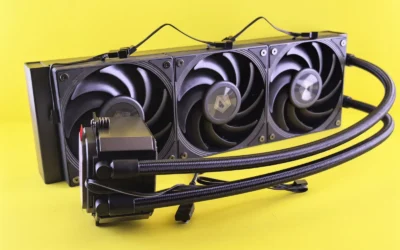
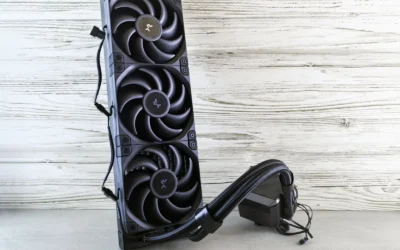
The ARCTIC Liquid Freezer III Pro 360 is a premium 360mm all in one liquid cooler designed for enthusiasts, gamers and creators pushing modern Intel and AMD CPUs. It is purpose built for users who need maximum thermal headroom without excess noise, especially in overclocked or high performance desktop builds.
Standout features translate directly to real world gains. The triple P12 Pro fans push up to 77 CFM at 3000 RPM while staying quieter at low speeds, and native offset mounting aligns the cold plate with the CPU hotspot for more efficient heat transfer. The integrated PWM VRM fan is a rare bonus that helps keep motherboard power delivery cool during long gaming or rendering sessions.
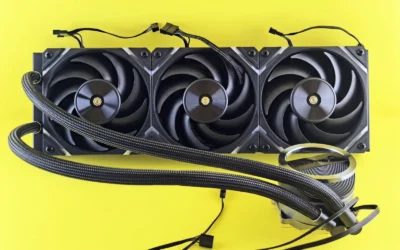
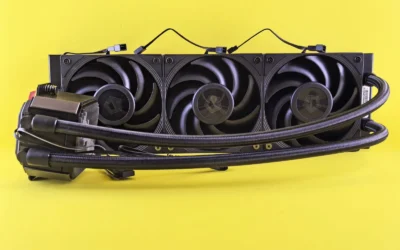
Design and build quality are a clear strength. The radiator and block use a durable mix of metal, plastic and rubber, and integrated cable management routes all fan PWM cables through the hose sheathing. The result is a clean look with only a single cable to the motherboard, plus an included contact frame for LGA1851 and LGA1700 that improves pressure distribution.
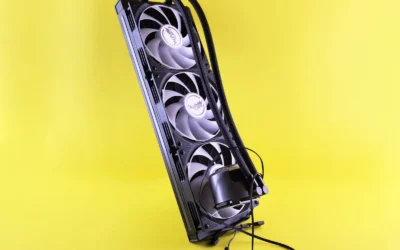
There are some tradeoffs to consider. The large 15.7 inch radiator and 2kg weight demand a spacious case and careful mounting, so compact builds are not compatible. Users looking for RGB lighting or extensive software control will also find the design focused purely on performance and simplicity.
Overall, the Liquid Freezer III Pro 360 delivers class leading cooling efficiency, quiet operation and thoughtful extras that justify its best seller status. For anyone building a powerful, reliable system where thermal performance and longevity matter more than lighting effects, it is an outstanding value and a highly recommended choice.
Model: ARCTIC Liquid Freezer III Pro 360 (ACFRE00180A) - 3 x 120mm AIO
Compatibility: Intel LGA1851, LGA1700 with included Contact Frame, AMD with native offset mounting, Desktop systems
Fans: 3x ARCTIC P12 Pro, up to 3000 RPM, 77 CFM airflow, PWM control
Special Features: Integrated PWM VRM fan, offset cold plate design, integrated cable management with single cable
Material and Dimensions: Metal, Plastic, Rubber, 15.7 x 4.7 x 2.9 inches, Weight 2020g
Power: 4-Pin connector, 12V, 3.96W
Warranty: 6 years manufacturer warranty
How They Compare
Cooling Architecture and Cold Plate Design
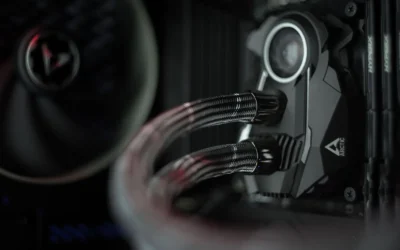
The ARCTIC Liquid Freezer III Pro 360 uses a 360mm radiator with 3 x 120 mm fans and a cold plate that is intentionally shifted toward the CPU hotspot. Per the spec sheet, it offers native offset mounting for both Intel and AMD, which is designed to improve heat transfer where modern chiplets run hottest. It also includes an integrated VRM fan on the pump housing that is PWM controlled to push air over the voltage regulators around the socket, a detail aimed at sustained performance under load rather than just peak CPU temperature.
The NZXT Kraken 360 takes a more conventional centered cold plate approach and focuses its engineering on broad platform compatibility and a polished pump head presentation. Owners commonly report that it provides solid cooling for high performance gaming CPUs, but its headline strength is not offset mounting or auxiliary VRM airflow. If your priority is targeted thermal transfer and added motherboard cooling, the ARCTIC design has a functional edge, while the Kraken appeals if you prefer a proven, widely supported layout with emphasis on visual integration.
Fans, Noise Profile and Everyday Acoustics
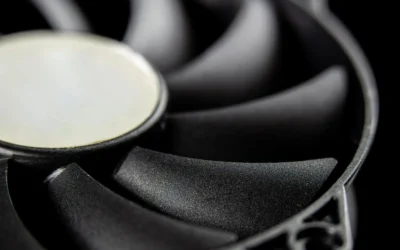
ARCTIC equips the Liquid Freezer III Pro 360 with its P12 Pro fans, which the brand describes as more powerful and quieter than the standard P12, especially at low speeds, with a higher maximum speed for high load scenarios. According to owners, this tuning helps keep noise down during browsing or light gaming while still allowing headroom when the CPU is fully stressed. The integrated VRM fan is also PWM controlled, so you can let the motherboard manage its curve rather than running at a fixed speed.
The NZXT Kraken 360 relies on its own fan package that is tuned to balance airflow with the acoustic expectations of a premium showcase cooler. Per owner feedback, the Kraken fans are generally smooth at moderate speeds and are often managed through NZXT CAM software for custom curves and monitoring. The difference is philosophy, the ARCTIC leans into raw airflow efficiency and low speed quietness as a core selling point, while the NZXT leans into software controlled tuning and a consistent acoustic profile that matches its aesthetic focus. If you value granular software control over fan behavior, that ecosystem may matter more than absolute fan spec.
Mounting, Compatibility and Installation Experience
For platform support, the ARCTIC Liquid Freezer III Pro 360 includes a contact frame for Intel LGA1851 and LGA1700 that is intended to distribute pressure more evenly for longer CPU life and better heat dissipation. Combined with native offset mounting for Intel and AMD, this gives you a more tailored installation that accounts for hotspot location without needing extra brackets. You should still verify socket support for your specific motherboard and confirm that your case supports a 360mm radiator in the top or front, and follow the included instructions for torque and thermal paste application.
The NZXT Kraken 360 is widely regarded for a straightforward installation experience with clear hardware and strong documentation, which many first time builders appreciate. It covers modern Intel and AMD sockets with its included mounting kit, and owners commonly report that the pump head and bracket design make alignment simple. The tradeoff is that it does not advertise an integrated contact frame or offset mounting as a built in feature, so while installation is polished and approachable, it does not offer the same socket specific pressure and hotspot optimizations that ARCTIC highlights for LGA1851 and LGA1700.
Looks, Cable Management and Software Ecosystem
Where the ARCTIC Liquid Freezer III Pro 360 stands out visually is not RGB but integration. Its PWM cables for the radiator fans are routed inside the sheathing of the hoses, so only a single visible cable connects to the motherboard header. This keeps the run from radiator to board clean without needing extra hubs, and it pairs well with builds that prioritize airflow and tidy routing over lighting. The overall look is understated and functional, which suits performance first cases and workstations.
The NZXT Kraken 360 is the opposite statement. Its pump head is designed as a visual centerpiece with an infinity mirror and customizable lighting that is controlled through CAM software, and it is often chosen specifically to anchor the aesthetics of a tempered glass build. That software also provides system monitoring, pump and fan curves, and lighting sync, which adds convenience if you already use NZXT components. If you are planning a themed build around a powerful GPU like those in our top RTX 5070 ti cards for 1440p gaming guide, or a balanced parts list such as our ryzen 5 7600 RX 7700 XT 1000 dollar gaming PC amazon build, the Kraken fits that showcase approach, while the ARCTIC keeps the focus on efficiency and cable simplicity. For broader component planning, our Graphics Cards section can help you balance cooler choice with GPU and case airflow.
Which One Should You Get
Choose ARCTIC Liquid Freezer III Pro 360 if you want a function first 360mm AIO that emphasizes cooling efficiency, low speed acoustics, and motherboard friendly extras. It is a strong match for Intel LGA1851 or LGA1700 builds where the included contact frame and native offset mounting are directly relevant, and for AMD builds where hotspot aware mounting is appealing. You also get the integrated VRM fan for added airflow around the socket and the integrated cable management that hides fan wiring inside the hose sheathing, which keeps installation neat without extra controllers. If your case has the required 360mm clearance and you prefer performance and simplicity over lighting, this is the more practical pick.
Choose NZXT Kraken 360 if your build priorities lean toward presentation, ecosystem control, and a premium showcase look. It is well suited to tempered glass cases where the pump head becomes a focal point and where you want unified lighting and monitoring through CAM software. You will appreciate it if you like to tune curves and lighting from one app and coordinate with other NZXT parts, and if you are willing to trade some of the ARCTIC functional extras for a more refined visual experience. Just confirm your case supports a 360mm radiator in your preferred location and that you are comfortable managing an additional software layer for control.
Who Should Skip Both
Both of these coolers are not ideal for compact builds that cannot accommodate a 360mm radiator, and they are not a good fit if your case only supports 240mm or 280mm up top or in front. They are also not recommended for users who want the simplest possible air cooling setup with no pump, hoses, or radiator mounting considerations, or for strict budget builds where a smaller AIO or tower cooler would be more appropriate. If you are unsure about clearance, measure your case radiator support and RAM and VRM heatsink height, and consider a smaller cooler that matches your chassis.
Frequently Asked Questions
Is the Arctic Liquid Freezer III 360 vs NZXT Kraken 360 better for Intel LGA1851 and LGA1700?
For LGA1851 and LGA1700 specifically, the ARCTIC Liquid Freezer III Pro 360 has a distinct advantage on paper because it includes a contact frame for those sockets and native offset mounting to target the hotspot. The NZXT Kraken 360 supports modern Intel platforms as well, but it does not advertise a bundled contact frame or offset mounting as a built in feature. If you are building on those Intel sockets and want that tailored mounting, the ARCTIC is the more specialized option.
Which is quieter for daily gaming, Arctic Liquid Freezer III 360 vs NZXT Kraken 360?
Both coolers can be quiet when tuned correctly, but they approach acoustics differently. The ARCTIC highlights its P12 Pro fans as quieter than the standard P12 at low speeds while offering higher maximum speed for heavy loads, plus a PWM controlled VRM fan. The NZXT relies on its fan tuning and CAM software curves, and owners commonly report smooth operation at moderate speeds. Your case airflow, fan curve, and radiator placement will influence perceived noise more than brand alone.
Do I need extra software or hubs for Arctic Liquid Freezer III 360 vs NZXT Kraken 360?
The ARCTIC Liquid Freezer III Pro 360 is designed to run without extra software, with radiator fan PWM cables integrated into the hose sheathing so only one cable reaches the motherboard. The NZXT Kraken 360 is intended to be used with NZXT CAM for lighting control, monitoring, and advanced curve adjustments, which adds functionality but also a software dependency. If you prefer a minimal, BIOS controlled setup, the ARCTIC approach is simpler, while the Kraken rewards users who want centralized software control.

Write Your Review
No reviews yet. Be the first to share your experience!