

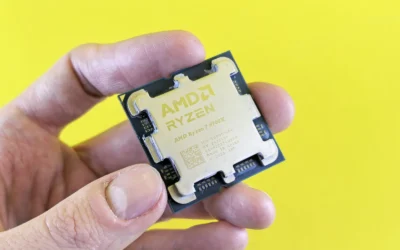
If you are asking is the be quiet Dark Rock Pro 5 enough to cool a Ryzen 7 9800X3D, you are really asking how to match cooler capability to your specific build. The 9800X3D is efficient for gaming but it still benefits from strong, quiet cooling that keeps temperatures steady under long loads without overwhelming your case or your ears.
This buying guide gives you a decision framework rather than a simple yes or no. You will learn what to weigh before you buy, including your resolution and refresh target, your AM5 platform and socket, your case size and cooler clearance, your power and noise budget, and whether you are building for today or planning a next CPU upgrade. For more context on air cooling options, browse our CPU Cooling category.
What Actually Matters
Cooler Class and Heat Transfer Design
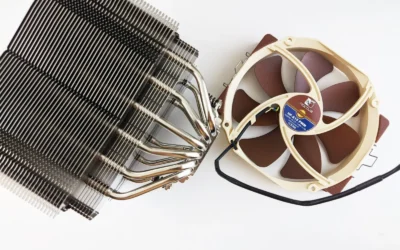
Start with the basic class of cooler. Single tower coolers with dual fans can handle high heat loads while staying more compact, while dual tower designs add surface area and often more heatpipes to spread heat. More heatpipes and more fin surface area generally help move heat away from the CPU faster, which can reduce thermal throttling during sustained gaming sessions. Per the spec sheet, some designs use 7 copper heatpipes while others use 8 heatpipes with about 20 percent more surface area, and that difference shows up in how much thermal headroom you have.
Fan size and airflow ratings also matter. Larger 140mm fans can move similar air at lower speed than 120mm fans, which often means less noise at the same cooling level. When you compare spec sheets, look at airflow in CFM and static pressure in mmH2O along with fan thickness, since a 30mm thick fan behaves differently than a standard 25mm fan. Think about whether you value peak cooling, low noise at idle, or a balance, and choose the class that matches that priority.
Noise, Fan Control and Your Tolerance
Noise is where many buyers feel the difference every day. Two fans at moderate speed are often quieter than one fan at maximum speed, and bearing type, motor design, and blade material all affect how smooth and steady the sound is. Some coolers include a physical Speed Switch that lets you cap maximum speed for quiet operation or allow higher speed for full performance. For example, one design offers a Quiet Mode that limits fans to up to 1500r/min and a Performance Mode that allows up to 2000r/min.
Consider how you use your PC. If you game with headphones, you may tolerate higher fan speed. If you work, stream, or game in a quiet room without headphones, you will appreciate fans that stay near silent at idle and ramp smoothly under load. Look for PWM control for automatic speed adjustment, vibration isolated mounting, and features like liquid crystal polymer blades that reduce flex at high speed. Owners commonly report that fan quality matters as much as raw airflow for daily comfort.
Clearance, RAM and Case Fit
Fit is non negotiable. Before you buy any air cooler, check the cooler height against your case CPU cooler clearance spec, and check RAM clearance against your memory modules. Tall RGB memory often conflicts with front fans, especially in dual fan setups. Some coolers address this with an offset design and recessed lower fins that keep clearance for the top PCIe slot and provide specific RAM clearance, such as 59mm in single fan mode and 32mm with both fans installed.
You should also think about access and installation. Tool free sliding fans, detachable top covers with integrated middle fans, and pre installed mounting bridges can make installation and later memory access easier. Always follow the manufacturer mounting instructions closely, use the correct AM5 hardware, and handle components with anti static precautions. If your case is compact or you have already filled your RAM slots with tall modules, you may need to plan for single fan operation or choose a slimmer single tower.
Socket Support and Long Term Platform Value
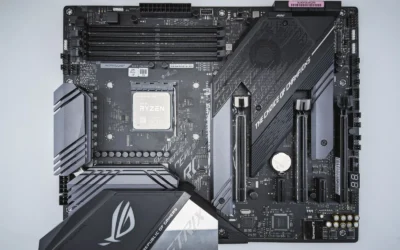
For a Ryzen 7 9800X3D build you need confirmed AM5 support and a mounting system you trust. Most current premium coolers support both AM5 and AM4 plus recent Intel sockets, which helps if you switch platforms later. Look for a secure backplate system, clear instructions, and included thermal paste. A Torx based mounting system with an included screwdriver, for example, can make the install more consistent and reduce the risk of uneven pressure.
Also consider how long you plan to keep the cooler. A well built air cooler can last through several builds if the brand provides socket upgrade kits. If you are building on a tight budget now but expect to upgrade your CPU within a year or two, it may make sense to choose a cooler with broad socket support and proven long term support rather than the most compact option. Check the compatibility center for your exact motherboard and RAM before you commit.
To see how these trade offs look in practice, here are a few options that show the range from focused single tower to larger dual tower designs:
This article contains affiliate links. If you buy through one of our links, CustomPCGaming may earn a commission at no extra cost to you. Commissions never influence which products we recommend or how we rank them. Read our Affiliate Disclosure for details.
Quick Picks at a Glance

Cooler Master V8 ACE 3DHP AMD CPU Air Cooler

be quiet! Dark Rock Pro 5 CPU Cooler

Noctua NH-D15 G2 chromax.Black Dual-Tower CPU Air
As an Amazon Associate we earn from qualifying purchases. Product prices and availability are accurate as of the date/time indicated.
Pros
- Outperforms highly regarded dual tower coolers despite single tower size
- Excellent thermal performance for high TDP Ryzen processors
- Durable LCP fan blades maintain stability at high RPM
- Tool free sliding fans simplify installation and memory access
- Premium stealth design without RGB for clean builds
Cons
- Overhangs RAM area and may block tall memory modules
- Fans become audible at full speed under sustained load
- Large 4.4 pound footprint requires a spacious mid tower or larger case
The Cooler Master V8 ACE 3DHP Black AMD is a flagship single tower air cooler engineered exclusively for AMD AM5 and AM4 platforms. It is built for gamers, creators and enthusiasts running high TDP Ryzen processors who want premium cooling without moving to liquid.
Its standout feature is 3DHP technology that pairs two larger 3D heat pipes with four traditional heat pipes to pull heat quickly from concentrated CPU hotspots. Real world user testing shows it can outperform respected dual tower coolers like the Noctua NH-D15 G2 and Thermalright Phantom Spirit, with dual 120x30mm PWM fans providing up to 89.6 CFM and strong static pressure.
Build quality is excellent with a clean engine inspired design without LEDs, Liquid Crystal Polymer blades that reduce flex at high speeds, and a dedicated AMD metal bracket for optimal contact. The single tower layout is more manageable than bulky dual towers, while tool free sliding fans make installation easier and improve access to memory slots.
There are a few drawbacks to note. The cooler extends over the memory area so tall RGB RAM may have clearance issues, and the fans are audible when running at maximum speed. Its height and weight also mean you will need a case with generous CPU cooler clearance.
Overall the V8 ACE 3DHP is a top choice for AM5 builders who want serious air cooling that rivals many AIOs. If you value reliable, high performance cooling with a stealthy look and AMD optimized mounting, it is an impressive and well engineered option.
Model: Cooler Master V8 ACE 3DHP Black AMD MAM-T6HA-225PK-RB, Single Tower Design
Socket Support: AMD AM5 and AM4 with dedicated contact plate and metal bracket
Heat Pipe Configuration: 2 x 3DHP plus 4 x standard heat pipes for rapid heat dissipation
Fans: Dual 120 x 30mm PWM, Front up to 89.6 CFM and 3.85 mmH2O, Rear up to 61.0 CFM and 2.0 mmH2O, LCP blades
Dimensions: 5.47 x 5.37 x 6.58 inches, Weight 4.4 pounds, Non LED engine inspired finish
Pros
- Extremely quiet operation at only 23.3 dB even under load
- Beats many 240mm AIOs in cooling while avoiding pump failures and leak risks
- Excellent thermal headroom for high-TDP CPUs like Ryzen 9 9900X and Intel Core Ultra 9
- Premium all-black build quality with easy installation and included accessories
- Speed Switch offers flexible tuning between silence and full performance
Cons
- Large 168mm tall and 3-pound dual-tower design requires a spacious case and RAM clearance check
- Heavy footprint can crowd RAM slots and motherboard components in compact builds
- Extreme all-core rendering on very hot CPUs can still push temps near thermal limits
The be quiet! Dark Rock Pro 5 is a premium dual-tower air cooler built for gamers, enthusiasts and overclockers who want elite cooling without liquid cooling. With 280W TDP capacity and support for Intel LGA 1851/1700/1200 and AMD AM5/AM4, it is designed for modern high-performance and heavily overclocked systems.
Its standout features are seven copper heat pipes with ceramic coating and two Silent Wings PWM fans that deliver up to 68.7 CFM at just 23.3 dB. In real use it keeps chips like the Ryzen 9 9900X and 9800X3D under 62C while gaming and under 78C in stress tests, often outperforming 240mm AIOs while staying quieter.
Design and build quality are exceptional, with an iconic all-black aluminum and copper finish, magnetic mesh top cover and vibration-isolated fan mounts. Installation is elegant for its size, thanks to a pre-installed mounting bridge, detachable top cover and included thermal paste and screwdriver.
The main drawback is sheer size, at 168mm tall and three pounds it needs a roomy case and careful RAM clearance planning. For extreme all-core rendering on hot CPUs like the i9-12900KF, temperatures can still climb high, so workstation users should ensure strong case airflow.
Overall, the Dark Rock Pro 5 is a top-tier air cooler that combines silent operation, powerful cooling and long-term reliability. If you want quiet, hassle-free performance with the flexibility of Quiet and Performance modes, it is an outstanding choice and a smart alternative to AIOs.
Model: be quiet! Dark Rock Pro 5 BK036, Dual-Tower Air Cooler
Cooling Capacity: 280W TDP, 7 Copper Heat Pipes with Ceramic Black Coating
Fans: 2x Silent Wings PWM, 4-Pin, up to 2000 RPM, 68.7 CFM Airflow, 23.3 dB Noise
Modes: Speed Switch with Quiet Mode up to 1500 RPM and Performance Mode up to 2000 RPM
Compatibility: Intel 1851/1700/1200/1151/1150/1155 and AMD AM5/AM4
Dimensions & Weight: 5.7 x 5.35 x 6.61 inches (168mm tall), 3 pounds, Aluminum and Copper
Pros
- Elite air cooling performance that rivals many 240mm and 280mm AIO liquid coolers
- Remarkably quiet at idle and well controlled under full load thanks to advanced G2 fans
- Outstanding Noctua build quality, reliability and attention to detail
- Comprehensive accessories and installer-friendly mounting system
- All-black design finally offers flagship performance without the classic brown color scheme
Cons
- Massive 6.61-inch tall dual-tower footprint requires a large case and RAM clearance planning
- Premium price is higher than many competing air coolers and entry-level AIOs
- Heavy 1810g weight needs careful handling, especially when moving a tower PC
The Noctua NH-D15 G2 chromax.Black is the second generation of Noctua's legendary flagship air cooler, refined for enthusiasts, gamers and workstation users running high-end AMD Ryzen and Intel Core processors. It is built for those who want elite cooling without the complexity or risk of liquid cooling.
In real-world use it delivers outstanding thermal headroom thanks to eight heatpipes, expanded fin surface area and two new NF-A14x25r G2 fans. Users report significant temperature drops compared to previous coolers, with chips like the Ryzen 9 9950X3D and 7800X3D staying well below throttling limits even under sustained stress, all while remaining remarkably quiet.
Build quality is classic Noctua, with dense aluminum fins, polished copper heatpipes and a sleek all-black chromax finish that finally matches modern stealth builds. The SecuFirm2+ mounting system with Torx screws and included NM-SD1 screwdriver makes installation more secure and straightforward, while the offset design improves PCIe and RAM compatibility.
The sheer size is its main trade-off, as the tall dual-tower heatsink demands a spacious case and low-profile RAM for dual-fan clearance. It is also a premium investment, and its weight means extra care is needed when transporting a tower system.
Overall, the NH-D15 G2 chromax.Black sets the benchmark for premium air cooling, combining top-tier performance, near-silent acoustics and exceptional craftsmanship. If your case can accommodate it, it is one of the best long-term cooling investments you can make for a high-performance PC.
Model: NH-D15 G2 chromax.black
Cooling Method: Dual-tower air cooler with 8 heatpipes
Fans: 2x NF-A14x25r G2 140mm PWM, 1500 RPM max, 24.8 dB noise, 155.6 m3/h airflow
Compatibility: AMD AM5, AM4 and Intel LGA1851, LGA1700, LGA1200, LGA115x
Dimensions: 5.98 x 5.91 x 6.61 inches
Weight: 1810g
RAM Clearance: 59mm in single-fan mode, 32mm with both fans
Connector: 4-Pin PWM, 12V, 2.28W
Included: NT-H2 thermal paste, Low-Noise Adaptors, NM-SD1 screwdriver, SecuFirm2+ mounting kit
Warranty: 6-year manufacturer warranty
Matching a Part to Your Build
If you are building a compact or silence focused gaming PC in a mid tower with limited cooler height, prioritize a cooler that balances strong heatpipe count with manageable size and a quiet fan profile. The be quiet! Dark Rock Pro 5 CPU Cooler is a good illustration of this approach, with 7 copper heat pipes with a ceramic particle coating and two Silent Wings PWM fans that use fluid dynamic bearings and 6 pole motors. Its Speed Switch lets you stay in Quiet Mode at up to 1500r/min for daily gaming and switch to Performance Mode up to 2000r/min when you want maximum headroom, which is useful if your case airflow is average.
If you want a single tower that is tuned specifically for AM5 and you value easy memory access, consider what a dedicated AMD design offers. The Cooler Master V8 ACE 3DHP AMD CPU Air Cooler uses a dedicated AMD contact plate for AM5 and AM4, plus 2 x 3DHP and 4 x heat pipes to move heat quickly into the fin stack. Its dual 120 x 30 mm PWM fans are rated at 89.6 CFM and 3.85 mmH2O for the front fan and 61.0 CFM and 2.0 mmH2O for the rear fan, and the tool free sliding fans make it easier to install and reach your RAM. This type of build suits you if you want strong AM5 focused contact and a single tower footprint, and you can see how it fits into a balanced parts list like our ryzen 5 7600 RX 7700 XT 1000 dollar gaming PC amazon build.
If you are building a premium, low noise system where you want the most surface area and you have room for a larger cooler, a dual tower with bigger fans is worth evaluating. The Noctua NH-D15 G2 chromax.Black represents that end of the range with 8 heatpipes, about 20 percent more surface area than its predecessor, and two 140mm NF-A14x25r G2 fans with speed offset tuning and Low Noise Adaptors. It also provides 59mm RAM clearance in single fan mode and 32mm with both fans, plus an offset design that helps clear the top PCIe x16 slot. This approach fits well if you pair a high end CPU with a powerful GPU and want headroom for long sessions, as discussed in our top RTX 5070 ti cards for 1440p gaming guide, or if you want to keep fan speeds low while still handling sustained loads. If you are trying to keep costs down, also review our Budget Build Guides to balance cooler choice against other components.
Common Mistakes
Mistake 1: Ignoring case and RAM clearance. Many buyers choose a cooler based on cooling potential alone and then discover it does not clear the side panel or it presses against tall RAM. Always compare the cooler height and RAM clearance numbers on the spec sheet to your case and memory specs before ordering, and remember that adding a second fan reduces RAM clearance. If you need more GPU headroom, check clearance alongside your Graphics Cards choice as well.
Mistake 2: Forgetting fan control and noise planning. Running fans at full speed all the time is loud and unnecessary. Use PWM control in your BIOS, set a sensible fan curve, and use quiet modes or low noise adaptors when available. Make sure your motherboard has enough fan headers and that your case airflow supports the cooler, otherwise even a capable cooler will run hotter and louder than expected.
Mistake 3: Mismatching cooler to platform or install method. AM5 mounting pressure and contact quality matter for consistent temperatures. Use the correct bracket and contact plate for your socket, follow the manufacturer mounting instructions step by step, and do not overtighten. BIOS updates and any overclocking are done at your own risk and may void warranty, so handle updates carefully and use anti static handling throughout the install.
Who Should Wait or Buy Differently
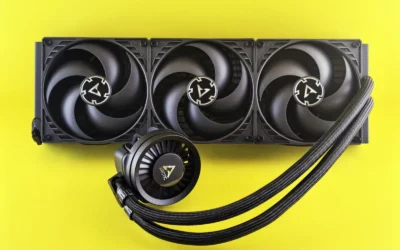
A large dual tower air cooler is not ideal for you if you have a small form factor case with tight cooler height limits, ultra tall RGB memory that you do not want to run in single fan mode, or a build where you plan to move to a 240mm or larger AIO for aesthetic or clearance reasons. It is also not the right choice if you are on a strict budget and would get more overall gaming performance by putting the difference toward a better GPU or more storage. If any of those describe your situation, consider a more compact single tower, a smaller dual tower, or waiting until you have confirmed your case and RAM combination.
Frequently Asked Questions
Is the be quiet Dark Rock Pro 5 enough to cool a Ryzen 7 9800X3D for gaming?
For most gaming builds in a case with decent airflow, a high end air cooler with 7 heatpipes and dual Silent Wings fans provides enough headroom for a Ryzen 7 9800X3D at stock settings. Your results will depend on case airflow, ambient temperature, and your fan curve. If you use Quiet Mode you will get lower noise with slightly higher temperatures, while Performance Mode allows higher fan speed for lower temperatures.
Do I need a dual tower cooler for the 9800X3D or is a single tower sufficient?
A well designed single tower with strong heatpipe layout and dual fans can be sufficient, especially if it has an AMD optimized contact plate and good static pressure. A dual tower with more surface area and larger fans gives you extra thermal margin and often lower noise at the same cooling level. Choose based on your case clearance, RAM height, and how quiet you want the system under long gaming loads.
What should I check before buying any cooler for an AM5 build?
Check three things on the spec sheet: confirmed AM5 socket support, cooler height versus your case CPU clearance, and RAM clearance in both single and dual fan configurations. Also confirm PCIe clearance if your top slot is close to the socket, and review the mounting system and included thermal paste. Following the manufacturer instructions and updating your BIOS carefully will help you get consistent contact and stable operation.
Write Your Review
No reviews yet. Be the first to share your experience!