

If you are asking is the NZXT Kraken 240 enough to cool a Ryzen 7 9800X3D, you are really asking how to match a 240mm liquid cooler to a chip that concentrates heat in a small hotspot. The 9800X3D does not behave like a high core count workstation CPU that pulls massive total wattage, but its stacked 3D V-Cache makes it sensitive to cold plate contact, mounting pressure, and steady heat transfer over time. Your choice comes down to case radiator support, socket compatibility and offset mounting, noise tolerance, and whether you value extra features or simple operation.
In November 2026, a 240mm AIO is a popular fit for this CPU because it offers more headroom than most compact air coolers while still fitting the majority of mid tower cases. To choose well, weigh your resolution and refresh target and how long you push the CPU at full load, your platform and socket, your case size and radiator clearance, your power and noise budget, and whether this cooler should also handle a hotter future upgrade. For an overview of cooler types and sizing, browse our CPU Cooling category before you lock in a model.
What Actually Matters
Radiator Size, Thickness and Case Clearance
A 240mm radiator means two 120mm fans side by side, but not every case fits it the same way. You need to check your case manual for radiator support at the top, front, or side, and note the maximum radiator thickness plus fan thickness. Some cases limit top clearance due to tall RAM or VRM heatsinks, while front mounts can be restricted by GPU length or drive cages.
For the 9800X3D, a well mounted 240mm AIO is generally sufficient for gaming loads when airflow is not choked, but only if the radiator can breathe. Look for a case with mesh or ventilated panels and space for unobstructed intake or exhaust. Always check radiator clearance against your case and follow the manufacturer mounting instructions for fan direction and tube routing. If you are planning a compact build, compare your case specs carefully, as our ryzen 5 7600 RX 7700 XT 1000 dollar gaming PC amazon build shows how case choice limits cooler options.
Cold Plate Contact and AM5 Hotspot Offset
The 9800X3D benefits more from even pressure and good contact over its hotspot than from simply adding radiator area. On AM5, the chiplet and cache stack create an off center hot zone, so mounting systems that offer an offset position can improve temperatures at the same noise level. A secure, easy to install mounting system with clear instructions reduces the risk of uneven pressure, which owners commonly report as a cause of higher than expected temperatures.
Thermal paste quality and application also matter, and pre applied paste can simplify your first install. If you reinstall, clean the cold plate and IHS thoroughly and apply fresh paste per the cooler maker guidance. Follow the manufacturer mounting instructions step by step, tighten in the recommended pattern, and do not overtighten. This is not the place to improvise, and anti static handling is sensible when working around the socket.
Pump and Fan Behavior for Noise and Sustained Loads
Pump design and fan tuning determine whether your system stays quiet during light tasks and steady during long gaming sessions. Some pumps are rated for higher flow and head pressure, which can improve heat transfer at lower fan speeds, while others prioritize low vibration through acoustic dampening structures. Per the spec sheet, one example pump runs up to 3,100 RPM for strong flow while aiming to minimize noise, and another uses a 3 layer acoustic soundproofing structure with a tuned mass damper effect for lower vibration.
Fans matter just as much. High static pressure fans push air through dense radiator fins more effectively, and PWM control lets you shape a curve that keeps noise down at idle. Features like Zero RPM Mode that stops fans at low loads can make desktop use near silent, while speed offset between two fans can help with acoustic optimization. When you evaluate a cooler, review its fan specs, bearing type, and control options rather than just radiator size.
Features, Software and Long Term Ownership
Beyond cooling, 240mm AIOs vary widely in features. Some offer a large 2.72 inch IPS LCD with 640 x 640 resolution, 60 Hz refresh rate, and a bright backlight for system stats, images, or GIFs. Others use a smaller 1.54 inch square LCD for the same personalization through software, while simpler models focus on RGB lighting and direct motherboard connectivity without extra controllers.
Consider whether you want software integration for lighting sync and monitoring, or prefer minimal cabling. Single frame fan designs reduce screws and cables, and a single breakout cable from the pump cap keeps the build cleaner. Also weigh warranty length, tube durability with sleeved protection, and how the cooler will fit your upgrade path. If you plan to pair a stronger GPU later, check how your cooler and case airflow will handle the extra heat, as discussed in our top RTX 5070 ti cards for 1440p gaming guide.
A few options that show the range help illustrate what you trade between simplicity, quiet operation, and display features:
This article contains affiliate links. If you buy through one of our links, CustomPCGaming may earn a commission at no extra cost to you. Commissions never influence which products we recommend or how we rank them. Read our Affiliate Disclosure for details.
Quick Picks at a Glance
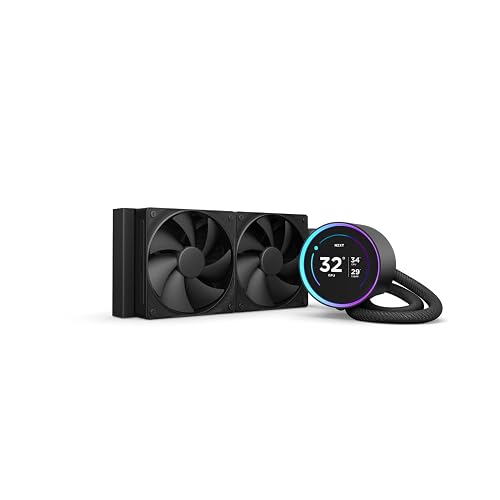
NZXT Kraken Elite 240mm AIO CPU Liquid Cooler

NZXT Kraken Plus 240 AIO CPU Cooler with 1.54 Inch

NZXT Kraken Core 240 RGB 240mm AIO CPU Liquid

Noctua NL-LC1-24 240mm AIO CPU Cooler

NZXT Kraken Elite 240 RGB White

NZXT Kraken X53 240mm AIO RGB Liquid Cooler
As an Amazon Associate we earn from qualifying purchases. Product prices and availability are accurate as of the date/time indicated.
Pros
- Strong cooling performance even for high TDP chips like Ryzen 9800X3D and 9900X with PBO overclocking
- Near silent pump operation and Zero RPM fan mode for quiet daily use
- Large, bright and highly customizable LCD screen with wide viewing angles
- Simple installation with broad support for AM5, AM4 and LGA 1851, 1700, 1200 and 115X sockets
- Premium minimalist design backed by a 6 year manufacturer warranty
Cons
- Higher cost than standard 240mm AIOs without a display
- Some users report missing AM5 standoffs leading to improper mounting
- Advanced LCD customization requires web integration and minor coding
The NZXT Kraken Elite 240 (RL-KN24E-B2) is a premium 240mm AIO liquid cooler designed for enthusiasts who want elite cooling and elite looks. It is best suited for gamers, creators and custom PC builders who value quiet performance and a centerpiece display.
At its core is NZXTs custom Turbine pump, engineered for high flow and head pressure to tame hot CPUs while staying quiet. In real world use, reviewers note it keeps chips like the 7800X3D and 9800X3D well under 80 degrees under load, with silent pump operation and effective 73.47 CFM airflow.
Design is unmistakably NZXT, with a clean black minimalist aesthetic, non RGB fans and a striking 2.72 inch IPS LCD. The 640x640, 60Hz panel reaches 690 cd/m2 brightness with 24 bit color, making GIFs, images and system metrics pop from any angle, while build quality feels solid with plastic, rubber and metal construction.
There are a few caveats to consider. The cooler sits at a premium price point for a 240mm unit, and a handful of buyers reported missing plastic standoffs for AM5 that caused mounting issues. Out of the box LCD options can also feel limited unless you use the web integration tools.
Overall, the Kraken Elite 240 delivers where it matters, combining strong, quiet cooling with one of the best LCD implementations on the market. If you want a 240mm AIO that performs reliably and lets you personalize your build, it is a compelling choice that justifies its enthusiast focus.
Model: RL-KN24E-B2, 240mm AIO Liquid Cooler, Black
Display: 2.72-inch IPS LCD, 640 x 640, 60Hz, 690 cd/m2, 24-bit color
Cooling Performance: Turbine pump, 73.47 CFM airflow, 1000 RPM max, 30 dB noise level, Zero RPM Mode
Socket Compatibility: AMD AM5, AM4, Intel LGA 1851, 1700, 1200, 115X
Power and Build: SATA/Molex, 12V, 2.16W, Plastic, Rubber, Metal, 1.2 kg, 11.4 x 7.4 x 4.9 inches
Warranty: 6 Year Manufacturer Warranty
Pros
- Strong cooling performance with low noise during idle and light use
- Bright, fully customizable LCD for both monitoring and personalization
- Simple and tidy installation with pre applied paste and single cable design
- Broad compatibility with latest AMD and Intel sockets
- Zero RPM Mode enables silent operation at low loads
Cons
- Requires NZXT CAM software for full pump speed and LCD control
- Pump can be audible when running at full speed
- Isolated reports of software connectivity loss causing pump issues
The NZXT Kraken Plus 240 (RL-KN240-B2) is a 240mm all in one liquid cooler designed for gamers, creators and compact PC builders who want strong cooling with visual flair. It pairs efficient liquid cooling with a customizable display, making it a great fit for anyone who values both performance and personalization.
At its core is the custom NZXT Turbine pump, engineered for high flow and head pressure to keep temperatures low even under heavy workloads. In real world use, users report low idle temps and quiet operation thanks to high static pressure F120P fans and Zero RPM Mode that stops fans completely at low loads.
Design is clean and premium, with a bright 1.54 inch square LCD on the pump cap, an aluminum radiator and minimal cable clutter from a single breakout cable. The display is fully customizable through NZXT CAM, letting you show system stats, custom images, animated GIFs or integrations like Spotify and YouTube.
There are a few tradeoffs to consider. Full control over pump speed and the LCD requires NZXT CAM software, with limited BIOS only options, and the pump can be audible at maximum speed. A small number of users have reported connectivity issues where CAM loses connection to the cooler.
Overall, the Kraken Plus 240 delivers reliable cooling, near silent everyday operation and standout customization in a compact 240mm form factor. If you want an easy to install AIO that looks as good as it cools and you are comfortable using CAM software, it is an excellent choice for modern AMD and Intel builds.
Model: NZXT Kraken Plus 240 RL-KN240-B2, 240mm AIO, Black, 4.5 pounds
Cooling System: Water cooling with Turbine pump, aluminum radiator, F120P high static pressure fans, 31.9 dB noise level, Zero RPM Mode
Display and Control: 1.54 inch square LCD customizable via NZXT CAM for temps, images, GIFs and web integrations
Compatibility and Power: Supports AMD AM5 and Intel LGA 1851 plus other modern sockets, tool free brackets, 4-Pin connector, 12V DC
Materials and Extras: Plastic, Aluminum, Metal, Glass, pre applied thermal paste, single breakout cable, 6 Year Manufacturer Warranty
Pros
- Excellent real world cooling for gaming and overclocked CPUs including 9800X3D and i9 10900KF
- Quiet operation even under load with minimal vibration and low noise
- Easy installation thanks to single-frame design and direct motherboard connection
- Clean, minimalist look with vibrant RGB lighting that enhances any build
- Durable aluminum radiator construction with reliable long term warranty support
Cons
- Not completely silent at full fan speed compared to premium flagship AIOs
- RGB lighting is more subtle and less flashy than some competing models
- 240mm radiator may limit headroom for extreme overclocking on very high TDP CPUs
The NZXT Kraken Core 240 RGB is a 240mm all-in-one liquid CPU cooler built for gamers, creators and PC builders who want dependable thermal performance without complexity. It is a great fit for modern Intel and AMD systems where quiet operation and a clean, stylish look are priorities.
In real world testing, the 3100 RPM pump and high static pressure RGB Core fans deliver strong results, keeping demanding CPUs cool during extended gaming and multitasking. Users report stable temperatures around 57 to 63C under load, with PWM control making it easy to fine tune the balance between cooling power and acoustics.
Design and build quality stand out with an aluminum radiator, sturdy construction and a smart single-frame fan design that reduces screws and cables. The RGB lighting is bright and polished but not overdone, and direct motherboard connectivity keeps wiring simple for a neater, more professional build.
There are a few tradeoffs to consider. At full throttle the fans are audible, so it is not the absolute quietest option on the market, and the lighting effects are more understated than flashier competitors. The 240mm size is also less suited for extreme overclocking where a larger 360mm radiator would offer more thermal headroom.
Overall, the Kraken Core 240 RGB offers an excellent blend of performance, ease of use and refined style. For builders seeking effective, quiet liquid cooling with simple installation and trusted NZXT reliability, it is a highly recommended choice.
Model: RL-KR24C-B1 | Cooling Method: Water, 240mm AIO
Pump Speed: Up to 3100 RPM | Noise Level: 31.9 dB | Airflow: 75.05 CFM
Power Connector: 4-Pin | Voltage: 5V DC | Wattage: 8.88 watts
Material: Aluminum and Plastic | Dimensions: 11.02 x 4.72 x 6.69 inches | Weight: 1.43 kg
Compatibility: Desktop, latest Intel and AMD sockets | Warranty: 5 Year Manufacturer
Pros
- Exceptionally quiet, users report inaudible pump and fans even while gaming under load
- Excellent thermal performance, keeps powerful CPUs like the 9850X3D under 72C in compact builds
- Compact 240mm footprint fits SFF cases like Thermaltake TR100 where larger coolers will not fit
- Premium build quality, thoughtful packaging and easy SecuFirm2 mounting system
- Backed by Noctua reliability and a 6 year warranty
Cons
- Premium price point higher than many competing 240mm AIO coolers
- Installation documentation for Intel offset mounting can be confusing for first-time builders
- Minimalist design with no RGB lighting or pump display for users who want visual customization
The Noctua NL-LC1-24 is Noctua's first 240mm closed-loop liquid cooler, built for enthusiasts who want top-tier cooling without noise. With its compact radiator and SFF-friendly dimensions, it is ideal for quiet, high-performance builds using hot running Ryzen X3D and Intel Core Ultra processors.
At its heart is the proven Asetek Emma V2 platform paired with two award-winning NF-A12x25 G2 PWM fans with speed-offset for acoustic optimization. In real world use owners report near silent operation with CPUs staying cool under gaming loads, while the innovative 3-layer pump noise absorber with tuned-mass damper effectively removes vibration.
Build quality is classic Noctua, featuring a copper cold plate, aluminium radiator and excellent packaging. The SecuFirm2 mounting system provides precise offset options for AM5 and LGA1851 hotspots, and the included NT-H2 thermal paste plus AM5 paste guard ensures a clean, secure installation.
There are a few tradeoffs to note. The instructions for Intel offset mounting can be unclear and may confuse first-time builders, and the understated design offers no RGB or pump screen. It also sits at a premium compared to mainstream 240mm alternatives.
Overall, the NL-LC1-24 delivers on Noctua's promise of quiet, reliable and high-performance cooling in a compact form factor. If you value acoustics, build quality and longevity over flashy aesthetics for your SFF PC, it is an outstanding investment.
Model: NL-LC1-24 | Platform: Asetek Emma V2 | Radiator Size: 240mm | Fans: 2x Noctua NF-A12x25 G2 PWM
Fan Speed: Up to 1800 RPM | Noise Level: 22.5 dB | Airflow: 107.3 m3/h | Connector: 4-Pin, 12V, 1.8W
Compatibility: AMD AM5 and Intel LGA1851 with SecuFirm2 offset mounting | Material: Copper base and aluminium radiator
Dimensions: 11.02 x 4.72 x 2.32 inches | Weight: 1.61 kg | Includes: NT-H2 thermal paste, AM5 paste guard | Warranty: 6 year manufacturer warranty
Pros
- Large, ultra-bright 640x640 IPS LCD with wide viewing angles and vivid color
- Efficient and quiet Turbine pump with improved cooling performance
- Zero RPM fan mode for silent operation during low loads
- Broad CPU socket compatibility with simple tool-free mounting
- Seamless personalization via CAM software, RGB sync and media integrations
Cons
- 240mm radiator may not match cooling capacity of larger 280mm or 360mm AIOs for extreme overclocking
- Requires NZXT CAM software for full LCD and RGB customization
- White finish and LCD premium add cost compared to basic AIO coolers
The NZXT Kraken Elite 240 RGB White is a premium 240mm AIO liquid cooler designed for gamers, creators and enthusiasts who want performance with personalization. It is best suited for mid to high end builds where aesthetics matter as much as thermal control.
In real world use, the custom Turbine pump delivers strong flow and head pressure for efficient heat dissipation, even with heat prone CPUs. Paired with static pressure radiator fans and Zero RPM Mode, it stays quiet under light loads and ramps smoothly when cooling is needed.
The centerpiece is the expansive 2.72 inch IPS LCD with 640 by 640 resolution, 60Hz refresh and 690 cd per m2 brightness. Colors are vibrant, viewing angles are wide, and the aluminum housing with RGB ring gives the cooler a clean, premium look in white builds.
There are a few tradeoffs to consider. A 240mm radiator offers excellent cooling for most users, but extreme overclockers may prefer larger sizes, and full customization depends on NZXT CAM software. Cable management is simplified with a single breakout cable, though software integration is required to unlock all features.
Overall, the Kraken Elite 240 RGB stands out for combining quiet, capable cooling with one of the best displays on any AIO. If you want a cooler that performs well and doubles as a customizable showcase piece, it is an excellent choice for a modern desktop.
Radiator Size: 240mm with aluminum construction for efficient heat dissipation.
Display: 2.72 inch IPS LCD, 640 x 640 resolution, 60Hz, 690 cd per m2 brightness, 24 bit color.
Pump: Custom NZXT Turbine pump with high flow rate and head pressure, 4 pin power connector.
Compatibility: AMD AM5, AM4 and Intel LGA 1851, 1700, 1200, 115X with tool free mounting brackets.
Cooling Details: Water cooling method, 30 dB noise level, up to 1000 RPM, Zero RPM Mode, pre applied thermal paste.
Dimensions: 11.41 x 4.92 x 7.48 inches, 12 volts DC, 2 watts, desktop compatible.
Pros
- Excellent cooling performance compared to air coolers, with significantly lower temps under load
- Very quiet operation even during gaming, rated at just 21 dB
- Stunning and customizable RGB lighting with larger infinity mirror
- User friendly CAM software for performance and lighting management
- Premium build quality with durable materials and long 6 year warranty
Cons
- Included installation instructions are vague and may require an online guide
- Some users report pump rattling or noise developing over time
- Threadripper bracket for TR4 and sTRX4 sockets not included
The NZXT Kraken X53 is a 240mm all in one liquid cooler designed for gamers, enthusiasts and builders who want strong thermal performance with standout aesthetics. It supports a wide range of Intel and AMD sockets including LGA 1200, 115X, 2011, 2066 and AM4, making it versatile for most modern gaming PCs.
In real world use it delivers noticeably lower temperatures and quieter operation compared to traditional air cooling, with users reporting stable temps in the low 60s under gaming loads. The Aer P fans with fluid dynamic bearings and chamfered intakes provide powerful airflow at just 21 dB, while CAM software lets you fine tune pump, fan and lighting settings with precision.
Design is a major highlight, featuring a redesigned cap with a larger infinity mirror RGB ring that is 10 percent bigger for more vivid lighting. The rotatable top keeps the logo correctly oriented in any mounting position, and fine nylon mesh sleeved tubing plus a copper cold plate ensure durability and efficient heat transfer.
There are a few drawbacks to consider. The included installation instructions are vague and many first time users need to consult an online guide, especially for the pump connection. A small number of users have reported pump rattling over time, and the Threadripper bracket for TR4 and sTRX4 is not included.
Overall, the Kraken X53 is an excellent choice if you want quiet, effective cooling with premium RGB flair and intuitive software control. Backed by a 6 year warranty and HUE 2 integration for expanded lighting, it is ideal for anyone upgrading from air cooling or building a clean, modern rig.
Model: NZXT Kraken X53 RL-KRX53-01, 240mm AIO Liquid Cooler
Compatibility: Intel LGA 1200, 115X, 1366, 2011, 2011-3, 2066 and AMD AM4, sTRX4, TR4 (Threadripper bracket not included)
Fans: 2x Aer P 120mm, up to 1200 RPM, 21 dB noise level, fluid dynamic bearing
Material: Copper cold plate with reinforced rubber tubing and nylon mesh sleeves
Power: 12V, 3.84W, 2-Pin connector with HUE 2 RGB connector
Dimensions: 12.2 x 5.51 x 9.84 inches, Weight 1.81 kg
Warranty: 6 Years
Matching a Part to Your Build
For a compact or noise focused gaming build where a 240mm radiator is the largest your case supports, prioritize acoustic design and mounting precision. The Noctua NL-LC1-24, High-Performance 240mm AIO CPU is built around an Asetek Emma V2 platform with a pump noise absorber and two NF-A12x25 G2 PWM fans that use a speed offset for acoustic optimization. Its SecuFirm2 mounting with offset options for AM5 is intended to improve contact over the 9800X3D hotspot, and it includes NT-H2 paste. This approach suits you if you want near silent operation in a small form factor case and are willing to choose the more premium choice for refinement over flash.
For a showcase build where personalization matters, look at display size and software. The NZXT Kraken Elite 240-240mm AIO CPU Cooler, LCD and the NZXT Kraken Elite 240 RGB – 240mm AIO CPU Cooler both use the custom NZXT Turbine pump for high flow and head pressure with a claimed 10 percent performance boost at lower noise, plus a large 2.72 inch IPS LCD at 640 x 640, 60 Hz, and 690 cd per square meter brightness. The NZXT Kraken Plus 240-240mm AIO CPU Cooler, LCD offers similar Turbine pump cooling with a smaller 1.54 inch square LCD that is still fully customizable through CAM for temps, images, GIFs, and integrations like Spotify. Choose the larger display if you want maximum visual impact, or the Plus if you want the LCD experience in a more streamlined package, both include Zero RPM Mode for quiet idle.
For a straightforward value build with clean wiring, the NZXT Kraken Core 240 RGB – 240mm AIO CPU Cooler focuses on essentials. It connects directly to your motherboard without an extra controller, uses a single frame design to cut down on screws and cables, and relies on high static pressure RGB Core fans with PWM control. The Kraken X53 (240 mm) sits in the middle with its Aer P fans featuring a chamfered intake and fluid dynamic bearing, plus a larger LED ring and CAM lighting sync. Either is a good fit if you want effective 240mm cooling for the 9800X3D without paying for a large LCD.
Common Mistakes
Choosing a cooler that does not fit your case is the most common error. A 240mm radiator may be listed as supported, but thickness, fan placement, and RAM height can still block a top mount. Measure your available clearance for radiator plus fans, confirm intake versus exhaust direction, and verify that your case manual lists 240mm support in the position you plan to use. Skipping this check often forces a rebuild or a front mount that hurts GPU thermals.
Ignoring AM5 mounting details hurts performance on the 9800X3D. Using the wrong standoffs, forgetting the offset bracket when provided, or applying uneven pressure can raise temperatures even with a capable radiator. Follow the manufacturer mounting instructions exactly, use the correct AM5 hardware, and recheck contact if owners commonly report high idle temps. For broader build planning on a budget, see our Budget Build Guides to avoid mismatched parts.
Overvaluing looks over airflow and control leads to noisy or inconsistent results. A bright LCD does not compensate for poor fan curves or a choked front panel, and running fans at fixed high speed wastes the benefit of PWM and Zero RPM features. Set a custom fan curve in BIOS or software, review for steady coolant temps during a long gaming session, and keep tubes free of sharp bends that can stress the pump.
Who Should Wait or Buy Differently
A 240mm AIO is not ideal for you if your case cannot properly support a 240mm radiator, if you plan to move to a much hotter high core count CPU soon, or if you prefer a zero maintenance air cooler with fewer points of failure. It is also not a good fit if you need maximum silence in a tiny case where a thick radiator would be starved for air, or if you do not want software control for RGB or LCD features. In those situations, consider a larger radiator if your case allows, a high quality air cooler with AM5 offset mounting, or waiting until you finalize your case and platform so you do not buy a cooler you must replace.
Frequently Asked Questions
Is a 240mm AIO enough for a Ryzen 7 9800X3D for gaming?
For most gaming builds with decent case airflow, a properly mounted 240mm AIO is enough to keep the 9800X3D from throttling and to keep noise reasonable. The chip benefits more from good cold plate contact and a sensible fan curve than from simply adding radiator area. Check your case clearance and use the AM5 offset if your cooler provides it.
Do I need an LCD or Turbine pump to cool the 9800X3D?
No, you do not need an LCD to cool this CPU effectively. Pumps like the NZXT Turbine design aim for higher flow and head pressure with lower noise, which can help at low fan speeds, but a well designed standard pump with good fans also handles the 9800X3D. Choose an LCD if you value system monitoring and personalization, not because the CPU requires it.
What should I check before buying a 240mm AIO for AM5?
Confirm your case supports a 240mm radiator in your preferred position, verify socket support for AM5 and AM4 plus Intel LGA 1851 and 1700 if you may reuse the cooler, and review the mounting system for offset options. Also check tube length and single cable versus controller setup for easier building. Follow the included instructions for paste and mounting pressure, and handle components with anti static care.


Write Your Review
No reviews yet. Be the first to share your experience!