

If you are asking is the Corsair iCUE Link H150i enough to cool a Ryzen 7 9800X3D, you are really asking how much cooler you need for a chip that is thermally sensitive but not extremely power hungry, and how that choice fits your case, noise tolerance, and upgrade plans. The short answer is yes, a cooler in the H150i class is more than sufficient for this CPU when it is mounted correctly and your case can support its radiator, but the details around size, fan control, and clearance decide whether you will be happy with temperatures and noise over time.
This guide gives you a decision framework for CPU cooling on AM5, especially for the Ryzen 7 9800X3D. You will learn what actually matters when you compare AIOs, how to match radiator size and features to your build, and which common mistakes to avoid. You will also see a few example Corsair iCUE Link coolers that illustrate the range, so you can judge what you need without overbuying.
What Actually Matters
Radiator Size and Case Clearance
Radiator size sets your thermal headroom and your fit requirements. In the current Corsair iCUE Link lineup you will see options described as 240mm, 280mm, 360mm, and 420mm, which refers to the length of the radiator and the number and size of fans it holds. A larger radiator gives you more surface area to dissipate heat at lower fan speeds, while a smaller one is easier to fit in compact cases but must run fans faster to move the same amount of heat.
Before you choose, check your case manual for radiator support on the top, front, and side mounts, and note both length and thickness limits plus RAM and motherboard heatsink clearance. A 280mm radiator uses two larger 140mm fans and can be quieter than a 240mm at similar performance, while a 360mm or 420mm radiator needs a case that explicitly supports that length. For more context on how cooling fits into a full parts list, browse the CPU Cooling category to compare form factors and mounting styles.
Cold Plate Contact and Pump Design
The Ryzen 7 9800X3D is limited more by how heat moves through its stacked cache and heat spreader than by sheer wattage, so the quality of contact between the cold plate and the CPU matters a lot. Look for a precision machined copper cold plate with pre-applied thermal compound and a pump that maintains steady flow without excessive noise or vibration. Per the spec sheet, Corsair’s FlowDrive cooling engine pairs a three-phase motor pump with a tuned cold plate surface profile to improve contact and flow efficiency, which helps keep temperatures stable during gaming loads that spike quickly.
You should also consider pump control. Coolers that let you adjust pump speed through software give you a way to balance noise and response time, and you should always follow the manufacturer mounting instructions for AM5, including even pressure and correct standoff height. Owners commonly report that even pressure and a thin, even layer of paste matter more than chasing the largest radiator, especially on AM5 where the integrated heat spreader shape rewards good contact. If you are planning a balanced AM5 build, the ryzen 5 7600 RX 7700 XT 1000 dollar gaming PC amazon build shows how cooler choice interacts with case airflow and component layout.
Fan Design, Speed Range, and Noise Control
Fans determine both cooling capacity and how your system sounds at idle and under load. Pay attention to the fan type, bearing design, and PWM speed range rather than just maximum speed. For example, per the spec sheet, some RX RGB fans are rated up to 2,100 RPM, others up to 1,700 RPM, while QX RGB fans are rated up to 2,000 RPM and the H150i Elite class fans are rated around 1850 rpm, and each uses AirGuide technology and Magnetic Dome bearings to focus airflow through the radiator at lower noise.
Zero RPM mode is a useful feature if you value a quiet desk. When supported, it lets fans stop completely at low coolant temperatures and spin up only when needed, which keeps idle noise minimal. Think about your noise target: if you game with headphones you may prioritize maximum headroom, while if you work in a quiet room you may prefer a larger radiator that can hold the same temperature at lower fan speeds. Always check your motherboard fan headers and software control options so you can create a curve that matches your comfort level.
Socket Support and Ecosystem Simplicity
Compatibility is non-negotiable. For the Ryzen 7 9800X3D you need AM5 support, and if you want the cooler to carry over to a future Intel build, look for LGA 1700 and LGA 1851 coverage as well. Per the spec sheet, the Titan and H-series iCUE Link coolers list support for Intel LGA 1851 and LGA 1700 alongside AMD AM5 and AM4, so they cover both current platforms without extra brackets.
Ecosystem matters for build simplicity. iCUE Link models use universal connectors that daisy chain fans and pump head together and plug into a single port on the included iCUE Link System Hub, which reduces cable clutter and simplifies control through one software interface. If you already use iCUE for fans or lighting, staying in that ecosystem can save you time and wiring headaches. If you prefer a minimal setup without software, weigh whether you want that integration or a simpler PWM-only approach, and check your case for hub mounting space.
The examples below show the range of sizes and fan types you will encounter, from compact 240mm to large 420mm, so you can see how the tradeoffs play out in real products:
This article contains affiliate links. If you buy through one of our links, CustomPCGaming may earn a commission at no extra cost to you. Commissions never influence which products we recommend or how we rank them. Read our Affiliate Disclosure for details.
Quick Picks at a Glance
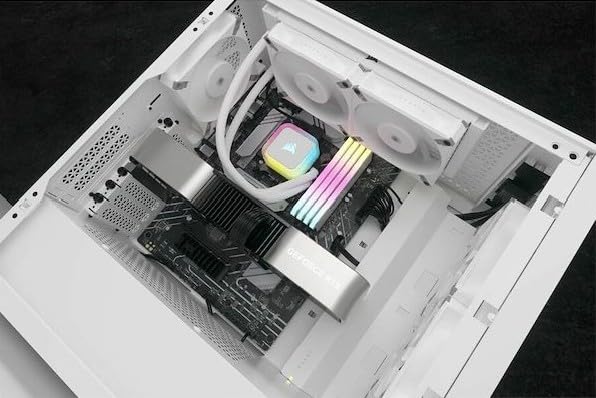
Corsair iCUE H150i RGB Elite White 360mm Liquid

Prime CORSAIR iCUE Link Titan 280 RX RGB Liquid CPU

Corsair iCUE LINK Titan 240 RX RGB 240mm AIO CPU
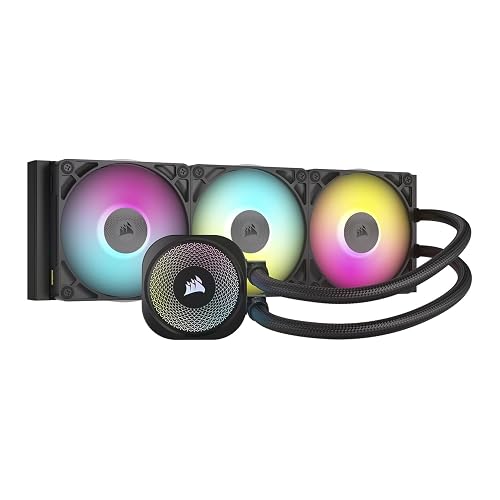
Prime CORSAIR iCUE LINK Titan 360 RX RGB Liquid CPU

CORSAIR iCUE Link H115i RGB 280mm AIO Liquid CPU

CORSAIR iCUE LINK H170i RGB 420mm AIO Liquid CPU
As an Amazon Associate we earn from qualifying purchases. Product prices and availability are accurate as of the date/time indicated.
Pros
- Excellent cooling efficiency for high performance CPUs and overclocking
- Very quiet 28.9 dB operation with intelligent fan and pump control
- Wide compatibility with latest Intel and AMD sockets including LGA1700 and AM5
- Stunning customizable RGB lighting integrated with Corsair iCUE ecosystem
- Premium build quality with copper cold plate and pre-applied thermal paste
Cons
- 360mm radiator requires a large case with triple 120mm fan support
- Full lighting and performance customization requires Corsair iCUE software
- Renewed condition may have minor cosmetic wear and limited warranty compared to new
The Corsair iCUE H150i RGB Elite in White is a 360mm all-in-one liquid cooler designed for gamers, enthusiasts and creators running high performance Intel and AMD CPUs. It is built for users who need strong thermal headroom with quiet operation and synchronized RGB style.
In real world use, the AF Elite fans with AirGuide technology and 1850 RPM max speed deliver strong airflow while keeping noise down to 28.9 dB. Zero RPM mode and variable pump speed let the system stay nearly silent at idle, then ramp efficiently under gaming or rendering loads.
Build quality is premium, with a thermally optimized copper cold plate, pre-applied thermal compound and a refined pump head featuring 16 individually addressable RGB LEDs. The clean white finish, metal and copper construction, and 4-pin power design give it a durable, modern look that fits showcase builds.
Drawbacks are worth noting. The large 360mm radiator needs a spacious case with triple 120mm fan support, so compact builds are not compatible. Full control of lighting and cooling profiles also requires Corsair iCUE software, and as a renewed unit it may have limited warranty coverage.
Overall, the H150i RGB Elite White offers an excellent balance of cooling power, low noise and vivid customization. For anyone building a stylish, high performance desktop who wants reliable liquid cooling with broad socket compatibility, it is a compelling choice.
Cooling Method: 360mm Liquid Cooling with Copper Cold Plate and Low Noise Pump
Fan Specs: AF Elite Series, up to 1850 RPM, 442.1 GPM Airflow, 28.9 dB Noise Level, 4-Pin Connector
Compatibility: Intel LGA 1700, 1200, 1150, 1151, 1155, 1156, 1366, 2011, 2066 and AMD AM4, AM5, sTRX4, sTR4
Design: White Finish, 16 RGB LEDs, iCUE Software Control, Pre-Applied Thermal Compound, Part Number CW-9060079-WW/RF
Pros
- Excellent cooling performance for gaming, heavy workloads and overclocking
- Very quiet operation with Zero RPM mode and low 36 dB noise level
- Clean, simple installation thanks to iCUE LINK System Hub and reduced cabling
- High-quality build with customizable RGB and CapSwap design
- Strong platform support for latest Intel and AMD sockets
Cons
- iCUE software can have a learning curve for first-time users
- Advertised 2.1 inch LCD screen is sold separately, not included
- Large 280mm radiator requires a compatible mid-tower or larger case
The CORSAIR iCUE Link Titan 280 RX RGB is a 280mm all-in-one liquid CPU cooler designed for gamers, enthusiasts and overclockers who demand high performance with clean aesthetics. It is ideal for modern Intel and AMD builds where low noise, thermal headroom and RGB customization are priorities.
At its heart is the FlowDrive cooling engine, combining a three-phase pump, precision engineered cold plate and pre-applied XTM70 paste for efficient heat transfer. The dual RX140 RGB fans deliver up to 94.7 CFM at 1700 RPM using AirGuide technology, while Zero RPM mode keeps the system silent during light tasks and users report noticeably lower temperatures under load.
Build quality is premium with a sturdy metal and plastic construction, low-profile pump head and CapSwap modules for easy personalization. The included iCUE LINK System Hub is a standout feature, letting you daisy chain components through a single port to drastically cut cable clutter and speed up installation.
There are a few caveats to consider. The 280mm radiator needs a mid-tower or larger case with proper clearance, and the iCUE software, while powerful, can feel complex for beginners. Some buyers also note that the 2.1 inch LCD upgrade shown in marketing is sold separately and wiring labels could be clearer.
Overall, the Titan 280 RX RGB delivers outstanding cooling, quiet operation and polished, customizable looks backed by a 6-year warranty. For builders invested in the CORSAIR ecosystem who want performance without wiring hassle, it is an excellent and reliable choice.
Model: CW-9061017-WW | Radiator Size: 280mm | Fans: 2x RX140 RGB, 1700 RPM, 94.7 CFM, 36 dB
Socket Support: Intel LGA 1851, Intel LGA 1700, AMD AM5, AMD AM4 | Cooling Method: Water | Connector: 4-Pin
Material: Metal, Plastic | Dimensions: 12.48 x 1.06 x 5.51 inches | Weight: 3.4 pounds
Features: FlowDrive cooling engine, AirGuide technology, Magnetic Dome bearings, Zero RPM mode, CapSwap ready
Included: iCUE LINK System Hub, pre-applied XTM70 thermal paste | Warranty: 6 Year Manufacturer
Pros
- Strong cooling performance with low 36 dB noise level
- Clean, clutter-free installation via iCUE LINK System Hub
- Broad compatibility with latest Intel and AMD sockets
- Quiet Zero RPM mode and efficient Magnetic Dome bearing fans
- Vibrant, customizable RGB lighting with easy CapSwap design
Cons
- Renewed condition may have minor cosmetic variations compared to new retail units
- 240mm radiator provides less thermal headroom than 360mm models for extreme overclocking
- Requires Corsair iCUE software for full RGB and fan control customization
The Corsair iCUE LINK Titan 240 RX RGB is a 240mm all-in-one liquid CPU cooler built for gamers, creators and DIY builders who want high performance cooling without complicated wiring. It supports Intel LGA 1851 and 1700 plus AMD AM5 and AM4, making it versatile for most modern desktops. It is ideal for anyone prioritizing clean aesthetics, quiet operation and centralized control.
At its heart is Corsair's FlowDrive engine, pairing a three-phase pump with a precision engineered cold plate and pre-applied XTM70 paste for efficient heat transfer. Real world feedback highlights noticeably lower temperatures versus air cooling with stable performance under load. The two RX120 RGB fans deliver strong airflow and static pressure while remaining quiet thanks to AirGuide technology and Magnetic Dome bearings.
Build quality feels premium with aluminum, copper and brass construction and a compact radiator that fits most mid-tower cases. The highlight is the iCUE LINK System Hub, which lets you daisy chain components with universal connectors to a single port to cut cable clutter dramatically. Interchangeable CapSwap modules and dynamic RGB lighting add a polished, personalized look.
There are some tradeoffs to note. As a renewed model, cosmetic condition can vary and the 240mm size will not match the headroom of larger 360mm coolers for heavy overclocking. Full control over lighting and fan curves also depends on Corsair's iCUE software, which adds a software requirement to the setup.
Overall, the Titan 240 RX RGB balances performance, acoustics and smart connectivity in a compact package. It is a great choice for builders who want efficient, quiet cooling with striking RGB and a tidy interior. If you want a modern AIO that simplifies installation while keeping temperatures low, it is a compelling pick.
Radiator Size: 240mm AIO with 2x RX120 RGB fans included
Cooling Engine: FlowDrive with three-phase pump and precision cold plate
Thermal Interface: Pre-applied XTM70 thermal paste
Fan Speed: Up to 2100 RPM, PWM controlled with Zero RPM mode
Noise Level: 36 dB
Socket Compatibility: Intel LGA 1851, LGA 1700, AMD AM5, AM4
Connectivity: 4-Pin, 12V DC, iCUE LINK System Hub included
Materials: Aluminum, copper, brass, metal, plastic, rubber
Dimensions: 9.45 x 9.45 x 9.45 inches, Weight: 3 pounds
Model: CW-9061016-WW
Pros
- Excellent cooling efficiency from FlowDrive three-phase pump and optimized cold plate contact
- Very quiet operation with Magnetic Dome bearings and Zero RPM fan stop at low temps
- Clean, clutter-free installation thanks to iCUE LINK System Hub and universal connectors
- Strong customization with iCUE software RGB control and CapSwap caps
- Broad compatibility with latest Intel and AMD sockets out of the box
Cons
- Renewed condition may show minor wear and offers different warranty support than new retail
- 360mm radiator requires a large case with dedicated 360mm mounting space
- Full RGB and fan control features require CORSAIR iCUE software
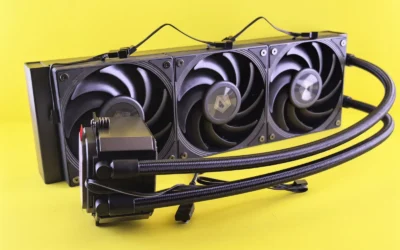
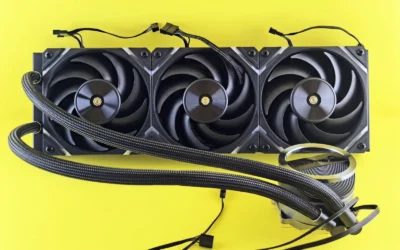
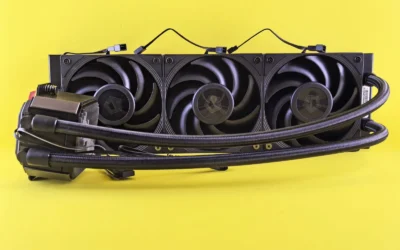
The CORSAIR iCUE LINK Titan 360 RX RGB is a premium 360mm all-in-one liquid CPU cooler designed for enthusiasts and gamers building high-performance desktops. It is best suited for users who want top-tier cooling for modern Intel LGA 1851/1700 and AMD AM5/AM4 systems while keeping cable management simple.
In real-world use, the FlowDrive cooling engine with its three-phase pump and precision cold plate delivers consistent heat transfer, aided by pre-applied XTM70 thermal paste. The three pre-mounted RX120 RGB fans push up to 73.5 CFM at 2100 RPM yet remain quiet at 36 dB, and Zero RPM mode stops fans completely at low temperatures for silent operation.
Build quality is a clear strength, with a mix of aluminum, copper, brass and durable plastics that feels robust and premium. The iCUE LINK System Hub is a standout design choice, letting you daisy-chain components with universal connectors to a single port, which drastically reduces cable clutter and speeds up installation.
There are a few tradeoffs to consider. As a Renewed unit, it may not offer the same unboxing experience or full new-unit warranty confidence as a brand new cooler. You will also need a case that fits a 360mm radiator, and getting the most from RGB and fan curves requires CORSAIR iCUE software.
Overall, the Titan 360 RX RGB is an excellent choice if you value efficient, low-noise cooling with smart connectivity and striking RGB customization. For builders invested in the CORSAIR ecosystem who want performance without the usual cable mess, it delivers a polished and powerful solution.
Model: CW-9061018-WW | Cooling Method: 360mm AIO Liquid Cooling with FlowDrive Engine
Fans: 3x RX120 RGB, PWM up to 2100 RPM, 73.5 CFM airflow, 36 dB noise level, Zero RPM support
Compatibility: Intel LGA 1851/1700, AMD AM5/AM4 | Thermal Paste: Pre-applied XTM70
Material: Aluminum, Copper, Brass, Plastic, Rubber | Weight: 3.7 pounds | Connector: 4-Pin, 12V
Included: iCUE LINK TITAN RX RGB Cooler with iCUE LINK System Hub and CapSwap modules
Pros
- Excellent cooling performance for gaming and heavy productivity workloads
- Very quiet operation with PWM control and Zero RPM fan stop technology
- Brilliant customizable RGB lighting with 34 LEDs per fan and 20 LED pump head
- Clean cable management via iCUE Link System Hub and hidden radiator connections
- Premium build quality backed by a 5-year manufacturer warranty
Cons
- Pump can be louder than previous H100 generation under load
- Large 280mm radiator and long tubing may cause clearance issues in compact cases
- Full lighting and control benefits require staying within the Corsair iCUE Link ecosystem
The CORSAIR iCUE Link H115i RGB is a premium 280mm all-in-one liquid CPU cooler designed for enthusiasts, gamers and creators who want top tier cooling without cable chaos. Built for modern platforms including Intel LGA 1700 and AMD AM5, it is ideal for high performance builds where thermals, noise and aesthetics all matter.
In real world use, it keeps even hot running CPUs cool under heavy gaming and productivity workloads thanks to its split-flow copper cold plate, 280mm radiator and pre-applied XTM70 thermal paste. Dual QX140 RGB fans push up to 2000 RPM with precise PWM control, while Zero RPM mode allows silent operation at idle by stopping the fans completely when temperatures are low.
Design is a major highlight, with a hidden connection layout that routes all wiring to the end of the radiator for a clean, distraction free view of the 20-LED pump head. The QX140 fans feature Magnetic Dome bearings for quiet, long lasting performance and pack 34 RGB LEDs per fan for vibrant, fully customizable lighting through iCUE software and the included iCUE Link System Hub.
There are a few tradeoffs to consider. Some users report the pump is louder than previous generation H100 models, and the large radiator plus long tubing can make fitment tight in smaller mid-tower cases near RAM. As with any iCUE Link product, you get the best lighting and control experience when staying within the Corsair ecosystem.
Overall, the H115i RGB is an outstanding choice if you want powerful, quiet cooling with showpiece lighting and dramatically simpler cable management. For builders who value performance, silence and a flawless look, it delivers excellent value and is easy to recommend for compatible Intel and AMD systems.
Cooling System: 280mm AIO liquid cooler with split-flow copper cold plate and pre-applied XTM70 thermal paste
Fans: 2x QX140 RGB PWM fans up to 2000 RPM, Magnetic Dome bearing, 34 RGB LEDs per fan, Zero RPM support, 37 dB noise level
Pump and Hub: 20 RGB LED pump head with hidden connection design, iCUE Link System Hub included, 12V 4-Pin, 10W
Compatibility: Intel LGA 1700 and AMD AM5 sockets, Desktop systems
Build and Warranty: Dimensions 12.68 x 5.51 x 1.06 inches, weight 3.6 pounds, copper cold plate construction, model CW-9061002-WW, 5 Year Manufacturer Warranty
Pros
- Top tier cooling performance from large 420mm radiator and copper cold plate
- Exceptional RGB lighting with 34 LEDs per fan and illuminated pump head
- Significantly cleaner build with iCUE LINK hidden connection system
- Quiet operation with PWM control and Zero RPM support
- Ready to install for Intel LGA 1700 and AMD AM5 with pre applied thermal paste
Cons
- Renewed condition raises potential reliability concerns, including reported hub and fan issues
- Oversized 420mm radiator requires a large case with 420mm support and limits compatibility
- Requires Corsair iCUE software and LINK ecosystem which may lock you into Corsair components
The CORSAIR iCUE LINK H170i RGB is a 420mm all in one liquid CPU cooler designed for enthusiasts and gamers who demand maximum thermal headroom. Built for Intel LGA 1700 and AMD AM5 platforms, it is ideal for high end builds in large cases that can accommodate its oversized radiator.
In real world use, the combination of a split flow copper cold plate, pre applied XTM70 paste, and three QX140 RGB fans delivers powerful and consistent cooling. With PWM speeds up to 2000 RPM and Zero RPM Mode, it handles heavy loads quietly and can go completely silent at idle.
Design and build quality are standout features, with a premium copper cold plate, sturdy 420mm radiator, and flawless hidden wiring. The iCUE LINK System Hub routes all connections through a single port, while the pump head with 20 RGB LEDs and fans with 34 LEDs per fan create vibrant, fully customizable lighting.
There are tradeoffs to consider. As a renewed unit, there is some risk of refurbishment related issues like hub recognition or fan failures reported by users. Its massive size also limits case compatibility, and getting the most from the lighting and control requires staying within the Corsair iCUE LINK ecosystem.
Overall, the H170i RGB is an excellent choice for builders who want elite cooling, striking aesthetics, and a clutter free setup. If you have the case space and are comfortable with a renewed product, it offers flagship level performance and looks that are hard to beat.
Model: CW-9061004-WW | Cooling Method: 420mm Liquid AIO | Fans: 3x QX140 RGB PWM, up to 2000 RPM
Socket Support: Intel LGA 1700, AMD AM5 | Cold Plate: Split flow copper with pre applied XTM70 thermal paste
Lighting: 20 LEDs on pump head, 34 LEDs per fan, iCUE controllable | Noise Level: 37 dB | Power: 12V, 4 Pin, 50W
Dimensions: 17.99 x 5.51 x 1.06 inches | Weight: 4.7 pounds | Included: iCUE LINK System Hub, iCUE LINK H170i cooler
Matching a Part to Your Build
If you are building a quiet 1440p gaming system in a mid-tower with top mount support for a triple-fan radiator, a cooler in the class of the Corsair iCUE H150i RGB Elite Liquid CPU Cooler is a comfortable fit for the Ryzen 7 9800X3D. You get a large radiator with three fans, a thermally optimized copper cold plate, and Zero RPM and variable pump speed modes that keep noise low at idle and still move heat quickly in games. This is the straightforward choice when your case has the clearance and you want low fan speeds without thinking about limits.
If your case is more compact or you prefer 140mm fans for lower pitch noise, consider a 280mm option such as the CORSAIR iCUE Link Titan 280 RX RGB Liquid CPU or the CORSAIR iCUE Link H115i RGB Liquid CPU Cooler. Both use two 140mm fans, with the Titan 280 rated up to 1,700 RPM and the H115i rated up to 2,000 RPM per the spec sheet, and both include the iCUE Link System Hub for single-cable control. Owners commonly report that a good 280mm handles the 9800X3D well in well-ventilated cases, and you gain easier fitment on top mounts where a 360mm would be tight, though you give up a bit of surface area compared to a larger radiator.
If you are maximizing headroom for a large airflow case or you want the quietest possible operation at low fan speeds, the CORSAIR iCUE Link Titan 360 RX RGB Liquid CPU and the CORSAIR iCUE Link H170i RGB Liquid CPU Cooler illustrate the top end. The Titan 360 uses three 120mm fans rated up to 2,100 RPM, while the H170i uses a 420mm radiator with QX140 RGB fans rated up to 2,000 RPM, both with hidden wiring and iCUE Link connectivity. These are ideal if your case supports 360mm or 420mm radiators and you want extra margin for warm rooms, high ambient temperatures, or a future move to a hotter CPU, but they are overkill if your case cannot fit them or you prioritize cost and simplicity. The Corsair iCUE Link Titan 240 RX RGB Liquid CPU shows the opposite end, a compact 240mm that can still cool the 9800X3D in a small case, but you should expect higher fan speeds and less acoustic headroom.
Common Mistakes
Mistake one is buying a radiator your case cannot actually mount. Always verify radiator length, thickness, and fan clearance against your case spec sheet, including RAM height and motherboard VRM heatsinks that can interfere with a top mount. A 360mm or 420mm cooler is not better if you have to force it into a front mount that chokes GPU airflow or blocks tubing. Measure first, then choose.
Mistake two is ignoring noise and control. A cooler that only runs at high fixed speeds will sound louder than a larger radiator running slowly, and skipping Zero RPM or custom curves means you miss easy gains in idle quietness. Check that your motherboard supports PWM control, that your hub has a mounting spot, and that you are comfortable using software to tune fan and pump behavior to your preference.
Mistake three is treating cooler size as a substitute for good mounting and airflow. Even the best AIO will underperform if the cold plate is unevenly mounted, the thermal paste is misapplied, or your case has restricted intake. Follow the manufacturer mounting instructions for AM5, use the correct standoffs, tighten in a cross pattern to even pressure, and ensure you have at least two unobstructed intake fans. Handle components with anti-static precautions and do not overtighten.
Who Should Wait or Buy Differently
A large iCUE Link AIO is not ideal for you if you are building in a small form factor case that only supports air cooling or a 240mm radiator, if you want to avoid software ecosystems entirely, or if you are on a tight budget where a quality air cooler meets your noise target. It is also not the right choice if you plan to move to a platform that requires different mounting and you do not want to manage hub wiring. In those situations, consider a simpler air cooler with verified AM5 clearance or a smaller AIO that fits your case without compromise, and put the savings toward case airflow or GPU headroom.
Frequently Asked Questions
Is the Corsair iCUE Link H150i enough to cool a Ryzen 7 9800X3D for gaming in 2026?
Yes, for most gaming builds it is more than enough when your case supports its radiator and you mount it correctly. The 9800X3D benefits from steady heat transfer and good cold plate contact rather than extreme wattage capacity, so a triple-fan class cooler with PWM control and Zero RPM support will keep temperatures well controlled at reasonable noise. Just confirm radiator clearance and follow the mounting guide for AM5.
Do I need a 360mm or 420mm radiator, or will a 280mm be sufficient?
A 280mm cooler such as the Titan 280 or H115i is generally sufficient for the 9800X3D in a case with good airflow, and owners commonly report quiet operation with those sizes. A 360mm or 420mm radiator gives you more surface area, so you can run fans slower for the same cooling or handle warmer ambient conditions with extra margin. Choose based on case support and noise preference rather than fear of overheating.
What should I check before buying any iCUE Link cooler for AM5?
Check socket support for AM5 and AM4, radiator length and thickness versus your case, and where the iCUE Link System Hub will sit. Also verify that your motherboard has the right USB header for the hub and that you are comfortable using iCUE software for fan and pump curves. Finally, review your RAM and VRM heatsink height for top mount clearance and follow anti-static handling during installation.

Write Your Review
No reviews yet. Be the first to share your experience!