

Video credit: Brian G. Original video: https://www.youtube.com/watch?v=WpqNefSVgd8. This is our own independent breakdown and is not affiliated with the video creator. As an Amazon Associate, CustomPCGaming earns from qualifying purchases. Product prices shown in the video may have changed.
Watch the build
Parts in this build
- Baskiss Under Desk Cable Tray
- VIVO Under Desk Cable Tray
- Corsair MM350 PRO
- Autonomous ErgoChair Pro
- MOUNTUP Single Monitor Arm
- UT Wire Cable Station
- FLEXISPOT E5 Standing Desk
- InnoGear Microphone Arm
- Govee Monitor Light Bar
Parts list is our summary of the video for reference. Confirm current specs and price on the retailer page before buying.
Watch: The Setup Tour
This retro console and PC pairing is about warm surfaces, a single focused screen zone and both systems ready to play without swapping cords. You will like this direction if you split evenings between cartridges or modern consoles and PC games and you want one seat that handles work too.
What This Setup Is Going For
You are chasing a cozy retro character built from finish and glow, not from lots of small props. Think a warm wood or soft white top, a wide stitched mat that anchors your keyboard and mouse, and bias light that sits in warm white for work and shifts to color for play. The tour video on this page is only a layout reference for proportions and mood, and the picks below are our own current recommendations for November 2026.
For layout, picture one main monitor on a gas spring arm in the center, your PC tucked to one side and your console dock or compact retro box to the other. A standing frame leaves open space underneath for a metal tray and a lidded box that holds strips and bricks, so your feet and floor stay open. A small desktop hub keeps controller leads and phone cables where your hand can find them instead of slipping behind the top.
This plan fits a bedroom wall, a dorm corner or a small home office where one desk must cover school or office work plus play. You can run the light bar in tunable white during the day, then add rear color at night to soften the contrast of a bright screen in a dark room. If you own discs or carts, plan shelf space beside the desk so the work surface stays open for keyboard, mouse and one controller.
Expect tradeoffs. Matching wood, white and black finishes takes intent, and mixing too many shades can look busy even with tidy routing. Running PC plus console means more bricks, longer HDMI and power runs, and extra weight under the top that moves when you stand. Standing frames add comfort and flexibility, but you must stay under the listed weight capacity and follow the assembly instructions closely.
This style does NOT suit every space. Skip the full version if you live in a very small rental with no depth for an arm to swing, if you move often and cannot reinstall mounts and trays, or if your budget only stretches to desk and chair today. Renters, frequent movers and tight budget builders should start with mat plus lighting and add arms and screw mount trays later.
The Gear Breakdown
This is the core of the breakdown. Use the table to see what is common in this style and what we would buy now, then read the notes on the three groups that shape the result most.
This article contains affiliate links. If you buy through one of our links, CustomPCGaming may earn a commission at no extra cost to you. Commissions never influence which products we recommend or how we rank them. Read our Affiliate Disclosure for details.
Quick Picks at a Glance

Prime Corsair MM350 PRO Extended XL Gaming Mouse Pad

Prime VIVO Under Desk Cable Management Tray 16.5 Inch

Govee Smart LED Light Bars H6056 RGBICWW
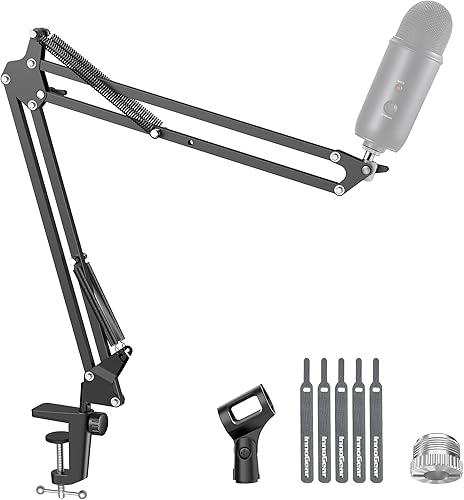
Prime InnoGear MU01 Mic Boom Arm Stand for Blue Yeti

Prime Baskiss Cable Management Box with Wood Lid
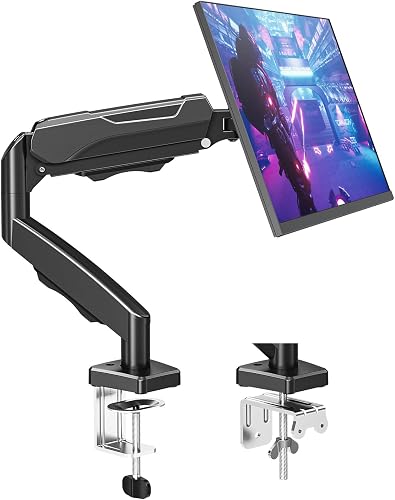
Prime MOUNTUP Single Monitor Arm for 17-32 Inch Screens

Prime UT Wire Cable Management Box Black
As an Amazon Associate we earn from qualifying purchases. Product prices and availability are accurate as of the date/time indicated.
Pros
- Massive extended size covers mouse and keyboard in one smooth surface
- Spill-proof coating makes cleanup fast and helps prevent stains
- Micro-weave fabric offers fast glide ideal for FPS and MOBA play
- Sturdy anti-slip rubber base and stitched edges hold up to heavy daily use
Cons
- Extra large 36.6 inch footprint requires a spacious desk and is not portable
- Cloth surface still needs prompt wiping after spills to stay pristine
- No RGB lighting or color options for users who want extra customization
The Corsair MM350 PRO Extended XL is a spill-proof cloth mouse pad designed for PC gamers who want one continuous surface for mouse and keyboard. With a massive 930mm by 400mm footprint, it suits battlestations, home offices and anyone who prefers low DPI sweeping movements.
In real world use, the micro-weave fabric feels dense and fast, allowing quick flicks with consistent tracking for FPS, MOBA and productivity work. The spill-proof coating causes liquids to bead on top instead of soaking in, so coffee or water can be wiped off quickly without stiffness.
Build quality is a clear strength, with 4mm thick plush rubber that stays flat and resists bunching during intense play. The 360 degree stitched anti-fray edges feel smooth on wrists, while the textured rubber base keeps the pad firmly planted on wood, glass or laminate desks.
The size is also its main tradeoff, as it needs a large, clear desk and is not meant for travel or compact setups. Gamers looking for RGB lighting, multiple colors or a harder speed surface may want to consider other options in the Corsair lineup.
Overall, the MM350 PRO is an excellent pick for gamers who value durability, easy maintenance and smooth speed. It combines practical spill protection with premium comfort and precision, making it a smart upgrade for any extended desk setup.
Model: CH-9413770-WW, Size: Extended XL, Dimensions: 930mm x 400mm, 36.6 x 15.7 inches, Thickness: 4mm.
Surface Material: Micro-weave cloth with spill-proof stain-resistant coating, Base: Anti-skid plush rubber, Edges: 360 degree anti-fray stitching.
Color: Black, Shape: Rectangular, Compatibility: Optical and laser gaming mice, Recommended Use: Gaming and office setups.
Pros
- Sturdy all-metal build supports up to 11 lbs without sagging
- Simple screw-in installation works with most wood desks
- Partially closed design hides clutter while keeping cables accessible
- Slim, minimalist black profile suits home and office decor
Cons
- Requires drilling into desk, not ideal for glass, metal or thin tops
- Single 16.5 inch tray may be tight for very large setups with multiple power strips
- No built-in cable clips or cover, so very thin cables may need extra ties
The VIVO DESK-AC06-1C is a 16.5-inch under-desk cable management tray designed to tame messy power strips and cords. It is built for remote workers, gamers and office users who want a cleaner, more productive setup without cables on the floor.
In daily use, it easily holds a full-size power strip plus chargers, ethernet and AV cables in one hidden spot. The open front makes it simple to plug in new devices or pull out a cable, so you do not have to remove the whole tray for small changes.
The tray features a low-profile steel body with a matte black finish that disappears under most desks. Its partially closed shape keeps bricks and wires concealed from view while still allowing airflow, and the metal frame feels solid and resistant to bending.
Installation requires screwing into a wood or particle board top, so it is not suited for glass or metal desks. The single tray size is perfect for standard setups, but users with extensive gear may need two units for full coverage.
Overall, this VIVO tray delivers a simple, durable and effective fix for under-desk clutter. If you want strong metal construction, easy access and a minimalist look, it is an excellent upgrade for any home or office workstation.
Model DESK-AC06-1C in Black with durable metal construction for indoor use. Measures 16.5 inches long by 3 inches wide with mounting holes spaced 11 inches apart.
Supports up to 11 lbs of power strips, adapters and cables with screw-in installation under wood or particle board desks. Includes mounting screws and 1 year warranty for peace of mind.
Pros
- Vibrant, color accurate RGBICWW output with smooth gradients and bright white options
- Quick 10 minute setup with intuitive app, versatile mounting brackets and voice control
- Highly customizable with scenes, DIY effects and AI generated lighting
- Works seamlessly with Alexa, Google Home and other Govee lights for expanded setups
Cons
- Bulkier than LED strips, which may not suit ultra minimal setups
- Recommended for displays under 45 inches, larger TVs may need extra lights
- Requires corded power and nearby outlet, limiting fully wireless placement
The Govee H6056 Smart Light Bars are a two pack ambient lighting kit designed for TVs, monitors, gaming setups and living rooms. They are made for gamers, movie fans and anyone who wants immersive bias lighting without installing LED strips.
Standout performance comes from RGBICWW technology that shows multiple colors at once plus tunable white from cozy warm to crisp cool. The built in mic syncs effects to music, games and movies in real time, while 60 plus scenes, DIY mode and AI lighting in the Govee Home App make customization simple.
Each bar can lay flat, stand upright on a desk or mount behind a display with the included brackets. The polished black plastic housing feels sturdy for daily use and the 106 inch cord gives flexible placement around most TV stands.
The kit works best with monitors and TVs under 45 inches, so very large screens may need additional lights for full coverage. The bars are also a bit bulkier than strip lights and require corded power, which can limit completely wireless setups.
Overall, this is one of the easiest and most versatile ways to upgrade a gaming or home theater setup. With Matter, Alexa and Google Home support plus vibrant segmented color, it delivers premium ambiance with minimal effort.
Model: Govee H6056 Base Kit includes 2 RGBICWW WiFi light bars, control box, adapter and mounting brackets.
Lighting: RGBICWW segmented color, 2200K tunable white, 192 LEDs, music sync mic, 60 plus scene modes and DIY effects.
Smart Control: Matter compatible, works with Alexa and Google Home, Govee Home App control, schedules and grouping.
Power and Build: 12V corded electric, 18W, plastic housing in black, table or screen mount, 106 inch cord length.
Pros
- Excellent load capacity for its class, holds popular condenser and dynamic mics securely
- Highly flexible joints allow precise, silent mic positioning in any direction
- Durable alloy steel build with improved spring layout for longer service life
- Folds away compactly to free up desk space for gaming and work setups
Cons
- Desk clamp only fits flat, squared edges up to 2 inches, not compatible with slanted or curved desks
- Shock mount not included, required for some Fifine and condenser mic setups
- Heavier broadcast setups over 3.3 lb with shock mount and pop filter may need frequent tension adjustment
The InnoGear MU01 is a scissor style desk mount boom arm designed for podcasters, streamers, gamers and home studio creators. It is built to get your microphone off the desk, reduce clutter and keep it in the perfect position for voice recording.
Real world performance centers on flexibility and silence. With 360 degree base rotation, wide arm extension and a 270 degree mic adapter, you can pull the mic close for recording and push it away when done, all without creaks or spring noise.
Build quality is a clear strength thanks to alloy steel tubing, super strong springs and an extra positioning hole for added stability. The 3.3 lb capacity handles most popular USB and XLR mics, including Blue Yeti, HyperX QuadCast and Shure MV7, with confidence.
There are a few limitations to consider. The clamp needs a flat, squared desk edge up to 2 inches thick, so it will not work on beveled or curved surfaces. A shock mount is also not included, which some condenser mic owners will need to buy separately.
Overall, the MU01 is a practical, heavy duty upgrade over basic mic stands. If you want affordable, flexible and quiet mic placement for streaming, gaming or recording, it is an easy recommendation.
Brand: InnoGear, Model: MU01, Style: Standard scissor boom arm in Black for desk mounting.
Material: Alloy steel, Product weight: 1.4 pounds, Folded size: 15 x 1.5 x 4 inches with max reach height of 27.6 inches.
Load capacity: Up to 1.5 kg or 3.3 lb, Mount threads: 3/8 inch and 5/8 inch with included adapter.
Mount type: Desk clamp for flat squared edges up to 2 inches thick, Base rotation: 360 degrees with fold away storage.
This arm fits dynamic mics like Shure SM58, Samson Q2U and Shure PGA48 with the included standard mic clip. It is a great way to free up desk space while keeping your everyday mic ready to use.
With the included 5/8 inch to 3/8 inch adapter, it also supports HyperX QuadCast and SoloCast, Blue Yeti, Snowball and Snowball iCE, Razer Seiren V3 Mini, Shure SM7B and MV7, plus Fifine AmpliGame, K669B, AM8 and more.
For best results, confirm your desk has a flat edge up to 2 inches thick and add a compatible shock mount if your microphone requires one. Keep total mic weight including accessories under the 3.3 lb limit.
Pros
- Compact 12 inch footprint reclaims valuable desk and floor space
- Stylish white box with wood look lid blends well with home and office decor
- Lid tray adds useful everyday function for phone or remote storage
- Simple no tool setup with easy cable routing for cleaner organization
Cons
- Only fits small or standard strips under 11.4 inch L x 4.1 inch W, not large or extra long units
- Limited interior room for bulky adapters or many oversized plugs at once
- Lightweight indoor tabletop build is for organization only, not heavy duty protection
The Baskiss Cable Management Box is a compact 12 x 5 x 4.5 inch organizer built to hide a standard power strip, adapters and loose cords. It is made for home offices, desks, TV stands, dorms and small entertainment centers that need a cleaner look.
Standout features include dedicated cord outlets that route cables neatly in and out, plus a wood style lid that works as a tray for a phone or remote. In daily use it consolidates charging gear into one hub, which cuts clutter and tripping hazards around desks and floors.
Design is simple and modern with a white body and wooden look top that suits most decor. The unit is lightweight at 0.44 kg, freestanding for tabletop or floor use, and intended for indoor setups with computers, USB hubs and TV accessories.
The main drawback is size. It only fits strips under 11.4 inch L x 4.1 inch W, so large surge protectors and bulky adapters may not fit. Buyers must measure first to avoid a tight fit or return.
Final verdict is positive for the right buyer. If you have a standard small strip and want an affordable, stylish way to conceal cords and add a safety barrier, this is a practical pick.
Brand: Baskiss, Model Number: 4330227480, Mfr Part: 40-100-C02, Color: White, Style: Wooden.
Product Dimensions: 12L x 5W x 4.5H inches. Fits power strips under 11.4L x 4.1W inches. Item Weight: 0.44 kg.
Material: Durable body with wood style lid. Indoor use, tabletop and freestanding installation. Unit Count: 1 cord management box.
Best Use: Desk, TV, computer, USB hub and small entertainment charging stations for cord concealment.
Measure your power strip length and width before ordering, including plugs and adapters. This box is designed for standard and small strips only and will not fit large units.
Allow extra room for cable bends at the side outlets and for the lid to close fully. If you use oversized adapters, consider a slimmer strip or fewer plugs per box.
For larger TV setups or workshop strips, look for an extra large cable box instead of forcing a tight fit.
Pros
- Smooth one finger adjustment once tension is set correctly
- Wide compatibility with flat and curved monitors from top brands
- Sturdy steel construction reduces wobble and holds position
- Built in cable management keeps workspace tidy
- Quick 15 minute setup with both clamp and grommet hardware included
Cons
- Tension and tilt require manual hex key adjustment, especially for heavier screens
- Tight curve monitors with 1000R to 1800R curvature may need a heavy duty model instead
- Maximum stability requires grommet mount and keeping the arm partially retracted
The MOUNTUP MU0004 is a single monitor desk mount designed for 17 to 32 inch screens weighing 4.4 to 19.8 lbs. It is built for remote workers, students and gamers who want ergonomic flexibility and a clutter free desk.
Standout performance comes from its full motion arm with tilt, swivel, 360 degree rotation and up to 19.4 inches of extension. Once tension is dialed in with the included hex key, repositioning feels smooth and the screen stays exactly where you place it.
Design is practical with heavy duty alloy steel, a compact clamp or grommet base and snap on covers that hide cables. Height adjusts up to 16.9 inches above the desk, and the VESA plate fits both 75mm and 100mm patterns from most major monitor brands.
Setup takes some fine tuning, as heavier monitors over 15 lbs need multiple counterclockwise turns to balance correctly. Deep curved screens and maximum arm extension can also introduce some wobble, so grommet mounting is best for stability.
Overall, this is a sturdy, versatile and user friendly mount that frees up valuable desk space. For single screen setups in home or office use, it delivers excellent adjustability and reliable daily performance.
Compatibility: 17 to 32 inch flat and curved monitors, 75x75mm and 100x100mm VESA, 4.4 to 19.8 lbs capacity. Fits monitors from ASUS, Acer, Samsung, LG, HP, Dell, Lenovo and AOC.
Motion Range: Tilt minus 45 degrees to plus 90 degrees, swivel plus or minus 180 degrees, 360 degree rotation, 19.4 inch extension, 16.9 inch height adjustment.
Mounting and Build: C-clamp or grommet base for desks 0.39 to 2.76 inches thick. Alloy steel construction in black, model MU0004 with tabletop mounting and integrated cable management.
Pros
- Large capacity holds big and tall plugs that smaller boxes cannot fit
- Creates a tidy, family friendly charging station for multiple devices at once
- Simple drop in setup with no tools, just place the strip inside and route cords
- Clean matte black finish looks neat in living rooms, bedrooms and offices
Cons
- Power strip and chargers are not included, box only
- Lid can feel loose and may need tidy cable placement to sit flat
- Lightweight plastic can sound hollow and rattle with phone vibration, and top grommets can pop out
The UT Wire UTW-BXSM-BK is a desktop cable management box designed to conceal a power strip, chargers and excess cord length. It is made for anyone tired of tangled cables on a desk, nightstand, kitchen counter or behind the TV.
In daily use, the extra long 16.4 inch interior easily swallows a standard 6 to 12 outlet strip plus bulky adapters. The top flip door with three slots lets you feed out just what you need for phones, tablets, headphones and watches, while the top groove holds a device upright as it charges.
The box is lightweight plastic in matte black, so it blends quietly under TVs and on mantels or desks. Side openings on the left, top and right make cable routing flexible, and setup takes seconds with no tools or mounting required.
Build quality is functional rather than premium, as the plastic feels a bit hollow and can rattle if your phone vibrates on top. The lid does not lock tightly and the soft top grommets can pop out when pulling thicker cables through, so a little cable arranging inside helps.
Overall, this is a practical and affordable fix for cord clutter, especially for shared family charging spots and home entertainment setups. If you want a larger, simple hideaway box with convenient top access, this UT Wire model is a smart pick.
Brand: UT Wire, Model: UTW-BXSM-BK, Color: Black, Style: Desktop charging box
Dimensions: 16.4L x 6.6W x 5.4H inches, Weight: 16 ounces, Material: Plastic
Capacity: Fits most standard 6 to 12 outlet power strips, power strip and chargers not included
Usage: Indoor only with top flip door plus left, top and right cable openings for flexible routing
| Gear | Common in this style | Our 2026 pick | Why |
|---|---|---|---|
| Cable management | a cable management in this style | Baskiss Under Desk Cable Tray | a wide basket for a heavier cable load on a standing desk |
| Cable management | a cable management in this style | VIVO Under Desk Cable Tray | a screw-mount metal tray for a permanent clean install |
| Desk mat | a desk mat in this style | Corsair MM350 PRO | a thick stitched XL mat that resists fraying |
| Chair | a chair in this style | Autonomous ErgoChair Pro | a mid-price ergonomic chair with a wide adjustment range |
| Monitor arm | a monitor arm in this style | MOUNTUP Single Monitor Arm | a low-cost gas-spring arm for a first upgrade |
| Cable management | a cable management in this style | UT Wire Cable Station | a small hub that keeps charging cables from falling behind the desk |
| Desk | a desk in this style | FLEXISPOT E5 Standing Desk | a lower-cost standing frame with the range most people need |
| Mic arm | a mic arm in this style | InnoGear Microphone Arm | a low-cost boom arm that mounts to the desk and stays out of the shot |
| Bias light | a bias light in this style | Govee Monitor Light Bar | a monitor light bar with RGB back glow for a gaming look |
The desk, mat and arms do most of the visual and ergonomic work. Pair your frame with Corsair MM350 PRO Spill-Proof Cloth Gaming Mouse which measures 930mm by 400mm with 4mm thick plush rubber, micro weave glide and stitched edges that resist fraying plus a spill resistant coating for drinks. For your screen, MOUNTUP Single Monitor Desk Mount Holds Screen supports screens from 17 to 32 inches with VESA patterns of 75 by 75mm and 100 by 100mm and a weight range of 4.4 to 19.8 lbs, with tilt, swivel and 360 degree rotation plus up to 19.4 inches of extension and up to 16.9 inches of lift, and it clamps to tops from 0.39 to 2.76 inches thick. Confirm your VESA pattern and weight first, check edge thickness for the clamp, and follow the mounting instructions. Add InnoGear Boom Arm Microphone Mic Stand for Blue for your mic, which offers 360 degree base rotation with wide swing and tilt adjustment and holds up to 3.3lb or 1.5kg while clamping to squared edges up to 2 inches thick.
Lighting sets the retro mood after the finishes. Govee Smart Light Bar, RGBICWW TV Lights uses RGBICWW tech for tunable cool to warm white plus segmented color, with voice control through Alexa or Google Home, app control with 60 plus scene modes, music sync through a built in mic, and a 106 inch cord with brackets for flat, vertical or behind monitor placement, rated for monitors under 45 inches. Place the bar behind or under the monitor for bias glow, then keep the front light warm and low so your screen stays the focus. Do not overload a single outlet with PC, console, chargers and lights on one strip, and keep power supplies ventilated.
Cable routing is what makes a console plus PC desk feel calm. Mount VIVO Black 17 in Under Desk Cable Management Tray under the top, a 16.5 inch by 3 inch metal tray with mounting holes 11 inches apart that supports up to 11 lbs and uses a front opening for adds and changes. Hide the strip and bricks in Cable Management Box by Baskiss, 12x5x4.5 inches, a 12 by 5 by 4.5 inch box with a wood style lid that doubles as a tray and fits strips under 11.4 inches long by 4.1 inches wide. Keep daily leads in UT Wire UTW-BXSM-BK Desktop Mobile Charging, a 16.4 by 6.5 by 5.4 inch high hub with top flip door and side openings that fits most 6 to 12 outlet strips. Route console HDMI and power on one side and PC runs on the other so you can trace each path later.
How To Adapt It To Your Room
Where do your console and PC cords go when you raise the desk and still want the top to look simple? Start with power in one place. Put a single strip in the lidded box or tray center rear, then run one thick drop to the wall outlet with slack looped for standing travel. If you rent, choose no drill trays and adhesive raceways rather than screws, and review our under desk tray guide before you drill anything.
Adapt this to your space before buying. Measure the wall or bedroom for the desk width, then leave side room for your tower and console so vents breathe. A wall mounted monitor layout needs more depth for a monitor arm to pull back, so pull the desk forward enough for the 19.4 inch extension and for cables to bend without strain. You want room to slide your chair back for controller play without hitting a bed or door.
Check your monitor for a VESA pattern before choosing an arm, and confirm the desk edge thickness for a clamp. The arm in our list fits 75 by 75mm and 100 by 100mm patterns, holds 4.4 to 19.8 lbs, and clamps to tops from 0.39 to 2.76 inches thick, while the mic boom clamps to squared edges up to 2 inches thick. If your screen is curved, very heavy or has no VESA holes, pause and compare options in our dual monitor routing guide or pick a different mount path. Never assume any arm holds any monitor, and follow the mounting instructions.
If you rent, use no drill cable trays and adhesive raceways rather than screwing into the desk or wall, and find a stud before any wall mount. Adhesive channels work well along a back edge or leg, and you can compare approaches in our adhesive clips versus raceway guide. Keep adhesive off heat sources and follow the maker cure time so channels do not peel. This keeps your deposit safe and still hides the long console runs.
Match the retro look with the finish of the desk and mat first, then the lighting color, rather than buying every accessory in one brand. Pick two main tones, such as warm wood plus black or soft white plus walnut, then set bias light to warm white to tie them together. Save saturated color for night sessions so the room still feels calm for work. Your eyes will thank you when the wall behind the screen is softly lit instead of pitch black.
A standing desk lists a weight capacity, keep the tower, monitors and arm under it. Place the tower on the floor or a stand when you can to cut top weight and vibration, and keep the tray load balanced left to right. Follow the assembly instructions, recheck bolts after the first week of up and down travel, and route cables with a service loop so nothing pulls at full height. For broader ideas, browse our Cable Management and Under Desk archive.
Give consoles their own path. Run retro power bricks and short HDMI leads together on the console side with ties, and keep high speed PC display and USB runs apart so you can swap systems without undoing everything. Label both ends of each HDMI lead with tape so you know which input is PC and which is console when you reach behind. Leave one spare port and one spare power socket for a future handheld dock or capture box.
What Actually Changes The Feel
No verified frame rate numbers are available for this build, so treat feel here as comfort, focus and ease of use rather than measured output. What you notice first in a retro console and PC space is glow, surface and order, not spec sheet gains.
Bias lighting changes the room most. A warm rear glow softens contrast between a bright screen and a dark wall, which many owners say feels easier for long nights, and a touch of color makes wood and mat tones look richer. Research the scene modes and app control in 2026 before you buy, and start with warm white before you chase bold presets.
Under desk routing is next. A metal tray plus a lidded box and a desktop hub remove the visual noise of bricks and wall warts and keep your feet free, and owners commonly report that one centered power point with labeled runs saves the most time. A full desk mat in the 930mm by 400mm class ties keyboard, mouse and controller space into one zone and protects the top from scratches.
Arms and mic booms matter less for mood but more for posture and desk space. A gas spring arm lets you set eye height and push the screen back for controller play, while a boom keeps the mic off the mat and out of camera. Upgrade those after light, tray and mat are settled, unless neck or wrist strain says otherwise. Per the spec sheet, small placement tweaks often help more than adding more gear.
Build It At Three Budgets
Use these three paths to match your room and budget in November 2026. The picks above are current, and each path keeps the retro character while changing how long it should last.
Budget: First Retro Setup
Choose a manual or single motor desk, a well reviewed chair in the sub 150 class such as the SIHOO M57, a single VIVO arm, one Govee light strip, a large cloth mat and a no drill cable tray. This suits you if you want the look on a tight budget and you can accept manual height changes and basic coverage for now. Start with VIVO Black 17 in Under Desk Cable Management Tray and Govee Smart Light Bar, RGBICWW TV Lights style pieces, then add a box later.
Balanced: The Setup We Recommend
Pick a dual motor standing desk, a mid ergonomic or racing chair, a gas spring arm such as MOUNTUP Single Monitor Desk Mount Holds Screen, a monitor light bar plus one strip such as Govee Smart Light Bar, RGBICWW TV Lights, a stitched XL mat such as Corsair MM350 PRO Spill-Proof Cloth Gaming Mouse and a clamp on cable tray with a sleeve. This suits most people who want it to last through daily work plus nightly console and PC play. You get stable height changes, warmer bias light and a tray plus box combo that handles both systems.
Premium: Keep It For Years
Choose a Herman Miller or Steelcase chair, an Ergotron arm, a light bar plus wall panels, a felt or leather pad and a fully sleeved cable run. This suits you if you plan to keep the same desk for years and you want top comfort and the most refined routing. Keep the same layout logic with Cable Management Box by Baskiss, 12x5x4.5 inches and UT Wire UTW-BXSM-BK Desktop Mobile Charging style hubs, only with better materials and tighter install.
FAQ
How do I route PC and retro console cables on one standing desk?
Group power in one centered tray or box, then run PC leads down one side and console leads down the other with slack for lift travel. Label HDMI ends and keep bricks in the box so only one cord drops to the wall, which makes swaps and dusting far easier.
Will one monitor arm and one mic arm fit on the same desk edge?
In many cases yes if you check specs first. Confirm your screen VESA pattern and weight against the 75 by 75mm and 100 by 100mm fit and 4.4 to 19.8 lbs range, confirm edge thickness for each clamp, and follow the mounting instructions so neither arm creeps or tilts.
Can I hide cables without drilling if I rent?
Yes. Use a no drill tray, adhesive raceways and a desktop charging hub, and route the wall drop along a leg with ties. Find a stud before any wall mount and avoid screws in rental walls or thin tops.
Final Verdict
A retro console and PC desk works best when finishes match, glow stays warm and every brick has a home off the floor. You do not need every accessory at once if you get tray, mat and light right first.
Our pick: the balanced version with a dual motor frame, the MOUNTUP arm, the Corsair mat and the Govee bar plus tray and box, because it fits most rooms and lasts through daily use.




Write Your Review
No reviews yet. Be the first to share your experience!