

Video credit: Izon Icy. Original video: https://www.youtube.com/watch?v=uTOKU7-Ddz8. This is our own independent breakdown and is not affiliated with the video creator. As an Amazon Associate, CustomPCGaming earns from qualifying purchases. Product prices shown in the video may have changed.
Watch the build
Parts in this build
- Ergotron LX
- YSAGi Leather Desk Pad
- 6amLifestyle Headphone Stand
- Nanoleaf Shapes Hexagons
- SIHOO Doro C300
- Razer Strider XXL
- Logitech G840 XL
- Corsair MM350 PRO
Parts list is our summary of the video for reference. Confirm current specs and price on the retailer page before buying.
Watch: The Setup Tour
The embedded tour is there to show proportions, spacing and mood for a minimalist battlestation. You get a sense of how a low profile layout, soft background glow and open desk surface work together for focus and play.
What This Setup Is Going For
You are building for visual quiet. A minimalist desk setup like this keeps the surface open, hides distractions and lets one or two accents carry the whole room. If you want a space that works for work calls by day and games by night, this direction fits you.
The layout in the reference style usually centers on a single wide monitor or one ultrawide on an arm, with keyboard and mouse low and centered. There is breathing room on both sides, no stacked shelves crowding the view, and lighting placed behind rather than on the desk. That openness is what makes the desk feel larger than it is.
This approach suits a bedroom, a small office or a basement corner where you want order without a full renovation. It pairs well with light wood, white tops or matte black tops, plus a large mat that ties the keyboard and mouse zones together. If you like warm white bias light or soft color accents, you can shift the mood without adding clutter.
The tradeoffs are real. You give up easy access storage when you remove drawers and pegboards, so you need a plan for controllers, chargers and paperwork. Cable routing takes more thought because every stray cable shows on a bare desk. Matching finishes also takes patience, since mixing too many blacks, grays and whites can look busy instead of calm.
This style does NOT suit everyone. It is a poor fit for very small rooms where you need vertical storage, for renters who cannot mount or route anything, for tight budgets that need function first, and for people who move often and need a setup that packs fast. If you need lots of gear within reach, a more equipped station will serve you better.
The Gear Breakdown
This is the core of our guide. The table below maps what you commonly see in this style to our current picks for 2026, then we explain which pieces shape the look most.
This article contains affiliate links. If you buy through one of our links, CustomPCGaming may earn a commission at no extra cost to you. Commissions never influence which products we recommend or how we rank them. Read our Affiliate Disclosure for details.
Quick Picks at a Glance

Prime Logitech G G840 XL Gaming Mousepad Shroud Edition

Prime Corsair MM350 PRO Extended XL Gaming Mouse Pad

Prime Razer Strider XXL Hybrid Gaming Mouse Mat

Prime Nanoleaf Shapes Hexagon Smart RGBW LED Wall Light
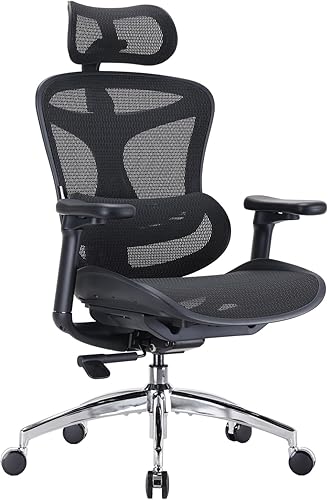
SIHOO Doro C300 Ergonomic Office Chair with 3D

Prime 6amLifestyle Shark 11 Pro Universal Controller

Ergotron LX Pro Monitor Arm for 34 Inch Ultrawide
As an Amazon Associate we earn from qualifying purchases. Product prices and availability are accurate as of the date/time indicated.
Pros
- Extra large size comfortably holds full keyboard, mouse and wrist rest area
- Smooth, consistent glide praised for both gaming precision and office comfort
- Stays flat and stays in place with no bunching during intense play
- Durable build holds up without fraying or color loss with daily use
- Clean Shroud design looks great on gaming and professional desks
Cons
- Unstitched edges may feel slightly rough if you rest wrists directly on the border
- Costs more than basic entry level extended pads
- Very large footprint requires a spacious desk and careful setup planning
The Logitech G G840 XL Shroud Edition is an extended desktop mousepad designed for gamers, creators and office users who want unified space for keyboard and mouse. With a 35.4 by 15.8 inch footprint, it is built for low sensitivity players who make wide sweeping movements and for anyone who wants consistent height across the desk.
In real world use, the performance tuned cloth surface provides clean sensor imagery for accurate tracking at high speeds. Moderate friction gives you enough control for precise micro adjustments while still allowing fast flicks, which helps build reliable muscle memory.
Build quality is a clear strength, with a 3mm rubber base that grips the desk and prevents bunching during intense sessions. The cloth top feels smooth and comfortable for wrists, lays flat quickly, and resists fraying, deformation and color fading with daily use.
It is not perfect, as the edges are not stitched which can cause slight rubbing if you rest your wrists directly on the border. Its XL size also demands plenty of desk space, so measure your setup before buying if you have a compact workstation.
Overall, the G840 XL Shroud Edition is an excellent pick for gamers and office users who want premium tracking, stability and style in one large mat. If you want durable, pro inspired desk coverage that works for play and work, this is easy to recommend.
Brand: Logitech G, Model Number: 943-000432, Size: 35.43 x 15.75 inches, Thickness: 3mm, Weight: 100g.
Material: Cloth top with rubber base, Color: Black, Theme: Gaming, Shape: Rolled, Special Feature: Portable.
Recommended Use: Gaming and Office, Item Type: Mouse Pad, Warranty: 1 Year Limited Hardware Warranty.
Pros
- Massive extended size covers mouse and keyboard in one smooth surface
- Spill-proof coating makes cleanup fast and helps prevent stains
- Micro-weave fabric offers fast glide ideal for FPS and MOBA play
- Sturdy anti-slip rubber base and stitched edges hold up to heavy daily use
Cons
- Extra large 36.6 inch footprint requires a spacious desk and is not portable
- Cloth surface still needs prompt wiping after spills to stay pristine
- No RGB lighting or color options for users who want extra customization
The Corsair MM350 PRO Extended XL is a spill-proof cloth mouse pad designed for PC gamers who want one continuous surface for mouse and keyboard. With a massive 930mm by 400mm footprint, it suits battlestations, home offices and anyone who prefers low DPI sweeping movements.
In real world use, the micro-weave fabric feels dense and fast, allowing quick flicks with consistent tracking for FPS, MOBA and productivity work. The spill-proof coating causes liquids to bead on top instead of soaking in, so coffee or water can be wiped off quickly without stiffness.
Build quality is a clear strength, with 4mm thick plush rubber that stays flat and resists bunching during intense play. The 360 degree stitched anti-fray edges feel smooth on wrists, while the textured rubber base keeps the pad firmly planted on wood, glass or laminate desks.
The size is also its main tradeoff, as it needs a large, clear desk and is not meant for travel or compact setups. Gamers looking for RGB lighting, multiple colors or a harder speed surface may want to consider other options in the Corsair lineup.
Overall, the MM350 PRO is an excellent pick for gamers who value durability, easy maintenance and smooth speed. It combines practical spill protection with premium comfort and precision, making it a smart upgrade for any extended desk setup.
Model: CH-9413770-WW, Size: Extended XL, Dimensions: 930mm x 400mm, 36.6 x 15.7 inches, Thickness: 4mm.
Surface Material: Micro-weave cloth with spill-proof stain-resistant coating, Base: Anti-skid plush rubber, Edges: 360 degree anti-fray stitching.
Color: Black, Shape: Rectangular, Compatibility: Optical and laser gaming mice, Recommended Use: Gaming and office setups.
Pros
- Smooth, fast glide with solid stopping power for FPS, MOBA and everyday use
- Extra large XXL size fits full keyboard and mouse with room for low DPI movement
- Stays firmly in place thanks to textured grooved anti slip underside
- Durable and easy to clean with water resistant surface and fray resistant edges
Cons
- XXL footprint needs a large desk and can overwhelm compact setups
- Hybrid texture feels different from pure cloth and takes time to adjust to
- Some users report actual dimensions measure slightly smaller than listed
The Razer Strider XXL is a hybrid mouse mat that combines a firm gliding top with a soft, rollable base. It is made for gamers who want hard surface speed without giving up cloth like control and comfort.
In real use, the glide feels fast and even yet offers reliable stopping power for precise flicks. Users moving from cloth pads note smoother tracking in games while keeping accuracy for productivity work.
Build quality is strong with a 3mm cushioned profile, grooved anti slip underside and stitched edges that resist fraying. The water resistant surface wipes clean easily and the XXL size covers keyboard and mouse with room to spare.
The large footprint is not ideal for compact desks and the hybrid texture takes time to adjust to if you love traditional fabric. A few buyers also note the mat can measure slightly smaller than the listed dimensions.
Overall, the Strider XXL is an excellent pick for competitive and casual gamers seeking speed, control and portability in one mat. If you have the desk space, it delivers a premium, durable upgrade over standard cloth pads.
Brand: Razer, Model: RZ02-03810100-R3U1, Color: Classic Black, Use: Gaming mouse mat.
Size: 16.2 x 37 inches, Thickness: 3mm, Weight: 13.92 ounces, Material: Polyvinyl Chloride.
Features: Non slip grooved base, anti fraying stitched edges, water resistant surface, rollable portable design with wrist support.
Pros
- Vivid, bright RGBW output with smooth animations and true white support
- Highly customizable scenes, music sync and screen mirroring for entertainment
- Modular, expandable design lets you mix Shapes and grow your layout over time
- Intuitive app control with creative freedom for colors, motions and automation
- Clean modern look with simple adhesive mounting, no hardwiring needed
Cons
- Link connectors can feel flimsy and may disconnect when moving the assembled layout
- Some users experience app connectivity drops and controller issues after firmware updates
- Starter kit covers a modest wall area, larger artistic designs require additional expansion packs
The Nanoleaf Shapes Hexagon Smarter Kit 7-Pack is a modular smart wall lighting system designed for gamers, streamers and home decor fans. It lets you build custom light art that doubles as ambient room lighting.
Standout features include 16M plus RGBW colors, animated scenes, real time music sync and screen mirroring for movies and gaming. In daily use, colors look vivid and transitions are smooth, with responsive effects that elevate entertainment setups.
Each hexagon panel has a clean polished white finish that blends into modern decor when off and glows evenly when on. Installation uses adhesive mounting with link connectors, and the system can mix with Triangles and expand for larger designs.
Some users report flimsy link connectors that can loosen when repositioning panels, plus occasional app connectivity hiccups. Firmware updates have also caused controller issues for a small number of owners, so setup may need patience.
Overall, this 7-panel starter kit is an excellent entry point for customizable smart wall lighting with strong creative potential. If you want immersive, expandable ambient light with music and screen features, it is a compelling pick.
Kit Contents: 7 hexagon LED panels, controller, power supply and mounting accessories for Smarter Kit setup.
Lighting: Smart RGBW LED with 16M plus colors, 6500K white, dimmable output and animated scenes.
Smart Features: Nanoleaf App control, Rhythm music sync scenes and Screen Mirror Match mode for immersive effects.
Power and Mounting: Corded electric 120V operation with adhesive based wall mounting and modular link connectors.
Design and Compatibility: Polished white plastic hexagon panels, mixable with Shapes Triangles and Mini Triangles for expansion.
Pros
- Stays cool and comfortable for 6 to 10 hour workdays thanks to bouncy, breathable mesh
- Highly adjustable headrest, backrest, armrests and tilt for a personalized ergonomic fit
- Solid, weighty base and certified frame construction feel durable and stable
- Sleek modern design with spine hugging support that promotes better posture
Cons
- Assembly is time consuming with many parts, and return shipping can be costly
- Some users find the seat angle firm on thighs and report the headrest can slip down
- Overseas version lacks the footrest found on domestic models and recline is limited compared to full recliners
The SIHOO Doro C300 is a full mesh ergonomic office chair designed for home office workers, programmers and students who sit for extended periods. It follows a body hugging concept with auto adjusting support to promote healthy posture throughout the day.
Standout features include the Domino auto adaptive lumbar support, 3D adjustable headrest and ultra soft 3D linkage armrests. In daily use, reviewers note the bouncy mesh feels supportive without heat buildup, and the linked armrests reduce arm fatigue during long typing sessions.
The chair uses a triangular elastic back frame, breathable mesh seat and S shaped spine support for balanced comfort. Build quality feels premium with a sturdy base, SGS Class 4 cylinder, plus BIFMA and TUV safety certifications for peace of mind.
It is not perfect. Assembly takes patience with many components, and some users need time to adjust from cushioned seats to mesh. A few owners mention the seat edge feels firm on legs, the headrest can slip, and this version omits the footrest available in other markets.
Overall, the Doro C300 is a smart pick for buyers seeking adjustable ergonomic support and cooling comfort for all day work. If you want a modern, certified mesh chair with strong lumbar support for a home office, it delivers excellent value and comfort.
Brand: SIHOO, Model: Doro C300 / A3-C500, Color: Black, Style: Modern ergonomic with solid back and tapered legs.
Materials: Breathable mesh seat and back, stainless steel and plastic frame, SGS Class 4 cylinder, recommended for hard floors and indoor office use.
Fit and size: Seat height 18.9 inches, seat depth 16.54 inches, back interior height 17.72 inches, supports up to 150 kg, assembly required with 3 year warranty.
Pros
- Holds both controller and headphones in one compact mount
- Strong VHB adhesive plus screw option for flexible installation on walls, desks, glass or behind monitors
- Anti-slip pad and curved design protect controllers and headbands from slipping or creasing
- Sleek shark-inspired design looks clean in any gaming setup
- Includes 12-month after sale service for added peace of mind
Cons
- 3.3lb load limit may not suit heavier premium headsets plus extra accessories
- Adhesive mounting requires a clean, flat surface and may mark paint on removal
- Holds only one controller and one headset, so multiplayer setups need multiple units
The 6amLifestyle Shark 11 Pro is a dual-purpose wall mount that stores a game controller and a headset together in one compact spot. It is built for PS5, PS4, Xbox, Switch Pro and PC gamers who want to free up desk space and show off their gear.
Standout features include the 60-degree tilted controller bed with anti-slip pad and the wide curved headphone arm. In real use, the tilt creates wall clearance to prevent scratches while the dual cable hooks keep cords lifted and tangle free.
Design is inspired by sharks with a streamlined minimalist look in black ABS plastic. Build feels solid for everyday gaming accessories, and the unit is not 3D printed, giving it a cleaner finished appearance.
Drawbacks center on mounting limits and capacity. The adhesive needs a smooth, clean surface to hold the full 3.3lb rating, and it holds just one set of gear, so households with multiple players will need more than one.
Final verdict: it is a smart, affordable organization upgrade for solo gamers. If you want a neat display for your controller and headset with flexible install options, the Shark 11 Pro is worth mounting in your setup.
Form Factor: Compact wall mount, 5 x 2 x 4 inches, black ABS plastic construction. Includes VHB foam adhesive pads and screws for installation.
Compatibility: Fits PS5, PS4, Xbox Series X, Xbox One, Xbox 360, Switch Pro, Steam and other PC gamepads. Curved 2-inch headset bed fits most gaming and standard headphones.
Mounting and Load: Sticky pad or screw fastening for wall, desk, shelf, cabinet, glass or monitor rear. Maximum load up to 3.3lb for stable controller plus headset storage.
Pros
- Smooth height, tilt and rotation adjustment for ergonomic viewing
- Strong metal construction with stable desk clamp for ultrawide monitors
- Integrated cable management creates a clean, professional look
- Wide VESA and weight compatibility fits most 34 inch flat and curved displays
Cons
- Grommet mount sold separately, clamp only included in box
- Some users report slight wobble or tricky cable routing with larger heavy monitors
- Lightweight aluminum feel may seem less substantial than expected at this level
The Ergotron LX Pro Premium Monitor Arm is a single desk mount designed for flat, curved and ultrawide monitors up to 34 inches and 22 lbs. It is a strong fit for remote workers, creators and gamers who want flexible positioning and more usable desk space.
In daily use, it offers up to 18.3 inches of height with 13 inches of smooth lift plus 85 degrees of tilt and 360 degrees of rotation. Users praise how easily it moves closer, lower or upright for portrait work, which helps reduce neck and shoulder strain during long sessions.
The arm uses powder coated metal with a clean matte black finish and improved built in cable routing for a streamlined look. The two piece desk clamp feels solid on desks from 0.4 to 2.4 inches thick, and the modular design supports extra accessories to personalize your space.
It is not perfect, as cable routing can feel tight with thicker ultrawide cables and some large heavy screens may show slight movement at the quick release joint. You will also need to buy the grommet mount separately if you prefer a through desk installation.
Overall, the LX Pro stands out for smooth ergonomics, sturdy engineering and long term support backed by a 10 year warranty. If you want a premium single arm that stays stable, looks clean and adjusts effortlessly, it is a smart upgrade for a 34 inch setup.
Compatibility: Single monitor up to 34 inches, 4 to 22 lbs, up to 3.6 inches deep, VESA 75x75mm and 100x100mm for flat, curved and ultrawide displays.
Adjustment: Up to 18.3 inches height, 13 inches lift, 85 degrees tilt, 360 degrees rotation with articulating motion for ergonomic positioning.
Mounting and Build: Two piece tabletop clamp for desks 0.4 to 2.4 inches thick, metal construction in matte black, model 45-682-292 with 10 year warranty.
| Gear | Common in this style | Our 2026 pick | Why |
|---|---|---|---|
| Monitor arm | a monitor arm in this style | Ergotron LX | the arm to buy once for a heavy or ultrawide monitor |
| Desk mat | a desk mat in this style | YSAGi Leather Desk Pad | a wipe-clean dual-sided pad for a minimalist desk |
| Headphone stand | a headphone stand in this style | 6amLifestyle Headphone Stand | a budget stand in several finishes to match the desk |
| Bias light | a bias light in this style | Nanoleaf Shapes Hexagons | modular wall panels for the wall behind the desk |
| Chair | a chair in this style | SIHOO Doro C300 | an ergonomic chair with a dynamic lumbar system at a mid price |
| Desk mat | a desk mat in this style | Razer Strider XXL | a hybrid hard-soft feel in a full-desk size |
| Desk mat | a desk mat in this style | Logitech G840 XL | a firm large cloth mat with consistent tracking |
| Desk mat | a desk mat in this style | Corsair MM350 PRO | a thick stitched XL mat that resists fraying |
Lighting defines the mood more than any other add on. The Nanoleaf Shapes Hexagon Lights sit on the wall behind your monitor to give you a soft wash for evenings. Per the spec sheet, you can mix shapes and expand the design, choose scenes and react to music or mirror your screen for movie nights.
Your base layer is the mat. The Razer Strider Hybrid Mouse Mat offers a firm gliding surface with a soft base, anti slip underside and stitched edges. The Logitech G G840 XL Gaming Mousepad gives you moderate surface friction and a rubber base that stays put, while the Corsair MM350 PRO Spill-Proof Cloth Gaming Mouse brings a massive 930mm x 400mm surface with spill resistant coating and 4mm thick rubber. Learn more in our how to choose an XXL desk mat for full desk coverage guide.
Support gear keeps the surface open. The Ergotron – Upgraded LX Pro Premium Monitor Arm lifts the screen off the desk and adds built in cable management, and the 6amLifestyle [Latest Version] moves your headset and controller off the desk. The SIHOO Doro C300 Ergonomic Office Chair with rounds out long sessions with adjustable support. For surface comparison, see cork vs felt desk mat
How To Adapt It To Your Room
Will a minimalist layout actually fit your wall without crowding you? Start there before you buy anything. Measure the wall or basement area for desk width, note doors, outlets and windows, and tape the footprint on the floor so you can see walking space.
Adapt this to your space before buying. Measure the wall or basement for the desk width, a L-shaped layout needs more depth for a monitor arm to pull back. You want enough depth that the arm can push the screen back for work and pull it forward for play without hanging past the edge.
Check your monitor for a VESA pattern before choosing an arm, and confirm the desk edge thickness for a clamp. Per the spec sheet, the Ergotron pick fits VESA patterns 75x75mm and 100x100mm, screens up to 34 inches diagonal from 4 to 22 pounds, and desk edges from 0.4 to 2.4 inches thick. Confirm your screen weight with stand removed and follow the mounting instructions closely.
If you rent, use no-drill cable trays and adhesive raceways rather than screwing into the desk or wall, and find a stud before any wall mount. Adhesive channels under the rear edge plus a clamp on tray keep power bricks off the floor with no damage. Keep lighting plug in and low profile so you can remove it without patching paint.
A standing desk lists a weight capacity, keep the tower, monitors and arm under it. Place the PC on the floor or on a dedicated stand when you can, and route slack in a hanging loop so the lift does not tug cables. Always follow the assembly instructions and check all bolts after the first week of use.
Match the minimalist look with the finish of the desk and mat first, then the lighting color, rather than buying every accessory in one brand. Pick two tones, such as warm wood with black or white with gray, and repeat them in your mat, stand and chair frame. Set your wall panels or strip to a warm white for work and a single soft color for evenings, and do not overload a single outlet while keeping power supplies ventilated.
If your room is narrow, favor a single display on an arm over dual screens that force you to twist. If your desk backs to a wall, pull bias light forward so it washes the wall evenly. For more ideas on keeping surfaces calm, browse our Desk Mats and Deskspace Organization archive and our All-White clutter free desk setup breakdown.
What Actually Changes The Feel
Bias lighting does the most for evening comfort. A gentle glow behind the monitor reduces contrast between a bright screen and a dark room, which many owners say feels easier on the eyes. Wall panels add shape and color when you want character, while a simple strip keeps the focus on the screen.
Cable management is second. When power bricks, USB hubs and headphone cables leave the top, your mouse moves freely and your mind feels less busy. A clamp on tray with a sleeve under the back edge is enough for most single PC builds, and you can add adhesive raceways for the last runs to the wall.
A full desk mat is third. It evens out keyboard sound, keeps the mouse tracking consistent across the whole sweep and protects the top from scratches. Lower priority upgrades include extra display shelves, small figurines and second light sources, which look nice but do not change comfort. No verified frame rate numbers are available for this build, so we keep performance qualitative and focus on comfort, layout and usability.
Build It At Three Budgets
Budget: First Minimalist Setup
Choose a manual or single motor desk, a well reviewed sub 150 chair such as a SIHOO M57, a single VIVO arm, one Govee light strip, a large cloth mat like the Corsair MM350 PRO Spill-Proof Cloth Gaming Mouse and a no drill cable tray. This suits you for a first minimalist setup on a tight budget when you want the look without permanent changes. Pair it with our 6 gaming desk mats for keyboard and mouse only picks if you prefer a smaller footprint.
Balanced: The One We Recommend
Choose a dual motor standing desk, a mid ergonomic or racing chair such as the SIHOO Doro C300 Ergonomic Office Chair with, a gas spring arm, a monitor light bar plus one strip, a stitched XL mat such as the Razer Strider Hybrid Mouse Mat or Logitech G G840 XL Gaming Mousepad and a clamp on cable tray with a sleeve. This suits most people who want it to last through daily work and nightly play with easy height changes and tidy routing.
Premium: Keep It For Years
Choose a Herman Miller or Steelcase chair, an Ergotron arm such as the Ergotron – Upgraded LX Pro Premium Monitor Arm, a light bar plus wall panels such as the Nanoleaf Shapes Hexagon Lights, a felt or leather pad and a fully sleeved cable run. This suits you for a setup you plan to keep for years where materials, warranty support and refined adjustment matter most. Explore glow options in our Bias Lighting and Ambient RGB hub.
FAQ
What size desk mat works best for a minimalist desk setup?
Start with a mat that covers your keyboard and mouse with margin on each side so your arms rest on fabric, not bare top. If you use low sensitivity, favor an extended XL such as the Corsair 930mm x 400mm size per the spec sheet. If you prefer a firmer glide, consider a hybrid option like the Razer Strider.
Do I need a monitor arm for a minimalist battlestation?
You do not need one, but an arm frees the most surface and makes alignment easier. Confirm your VESA pattern and screen weight first, then check desk edge thickness for the clamp. Follow the mounting instructions and keep cables looped with slack for movement.
How do I add RGB without making a minimalist setup look busy?
Use one background source and keep it behind the line of sight. A single strip or a small panel cluster set to warm white or one soft color is enough for most rooms. Avoid adding desk level lights in multiple colors, and keep power supplies ventilated without overloading one outlet.
Final Verdict
You get the most from this style when you invest in placement and restraint rather than more gear. A supportive chair, a screen on an arm, one background light and a large mat will carry the whole experience for work and play in November and beyond.
Our pick: the Balanced version for most people who want lasting comfort, flexible lighting and tidy cables without a full custom rebuild.


Write Your Review
No reviews yet. Be the first to share your experience!