

If you are figuring out how to store controllers on a desk, you are really deciding between visibility, reach, and free surface area. You want your pads ready to grab, your headset off the desk surface, and your mouse area clear for both work and play.
Your main variables are desk thickness and surface material, how many controllers and headsets you own, whether you prefer an on desk stand or an under desk hang, and how you will route charging cables. If you want context on display styles, browse the full Headset, Controller & Collectible Displays archive while you plan your layout in 2026.
What Actually Matters
Mounting Style and Desk Compatibility
Start with how the holder attaches to your setup, because that determines where you can place it and whether you can move it later. Clamp mounts grip the edge or underside of the top, adhesive and screw mounts fix to a smooth side panel or wall, and freestanding stands simply sit on the surface and rely on a weighted base.
Measure your top thickness, check for beveled edges or a cable channel, and note the surface finish before you choose. If you rent or rearrange often, favor a clamp or freestanding design, and always follow the manufacturer mounting instructions so you do not crack laminate, dent soft wood, or overload a thin panel.
Capacity and Footprint
Count what you need to store today, then add one spare slot for a second player, a new pad, or a headset upgrade. Some designs hold one headset plus one controller in a slim hanger, others hold two controllers plus a headset, and larger organizers add phone slots, remote bins, and pen holders that are useful if your desk doubles as a work space.
Think in terms of footprint versus hang space. An on desk box keeps everything in one visible tower but uses mouse and keyboard room, while an under desk hanger frees the top but needs knee clearance and a clear swing path. Modular pegboard panels can expand vertically, which helps if you want display and storage without widening the base.
Protection, Stability and Build Materials
Look at what touches your gear. Soft silicone pads, EVA padding, and anti slip rubber on hooks and cradles help prevent scratches and keep controllers from sliding when you bump the desk. Aluminum support bars resist wear and hold shape well, while high quality ABS and PC blends keep weight down and work well for molded cradles and storage boxes.
Stability comes from the base or clamp, not just the material. A steel base or a strong clamp with padded contact points will wobble less when you dock a heavy pad with thumbstick extensions or a bulky case. Owners commonly report that overloaded hooks and uneven weight distribution cause most tipping, so respect the listed weight support and keep heavier items low and centered.
Access, Rotation and Cable Control
Consider how you grab and return gear during a session. Rotating hooks let you turn a headset toward your chair for a quick pickup, front facing cradles make controller status lights easy to see, and side hangers keep cables from draping across your keyboard. Choose the orientation that matches your dominant hand and your charging routine.
Cable control is what separates a tidy setup from a tangle. Built in clips, side hooks, and cable organizers keep headset cords and charge leads off the floor and ready for use. For a cleaner run to your PC or console, pair your holder plan with a routing strategy from how to choose Under-Desk cable routing for a clean setup so power and USB leads do not pull on docked controllers.
Below are a few options that show the range, from slim clamp hangers to desktop organizers to modular pegboards. Compare their mount types, capacities, and footprints as you read the build scenarios next.
This article contains affiliate links. If you buy through one of our links, CustomPCGaming may earn a commission at no extra cost to you. Commissions never influence which products we recommend or how we rank them. Read our Affiliate Disclosure for details.
Quick Picks at a Glance
Prime TpeeTeek 2-in-1 Aluminum Headphone Stand

Prime KDD Dual Controller Holder with Headphone Stand

Prime PEGZONE Gaming Controller & Headphone Holder

Prime Yocice Under Desk Controller Holder & Headphone
Prime OrgaFocus 3-in-1 Under Desk Headphone Hanger
As an Amazon Associate we earn from qualifying purchases. Product prices and availability are accurate as of the date/time indicated.
Pros
- Solid aluminum construction feels sturdy and built to last
- Dual holder design keeps headset and controller together and within reach
- Clamp with protective silicone and EVA pads prevents slips and desk scratches
- Works with PS5, Xbox Series X/S and most over-ear headphones
- Mounts above or below desk for clean, customizable setup
Cons
- Clamp only fits desks up to 1.95 inches thick, not suitable for extra thick tabletops
- Single silver color and minimalistic style offers limited aesthetic options
- Under-desk placement may not suit users who prefer a freestanding desktop display stand
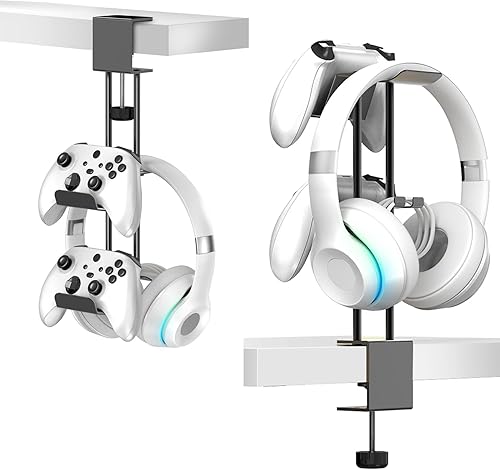
The TpeeTeek Headphone Stand with Controller Holder is a 2-in-1 under desk organizer designed for PC and console gamers. It is ideal for anyone with a PS5, Xbox Series X/S and over-ear headphones who wants to clear desktop clutter.
Its dual hanger keeps your headset and controller side by side and within easy reach during play. The adjustable clamp locks firmly to desks up to 1.95 inches thick and can mount on top or underneath for flexible use.
Built from robust aluminum with a high temperature paint finish, the bar feels solid and resists oxidation and daily wear. Soft silicone pads in the holder plus an EVA pad on the clamp keep gear stable while protecting desks from scratches.
The clamp design does limit compatibility to thinner desks and will not fit extra thick tabletops. It also comes in a single silver minimalistic style, so options are limited if you want a matching setup color.
Overall, this is a practical, sturdy and space saving upgrade for small gaming stations. If you want affordable, universal storage that keeps essentials organized and protected, this TpeeTeek stand is a smart pick.
Form Factor: Desk stand with under desk clamp mount for gaming setups.
Compatibility: Most over-ear headphones, PS5, Xbox Series X/S and other controllers.
Material: Aluminum support bar with high temperature paint, silicone and EVA pads.
Clamp Range: Fits desks up to 1.95 inches thick, top or under desk install.
Color: Silver, Style: Modern Minimalistic, Includes: 1 stand holder with 2 year warranty.
Pros
- Consolidates multiple stands into one compact organizer to maximize desk space
- Universal design works with most headphones and game controllers
- Thoughtful extras like cable organizers, pen slots and phone stand improve daily convenience
- Sturdy ABS build with rubber protection helps keep expensive gear safe
Cons
- All plastic build feels functional rather than premium compared to metal or wood stands
- Clips can be stiff on first assembly and require firm force to connect
- Storage compartments and phone slot may feel snug for oversized accessories or bulky cases
The KDD Dual Controller Holder with Headphone Stand is a 5-in-1 desktop organizer built for gamers, streamers and anyone with a crowded desk. It combines storage for two controllers, headphones, a phone, remotes and small accessories into one compact tower.
In daily use, it keeps your most used gear within arm's reach and off the desk surface. The dual controller slots hold grips securely to prevent slips, while the front phone holder lets you watch videos or check messages hands free and the dual boxes swallow remotes, cables and tools.
The standout headphone arm rotates 360 degrees for easy access from any angle and includes soft rubberized pads to prevent scratches. Two built in cable organizers plus four pen slots help tame headset wires and stop small items from getting lost.
Built from durable black ABS plastic, the stand looks clean and modern next to PS5, Xbox and Switch setups. Assembly takes just a few minutes without tools, though the clips can feel tight on first setup and need firm pressure to snap in.
For gamers wanting affordable, all in one organization without buying multiple stands, this KDD organizer is a smart pick. It saves space, protects gear and tidies your entire gaming station in one move.
Brand: KDD, Model Name: KDD-760B, Color: Black, Style: Multi-Functional Tower, Material: Durable ABS Plastic
Compatibility: Universal headphone hook plus dual controller holders for Xbox, PlayStation and Switch style controllers, Phone holder fits iPhone and similar smartphones
Features: 360 Degree Rotating Headphone Arm with Rubber Pads, 2 Storage Boxes, 4 Pen Holders, 2 Cable Organizers, Front Phone Stand, Tabletop Mount
Pros
- Tool free clamp installation preserves desk and walls
- Rotating design saves space and improves accessibility
- Holds controllers, multiple headsets and cables in one organizer
- Durable metal and plastic construction with anti-slip protection
Cons
- 3.3 lb capacity limits how much heavy gear you can load at once
- Clamp design requires a compatible desk edge and may not fit extra thick desks
- Three panel layout may feel small for collectors with many accessories
The PEGZONE HW1022BK is a 3 panel pegboard organizer that clamps to your desk to hold gaming controllers, headphones and cables. It is ideal for console and PC gamers who want a tidy, accessible setup in a bedroom, living room or dedicated game room.
In daily use, the 360 degree rotation makes it easy to grab gear from any side without moving the whole unit. The included controller holders and cable hooks keep everything visible and untangled, which helps maintain a clean and efficient gaming area.
Build quality centers on a steel base with an enhanced support plate for added stability. The combination of metal and plastic feels solid for desktop use, while anti slip rubber on the holders helps prevent controllers from sliding or getting scratched.
The main limitation is the 3.3 lb weight capacity, so overloading it with multiple heavy headsets can affect stability. The clamp mount is convenient, but it does require a suitable desk edge and the three panel footprint may be tight for very large collections.
Overall, this is a smart, space saving organizer for gamers who need simple and flexible storage. If you want a sturdy, no drill solution to keep controllers and headsets within reach, this PEGZONE pegboard is a practical pick.
Form Factor: Rotatable controller stand with modular 3 panel pegboard
Mounting Type: Clamp mount for on desk or under desk installation, no drilling required
Rotation: 360 degree rotation for space saving access
Capacity: Holds up to 1.5kg or 3.3 lbs
Compatibility: Gaming consoles, controllers and multiple headphone types plus cables
Materials: Metal and plastic with steel base and anti slip rubber holders
Dimensions: 7.68 x 2.17 x 13.43 inches, 3.2 pounds
Model: PEGZONE HW1022BK, Black, Gaming Theme
Pros
- Universal compatibility covers all major consoles and PC controllers
- Doubles as headphone stand for added value and organization
- Offers both adhesive and screw mounting for flexibility
- Compact under desk design frees up valuable surface space
Cons
- Adhesive only bonds well to smooth surfaces, not textured walls or rough wood
- Holds just one controller and one headset, not ideal for multiplayer households
- No extra padding or cable management for premium protection
The Yocice Under Desk Controller Holder is a compact mount that stores a game controller and a headset in one place. It targets Xbox, PS5, PS4 and PC gamers who want to clear clutter from desks, TV stands and gaming tables.
In daily use, the universal cradle fits most first party and third party controllers while the extended arm works well as a headphone hook. Mounting under a desk keeps gear within arm's reach but off the surface, which helps keep your setup tidy.
Build quality centers on PC plus ABS plastic that feels rigid and resists warping with regular use. The material has no noticeable odor, and the included strong double sided tape plus optional screw holes give a secure hold on plastic, metal, wood or glass.
The main limitation is that the adhesive needs a clean, smooth surface to grip reliably, so textured finishes can be a problem. It also holds a single controller and headset only, so households with multiple players will need more than one unit.
Overall, this is a simple, practical organizer for solo gamers who value quick access and a cleaner play area. If you need universal compatibility and flexible mounting in a minimalist design, it is a smart pick.
Form Factor: Tripod under desk mount in Black
Compatibility: Xbox One, PS5, PS4, PS3, Steam Controller, PC gamepads and most third party controllers plus headphones
Material: PC plus ABS, lightweight at 0.11 kg
Mounting: Strong double sided sticky pad for smooth surfaces or screw installation for added strength
Use Locations: Gaming desk, office, bedroom, TV table and other smooth plastic, metal, wood or glass surfaces
Pros
- Tool-free clamp mount saves desk space and avoids wall damage
- Holds full gaming loadout with dedicated slots for headset and two controllers
- Soft padded hooks prevent slipping and scratching
- Rotating design plus cable organizer keeps setup tidy and accessible
Cons
- 3lb weight limit may not suit heavier premium headsets with extra accessories
- Clamp requires a suitable desk edge thickness, not ideal for glass or extra thick desks
- Plastic construction may feel less premium than full metal mounts
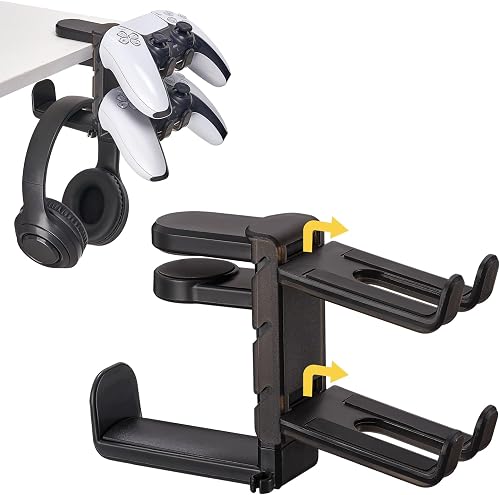
The OrgaFocus 3-in-1 Under Desk Headphone Hanger is a clamp mount organizer that holds one headset and two controllers under your desk. It is built for PS5, Xbox and PC gamers who want to clear clutter without drilling holes or using adhesive.
The spring loaded clamp installs in seconds and adjusts to fit different desk thicknesses for a secure grip. The 360 degree rotatable hook plus dual controller slots keep gear within easy reach while the side cable clip prevents tangled cords.
Finished in black with a sleek modern look, it blends cleanly into home gaming setups and workstations. The mix of metal, plastic and silicone with soft padded hooks helps protect your devices from scratches and slipping during daily use.
It supports up to 3lbs, which covers most standard headsets and controllers but may feel limited for heavier gear. The clamp also needs a suitable flat desk edge, so it may not fit very thick desks, rounded edges or glass tops.
Overall, this is a practical and space saving solution for gamers who want an all in one headset and controller holder. If you need simple, hidden under desk storage with cable management, it is a smart pick for a tidy setup.
Brand: OrgaFocus, Model: V04 Under Desk Headphone Hanger, Color: Black
Capacity: 1 Headset plus 2 Controllers, Max Load: Up to 3lbs, Mounting: Spring Loaded Clamp
Features: 360 Degree Rotatable Hook, Padded Anti Slip Hooks, Built In Cable Organizer
Dimensions: 7.5 x 1.6 x 4.7 inches, Weight: 0.19 kg, Materials: Acrylic, Metal, Plastic, Silicone
Compatibility: Headphones, PS5, Xbox and PC Controllers, Mounting Location: Desk and Gaming Setup
Matching a Part to Your Build
If your desk is small and you want zero surface footprint, look at an under desk clamp hanger first. The 3 in 1 Under Desk Headphone Hanger with Adjustable is built for that job with slots for two controllers and one headset, a rotating hook, and a side cable clip, and it is rated to support up to 3lbs per the spec sheet. The Headphone Stand with Controller Holder takes a similar approach with an aluminum support bar, soft silicone pads in the cradle plus an EVA pad on the clamp, and a locking clamp rated for tops up to 1.95 inches thick, so measure your edge before you commit.
If you keep two pads, a headset, a phone, and remotes in one place, a desktop tower saves you from hunting through drawers. The KDD Dual Controller Holder with Headphone Stand is a 5-in-1 style organizer with dual controller holders, a rotating headphone hook with rubberized pads, two storage boxes, four small pen slots, and a front phone holder plus cable organizers. The trade off is surface area, so pair it with an under desk tray plan like 10 top Under-Desk cable trays for gaming desks if your top is already crowded with a large keyboard and speakers.
If you cannot use a thick edge clamp or you want a side mount on a smooth panel, consider adhesive or screw mounting. The Controller Holder,Headphone Stand Headset uses a PC plus ABS body with strong double sided tape for quick placement and screw holes if you want a more permanent fix, and it is listed as universal for Xbox One, PlayStation consoles, Steam Controller, and most PC gamepads. For display and growth, the PEGZONE Headphone Controller Holder joins three panels with fasteners, uses a steel base with a support plate rated to hold up to 1.5kg, and adds rotation plus cable hooks, but it needs assembly time and more desk depth than a single hanger.
Common Mistakes
1. Choosing a clamp that does not fit your top. Many buyers skip measuring and then find the clamp hits a modesty panel, a beveled edge, or a metal cable channel. Measure thickness at the exact spot you will mount, check underside clearance for knees and drawers, and confirm the clamp pads will sit flat.
2. Trusting adhesive on the wrong surface. Tape holds best on clean, smooth plastic, metal, wood, or glass, and it struggles on textured laminate, fabric wrapped panels, or dusty surfaces. Clean with isopropyl, let it cure per the instructions, and use screws where the maker allows if you store heavy pads, or review adhesive clips vs delamu cord hider raceway for lessons on adhesive limits.
3. Blocking ergonomics to save space. An under desk hanger placed too far forward will hit your knees, and a tall desktop box placed beside your mouse will shrink your aim area and snag headset cables. Mock up the position with your chair pushed in, swing any monitor arm through its range, and keep charge cables on the side where you naturally dock.
Who Should Wait or Buy Differently
If you run a large collection, a wall display case or a powered charging dock may serve you better, and this type of desk holder is not ideal for storing four or more controllers plus multiple headsets in one spot. It is also not a good fit if your top is extra thick live edge wood, tempered glass with no clamp zone, or a standing desk with a moving crossbar that would shear off an under mount, so wait until you can measure clearance or plan for a wall or shelf based layout instead.
Frequently Asked Questions
Where should you hang controllers under a desk?
Mount on the side closest to your dominant hand, just behind the front edge so pads clear your knees when you sit. Keep the hanger away from PC intakes and leg frames, and leave room for the cable clip so charge leads do not stretch across your lap.
Will a clamp or adhesive holder damage the desk?
A padded clamp rarely marks when you follow torque guidance and avoid overtightening on hollow core tops. Adhesive can leave residue or pull finish on soft veneer, and screws leave permanent holes, so researched owners suggest a hidden trial spot first if you care about resale or rental return.
Can one stand hold both a headset and controllers?
Yes, many 2 in 1 and 3 in 1 designs combine a headset hook with one or two controller slots to cut clutter. Check the rated weight support, confirm wide headbands and bulky grips fit the cradles, and route cables per how to choose cable management for dual monitor setup if your headset shares power with monitors and docks.

Write Your Review
No reviews yet. Be the first to share your experience!