

You are trying to figure out how to display a gaming collection on a desk while keeping the setup comfortable for daily play, work, and streaming. You want figures, models, steelbooks, or retro boxes where you can see them, yet you still need clear space for your keyboard, mouse pad, monitor, and headset. The central decision is whether you need integrated display furniture with a built-in showcase or a compact add-on that upgrades the desk you already own. Your available footprint, clearance for your tower and screens, power budget for lighting and charging, and plans for current versus future growth will point you toward the right approach.
If your collection is small and curated, a riser that lifts a few prized pieces above the work surface can add style without a full rebuild. If your collection keeps growing, a corner station with enclosed compartments, a pegboard wall, and under-desk storage can keep everything visible and organized. As you shop in November 2026, think about what you own today and what you expect to add over the next couple of seasons. For related display ideas, you can browse the full Headset, Controller and Collectible Displays archive to compare styles.
What Actually Matters
Visibility Versus Dust Protection and Everyday Access
Open shelves look striking because every figure and box faces you and your camera, and you can grab a controller without opening a door. The tradeoff is dust, fingerprints, and accidental bumps, especially if your desk sits near a walkway or a pet zone. Enclosed display space with a clear front keeps items visible while cutting down on daily cleaning and clutter. Per the spec sheet for showcase desks, a 4-compartment display cabinet is designed to keep figures, models, and collectibles visible and protected from daily clutter, which is ideal when you want a show-ready look with less wiping.
You should also think about how you interact with gaming gear alongside collectibles. A pegboard panel lets you hang headphones, controllers, and accessories for quick access while freeing the desktop for display pieces. That hybrid approach works well if your collection includes playable items like fight sticks or headsets that you grab often. If you rarely touch your statues and want them pristine, prioritize enclosed compartments and keep interactive gear on hooks or side shelves instead of next to fragile paint.
Footprint, Depth, Clearance and Stability
Depth and width decide whether display and play can coexist. An extra-deep desktop gives you comfortable viewing distance and room for a large mouse pad in front while figures sit toward the back. Per the spec sheet, one example main desktop measures 51.18 inches wide by 21.65 inches deep, which supports dual-monitor and multi-device layouts without pushing collectibles to the edge. Thick legs and a reinforced steel frame add stability for long sessions, and open under-desk legroom helps tall users stay comfortable when the surface is fully loaded.
Clearance matters as much as surface area. An on-desk CPU display space keeps your tower off the floor, showcases your rig, and can support better airflow than under-desk placement in many setups, but you need to confirm your mid-tower case fits the cubby. For add-ons, look at how the shelf attaches and whether your desk edge allows it. A clip-on design with double-C clamps and non-slip pads can mount without tools or drilling, and flexible models can sit above the desk for display or underneath for concealed storage.
Power, Lighting and Cable Control
Lighting turns a shelf of boxes into a collection that pops on camera, but it adds power and cable needs. A desk with a built-in power outlet that includes 3 AC outlets and 2 USB ports keeps charging and cable routing in one place, so you can run LED strips, charge controllers, and power a headset stand without a tangle of extension cords. LED light on the platform and desk edge adds customizable ambience for gaming rooms and streaming corners. You will want to plan where that glow falls so it highlights figures without washing out your monitor.
Cable control is what separates a clean showcase from a dusty nest of wires. Route power bricks and USB leads behind uprights or under the surface so they do not drape across collectibles. If you are adding lights to an existing desk, pair your shelf with a dedicated routing strategy from guides like how to choose Under-Desk cable routing for a clean setup and how to choose cable management for dual monitor setup. That planning keeps dust down and makes it easier to lift figures for cleaning.
Layout Flexibility and Room to Grow
Collections rarely stay the same size, so choose a layout that can adapt. A reversible corner design lets you flip the long side to fit left or right walls, while a large under-desk storage rack holds consoles, bags, or boxes and side shelves keep quick-access items within reach. That mix of open and hidden storage helps when you rotate seasonal displays or bring home new limited pieces. Per the spec sheet, thick legs and open legroom also preserve comfort when you add more gear underneath instead of crowding the top.
For smaller setups, modularity matters more than raw size. A 3-tier structure expands vertical space without eating mouse area, and premium particleboard with a robust metal frame resists deforming during long-term use according to owners. Tool-free mounting is helpful for renters because you can twist to secure the clamps and move the unit later. Think in zones when you plan growth, one zone for daily gear, one for hero display pieces, and one for boxed overflow that can live underneath or on a side shelf.
To see how these tradeoffs look in real hardware, here are a few options that show the range from a full showcase desk to a compact clamp-on upgrade. Use them to compare footprint, enclosed versus open storage, and built-in power features:
This article contains affiliate links. If you buy through one of our links, CustomPCGaming may earn a commission at no extra cost to you. Commissions never influence which products we recommend or how we rank them. Read our Affiliate Disclosure for details.
Quick Picks at a Glance
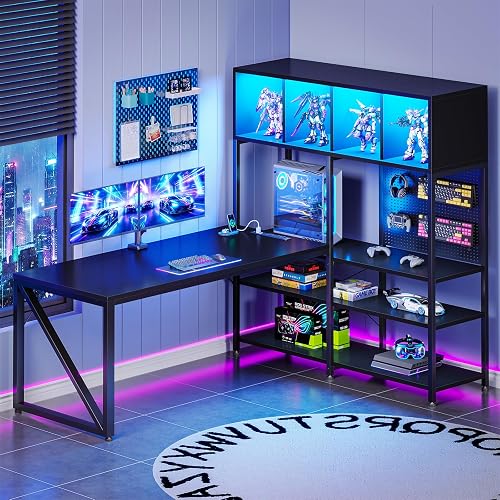
Prime AODK 63 Inch L Shaped Gaming Desk with Display

Prime MAHANCRIS 3-Tier Clamp On Desk Shelf Organizer
As an Amazon Associate we earn from qualifying purchases. Product prices and availability are accurate as of the date/time indicated.
Pros
- Extra deep desktop ideal for dual monitors and comfortable viewing distance
- Unique display cabinet and pegboard keep collectibles visible and accessories organized
- Built in outlets, USB ports and LED lights reduce clutter and add ambience
- Sturdy alloy steel frame with thick legs for long term stability
- Reversible layout with generous under desk storage and legroom for tall users
Cons
- Tall 62.2 inch hutch design requires ample vertical space and may not suit low rooms
- On desk tower shelf takes up desktop space and fits mid tower cases best, so check dimensions
- Large L shaped footprint needs a dedicated corner and assembly will take time and space
The AODK 63 Inch L Shaped Gaming Desk is a corner workstation built for gamers, streamers and home office users who want display space plus work space. With its tall display hutch, pegboard and reversible L shape, it is designed to turn a corner into a clean, show worthy battle station.
Standout features include the 4 compartment display cabinet for figures and collectibles, pegboard storage for headsets and controllers, and a dedicated on desk shelf for a mid tower PC. The built in power outlet with 3 AC outlets and 2 USB ports plus LED edge lighting keeps charging simple and adds immersive ambience for gaming or streaming.
The main desktop measures 51.18 inches wide by 21.65 inches deep, giving extra room for dual monitors, large mouse pads and comfortable viewing distance. Thick metal legs, engineered wood top with laminated finish and a reinforced alloy steel frame provide solid stability for intense sessions and heavy daily use.
The tall hutch and large L footprint need a dedicated corner with good vertical clearance, so it is not ideal for small rooms. The on desk tower space is sized for many mid towers, so measure your case first, and the desktop tower placement does reduce usable surface area compared to floor placement.
Overall, this desk is a strong pick if you want organization, display and power in one gaming ready package. It blends storage, lighting and sturdy construction to support both long gaming sessions and productive workdays.
Shape: L Shape, reversible layout for left or right corner placement.
Overall Size: 62.99 inches W x 43.31 inches D x 62.2 inches H with 63 inch diagonal work surface.
Materials: Engineered wood top with laminated black finish, alloy steel frame and metal legs.
Storage: 4 enclosed display compartments, 3 open shelves, under desk rack, pegboard and PC tower shelf sized 10.24 inches W x 23.46 inches H.
Included: Built in outlet with 3 AC and 2 USB, LED lights, headphone hook and display hutch.
Pros
- No-drill clamp design saves desk space and works on most desk types
- Flexible above or below desk placement for customized organizing
- Sturdy particleboard and metal frame built for daily use
- Easy assembly with numbered parts and illustrated instructions
- Compact modern black finish suits office, study and gaming rooms
Cons
- 7.7-inch shelf depth may not fit larger books or bulky equipment
- Clamp mount needs a compatible desk edge and may not suit very thick desks
- Engineered wood shelves should be kept dry to prevent damage
The MAHANCRIS DSBK3601 is a 3-tier clamp-on organizer designed to add vertical storage to crowded desks. It is made for students, remote workers and gamers who need more room for books, devices and essentials without buying a bigger desk.
Its standout feature is flexible mounting above or below the desktop. Place it on top to keep daily items within reach, or tuck it underneath for concealed storage that keeps your workspace clear and focused.
The double-C clamp system installs with a simple twist, so no tools or drilling are needed. That makes it ideal for rentals, dorms and offices where you want extra shelving without damaging furniture.
Build quality combines engineered wood shelves with a robust black metal frame in a modern style. Non-slip pads add stability and protect your desk surface, while the compact 13.8 by 7.7 inch footprint fits tight spaces well.
The trade-off is limited shelf depth, so oversized books or large gaming accessories may not fit. Overall, it is a practical fix for small desk clutter and a smart pick for anyone wanting tidy vertical storage.
Model DSBK3601 with 3-tier rectangular design in black painted finish. Dimensions are 7.7 inches deep by 13.8 inches wide by 25.2 inches high for compact desks.
Materials include engineered wood shelves with a sturdy metal frame for lasting support. Tabletop clamp mount with non-slip pads protects surfaces and improves stability.
Designed for office, study room and game room use as a bookshelf, organizer or display stand. Assembly is tool free for the clamp with numbered parts included.
Matching a Part to Your Build
If you run a corner battlestation with dual screens, a tower you want to show off, and dozens of figures, look at an integrated showcase desk like AODK 63″ L Shaped Gaming Desk with Display Hutch. You get a 4-compartment cabinet for fragile items, a pegboard for headphones and controllers, plus an on-desk tower space that measures 10.24 inches wide by 23.46 inches tall. The downside is bulk, you need a true corner, time for assembly, and care to avoid blocking your monitor with tall pieces.
If you rent, use a compact desk, or own only a handful of hero pieces, a no-drill add-on like MAHANCRIS Clamp On Desk Organizer is often smarter. You clamp it above your desk to lift books, controllers, and figures into a 3-tier display, or mount it below for hidden storage. Assembly uses clearly numbered parts and illustrated instructions, and non-slip pads help protect the surface. The tradeoff is exposure, open tiers collect dust faster and offer less protection than enclosed cabinets.
If you stream and your collection shares the desk with headsets, mics, and cameras, prioritize lighting control and cable access. An integrated desk with 3 AC outlets and 2 USB ports plus edge lighting keeps your key light, charge cables, and RGB in one zone. A clamp-on tier can then raise background figures into camera view without crowding your keyboard. For glow that flatters paint without glare, review ideas in Bias Lighting and Ambient RGB before you lock in shelf height.
Common Mistakes
Mistake 1: Forcing your PC into a tight cubby. You crowd a wide tower into display shelving, block side vents and rear ports, and trap heat and cables. Always compare your case width and height against the stated tower space and leave room for plugs, then follow the manufacturer mounting instructions for stability.
Mistake 2: Stacking tall items where you play. You place large statues directly behind your mouse pad or in front of a monitor, so you crane your neck, knock paint with your elbow, and catch LED glare on screen. Keep hero pieces to the sides or on upper tiers, reserve the deep front area for mouse movement, and angle lights away from your eyes.
Mistake 3: Skipping a power and cable plan. You add lights and chargers with no routing, so cords drape over figures and collect dust. Plan outlets, raceways, and an Under-Desk Cable Tray for Gaming Desks before you style the shelf, and keep bricks off the display surface where they trap heat.
Who Should Wait or Buy Differently
A dedicated desk showcase is not ideal for you if your setup changes often, your room cannot fit an L shape, or most of your collection lives boxed in storage. You should not buy a large hutch desk when a simple riser would do, and renters who cannot handle bulky assembly should start with a clamp-on tier. If you mainly need hidden console storage or full-room RGB rather than desktop display, put your budget toward cable management and wall lighting first.
Frequently Asked Questions
Can a clamp-on shelf hold collectibles safely?
Yes, for lightweight to medium display pieces when you respect the design. Choose a metal frame with non-slip pads, center heavier items over the clamps, and keep very fragile or top-heavy statues low. Follow the manufacturer mounting instructions and check for wobble before you style the top.
Will a display hutch block my monitor or lights?
It can if you ignore depth and sight lines. Use an extra-deep surface to keep screens at a comfortable distance, place tall figures to the sides, and aim LED strips at the backdrop rather than your eyes. A reversible layout helps you mirror the tall side away from your primary monitor.
How do I keep a desk collection dust-free?
Favor enclosed compartments for dusty rooms and reserve open tiers for items you handle and wipe often. Route cables behind or under the desk so dust does not cling to cords, and leave finger space around each piece for easy lifting. A quick weekly wipe and rotated display keeps buildup low.








Write Your Review
No reviews yet. Be the first to share your experience!