

You share walls, you follow lease rules, and you still want a clean setup with your screen floating at eye level. A bulky stand eats precious desk depth in a studio, while neck strain builds when you hunch over a low display. This guide to the best monitor wall mount for a rented apartment covers renter-friendly wall options plus a no-drill alternative, so students, remote workers, and gamers can save space without risking a deposit.
We focused on mounts that need only one or two small anchor points, sit close to the wall, and patch cleanly when you move. You will see how stud placement, VESA patterns, and arm reach affect comfort in small bedrooms and living rooms. For broader context on arms, stands, and brackets, browse our monitor arms and mounting guides to visualize how each style fits your desk and wall layout.
This article contains affiliate links. If you buy through one of our links, CustomPCGaming may earn a commission at no extra cost to you. Commissions never influence which products we recommend or how we rank them. Read our Affiliate Disclosure for details.
Quick Picks at a Glance

Prime monTEK Single Monitor Wall Mount for 17-32 Inch

Prime Mount-It! TV Wall Mount for 19-32 Inch TVs

HUANUO FlowLift Dual Monitor Stand for 13-32 Inch

Prime WALI Full Motion Wall Mount for 13-32 Inch TV
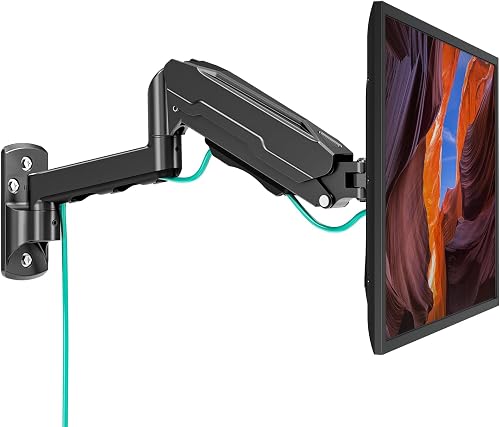
Prime MOUNT PRO Single Monitor Wall Mount for 13-32 Inch
As an Amazon Associate we earn from qualifying purchases. Product prices and availability are accurate as of the date/time indicated.
Pros
- Superior stability from thickened steel and integrated mechanical spring
- Broad compatibility with most 17 to 32 inch VESA monitors
- Highly flexible tilt, swivel, rotation and height adjustment for ergonomic comfort
- Space saving wall design keeps desk completely clear
- Simple installation with quick-release plate and complete hardware kit
Cons
- Not safe for drywall alone, requires wood stud, brick or concrete wall
- 20 lb capacity may not support heavier large 32 inch displays
- Wall mounted design is semi-permanent and less flexible than desk clamp for renters
The monTEK Single Monitor Wall Mount is built for 17 to 32 inch monitors and is ideal for home offices, gaming rooms and compact workspaces. It is a smart pick if you want to clear your desk completely while keeping your screen stable and adjustable.
Standout performance comes from the wobble-free steel spring that holds up to 20 lbs with minimal shake. You get smooth tilt, swivel and rotation plus 9.3 inches of height adjustment and up to 21.5 inches of extension for comfortable viewing all day.
Build quality feels solid thanks to thickened high grade steel and a clean black metal finish. The zero clearance design retracts to 3.8 inches from the wall, so your setup looks tidy and flush with no wasted gap behind.
The main limitation is installation, as it cannot mount to drywall alone and needs a wood stud, brick or concrete wall. The 20 lb limit also means you should check the weight of larger 32 inch monitors before buying.
Overall, this is a sturdy, ergonomic and space saving wall mount that delivers excellent value for single monitor users. If you have a compatible wall and VESA monitor, it is an easy recommendation for work and play.
Model: monTEK US-DS-MA1012WBK, Single Monitor Wall Mount in Black
Screen Compatibility: 17 to 32 inches, VESA 75x75mm and 100x100mm, up to 20 lbs
Adjustment Range: Tilt 90 degrees up and 45 degrees down, Swivel 90 degrees, Rotation 180 degrees
Reach and Height: 3.8 to 21.5 inch extension, 9.3 inch height adjustment, 3.8 inch wall profile when retracted
Mounting and Build: Wall mount for wood stud, brick and concrete, thickened steel construction, quick-release VESA plate included
Pros
- Sturdy steel build supports up to 44 lbs with stable, low flex performance
- Tilt and swivel adjustments improve comfort and help reduce glare
- Slim low profile design is ideal for small rooms, dorms and offices
- Single stud installation allows flexible placement in tight spaces
- Comes with all hardware, tools and lifetime support for easy setup
Cons
- Only fits 19 to 32 inch screens with VESA 75x75 or 100x100, not for larger TVs
- Requires a wood stud or concrete wall, not suitable for drywall only installation
- Swivel range can feel limited with larger 32 inch TVs due to wall clearance
The Mount-It! MI-2829 is a compact tilt and swivel wall mount built for 19 to 32 inch flat screen TVs and monitors. It is a smart pick for bedrooms, kitchens, dorm rooms, home offices and other tight spaces where saving desk and floor space matters.
Tilt adjustment helps cut glare from lights and windows, while 30 degrees of swivel each way lets you angle the screen toward the couch, bed or desk. In daily use, that flexibility makes a small TV far more comfortable to watch from multiple positions.
With a slim 2.4 inch profile, the mount holds the TV close to the wall for a clean, modern look. The solid steel construction feels sturdy and stable once secured, helping minimize flex and unwanted movement.
Fitment is specific, so you need VESA 75x75 or 100x100 hole patterns and a wood stud or solid concrete wall, as drywall alone will not work. Larger 32 inch screens may also see slightly reduced swivel due to wall clearance.
For anyone with a small TV or monitor who wants an affordable, space saving and adjustable mounting solution, this is an excellent choice. Easy single stud installation, included hardware and lifetime US based support make it a reliable long term upgrade.
Model MI-2829 fits screen sizes from 19 inches to 32 inches with a maximum weight capacity of 44 lbs. It supports VESA mounting patterns 75x75mm and 100x100mm, so please confirm your bolt holes measure about 3 or 4 inches apart.
The mount offers a low 2.4 inch profile from the wall, up to 12 degrees of downward tilt and up to 30 degrees swivel left and right. Construction is high strength steel in a black finish for durability and a clean appearance.
Installation requires mounting to a single wood stud or solid concrete wall and is not intended for drywall only. The box includes the wall mount, installation hardware, tools and model specific instructions.
Pros
- Very sturdy dual clamp design stays stable during typing and gaming
- Smooth, easy adjustment with tilt, swivel, rotate and height for ergonomic viewing
- Frees up desk space and includes cable management for a clean setup
- Solid cast metal build with straightforward installation and all hardware included
Cons
- Fits wooden desks 0.59 to 3.54 inches thick only, not for glass or plastic desks and needs clear space underneath
- Monitors under 4.4 lbs may feel floaty and require careful tension adjustment
- Included VESA screws may be too long for some slim monitors, so check screw depth before mounting
The HUANUO FlowLift HNDS6 is a dual monitor desk mount made for 13 to 32 inch computer screens with standard VESA mounting. It suits gamers, home office workers, programmers and students who want two screens at the right height while reclaiming desk space.
Each arm supports 4.4 to 19.8 lbs and moves with tilt, swivel, full rotation and generous height lift. Users report smooth one hand repositioning for landscape to portrait flips, pulling screens close for focused work, or pushing back for video.
Build quality stands out with alloy steel arms, a large base platform and a dual C-clamp structure for extra grip. The mount offers both clamp and grommet installation for desks 0.59 to 3.54 inches thick, plus integrated cable guides for a tidy look.
Compatibility needs careful checking before buying. It is recommended for wooden desks only, it will not suit glass or plastic tops or desks with cross beams underneath, and very light displays can need extra tension tuning.
For a stable, flexible and space saving dual screen upgrade, this FlowLift mount is a smart pick. It delivers ergonomic comfort, solid stability and clean cable routing that works well for work, study and play.
Model: HUANUO HNDS6 FlowLift Dual Monitor Stand in Black, made with alloy steel for strength and stability.
Monitor compatibility: 13 to 32 inches, VESA 75x75mm and 100x100mm, 4.4 to 19.8 lbs per arm with tilt, swivel, rotation and height adjustment.
Desk compatibility and mounting: C-clamp or grommet mount for wooden desks 0.59 to 3.54 inches thick with clear under desk space.
Pros
- Highly adjustable with tilt, swivel and rotation for ergonomic viewing
- Extends far from the wall yet folds flat to save space
- Strong metal build supports up to 33lbs with stable performance
- Easy to install with complete hardware and clear instructions
Cons
- Only fits 13 to 32 inch screens with VESA 75x75 or 100x100, so larger TVs are not compatible
- Requires wood stud, brick or concrete, drywall alone will not support it
- Single arm design is best for smaller displays and may feel less rigid at full 15 inch extension
The WALI WL-1330LM is a compact full motion wall mount built for 13 to 32 inch monitors and small flat panel TVs. It is ideal for anyone who wants to free up desk space in a bedroom, office, kitchen or gaming setup while keeping the screen perfectly positioned.
In daily use, the adjustability stands out with plus or minus 15 degrees of tilt, 180 degrees of swivel and 360 degrees of rotation. You can extend the arm up to 15 inches to pull the screen toward you, then push it back to just 2 inches from the wall when not in use.
Build quality is solid for its class with a full metal frame and a compact 5.9 by 1.6 inch wall plate. The joints move smoothly for repositioning yet hold the screen steady once tightened, which helps reduce neck strain during long work or viewing sessions.
There are limits to consider, as it only supports up to 33lbs and VESA 75x75 or 100x100 patterns. It also needs a wood stud, brick or concrete wall for safe mounting, so drywall only installation is not an option.
Overall, this is an excellent value for small to midsize screens where flexibility and space savings matter. If you need an affordable, sturdy and highly adjustable mount for a monitor or small TV, this WALI model is easy to recommend.
Brand and Model: WALI WL-1330LM, Black single monitor wall mount
Compatibility: Fits 13 to 32 inch screens up to 33lbs, VESA 75x75mm and 100x100mm
Motion Range: Plus or minus 15 degree tilt, 180 degree swivel, 360 degree rotation, 15 inch extension, 2 inch retracted profile
Installation: Wall mount for wood stud, brick or concrete, includes hardware kit and manual, 10 year warranty
Pros
- Wide 13 to 32 inch compatibility with standard VESA 75x75 and 100x100 patterns
- True full motion range with tilt, swivel, rotation and long 21.6 inch extension
- Smooth height adjustable gas spring for ergonomic comfort
- Sturdy metal construction with integrated cable management
- Space saving wall mount design ideal for compact desks and clean setups
Cons
- Not compatible with 1000R, 1500R or 1800R curved monitors
- Requires secure mounting to wood stud or solid concrete, not for drywall alone
- Initial tension adjustment is needed to match monitor weight for best performance
The MOUNT PRO Single Monitor Wall Mount is designed for 13 to 32 inch monitors weighing 4.4 to 19.8 lbs with VESA 75x75 and 100x100 patterns. It is a smart pick for remote workers, gamers, students, creators and traders who want a cleaner desk and more flexible viewing.
Standout performance comes from true full motion adjustment with tilt, 180 degree swivel, 360 degree rotation and up to 21.6 inches of extension. You can pull the screen close for focused work, push it back to open space, or flip between portrait and landscape for coding and design.
Build quality centers on a sturdy metal arm with a gas spring height system tested for thousands of movements. Motion feels smooth and stable once tension is set to your monitor weight, and integrated cable clips keep power and AV cords routed neatly along the arm.
There are a few limits to note. It does not support heavily curved 1000R, 1500R or 1800R screens, and it must be anchored to a wood stud or solid concrete wall for safety. You will also need a few minutes to dial in the tension and tilt resistance during setup.
Overall, this is a practical, space saving upgrade for home offices, gaming stations and collaborative workspaces. If you want ergonomic flexibility, solid construction and easy wall installation in one compact package, it delivers strong value.
Supported Screen Size: 13 to 32 inches
VESA Patterns: 75x75mm, 100x100mm
Weight Capacity: 4.4 to 19.8 lbs
Motion: +90 to -45 degree tilt, 180 degree swivel, 360 degree rotation, 21.6 inch extension
Mounting Type: Wall mount for wood stud or solid concrete walls
Material and Color: Metal, Black
Buying Guide: What Renters Should Check Before Drilling
Wall Impact, Holes, and Lease-Friendly Installation
Start with permission and placement, because most rentals allow small screw holes if you fill them before move-out. The WALI TV Wall Mount Full Motion for 13-32 inch uses a narrow 5.9 by 1.6 inch wall plate that lands on one wood stud, brick, or concrete, while the Mount-It! Small TV Wall Mount for 19–32 Inch Flat is also built for single-stud installs with a slim 2.4 inch profile. If you are furnishing a first place on a tight budget, our budget build guides for affordable setups show how to prioritize essentials without clutter.
Never mount to drywall alone, and always confirm stud centers with a finder plus a small pilot hole. Take photos before you drill, keep paint chips for color matching, and save toothpaste-free spackle, putty knife, and touch-up paint for move-out day. One or two well-placed anchors patch in minutes, while multiple misses create extra work you could have avoided.
Size, Weight Capacity, and VESA Compatibility
Match your screen to three details at once: diagonal size, weight, and VESA hole pattern. The MOUNT PRO Single Monitor Wall Mount for 13 to 32 supports 13 to 32 inch screens with 75x75mm and 100x100mm VESA and 4.4 to 19.8 lbs capacity, while the monTEK Single Monitor Wall Mount fits 17 to 32 inch screens up to 20 lbs with the same common patterns. Just as you would choose a CPU cooler by checking TDP and clearance, confirm your monitor specs before you order.
Look for a quick-release VESA plate if you move often, since it lets you lift the screen off without unbolting the wall bracket. The mounts here suit mainstream Dell, LG, and Samsung displays, yet MOUNT PRO notes incompatibility with deep 1000R, 1500R, and 1800R curved screens. Measure bolt spacing at about 3 or 4 inches square and weigh your display with cables attached.
Motion, Reach, and Comfort in Small Rooms
In a narrow room you cannot step back, so arm articulation replaces distance. The monTEK Single Monitor Wall Mount offers tilt plus 90 degrees to minus 45 degrees, swivel plus or minus 90 degrees, 180-degree rotation, 9.3 inch height adjustment, and 3.8 to 21.5 inch extension for shared viewing or standing breaks. When you plan a compact gaming station built around a long GPU, that same reach lets you pull the display close for play and push it flat for floor space.
WALI extends about 15 inches and retracts to 2 inches with plus or minus 15-degree tilt, 180-degree swivel, and 360-degree rotation for portrait coding. Mount-It! favors a low-profile tilt and swivel tune with up to 12-degree downward tilt to cut glare in bright rentals. Built-in cable guides and a wobble-free steel spring structure help reduce shake from typing on shaky apartment desks.
When You Cannot Drill: No-Hole Alternatives
If your lease bans drilling, skip the wall and clamp to the desk instead. The HUANUO FlowLift Dual Monitor Stand holds two 13 to 32 inch screens with VESA 75×75 or 100×100, 4.4 to 19.8 lbs per arm, using a dual C-clamp plus grommet option for 0.59 to 3.54 inch wooden desks. Pair it with smart routing and our cases and airflow layout tips to keep cords tidy and air moving around your PC in a warm rental.
Choose a clamp when you want zero patching, frequent layout changes, or dual screens without two wall plates. Choose a wall arm when your desk is tiny, glass-topped, or has a crossbeam that blocks clamps. Either path lifts panels off the surface, frees room for keyboard, dock, and notebook, and gives you a healthier sight line.
Final Thoughts
If you can use one stud hole with easy patching, pick monTEK Single Monitor Wall Mount for smooth full motion and steady support, while if drilling is off limits, pick HUANUO FlowLift Dual Monitor Stand for a sturdy no-hole dual-screen setup.
Frequently Asked Questions
Can I use a wall mount in a rental without losing my security deposit?
Yes, in most cases if you get written approval, mount into a stud or solid concrete, and patch carefully at move-out. Single-stud plates leave far less to repair than large multi-hole brackets. For 2026 renter setups that pair a mount with a full tower, see this Ryzen 7 7700 RTX 5070 gaming PC breakdown to plan desk weight and layout before you drill.
How do I know if my apartment wall can hold a monitor arm?
Check for wood studs with a reliable finder, or confirm solid brick or concrete if you live in a masonry building. Avoid drywall alone, plasterboard without backing, and thin partition panels that flex. When in doubt, ask your property manager for wall specs and approved anchor types.
Are desk clamp stands better than wall mounts for renters?
Clamp stands are better when drilling is banned, when you rearrange often, or when you run dual monitors from one footprint. Wall mounts are better for ultra-small, glass, or unstable desks where a clamp cannot grip safely. Your desk material, thickness, and under-desk clearance usually decide the winner.
What monitor size works with most apartment-friendly mounts in 2026?
Most renter-friendly options here support 13 to 32 inch flat panels with 75x75mm or 100x100mm VESA patterns. That range covers popular 24, 27, and 32 inch work and gaming displays. Always verify your exact weight with stand removed, since capacity matters more than diagonal size for long-term stability.
This roundup is not a good fit for every build; consider your target resolution, platform, and budget before buying.





Write Your Review
No reviews yet. Be the first to share your experience!