

If you are asking is the Kingston Fury Beast 32GB DDR5 6000 CL30 kit good for a Ryzen gaming build, you are really asking how to pick the right DDR5 for AM5. That decision comes down to a few linked variables, and getting them right matters more than chasing the highest number on the box.
Think about your target resolution and refresh rate, your platform and socket, your case size and clearance for coolers and tall heat spreaders, your power budget, and whether you want a kit that is perfect right now or one that leaves room for a future upgrade. This guide walks you through that framework, and you can explore more options in our Memory (RAM) category before you decide.
What Actually Matters
Speed, Latency, and the Ryzen Sweet Spot
For modern Ryzen on AM5, 6000MT/s has become the practical sweet spot that most builders aim for. It pairs well with the memory controller and fabric clock without requiring complex tuning, which is why you see so many 6000MT/s kits marketed with AMD EXPO.
Latency matters right alongside speed. A CL30 kit will respond a bit quicker than a CL36 kit at the same 6000MT/s, so if you play competitive shooters or CPU heavy titles you will appreciate the lower latency. If you are building on a tighter budget, CL36 still gives you the same bandwidth and is often easier to find, but you should weigh that small responsiveness trade off. Also check that the kit you consider supports both AMD EXPO and Intel XMP 3.0, so the profile is easy to enable in BIOS and you are not stuck with manual timing entry.
Capacity and Kit Configuration
Capacity is about how you use your PC. For most gamers in 2026, 32GB in a 2x16GB configuration is the balanced choice, it gives you headroom for games, browsers, and background apps without overbuying. A 2 DIMM kit is important because it runs in dual channel mode from day one, which helps performance compared to a single DIMM.
Think about your upgrade path before you buy. A single 32GB module leaves one slot open on a two slot board or two slots open on a four slot board, but you lose dual channel until you add a second matched stick, and mixing separate purchases later can cause stability issues. A 64GB kit built as 2x32GB makes sense if you also edit video, run virtual machines, or keep many heavy applications open, but for pure gaming it is more than most people need. Review your Budget Build Guides plan to see if that extra capacity fits your actual workflow.
Physical Fit and Motherboard Compatibility
DDR5 DIMMs use a 288 pin form factor, but the heat spreader design determines whether they clear your cooler. Low profile heat spreader designs are easier to fit under large air coolers, while taller RGB spreaders with features like Infrared Sync Technology look great but need extra clearance. Always check your case spec for cooler height and radiator clearance, and compare it to the RAM height.
Compatibility is more than just DDR5 versus DDR4. Check your motherboard QVL or qualified vendor list for the exact kit, and confirm the board supports AMD EXPO. Features like on die ECC and dual 32 bit subchannels are part of the DDR5 standard and help with stability and efficiency, but they do not replace enabling the correct EXPO profile in BIOS. Remember that enabling EXPO or XMP is considered overclocking, it is done at your own risk and may affect warranty, so follow the motherboard manual and handle modules with anti static precautions.
Profiles, Stability, and Ease of Use
You want a kit that posts reliably and runs its advertised speed with one setting. Kits that list both AMD EXPO and Intel XMP 3.0 give you flexibility if you switch platforms later, and some also support Plug N Play at 4800MT/s for a baseline JEDEC speed before you enable the faster profile.
Look for clear statements about stability for overclocking and support from major motherboard makers. Owners commonly report that kits with well tuned EXPO profiles are simpler to set up, while kits without a validated profile may require manual voltage and timing adjustments. If you prefer a set and forget experience, prioritize a kit that explicitly lists EXPO support for your board.
To see how these trade offs look in real products, here are a few options that show the range:
This article contains affiliate links. If you buy through one of our links, CustomPCGaming may earn a commission at no extra cost to you. Commissions never influence which products we recommend or how we rank them. Read our Affiliate Disclosure for details.
Quick Picks at a Glance

Kingston FURY Beast 32GB DDR5 RAM 6000MT/s CL30
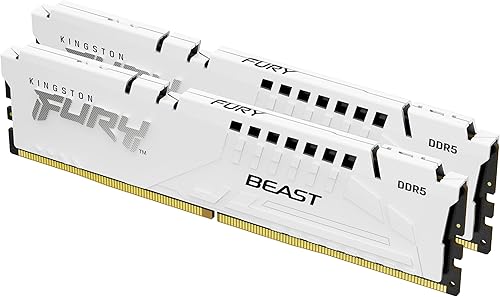
Prime Kingston Fury Beast White 32GB DDR5 6000MT/s CL30
Kingston FURY Beast 32GB (2x16GB)

Kingston FURY Beast White RGB 32GB DDR5 6000MT/s
Kingston FURY Beast White 64GB DDR5 RAM Kit

Kingston FURY Beast 32GB DDR5 6000MT/s CL36
As an Amazon Associate we earn from qualifying purchases. Product prices and availability are accurate as of the date/time indicated.
Pros
- Ideal 6000MT/s CL30 speed and latency balance for Ryzen AM5 and Intel DDR5 systems
- Dual compatibility with AMD EXPO and Intel XMP 3.0 for effortless setup
- Excellent stability with on-die ECC, users report zero issues after enabling EXPO
- Low-profile heat spreader design runs cool and fits under most CPU coolers
- Backed by Kingston limited lifetime warranty and strong build quality
Cons
- Requires enabling EXPO or XMP in BIOS to reach advertised 6000MT/s, defaults to lower JEDEC speed
- Desktop DIMM only and requires DDR5 compatible motherboard and CPU, check QVL for support
- No RGB lighting or extra customization for users wanting visual effects
The Kingston FURY Beast KF560C30BBEK2-32 is a 32GB DDR5 kit with two 16GB modules rated at 6000MT/s and CL30. It is designed for next gen desktop builds, especially AM5 Ryzen systems, and also supports modern Intel platforms for gamers, streamers and creators.
Its standout feature is the balanced 6000MT/s CL30 profile, widely regarded as the efficiency sweet spot for DDR5. With AMD EXPO and Intel XMP 3.0, you get one click overclocking, plus on-die ECC and dual 32-bit subchannels for added stability and efficiency. In real use it delivers noticeably faster multitasking, smoother gaming and quicker rendering.
Build quality is solid and practical, with a low-profile black heat spreader that stays cool and clears large air coolers. The 288-pin DIMM design feels durable and lightweight, and the understated look fits cleanly in most builds without adding bulk.
There are a few caveats to note. You must enable EXPO or XMP in BIOS to hit the full speed, otherwise it runs at standard JEDEC rates. It is DDR5 desktop only, so you will need a compatible motherboard and CPU, and checking the QVL list is recommended for guaranteed support.
Overall, this is a top tier DDR5 kit for anyone building a modern desktop who wants fast, stable and hassle free performance. If you want reliable high speed memory with simple setup and proven stability, the FURY Beast 32GB 6000 CL30 is an excellent, highly recommended choice.
Model: Kingston FURY Beast KF560C30BBEK2-32, 32GB Kit (2x16GB)
Memory Type: DDR5 DIMM, 288-Pin, 6000MT/s, CL30, 1.35 Volts
Compatibility: Desktop only, AMD EXPO and Intel XMP 3.0, Auto Overclocking support
Features: On-die ECC, Dual 32-bit subchannels, Low-profile heat spreader
Warranty: Limited Lifetime Warranty from Kingston Technology
Pros
- Very fast 6000MT/s with tight CL30 timing for DDR5
- Broad compatibility with Intel and AMD platforms via XMP 3.0 and EXPO
- Enhanced stability features including on-die ECC and PMIC
- Stylish low-profile white design with quality Kingston build
- Qualified by leading motherboard manufacturers for reliable performance
Cons
- Requires enabling XMP or EXPO in BIOS to reach advertised 6000MT/s speed
- White heat spreader and lack of RGB may not suit every build preference
- DDR5 only, so not compatible with older DDR4 motherboards
Kingston Fury Beast White KF560C30BWEK2-32 is a 32GB DDR5 memory kit with two 16GB DIMMs tuned for modern desktop gaming platforms. It is designed for gamers, streamers and creators who need high bandwidth and low latency in a clean white build.
In real world use, the 6000MT/s speed and CL30 latency deliver noticeably quicker load times, smoother multitasking and better frame stability. Dual 32-bit subchannels, doubled banks and burst length, plus on-die ECC, help maintain efficiency and stability when pushing extreme settings or heavy creative workloads.
Build quality is excellent with a low-profile aluminum heat spreader in matte white that dissipates heat while staying compact. At just 37g per module and 288 pins, it fits easily under large air coolers and adds a premium, minimalist look without bulky RGB.
There are a few tradeoffs to consider. You must enable XMP 3.0 or EXPO in BIOS to hit the full 6000MT/s, as it defaults to 4800MT/s Plug N Play. Also, as a DDR5 only kit, it requires a compatible next gen motherboard and CPU.
Overall, the Fury Beast White 32GB 6000MT/s CL30 kit is a compelling upgrade for performance focused white builds. It blends speed, stability and style, and is an excellent choice if you want hassle free overclocking with broad Intel and AMD support.
Model: Kingston Fury Beast White KF560C30BWEK2-32, 32GB Kit (2x 16GB) DDR5 DIMM
Performance: 6000MT/s, CL30, 1.35V, 288-pin DIMM, on-die ECC and on-module PMIC
Compatibility: Desktop DDR5 systems, Intel XMP 3.0 Ready and AMD EXPO, Plug N Play at 4800MT/s
Design: Low-profile white heat spreader, 37g per module, ideal for compact and white themed builds
Pros
- High 6000MT/s speed with CL36 for responsive multitasking and gaming
- Supports both AMD EXPO and Intel XMP 3.0 for broad platform compatibility
- Low-profile design fits small form factor builds and avoids cooler clearance issues
- On-die ECC enhances stability when overclocking
- Trusted Kingston build quality with limited lifetime warranty
Cons
- CL36 latency is higher than premium low-latency enthusiast kits
- No RGB lighting option for users who want customizable aesthetics
- May require BIOS update to achieve full 6000MT/s on some motherboards
The Kingston FURY Beast KF560C36BBE2K2-32 is a 32GB DDR5 desktop memory kit with two 16GB modules rated at 6000MT/s and CL36. It is built for gamers, content creators and PC enthusiasts on next generation AMD and Intel platforms who need fast, reliable memory.
In real world use, the 6000MT/s speed and dual 32-bit subchannels deliver faster load times, smoother 4K streaming and quicker rendering. Support for both AMD EXPO and Intel XMP 3.0 enables simple one-click overclocking, while on-die ECC helps maintain stability during demanding tasks.
Build quality is a standout, featuring a low-profile heat spreader that stays cool and fits easily under large CPU air coolers. This compact design is especially valuable for ITX and small form factor builds, and users note it avoids the clearance problems of bulkier RGB modules.
There are a few tradeoffs to consider. CL36 is standard for this speed tier but not as tight as more expensive low-latency kits, and the lack of RGB may disappoint those wanting lighting effects. Some motherboards may also need a BIOS update to reach the advertised speed.
Overall, the FURY Beast 32GB 6000MT/s kit offers an excellent balance of speed, compatibility and reliability. If you want plug and play performance for gaming and creation without clearance headaches, it is a smart and future ready choice backed by a limited lifetime warranty.
Capacity: 32GB Kit (2x 16GB) Dual Channel DDR5 DIMM
Speed and Latency: 6000MT/s, CL36, 1.35 Volts, 288-Pin
Compatibility: AMD EXPO and Intel XMP 3.0 with Auto Overclocking
Features: On-Die ECC, Dual 32-bit Subchannels, Low-Profile Heat Spreader
Model and Warranty: KF560C36BBE2K2-32, Limited Lifetime Warranty
Pros
- High 6000MT/s speed with CL36 for smooth gaming and multitasking
- Dual platform support for both AMD EXPO and Intel XMP 3.0
- Vibrant customizable RGB with patented Infrared Sync Technology
- Stylish white heat spreader ideal for showcase builds
- Lifetime warranty and trusted Kingston build quality
Cons
- Sold as a single module, so dual channel performance requires an additional matching stick
- Reported POST and compatibility issues when mixing with existing memory kits
- CL36 and 1.35V are solid but not the tightest timings for extreme overclockers
The Kingston FURY Beast White RGB 32GB DDR5 6000MT/s CL36 is a single module DIMM designed for modern desktop gaming and content creation builds. It is ideal for users building a new AMD or Intel system who want high capacity, fast speeds and striking aesthetics in one stick.
In real world use, the 6000MT/s speed and support for both AMD EXPO and Intel XMP 3.0 deliver smooth, one click overclocking with improved stability. You get faster load times, better multitasking and headroom for gaming and overclocking without complex manual tuning.
Design wise, the white heat spreader and enhanced RGB lighting add a premium, clean look that stands out in tempered glass cases. Kingston's patented Infrared Sync Technology keeps lighting effects perfectly aligned across modules, while FURY CTRL software offers easy customization.
There are some caveats to consider before buying. As a single 32GB module, it will not run in dual channel unless paired, and some users have reported POST failures when mixing this kit with existing memory. Compatibility checks with your motherboard QVL are strongly recommended.
Overall, the FURY Beast White RGB is a compelling choice for builders prioritizing style, capacity and plug and play overclocking. If you want a future ready white DDR5 kit with reliable performance and standout lighting, this module delivers excellent value and flexibility.
Model: Kingston FURY Beast White RGB KF560C36BWEA-32, 32GB Single DIMM
Memory Technology: DDR5, 288-Pin DIMM, 6000MT/s, CL36, 1.35 Volts
Compatibility: Desktop PCs, Supports Intel XMP 3.0 and AMD EXPO
Features: Infrared Sync Technology, Customizable RGB Lighting, FURY CTRL Software, Overclocking Ready
Design: White Heat Spreader with Enhanced RGB, Form Factor DIMM
Warranty: Lifetime Warranty from Kingston Technology
Pros
- Very fast 6000MT/s CL30-36-36 timing offers excellent DDR5 performance
- Large 64GB capacity handles demanding games and creative applications with ease
- Supports both AMD EXPO and Intel XMP 3.0 profiles for broad motherboard compatibility
- Low profile 34.9mm white heatsink provides effective cooling without clearance issues
- Lifetime manufacturer warranty and proven Kingston reliability
Cons
- Requires 1.4V for full 6000MT/s EXPO and XMP speed, higher than JEDEC 1.1V standard
- Premium high speed kit positioning may not suit budget focused builds
- Desktop DIMM only, not compatible with laptops or SODIMM systems
The Kingston FURY Beast White KF560C30BWEK2-64 is a 64GB DDR5 memory kit configured as two 32GB modules rated at 6000MT/s with CL30 timings. It is designed for gamers, overclockers and creators building a high performance AMD or Intel desktop that demands both capacity and speed.
In real world use, the 6000MT/s speed and tight 30-36-36 timings deliver snappy responsiveness for gaming, heavy multitasking and video editing. With both AMD EXPO and Intel XMP 3.0 profiles, you can enable the rated speed with a single BIOS setting, while the JEDEC DDR5-4800 fallback ensures broad compatibility.
Build quality is solid, with a stylish white heatsink that stays low profile at just 34.9mm tall for excellent cooler clearance. Each module uses gold contact fingers, On-Die ECC for stability, and is engineered to run reliably at 1.4V under its overclock profile.
The main drawbacks are the higher voltage needed for the top speed and the fact that this is a desktop DIMM kit only, so it will not fit laptops. As a premium high speed kit, it is also aimed more at enthusiasts than casual users who may not need 64GB.
Overall, this is an excellent choice if you want a fast, high capacity, low latency DDR5 kit with flexible platform support and a clean white aesthetic. For a future proof white build that needs to handle demanding games and creative workloads, it offers strong performance and proven Kingston reliability.
Model: Kingston FURY Beast White KF560C30BWEK2-64 (2x32GB)
Technology: DDR5 SDRAM, 288-Pin DIMM, Unbuffered, 2Rx8
Capacity: 64GB Total Kit, Data Transfer Rate 6000MT/s
Latency & Voltage: CL30-36-36 at 1.4V (EXPO/XMP), JEDEC CL40-39-39 at 1.1V
Profiles: AMD EXPO v1.1 (6000 and 5600) and Intel XMP 3.0 (6000 and 5600)
Design: White Heatsink, Height 34.9mm, Gold Contact Fingers, On-Die ECC
Compatibility: Desktop Systems Only, Lifetime Manufacturer Warranty
Pros
- High 6000MT/s speed delivers strong DDR5 bandwidth for gaming and creation
- Supports both AMD EXPO and Intel XMP 3.0 for easy, stable overclocking
- Low-profile heat spreader offers great thermal performance and case compatibility
- Single 32GB stick allows simple upgrade path to higher capacity
- Improved efficiency and Kingston reliability for long term stability
Cons
- Single module runs in single-channel mode until a second stick is added
- CL36 latency is standard, not as tight as premium low-latency kits
- May require BIOS update or manual tuning to reach full 6000MT/s on some motherboards
The Kingston FURY Beast 32GB 6000MT/s DDR5 CL36 (KF560C36BBE2-32) is a single-module desktop memory kit designed for gamers, content creators and PC enthusiasts moving to DDR5. It targets users who want high bandwidth and easy overclocking without manual tuning, especially those building on AMD or Intel platforms.
In real world use, the 6000MT/s speed offers a noticeable uplift in gaming responsiveness, multitasking and creative workloads compared to DDR4. Support for both AMD EXPO and Intel XMP 3.0 lets you achieve the advertised speed with a single BIOS setting, while improved stability and efficiency help maintain consistent performance during overclocking.
Build quality is a strong point, with Kingston's signature low-profile heat spreader that dissipates heat effectively while staying compact. The sleek black design fits easily under large air coolers and in small form factor cases, and the single 32GB stick leaves an extra slot open for a future upgrade.
The main drawback is that as a single module, it will run in single-channel mode until you add a second stick, which limits bandwidth versus a dual kit. The CL36 latency is also standard rather than enthusiast grade, and some motherboards may need a BIOS update to hit the full 6000MT/s speed reliably.
Overall, the FURY Beast 32GB DDR5 6000MT/s is a smart, future ready choice for anyone wanting fast, stable DDR5 with broad platform compatibility. If you plan to expand to 64GB later and value plug and play overclocking, it delivers excellent flexibility and reliable Kingston performance.
Model: Kingston FURY Beast KF560C36BBE2-32
Capacity: 32GB Single Module, DDR5 Desktop Memory
Speed and Latency: 6000MT/s, CL36
Overclocking Support: Intel XMP 3.0 and AMD EXPO ready
Design: Low-profile heat spreader for improved cooling and compatibility
Compatibility: Desktop PCs, optimized for DDR5 platforms
Matching a Part to Your Build
Scenario 1: Mainstream Ryzen gaming PC for 1440p high refresh. You want smooth frame pacing without overspending on capacity you will not use. The top RTX 5070 ti cards for 1440p gaming pairing is a good reference point, and 32GB as a 2x16GB kit at 6000MT/s CL30 is the direct fit. The Kingston FURY Beast 32GB (2x16GB) and the Kingston Fury Beast White 32GB 6000MT/s DDR5 CL30 both give you that 6000MT/s speed with CL30 latency, AMD EXPO support, and a low profile heat spreader design. Choose the white version if you are coordinating a white build, otherwise the standard black spreader offers the same core spec in a compact form that clears most air coolers.
This setup is ideal if you want dual channel out of the box, easy EXPO enablement, and latency that suits CPU sensitive games. The trade off is that you fill two slots, so a future jump to 64GB would mean replacing the kit rather than adding to it. If you know you will stay at 32GB for several years, that is a sensible compromise.
Scenario 2: Compact build or phased upgrade on AM5. Maybe you are reusing a tight case or planning to add memory later. The Kingston FURY Beast 32GB 6000MT/s DDR5 CL36 as a single 32GB module gives you the same 6000MT/s bandwidth with CL36 latency and leaves slots open, but you will run in single channel until you add a second matched module, which limits performance in the meantime. The Kingston FURY Beast 16GB (2x16GB) kit, listed as a 6000MT/s CL36 kit of two, shows the alternative approach of starting with dual channel at a lower total capacity and adding later only if needed.
For a compact build where cooler clearance is tight, the low profile design of these non RGB kits is an advantage. If you like RGB and want synced lighting, the Kingston FURY Beast White RGB 32GB 6000MT/s CL36 as a single module offers Infrared Sync Technology and FURY CTRL software control, but it is still a single DIMM, so you should plan to buy as a matched pair when budget allows. Check your motherboard manual for the preferred slots for two DIMM operation.
Scenario 3: Gaming plus creation or heavy multitasking. If you edit video, compile large projects, or run many applications at once while gaming, 64GB can be justified. The Kingston 64GB (2x32GB) DDR5 6000MT/s CL30 Fury provides 64GB as 2x32GB at 6000MT/s CL30 with both AMD EXPO v1.1 and Intel XMP 3.0 support, plus the 288 pin DIMM layout and on die ECC features of DDR5. You keep dual channel, you keep the lower CL30 latency, and you avoid the need to replace a 32GB kit later.
The consideration here is cost and necessity. For pure gaming, owners commonly report that 32GB is already comfortable, so you should only step to 64GB if your workflow regularly exceeds 32GB. Also confirm your motherboard and CPU can maintain 6000MT/s with 32GB DIMMs, and that your case and cooler still clear the modules, especially if you choose a white heat spreader for aesthetics.
Common Mistakes
Buying a single DIMM to save money now and expecting dual channel performance. A single 32GB stick, even at 6000MT/s, runs in single channel and will hold back gaming performance until you add a second identical module. If you need dual channel on day one, buy a validated kit of two and install them in the slots recommended by your motherboard manual. See how balanced builds allocate memory in our ryzen 5 7600 RX 7700 XT 1000 dollar gaming PC amazon build for context on pairing RAM with CPU and GPU.
Forgetting to check physical clearance and QVL. Tall RGB spreaders can conflict with large air coolers or front mounted radiators, and not every 6000MT/s kit is validated on every board. Measure cooler height against case clearance, confirm RAM height, and look up the exact kit on the motherboard support page before you order. Handle modules by the edges and use anti static precautions during installation.
Assuming the advertised speed is automatic or buying more than you can use. You must enable the AMD EXPO or Intel XMP 3.0 profile in BIOS to reach 6000MT/s, otherwise the kit may run at a lower Plug N Play speed such as 4800MT/s. At the same time, do not buy 64GB just because it exists if your games and apps rarely exceed 32GB, and do not chase an extreme speed that your platform does not support well. Enabling any overclocking profile is at your own risk and may void warranty, so follow the board maker instructions.
Who Should Wait or Buy Differently
A 6000MT/s CL30 32GB kit is not ideal for every builder. It is not the right choice if you are on a DDR4 platform, if you use a laptop or small form factor system that requires SO DIMM, if your motherboard does not support DDR5 or AMD EXPO, or if your budget would be better spent on a stronger GPU or CPU for your target resolution. It is also not a good fit if you specifically need the lowest possible height for a very tight cooler or you plan to stay at 16GB for a lightweight esports only build. In those cases, wait for a sale on a validated lower capacity kit, or choose a different speed and latency that your board lists as fully supported.
Frequently Asked Questions
Is 6000MT/s CL30 better than 6000MT/s CL36 for Ryzen gaming?
Yes, at the same 6000MT/s speed, CL30 has lower latency than CL36, so it can offer slightly quicker response in CPU heavy games. The difference is modest, so if the CL30 kit is the higher end pick, a CL36 kit with AMD EXPO still gives you the same bandwidth and is a solid alternative for most gamers.
Do I need 32GB or is 16GB enough, and should I buy one stick or two?
For most Ryzen gaming builds in 2026, 32GB as a 2x16GB kit is the balanced recommendation because it covers games plus background tasks and runs in dual channel immediately. A single 32GB module leaves room to expand but sacrifices dual channel until you add a second matched stick, so buy a kit of two if you want optimal performance from the start.
Do I need to enable anything in BIOS to get 6000MT/s?
Yes. Most DDR5 kits will boot at a lower JEDEC speed like 4800MT/s until you enable the AMD EXPO or Intel XMP 3.0 profile in BIOS. Enter BIOS, select the EXPO profile for your kit, save, and verify the speed. Remember that this is overclocking and is done at your own risk, so follow your motherboard instructions and ensure your board lists the kit as supported.
Write Your Review
No reviews yet. Be the first to share your experience!