

If you want to learn how to raise a monitor to eye level without an arm, you are really choosing between a simple desk riser and a freestanding pedestal that holds your screen higher. You keep your desk surface intact, you avoid clamps or wall drilling, and you still get a comfortable view where your eyes land near the top of the panel. The trick is matching lift height, base size and weight support to your monitor and your desk.
Before you pick, think through your main variables the way you would for any PC build decision. Note your screen size and factory stand footprint, your desk depth and clearance on a small desk, your cable plan for a power strip and hub, and whether this is for your current single monitor or a next upgrade to a larger panel. Our desk space organization ideas hub shows how a riser fits with mats and trays, and this guide updated in November 2026 walks you through each choice in plain language.
What Actually Matters
How Much Lift You Really Need
Start with viewing height, not looks. When you sit upright with shoulders relaxed, your eyes should meet the top edge or upper portion of the display while your neck stays neutral. Too low keeps you hunching forward, too high forces you to tilt your chin up, so you want a riser that lets you fine tune in small steps.
That is why adjustable legs matter more than a fixed block. Per the spec sheet, some plastic risers offer 4.5 inches, 5.3 inches, or 6.1 inches of lift, others offer 3.94 inches, 4.72 inches, and 5.51 inches, and a stackable design offers 2.87 inches, 4.2 inches, and 4.8 inches. A pedestal style with 4 level height adjustment along a center tube gives you a different path, because you remove the factory stand and set height on the column. Measure your seated eye height first, then pick a range that puts you in the middle setting so you have room to move up or down.
Base Size, Weight Support and Stability
Next, compare the platform to your monitor base and your desk depth. A shelf that measures 14.6 x 9.3 inches suits many flat screens, laptops and printers, while a top surface that measures approx. 11.6 inches x 11 inches suits more compact bases. If your factory stand has wide feet, trace its outline on paper and compare it to those dimensions before you order.
Weight support is just as important for wobble and long term sag. Per the spec sheet, two common steel and plastic risers each support up to 44 lbs, one stackable ABS design supports up to 22 lbs, and a glass base pedestal holds one screen up to 77 lbs. Rubber pads or non-skid feet help prevent slipping and protect your work surface, but you still need a flat and sturdy desk. Owners commonly report that running near the limit causes rocking when you type hard, so stay well under the rating if you have a larger panel.
Material, Ventilation and Desk Protection
Material affects flex, heat and how easy the riser is to move for cleaning. Powder-coated steel with a ventilated platform resists bending and helps airflow under a warm laptop, while high-quality ABS plastic keeps the riser light and simple to reposition. A tempered glass base on a pedestal adds mass down low, which helps stability when you swivel the screen.
Look closely at ventilation and contact points. Vented holes in the platform help keep a laptop or mini PC running cool by letting warm air escape, and anti-slip rubber pads reduce vibration and prevent scratches on wood or laminate. If you use a glass top, read our guide on how to hide cables on a glass desk before you add a riser, because reflections and visible cables change what works well.
Storage, Cable Routing and Upgrade Path
A good riser should give you back space, not steal it. Storage space underneath the platform that measures 12.40 x 7.09 inches can hold a keyboard, notebook, hub or controller when you are not gaming. Stackable legs that let you combine two units can double that cubby for speakers or office supplies, but only if your desk can handle the added height without pushing the screen too high.
Think about cables and your next monitor as well. A simple shelf leaves cables to drape behind the desk, while a pedestal with cable management and VESA patterns of 50x50mm, 75x75mm or 100x100mm keeps cords along the column and lets you switch between landscape and portrait with 360 degree rotation. If you plan to move from a smaller display to a 32 inch screen, or add a second screen later, you may prefer the pedestal path now rather than buying another low riser. Our roundup of desk shelf organizers for small desks shows how risers pair with vertical storage.
These are a few options that show the range, from simple height adjustable platforms to a freestanding mount that replaces your factory stand. Use them to compare lift steps, footprint and weight support side by side.
This article contains affiliate links. If you buy through one of our links, CustomPCGaming may earn a commission at no extra cost to you. Commissions never influence which products we recommend or how we rank them. Read our Affiliate Disclosure for details.
Quick Picks at a Glance

Prime WALI 3-Level Height Adjustable Monitor Stand

Prime HUANUO Monitor Stand Riser

Prime Amazon Basics Adjustable Monitor Stand Riser
Prime HEMUDU Single Monitor Desk Stand for 13-32 Inch
As an Amazon Associate we earn from qualifying purchases. Product prices and availability are accurate as of the date/time indicated.
Pros
- Sturdy for its size with high 44 lb weight capacity
- Three height options for personalized ergonomic comfort
- Ventilated top helps prevent device overheating
- Compact footprint frees up valuable desk space
Cons
- Plastic build feels less premium than metal or wood alternatives
- Top surface may feel small for large ultrawide monitors over 27 inches
- Only three fixed heights with no swivel, drawer or cable management
The WALI monitor stand is a simple, height adjustable riser designed for home offices, students and hybrid workers. It lifts your screen to eye level to promote better posture while freeing up space underneath for a cleaner desk.
In real world use, the three height settings at 4.5, 5.3 and 6.1 inches make it easy to find a comfortable viewing angle. The vented 14.6 by 9.3 inch platform stays stable under monitors, laptops and printers up to 44 lbs while improving airflow.
The matte black plastic design is lightweight yet sturdy, with a modern look that blends into most setups. Rubber pads on the feet prevent sliding and protect wood or glass desks from scratches.
It is not perfect, as the plastic construction lacks the premium feel of metal or bamboo and the top can feel tight for very large screens. You also get only three fixed heights with no extra features like drawers or cable routing.
Overall, this is a practical and affordable ergonomic upgrade for anyone with neck strain or a cluttered desk. If you need a sturdy, ventilated and easy to set up riser for everyday computing, it is a smart pick.
Brand: WALI, Color: Black, Material: Plastic with matte finish
Platform Size: 14.6 x 9.3 inches, square riser with ventilated holes
Height Settings: 4.5 inches, 5.3 inches, and 6.1 inches
Max Load: Up to 44 lbs (20kg) for monitors, laptops and printers
Pros
- Three ergonomic height options for personalized comfort
- Strong steel construction supports up to 44 lbs with stable, wobble free use
- Ventilated platform improves heat dissipation for laptops
- Built in under desk storage helps declutter small workspaces
- Fast, tool free setup backed by 2 year warranty
Cons
- Platform fits laptops up to 15.6 inches wide, so larger laptops may overhang
- No swivel, drawer or USB hub features found on premium models
- 15.4 inch width is compact and may feel small for dual monitors or large printers
The HUANUO HNLL3 monitor stand riser is a simple ergonomic upgrade for office workers, students, remote workers and gamers using monitors, laptops or printers. It lifts your screen to a healthier eye level to help reduce neck, shoulder and back discomfort.
Standout features include three push button height settings, generous under platform storage and a ventilated top for cooling. In daily use, it keeps keyboards and supplies tucked underneath while airflow slots help prevent laptop overheating.
Built from powder coated steel with anti slip rubber pads, the stand feels solid and stable for up to 44 lbs. Assembly takes minutes with screw on legs and no tools required, and two units can be stacked for extra height and storage.
Drawbacks are modest but worth noting. The 15.4 inch platform is compact for larger setups and wider than 9.25 inch laptops will overhang, plus it lacks premium extras like drawers, swivel or cable management.
Overall, this is a practical, durable and space saving pick for anyone wanting ergonomic comfort and desk organization. If you need an affordable, sturdy and height adjustable riser for a monitor or small laptop, it is an excellent value.
Model: HUANUO HNLL3, Color: Black, Material: Powder coated steel with rubber pads for stability and desk protection.
Dimensions: 15.4 x 9.8 inch platform with 3 height settings at 3.94, 4.72 and 5.51 inches, plus 12.40 x 7.09 inch storage space underneath.
Compatibility: Supports up to 44 lbs for monitors, laptops up to 15.6 inches, printers and consoles. Includes monitor stand with 2 year warranty.
Pros
- Adjustable 3 level design improves posture and viewing comfort
- Strong enough for most monitors and laptops up to 22 lbs
- Built in under stand storage helps declutter small desks
- Lightweight, easy to assemble and stable with anti-slip feet
Cons
- Plastic construction feels less premium than wood or metal alternatives
- Tapered top is compact, so oversized monitors or heavy equipment will not fit
- Height adjusts only by stacking legs, not with a quick lift mechanism
The Amazon Basics Height Adjustable Monitor Stand Riser is a simple desk accessory designed to lift your screen to a healthier viewing height. It is best for home office workers, students and anyone using a standard monitor or laptop on a flat desk.
In daily use, the three stackable heights of 2.87, 4.2 and 4.8 inches make it easy to find a comfortable position. The space underneath is perfect for tucking away a keyboard, notebook or small supplies, which helps keep compact workspaces tidy.
Built from lightweight ABS plastic, the stand balances portability with solid everyday support for devices up to 22 lbs. The rectangular top measures about 11.6 by 11 inches with a tapered shape, while non-skid feet keep it firmly in place on smooth surfaces.
It is not designed for large or heavy duty setups, so oversized monitors will feel cramped and less stable. The plastic finish also looks and feels more functional than premium, and height changes require removing and restacking the legs.
Overall, this is a practical, no fuss upgrade for better ergonomics and desk organization. If you want an affordable, lightweight riser for a standard monitor or laptop, it delivers reliable value and everyday comfort.
Brand: Amazon Basics
Model Number: DHMSA, Part DS-MSR11
Overall Dimensions: 16.1 x 11 x 4.88 inches
Top Platform: Approx. 11.6 x 11 inches with tapered design
Height Options: 2.87, 4.2 and 4.8 inches with stackable legs
Material: Durable ABS plastic with painted black finish
Load Capacity: Up to 22 lbs, 10 kg
Pros
- Strong tempered glass base provides excellent stability for heavy monitors
- Full motion tilt, swivel and rotation helps improve posture for neck and back
- Freestanding design works on any desk without damage or clamps
- Easy installation with all necessary tools and hardware included
Cons
- Only supports VESA 50, 75 and 100, not compatible with larger VESA 200 monitors
- Glass base has a larger footprint than clamp mounts and uses more desk space
- Height adjusts in 4 fixed levels rather than continuous smooth sliding
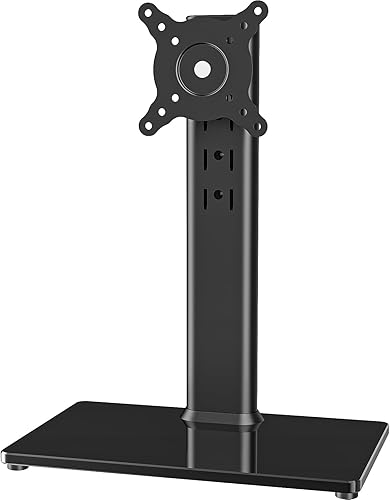
The HEMUDU HT05B-001 is a freestanding single monitor riser designed for 13 to 32 inch LCD, LED and plasma screens. It is made for students, remote workers and office users who need better ergonomics without mounting to a wall or desk edge.
In daily use, the adjustable bracket delivers smooth tilt from -15 to +10 degrees, swivel from -50 to +50 degrees and full 360 degree rotation. You can switch quickly between landscape and portrait mode and choose from four height levels to reduce neck and back strain.
Build quality stands out with a 1/3 inch tempered glass base paired with a painted stainless steel center pole. The combination feels solid, supports up to 77 lbs, and includes built in cable management to keep your workspace neat.
The freestanding design takes up more desk space than a clamp or grommet mount, and height changes in fixed steps instead of continuous sliding. It also only fits VESA 50x50, 75x75 and 100x100 patterns, so check your monitor before buying.
Overall, this is a practical and stable solution for single monitor setups that need flexibility and easy installation. If you want an affordable, no drill stand with true ergonomic adjustment, this model is easy to recommend.
Compatibility: 13, 15, 17, 19, 21, 23, 27, 30, 32 inch screens with VESA 50x50, 75x75, 100x100.
Load Capacity: Up to 77 lbs (35 kg), Base Type: Freestanding pedestal with tempered glass.
Adjustments: Tilt -15 to +10 degrees, Swivel -50 to +50 degrees, 360 degree rotation, 4 level height.
Materials and Size: Stainless steel and tempered glass, 11.8 x 7.9 x 16 inches, 4.8 lbs, Black finish.
Model: HT05B-001, Installation: Open top slot VESA plate with tools and hardware included.
Matching a Part to Your Build
If you have a compact setup with a laptop and a single desktop monitor, prioritize moderate lift and usable space underneath. The WALI Computer Monitor Stand for Desk raises your screen by 4.5 inches, 5.3 inches, or 6.1 inches on a 14.6 x 9.3 inches shelf, supports up to 44 lbs, and uses vented holes plus rubber pads to help with cooling and surface protection. You can slide a full size keyboard underneath when you switch to laptop mode, which is ideal when desk depth is tight.
If you swap devices often or want a steel frame with push button legs, look at the HUANUO Monitor Stand, Monitor Stand Riser 3 Height. It offers 3.94 inches, 4.72 inches, and 5.51 inches of lift, supports up to 44 lbs for monitors, laptops up to 15.6 inches with width under 9.25 inches, printers and consoles, and provides 12.40 x 7.09 inches of room underneath. The powder-coated steel platform with airflow vents is a good match when your laptop runs warm and you want tool free assembly with screw on legs.
If your monitor is on the lighter side or you want the lowest profile, the Amazon Basics Height Adjustable Monitor Stand is worth a close look. It uses detachable legs for 2.87 inches, 4.2 inches, and 4.8 inches of height, has a top surface of approx. 11.6 inches x 11 inches with a tapered shape, and supports up to 22 lbs with non-skid feet. You give up some load capacity compared with larger steel models, but you gain a smaller footprint that leaves more room for speakers and a cleaner cable run like a mesh cable tray compared with a solid tray underneath.
If your factory stand cannot get high enough or you want full position control without drilling, consider the Single LCD Computer Monitor Free-Standing Desk. It fits 13 inch to 32 inch screens with 50x50mm, 75x75mm or 100x100mm mounting holes, holds one screen up to 77 lbs, and offers tilt from -15 degrees to plus 10 degrees, swivel from -50 degrees to plus 50 degrees, 360 degree rotation and 4 level height adjustment. Built in cable management keeps cords along the column, and portrait or landscape placement helps coders and readers who want more vertical space.
Common Mistakes
Mistake one is buying a platform that is smaller than your factory base. A tapered top or narrow shelf may look tidy in photos, but wide monitor feet can hang over the edge and rock when you adjust tilt. Trace your base, compare it with the listed top dimensions, and leave margin on all sides for cables and rear ports.
Mistake two is ignoring weight limits and stacking without a plan. A 22 lbs rated ABS riser is fine for many office displays and laptops, but it is a poor match for a large gaming panel with a heavy stand, and stacking two units doubles height and leverage. If you are near the limit, move up to a 44 lbs rated platform or a pedestal rated up to 77 lbs and keep heavy printers off the top shelf.
Mistake three is choosing a simple shelf when you actually need angle control. A fixed riser lifts straight up, it does not add tilt, swivel or portrait rotation. If you share your screen often, battle glare from a window, or want precise VESA positioning, a freestanding column with tilt, swivel and rotation will serve you better than adding books or blocks under a short stand.
Who Should Wait or Buy Differently
A single small riser is not ideal for you if you run dual large monitors, an ultrawide beyond the 13 inch to 32 inch pedestal range, or a glass desk that already flexes under load. In those cases you should wait and plan differently, either with a wider desk shelf that spans both screens, a pair of matched risers rated with headroom to spare, or a dedicated dual mount path, and review your cable and power layout before you buy.
Frequently Asked Questions
How high should you raise your monitor?
Raise it so the top bezel sits near eye level and you can view the center without bending your neck. Start in the middle of your riser range, such as 4.2 inches or 4.72 inches depending on the model, then move up or down one step after a full day of use. If you still crane upward at the highest step, you likely need a taller pedestal rather than more blocks underneath.
Can you use these risers for a hot gaming laptop?
Yes, provided you respect size and weight limits and choose a vented design. A steel or plastic platform with airflow vents and rubber pads helps air move under the chassis and protects the desk from heat marks. Keep rear vents clear and pair the riser with a rear cable path so cords do not block airflow.
Should you pick a simple platform or a VESA pedestal?
Pick a simple platform when your factory stand already tilts well and you only need lift plus under desk storage. Pick a VESA pedestal when you need tilt from -15 degrees to plus 10 degrees, swivel, portrait rotation and column cable management for 13 inch to 32 inch screens. If you are unsure, check your monitor back for 50x50mm, 75x75mm or 100x100mm holes, since only the pedestal path uses them.



Write Your Review
No reviews yet. Be the first to share your experience!